sketchucation logo sketchucation
    • Login
    1. Home
    2. eneroth3
    3. Posts
    Oops, your profile's looking a bit empty! To help us tailor your experience, please fill in key details like your SketchUp version, skill level, operating system, and more. Update and save your info on your profile page today!
    ⚠️ Important | Libfredo 15.6b introduces important bugfixes for Fredo's Extensions Update
    Offline
    • Profile
    • Following 0
    • Followers 0
    • Topics 5
    • Posts 195
    • Groups 2

    Posts

    Recent Best Controversial
    • RE: [Plugin] Eneroth Railroad System (v 0.1.21)

      Hi Pascal

      I've never tried making such small tracks but I can look into it. It'd be helpful to see the file. The mouse wheel doesn't work as long as the web dialog is focused and I don't think I can do much about it.

      The signal system is quite old and will be replaced completely. Some signal types can show both left, straight and right will some only can show straight and turn so it's a bit complicated but the new system will contain one model only and the hidden property will be changed on the lights/arrows instead of replacing the component.

      I have planned for some time to make the track properties dialog work on multiple tracks but haven't been sure how to do it. I'll keep working on this.

      I've actually tested to follow with a fixed camera by changing the source code temporarily and it would be quite easy to implement technically but I'm not sure where to put the options in the UI. The Drive Train dialog wouldn't work when you follow a rolling stock without having the tool activated.

      The Balise ideas are great! I'll defensively look into it.

      Christina

      posted in Plugins
      eneroth3E
      eneroth3
    • RE: [Plugin] Eneroth Railroad System (v 0.1.21)

      I think everything but the cables could be drawn as a track type. if the cables were straight even those could be included but the bridge would be a lot less cool.

      You can follow the instructions for double tracks in the docs and just make it wider to fit more tracks of the corresponding track type.

      posted in Plugins
      eneroth3E
      eneroth3
    • RE: [Plugin] Eneroth Railroad System (v 0.1.21)

      Cool bridge!

      have you created custom track types for street lights and bridge deck?

      posted in Plugins
      eneroth3E
      eneroth3
    • RE: [Plugin] Eneroth Railroad System (v 0.1.21)

      @oxer said:

      On my computer export each frame it's near to real time (milliseconds) with shadows included. I have a iMac i7 3,4GHz 27" (mid 2011) 16GB Ram.

      Hehe, I'm on a 1,8GHz (dual core) with about 3GB ram. I think it's time to replace it 😲 .

      posted in Plugins
      eneroth3E
      eneroth3
    • RE: [Plugin] Eneroth Railroad System (v 0.1.21)

      @oxer said:

      The new feature to export animation images is really fantastic πŸ‘ , here a quick test of video animation created with Quicktime Pro
      http://youtu.be/khK_p5UaK4g

      First I couldn't understand how you could move the camera while exporting. Then I realized that it's probably my computer that is so slow Sketchup nearly freezes when exporting. Each frame takes several seconds for me πŸ˜• .

      posted in Plugins
      eneroth3E
      eneroth3
    • RE: [Plugin] Eneroth Railroad System (v 0.1.21)

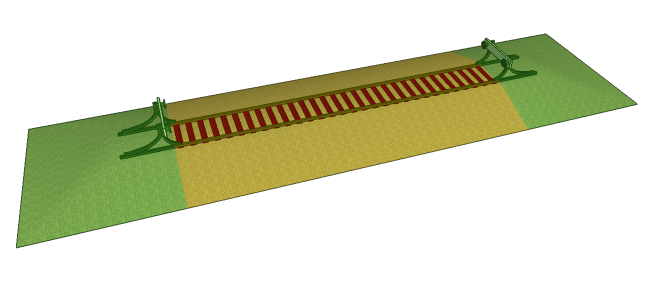
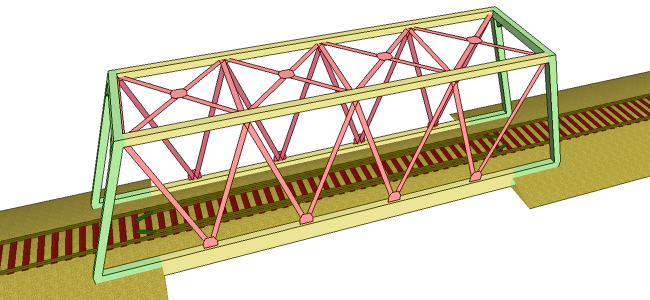
      The latest version of the plugin is now published. Now rolling stocks can be added to the library from their context (rigth click) menu so there's no need to write stuff in the terminal any more! The documentation for custom tracks has been improved with images showing how different parts are drawn. Advanced animation settings now allow users to execute code between each frame. An example how to make a simple animation with Sketchup's own view.write_image has been added to the documentation.

      normal.png

      bridge.png

      (Images from documentation showing what's the extrusion, arrayed parts and endings)

      posted in Plugins
      eneroth3E
      eneroth3
    • RE: [Plugin] Eneroth Railroad System (v 0.1.21)

      My first video exported with the plugin. Also the first time I can see the trains run with shadows, fog and textures without lag πŸ˜„ .

      posted in Plugins
      eneroth3E
      eneroth3
    • RE: [Plugin] Eneroth Railroad System (v 0.1.21)

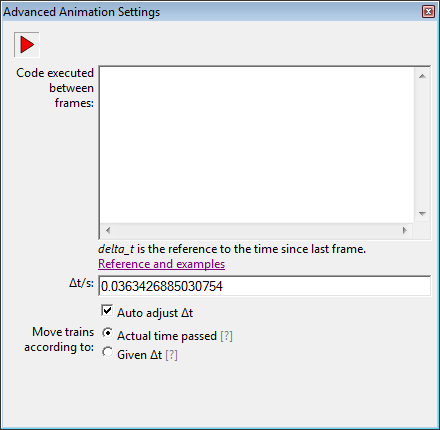
      I've started working on the Advanced Animation Settings which includes running custom code between frames.

      @ppoublan: Is there any specific renderer you where thinking of? I'm quite new to rendering but was thinking about some example code to show in the documentation.


      advanced_animation_settings.png

      posted in Plugins
      eneroth3E
      eneroth3
    • RE: [Plugin] Eneroth Railroad System (v 0.1.21)

      @ppoublan said:

      Hi Eneroth,
      First thanks for this amazing plugin. I really appreciate the way animation is done and the "open" features that allows customization of all objects.
      I have a wish and would like to know if this is something you could think of :
      I would like to be able to run custom script at each image change, to be able to render images in external render. I've seen its possible to add points where external script is called, but adding them one by one for each image would be too long.
      Just an idea...
      Yours
      Pascal

      This is a great idea! I've been thinking about renderers and if they could be changed to run a script each frame but that's really backward. Letting the plugin run a script each frame and tell the renderer what to do is much better since I don't need to change the renderer.

      edit: Or perhaps both. In case there are renderers that have the feature to run a script between each frame I can add a method to the plugin that can be called with the time difference as argument (this more or less already exists but isn't documented).

      posted in Plugins
      eneroth3E
      eneroth3
    • RE: [Plugin] Eneroth Railroad System (v 0.1.21)

      @deaneau said:

      ground level tracks= street track (like for tram) or Tram Track
      Tracks with cantenary etc.
      Edit:
      tracks without ballast.
      you can work with code numbers too. 3 or 4 digits

      numbers will be used by all languages.

      ene_1000_001_00 default with wooden sleepers
      ene_1000_002_00 default with concrete sleepers
      ene_1000_002_01 default with concrete sleepers and catenary

      track with buildings like plateform
      loading ramp

      ene_se_1000_002_01 sweden default with concrete sleepers and catenary
      ene_es_1000_002_01 spain default with concrete sleepers and catenary
      ...

      1000=default track
      1001= Tramtrack
      1003= bridge
      1004=tunnel

      ...

      streets begin with 1

      2000
      2001

      runway 2

      3000
      3001

      waterway 3

      4000
      4001

      combinations

      track and street

      5000

      track and runway

      6000

      track and waterway

      7000

      Technically that would work and a friend and I used a similar system to store metadata in file names for an early web project before we new about databases. However it would in the end mean the same thing as choosing these values (tunnel, bridge etc) from dropdown lists in the same form as name and description are written and store it in the same file.

      The problem is that the user must be able to add own information that could be just about anything. A track can be made of dancing sharks or purple mushrooms with pink stripes or whatever and I can't make a list of all words and phrases that could theoretically occur. Those examples are quite extreme but what if a user wants to add Lego style tracks, or MΓ€rklin M tracks? I don't want to limit users to just make what I originally thought of with something as arbitrary as the user interface when it's actually supported by the rest of the code. If I had added such a limitation from the start there probably wouldn't even be roads now.

      posted in Plugins
      eneroth3E
      eneroth3
    • RE: [Plugin] Eneroth Railroad System (v 0.1.21)

      I'm working on making the documentation for custom track types easier to understand with images explaining how to draw extrusion profiles and such. However I ran into an issue at the naming convention of tracks. Tunnels' and bridges' name should start with "Tunnel" or "Bridge" to make them easier to find in the alphabetic track type list. However I don't know what label I should use for ground level tracks. Any ideas? Something telling it's ground level or normal or without additional structures expect for the track bed. I think there are some real train geeks in the thread πŸ˜„ .

      Also I'm adding a copyright note in the documentation saying it's not allowed to be modified, including, translated without my permission. Pilou's awful piece of crap-shit so called "translation"-rubbish-poop will need to be taken down from the Internet because it's a copyright infringement and breaks international copyright law.

      posted in Plugins
      eneroth3E
      eneroth3
    • RE: [Plugin] Eneroth Railroad System (v 0.1.21)

      @unknownuser said:

      Will be updated when the original will be updated! πŸ˜„

      Something that you don't understand
      A documentation even insufficient at your point of view, is fully sufficient for take in hand your very cool plugin for someone who is anglophobic! πŸ˜„
      I know I am incompetent from more than half a century and hundred of translations! πŸ˜‰

      Verbal communication has failed. Trying graphic communication.

      http://rack.3.mshcdn.com/media/ZgkyMDEzLzA2LzEyL2FhL0NoYXJsaWVNY2RvLmFmOTNkLmdpZgpwCXRodW1iCTEyMDB4OTYwMD4/561e9b54/f87/Charlie-Mcdonnell.gif

      posted in Plugins
      eneroth3E
      eneroth3
    • RE: [Plugin] Eneroth Railroad System (v 0.1.21)

      @unknownuser said:

      You have a simple thing to do! πŸ˜„
      Find someone who speaks French around you and ask him to see the REMOVED LINK or French Interface!

      Will you never understand? You are incompetent!

      There are still loads of errors in the documentation I've told you about that are still not fixed so no, I will not show it to a French person and let them judge because I know for myself that it is shit.

      posted in Plugins
      eneroth3E
      eneroth3
    • RE: [Plugin] Eneroth Railroad System (v 0.1.21)

      @unknownuser said:

      Innacurate Green x corrected! πŸ˜„

      I don't know how to say this.

      I don't want you to fix the examples I give you of what is wrong. They are examples to show you that you clearly do not understand what you are trying to translate. You don't seem to understand English. I don't know if you batter the text through Google Translate or what you do with it but it's like you don't even read it. Words mean totally different things in different contexts. Canceling a meeting and canceling a dialog are for instance different things. If you do not even recognize these terms I do dot trust any phrase you have translated. Your translation attempts are only causing me problems. Sorry.

      posted in Plugins
      eneroth3E
      eneroth3
    • RE: [Plugin] Eneroth Railroad System (v 0.1.21)

      @box said:

      As a side note to this excellent plugin, it is incredibly hard to make accurate translations of technical language. Not only do you need to be fluent in both languages you also need to be fluent in the relivant jargon of the technology involved. I speak 6 languages and can order a beer in several others but I haven't joined any of the foreign language sections because I know how easy it is to get it all screwed up. My wife works as a similtanious translator in 3 languages and she has translated quite a number of help files/user manuals etc and even she has problems to get it right. We often spend hours rereading and discussing the nuances of phrases and words that can have a multitude of meaning and therefore an almost infinite number of possible target words.

      You must understand what needs to be said in both languages, if you aren't fluent in one it will be wrong!

      This is very true and one of the reasons I from the start was quite unsure whether I wanted it translated or not. I've tried to explain in my post how important it is to look at the text in its context but I don't know if everyone understood.

      posted in Plugins
      eneroth3E
      eneroth3
    • RE: [Plugin] Eneroth Railroad System (v 0.1.21)

      @deaneau said:

      is it possible to change the value m/s about more than 50m/s?
      this would be great for take offs
      dean

      I scaled the slider so it would be easier to run at low speeds at rail yards but you can enter much higher values in the text box πŸ˜„ .

      I don't know if I should re-scale the slider so it can be used for high speed trains or perhaps even make it logarithmic or something so it can be used for both. That could however be less user intuitive when the user for instance want to double the speed and tries to drag the slider twice as far from its start.

      posted in Plugins
      eneroth3E
      eneroth3
    • RE: [Plugin] Eneroth Railroad System (v 0.1.21)

      It's not just about these 2 phrases. It's about everyone in the whole plugin (230 of them) and every sentence in the whole so called translation of the documentation.

      If you run this in the console, what does it return?

      UI.messagebox "TEXT", MB_YESNOCANCEL
      

      It's not "strictly" the same. Different words are used in different contexts. It's strictly wrong with other inconsistent words.

      I have no idea how you do it when you so called translate. When you see strings such as "OK", "Cancel" and "Apply" under the header "Web dialog buttons" in the dictionary file, how can you not recognize those words from similar dialogs?

      Btw, you've also managed to color the x axis green several times in the so called translation of the documentation. That makes your statement that the so called translation is perfectly understandable to French people a lie.

      posted in Plugins
      eneroth3E
      eneroth3
    • RE: [Plugin] Eneroth Railroad System (v 0.1.21)

      @unknownuser said:

      Ok About the Pop UP Menu πŸ˜‰
      I will just add that to the Documentation πŸ˜‰

      About the number of lines : no problem I have them! (mΓͺme les lignes vides sont numΓ©rotΓ©es! πŸ˜‰

      About the Cancel : that is made πŸ˜„ (But synonym πŸ˜‰

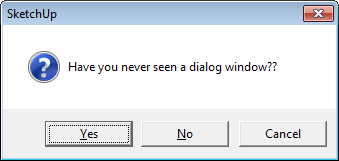
      I really don't understand how you manage to get it wrong all the time. It's not a synonym. It's a translation of the word in another context. Another, faulty, word doesn't make sense. If the translation doesn't make sense it' to no help at all. It's only harming the plugin.

      dialog.png

      Also Apply seems to be translated to Appliquer in this context. Can you please explain how you managed to get completely different words? I really want to know because I just can't understand it. Have you never seen a dialog box like the one above?

      posted in Plugins
      eneroth3E
      eneroth3
    • RE: [Plugin] Eneroth Railroad System (v 0.1.21)

      You can all make models of these locomotives and share here πŸ˜„ . Remember that they might need to be quite low detailed to avoid lag, you can check out how the rolling stocks shipped with the plugin are drawn πŸ˜„ .

      posted in Plugins
      eneroth3E
      eneroth3
    • RE: [Plugin] Eneroth Railroad System (v 0.1.21)

      @deaneau said:

      pilou the entries in the drop down menue you canΒ΄t change, this is a entries written by the user.

      this will be the best idea, that all name of the objects, bridges, tunnel etc. is in english.
      what do you want do if a russian or japanese people write all entries in the own language. nobody will understand this.

      That's how it works with rolling stocks but I'm afraid track types are more complicated. Besides predefined strings such as bridge, tunnel etc the user must be able to add new words like arc, beam, low polygon or whatever describes that track type. I can't think of all possible terms and there can't be translations for them all because they are just too many.

      However I can write in the documentation that this info should be in English so track types can be shared but it will still, as I've said long ago, be mixed languages.

      posted in Plugins
      eneroth3E
      eneroth3
    • 1
    • 2
    • 3
    • 4
    • 5
    • 6
    • 7
    • 8
    • 9
    • 10
    • 6 / 10