sketchucation logo sketchucation
    • Login
    1. Home
    2. eneroth3
    3. Posts
    Oops, your profile's looking a bit empty! To help us tailor your experience, please fill in key details like your SketchUp version, skill level, operating system, and more. Update and save your info on your profile page today!
    ⚠️ Important | Libfredo 15.6b introduces important bugfixes for Fredo's Extensions Update
    Offline
    • Profile
    • Following 0
    • Followers 0
    • Topics 5
    • Posts 195
    • Groups 2

    Posts

    Recent Best Controversial
    • RE: [Plugin] Eneroth Railroad System (v 0.1.21)

      @unknownuser said:

      Can you give me an example and addresse page?
      For correction if necessary πŸ˜„

      I don't know if you changed the capital letter because now I can't find them but the Create Rolling stock page mentions an attribute called "rayon" that doesn't exist in the plugin. Also there are no headers in the text except for in a few random places so it's quite hard to see what text belongs to what.

      posted in Plugins
      eneroth3E
      eneroth3
    • RE: [Plugin] Eneroth Railroad System (v 0.1.21)

      @unknownuser said:

      French translation of the Documentation is done! πŸ˜„

      I will see now if the new version 1.1.0 has a new documenttion! πŸ˜‰

      πŸ‘

      I don't understand much French so I can't say much about the translation but I did notice you have capital letters where there shouldn't be in the motion types of the mechanical parts in rolling stocks. Unless these (and all other text the user writes) is spelled correctly the computer won't understand it.

      posted in Plugins
      eneroth3E
      eneroth3
    • RE: [Plugin] Eneroth Railroad System (v 0.1.21)

      @mwm5053 said:

      Here's some more screen shots of the other dialog boxes.

      Thanks πŸ˜„

      It looks as if the javascript code in dialog.show_modal doesn't run on that specific web dialog, probably due to a misspelling in the code. Hopefully there's no problem with the other dialogs πŸ˜„

      posted in Plugins
      eneroth3E
      eneroth3
    • RE: [Plugin] Eneroth Railroad System (v 0.1.21)

      @mwm5053 said:

      Hi Eneroth3 not getting any thing in dialogue box. I'm on Mac with Safari 7.0.4 and SU 2014 everything up to date.

      Hi

      Is it the same for all dialogs or just this one?

      Thanks!

      posted in Plugins
      eneroth3E
      eneroth3
    • RE: [Plugin] Eneroth Railroad System (v 0.1.21)

      The work of manually translating would be lost in some week or so. Unless the text strings are separated from the code there's not really any idea doing it. However I'm not really sure of what to do since user created content (including track types shipped with the extension) would just be in the user's language unless the user translates it themselves to all languages.

      Randomly mixed languages is just annoying and one of the reasons I really hate it when websites and softwares tries to make Swedish translations.

      However, if anyone is really keen to translate you could make a spreadsheet (like in excel) with the original string and translation next to each other. πŸ˜„

      posted in Plugins
      eneroth3E
      eneroth3
    • RE: [Plugin] Eneroth Railroad System (v 0.1.21)

      @unknownuser said:

      What append of the previous version?
      We must kill it ? Or the new version overwrite the previous automatically ?

      You should be able to just install it over the old version. However you may need to restart Sketchup. Otherwise you could first delete the old version's files but then make sure you haven't made any custom track types or rolling stocks you want to keep.

      @aerilius said:

      The LanguageHandler has been published too early with an unfinished design and without considering the feedback that ruby developers gave. Since it's now part of the API, I'm not sure if there will ever be changes. It might certainly be "just enough" for new plugins, but it was too limited to make older plugins use it in place of our own translation libraries and many other plugins have also not switched to this new API.

      If you are curious how one can translate a webdialog with one single method call, take a look into my Translate.rb (like in AttributeInspector or ToolbarEditor).

      That's too bad πŸ˜• . I'll look into your code but I'm not sure what I'll eventually do. Even if all text in the plugin itself is translated titles and description of track types and other content will be in just one language, unless I ask the user for one string in each language.

      posted in Plugins
      eneroth3E
      eneroth3
    • RE: [Plugin] Eneroth Railroad System (v 0.1.21)

      Any feedback how the new version works on Mac?

      posted in Plugins
      eneroth3E
      eneroth3
    • RE: [Plugin] Eneroth Railroad System (v 0.1.21)

      Version 0.1.11 is now published! Hopefully it should work better on Mac now (feedback greatly appreciated as usual!!) and some updates have been made to make streets work better.

      Plugin download: http://sketchucation.com/pluginstore?pln=ene_railroad

      An example of streets and intersections, and some videos showing how to alter them, is posted on the previous page.

      posted in Plugins
      eneroth3E
      eneroth3
    • RE: [Plugin] Eneroth Railroad System (v 0.1.21)

      @oxer said:

      I have translated the plugin to Spanish Language but I'll wait to the final version to translate the documentation.
      Eneroth, has you had time to investigate the problem with the ""Add Rolling Stock" window on Mac?

      I've looked into the web dialog and tested it with the desktop version of Safari for windows. The problem with the unresponsive library was due to Safari's way of interpreting z-index (I used it to make the tabs appear on top of the content but now I've applied the z-index to the tabs instead). The problem with the Create guide was that Safari thought of line breaks as elements and changed their properties instead of the images/text when trying to show a specific step.

      Hopefully this will work in Sketchup too πŸ‘

      @unknownuser said:

      About the translation of the plugin itself, does exist a system multi language?

      There is a system made by the Sketchup team to put all text strings in separate files that can be loaded in different languages. However since it's a Sketchup API feature I can't find any documentation for it. I guess I could look through some other plugins to better understand it but I think it still would be difficult to dynamically add these text strings to web dialogs.

      posted in Plugins
      eneroth3E
      eneroth3
    • RE: [Plugin] Eneroth Railroad System (v 0.1.21)

      @unknownuser said:

      No problem, i can change anything at any time! πŸ˜„

      And the advantage for me of this actual translation is that I learn it in the same time! πŸ˜‰

      Then it sounds like a good idea πŸ‘ πŸ‘

      posted in Plugins
      eneroth3E
      eneroth3
    • RE: [Plugin] Eneroth Railroad System (v 0.1.21)

      @deaneau said:

      @eneroth3 said:

      deaneau: Instead of manually modelling the fence you could add it as a track type and be able to use it in all sorts of curves without ever having to remodel it! The plugin adds parametric behavior for just this.

      oh realy? could you guide me with a movie?
      that will be interesting for other ,too.

      thank you Dean

      It's all in the documentation. So far placing objects along the track is written in the Tie/Sleeper section but it's done in the same way even no matter what kind of objects there are. Also the existing tracks are great to understand how track types work. The truss bridge in particular shows how to place objects along the track.

      @unknownuser said:

      Are you interested by a French translation of the documentation ? πŸ˜„
      If someone don't yet made it! πŸ˜’
      Started πŸ˜„
      http://railroadsystem.weebly.com/

      So far the plugin is under quite heavy development and the docs are changing. For instance I might rewrite the Tie/Sleepers section to make it more clear that it can be used to place any objects along the track. Perhaps it's better to wait with the translation until the plugin doesn't change as much.

      posted in Plugins
      eneroth3E
      eneroth3
    • RE: [Plugin] Eneroth Railroad System (v 0.1.21)

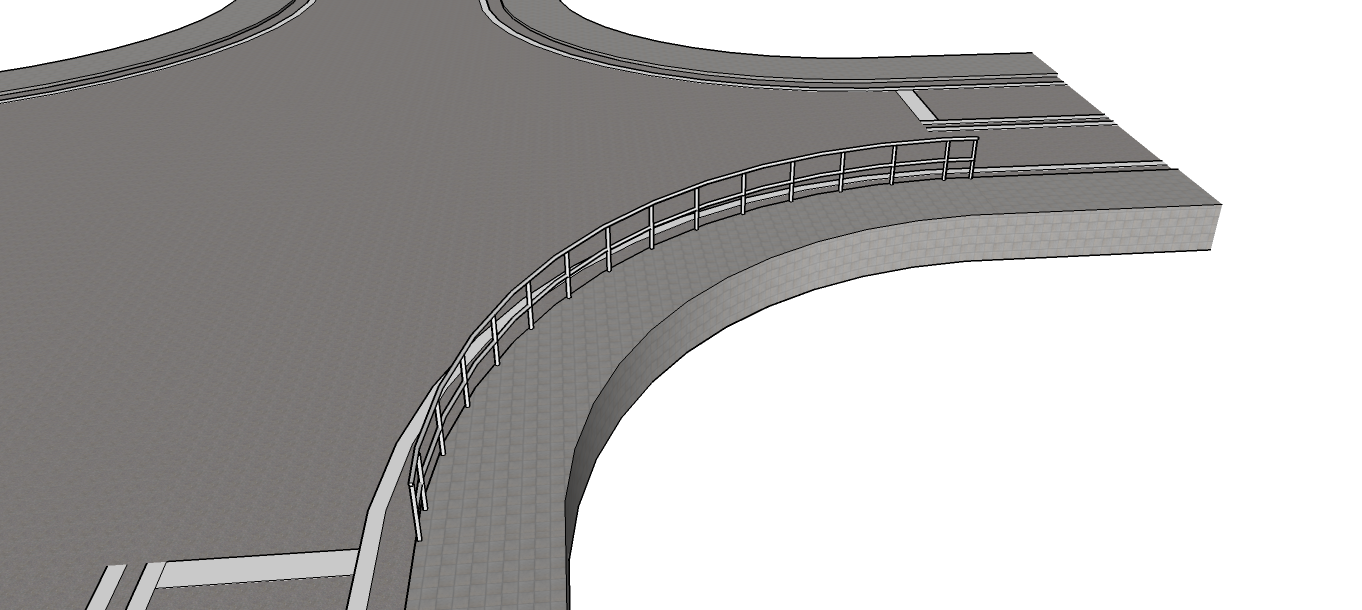
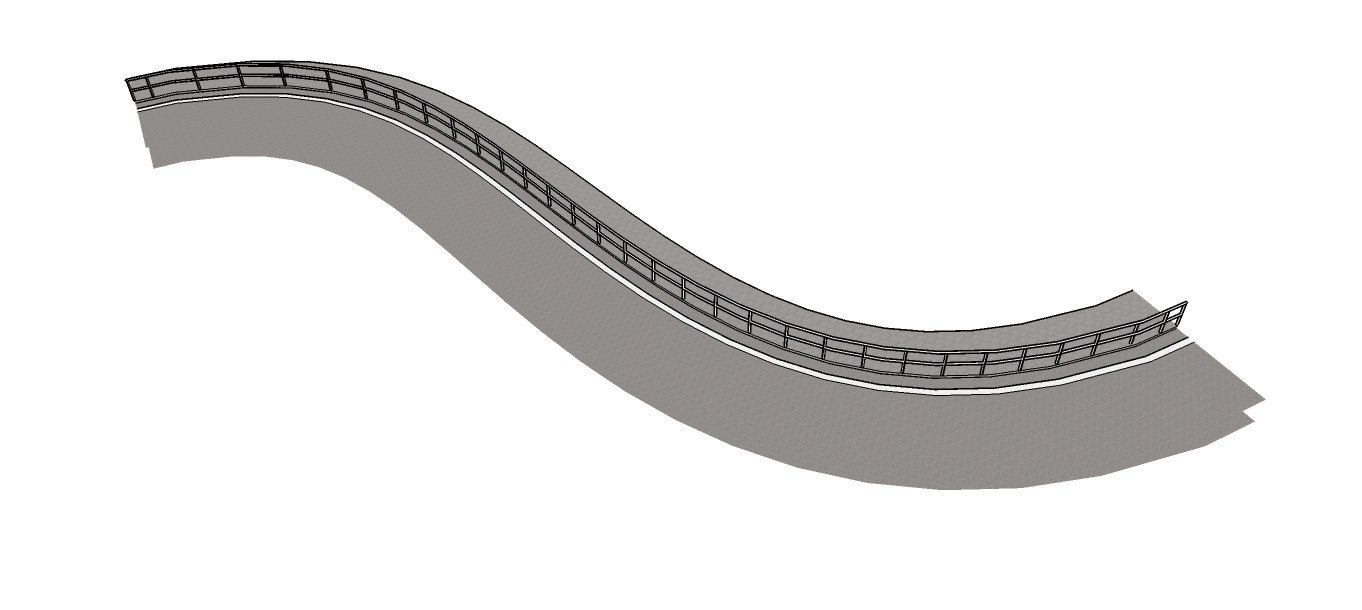
      deaneau: Instead of manually modelling the fence you could add it as a track type and be able to use it in all sorts of curves without ever having to remodel it! The plugin adds parametric behavior for just this.


      intersection2_fence1.png


      intersection2_fence2.png

      posted in Plugins
      eneroth3E
      eneroth3
    • RE: [Plugin] Eneroth Railroad System (v 0.1.21)

      I've been working on an update to the plugin so the inner side of the road can be hidden when automatically drawn. This means each "track" doesn't need to be manually edited to hide these edges and the parametric functionally is much better.

      I've made some videos showing how fast it is/will be to edit the intersections.

      Change angle and remove outgoing street

      Draw road (and how to make sure curves can be arcs)

      Drawing a bridge

      You can try this already with the new intersections attached but with the current version of the plugin edges will appear in the middle of the street. I'll publish a new version of the plugin when there are some more features added.


      intersection2.skp

      posted in Plugins
      eneroth3E
      eneroth3
    • RE: [Plugin] Eneroth Railroad System (v 0.1.21)

      @unknownuser said:

      Last mystery : πŸ’š
      Just now, how to put this volume in the library ? ❓ ❓ ❓

      A better and graphical interface is planned (including prompting the user already when initializing the rolling stock). for now you need to do as the documentation (Plugins>Railroad>Documentation) or the video I linked says.

      posted in Plugins
      eneroth3E
      eneroth3
    • RE: [Plugin] Eneroth Railroad System (v 0.1.21)

      @unknownuser said:

      I am not sure that only this placement resolve my little problem πŸ˜„
      As I want input any volume as Loco I had believed that the 7 clicks inputs on this volume were sufficient!
      As I had the message "Give a name" (I gave "Bull" I had supposed that all works fine!
      But no trace of this file nowhere! 😲
      Move it on the good altitude of rail don't change nothing!

      http://sketchucation.com/forums/download/file.php?id=120825&mode=view/rokbox.jpg

      Something is wrong with the point you input, otherwise the rolling stock would stand on the track. Also initializing as rolling stock doesn't add it to the library.

      posted in Plugins
      eneroth3E
      eneroth3
    • RE: [Plugin] Eneroth Railroad System (v 0.1.21)

      At 2:48:04 in this video you can see how rolling stocks are initialized and then optionally saved to the library. Saving to the library is still quite undeveloped and has to be done through the console now but a graphical interface is planned.

      posted in Plugins
      eneroth3E
      eneroth3
    • RE: [Plugin] Eneroth Railroad System (v 0.1.21)

      It must be standing on a track/street to be driven so it's easiest to initialize it there too. To find the center plane of the street you can draw a temporary edge between the painted lines at the sides of that lane and position the group at its midpoint.

      posted in Plugins
      eneroth3E
      eneroth3
    • RE: [Plugin] Eneroth Railroad System (v 0.1.21)

      You can initialize cars as rolling stocks to drive them on the roads.

      You can also right click on the streets with the sidewalk in the middle, open their properties and reverse them to put the sidewalk on the side.

      posted in Plugins
      eneroth3E
      eneroth3
    • RE: [Plugin] Eneroth Railroad System (v 0.1.21)

      place the folders in "<plugin folder>/ene_railroad/tracks/". If you can't find the plugin folder you can activate the Insert Rolling Stock tool and click the Open Rolling Stock folder button, then go up one level and open you'll see tracks/.

      posted in Plugins
      eneroth3E
      eneroth3
    • RE: [Plugin] Eneroth Railroad System (v 0.1.21)

      Hi all.

      I've made a street version of the track now. I've also made a 90 degrees and a 45 degrees intersection by combining several track parts that you can just copy into other models. The new track types and intersections are attached. Just copy the track the folders into the track folder within the ene_railroad folder.

      The upcoming version of the plugin wont draw switch indicators to these tracks. Also I might look into hiding the edges between each half of the street when adding new street tracks.

      To change the direction of travel the velocity needs to be set to 0. You can't change direction while moving.


      streets.zip

      posted in Plugins
      eneroth3E
      eneroth3
    • 1
    • 2
    • 6
    • 7
    • 8
    • 9
    • 10
    • 8 / 10