sketchucation logo sketchucation
    • Login
    1. Home
    2. EarthMover
    3. Posts
    Oops, your profile's looking a bit empty! To help us tailor your experience, please fill in key details like your SketchUp version, skill level, operating system, and more. Update and save your info on your profile page today!
    Check out Febhouse | New extensions for Shadow Analysis in SketchUp Download
    EarthMoverE Offline
    • Profile
    • Following 0
    • Followers 0
    • Topics 112
    • Posts 1,768
    • Groups 3

    Posts

    Recent Best Controversial
    • RE: 2 rendering issues?

      @unknownuser said:

      Vray it's a very powerful and adaptable render, but the SK version it's a dumbed down version

      I hear these sentiments often on this forum and would have to disagree. Yes, you are limited by 32 bit memory and yes, there are some additional perks in 3ds Max, but the underlying algorithms in the engine are the same, regardless of platform. I would only have to steer you toward the work of Teofas, FreeAgent and others who have shown what Vray for SU can do in the right hands. I think there is a general assumption that somehow opening this same scene in Vray for Max will magically render perfect in situations where it's failing in sketchup. It's simply not true. I'm speaking as someone who spent the money based on this faulty assumption. I have learned to love and do prefer Vray for Max for a lot of reasons, but instant push button quality with little knowledge is not one of them.

      Tomot, issues like that of the blotchy furniture could also be a material and /or lighting problem. Can you post the file to have others take a look?

      posted in V-Ray
      EarthMoverE
      EarthMover
    • RE: Www.leveleonline.com Project

      Hotness! ๐Ÿ˜ฎ I love it. A touch of class, a touch of grime....it's perfect. Well done. I could see something like that leading to lots more work. ๐Ÿ‘

      posted in Gallery
      EarthMoverE
      EarthMover
    • RE: [req] follow me helix

      Perhaps change the OP to reflect [Plugin] and attach the script to the first post.

      posted in Plugins
      EarthMoverE
      EarthMover
    • RE: Readymade archviz backgrounds

      That's tough. Perhaps if you clarified exactly what you need and what you need it for. There are thousands of cities in the world and all are a bit different and the type you need is probably relative to where your clients are located. You can try to search Google images for things like "Urban Communities", "Urban Centers", "Town Square", etc. I still say your best bet is to get out with a camera and spend a day in an area relevant to your archvis projects and take as many photos as you can. If you want 3D backgrounds that are ready made with all that stuff in it, I know of nothing like that on the market, except for hobbyist software like DAZ3D and iClone. Most archvis professionals want more control over their projects and would rather create the entourage and backgrounds themselves so it doesn't look like they just drop clip art into their scene.

      posted in SketchUp Discussions
      EarthMoverE
      EarthMover
    • RE: Courtyard House

      Nice work Gareth. A good showing of what Twilight can do. I think there are far too many lights on in the house for as much exterior light is coming in. Perhaps two renders are in order. One toward the evening with the lights on and one during the day with mostly exterior and a few fill lights illuminating the scene.

      Awesome design though. The courtyard is very cool.

      posted in WIP
      EarthMoverE
      EarthMover
    • RE: Readymade archviz backgrounds

      Or here - http://en.wikipedia.org/wiki/Camera

      posted in SketchUp Discussions
      EarthMoverE
      EarthMover
    • RE: [req] follow me helix

      Reminds me of the days before cordless phones! ๐Ÿ˜†

      posted in Plugins
      EarthMoverE
      EarthMover
    • RE: From SketchUp to Reality

      Fascinating process. Can't wait to see more Dale! What a fantastic accomplishment, to design and build your own home. I hope to one day do the same. ๐Ÿ‘ ๐Ÿ‘

      posted in Corner Bar
      EarthMoverE
      EarthMover
    • RE: Flagstone Patio & Landscaping (Real Project)

      Thanks Gus.

      Troy, wouldn't that be great! But then again what fun is an artist who isn't starvin'! ๐Ÿ˜„

      posted in Gallery
      EarthMoverE
      EarthMover
    • RE: Flagstone Patio & Landscaping (Real Project)

      Thanks Ben, Nomer and Dave. I agree on the animation speed. It was more a less just a test for myself that never went to the client. I was really just testing out Sketch3D plants. I may do a more serious one as portfolio piece down the road.

      The waterfall and spa were existing on site. I was able to take a photo of the waterfall, mask it out and then import it into Sketchup as an image. For the rocks I essentially just traced around each stone in the image with the Freehand tool and push pulled them to varying thicknesses. Then I subdivided each stone with Artisan and projected the site photo onto them, using a corresponding normal map in the render engine. It caused stretching in the top view, but from the patio level vantage points, it looked a lot like the real thing. I used TIG's drape Cpoints and Triangulate points to make the waterfall itself, adding some thickness with ThomThom's Shell plugin. I also used the Hatch Faces plugin by jolran to quadrify the spa water plane and then sculpted it a little with Artisan to bend the reflection on the surface.

      posted in Gallery
      EarthMoverE
      EarthMover
    • RE: Flagstone Patio & Landscaping (Real Project)

      Sorry, got busy and missed a lot of comments. Thanks to everyone.

      I did use a bit of layer management to handle the large scene. The dynascape collection uses a ton of component instances, so it helps when in sketchup. The poly count of the scene in Sketchup was around 550K. However I was unable to get the scene to open in 3ds Max. How ironic is that! The reason being is that Max triangulates everything, which ballooned the scene by six times the size in Sketchup. The .dae export to get it into Lumion took separating the model into 4 pieces and then re-assembling. It was a learning experience. Next time I'll most likely just import one plant at a time and then copy and place in whatever external program I'm using. Once in Lumion though, there was absolutely no slow down in frame rate and rendering went smoothly.

      Pete, I agree with the realism of the plants. However, I've found that they are pretty well organized and it's really easy to swap out leaves for foreground plants. Only takes a few minutes. I know that the Dynascape team set a file size budget for most of their plants. They had to sacrifice somewhere....usually with texturing. Really it's no different than Onyx plants, which are great, but usually need retextured for them to look realistic.

      posted in Gallery
      EarthMoverE
      EarthMover
    • RE: [Plugin] Volume Calculator2...

      Thanks TIG. Would it involve changing the coding for each desired depth? For instance on a brick patio I often have to figure out three volume calculations. One for excavation depth and soil removed (10"), one for crushed gravel base (6") and one for bedding sand @ 1". Right now I do it by copying the surface shape into a different SU session and then making three copies of that and then extruding each to their desired depth. I then run the volume plugin on each group. I thought it would be easier with a prompt to set depth from the initial surface.

      posted in Plugins
      EarthMoverE
      EarthMover
    • RE: [Plugin] Volume Calculator2...

      Would it be possible to create a Volume by Surface option for this plugin? I often have to figure out volume calculations of things that below grade and hence not shown in the model. Say something like a concrete footer or slab. In the model I only usually show the surface. I thought it would be great if the plugin recognized if the selection was a single plane with no depth and would prompt the user to set a virtual depth before proceeding to the volume dialog. If it's not too much trouble.

      posted in Plugins
      EarthMoverE
      EarthMover
    • REQ - Divide to Components

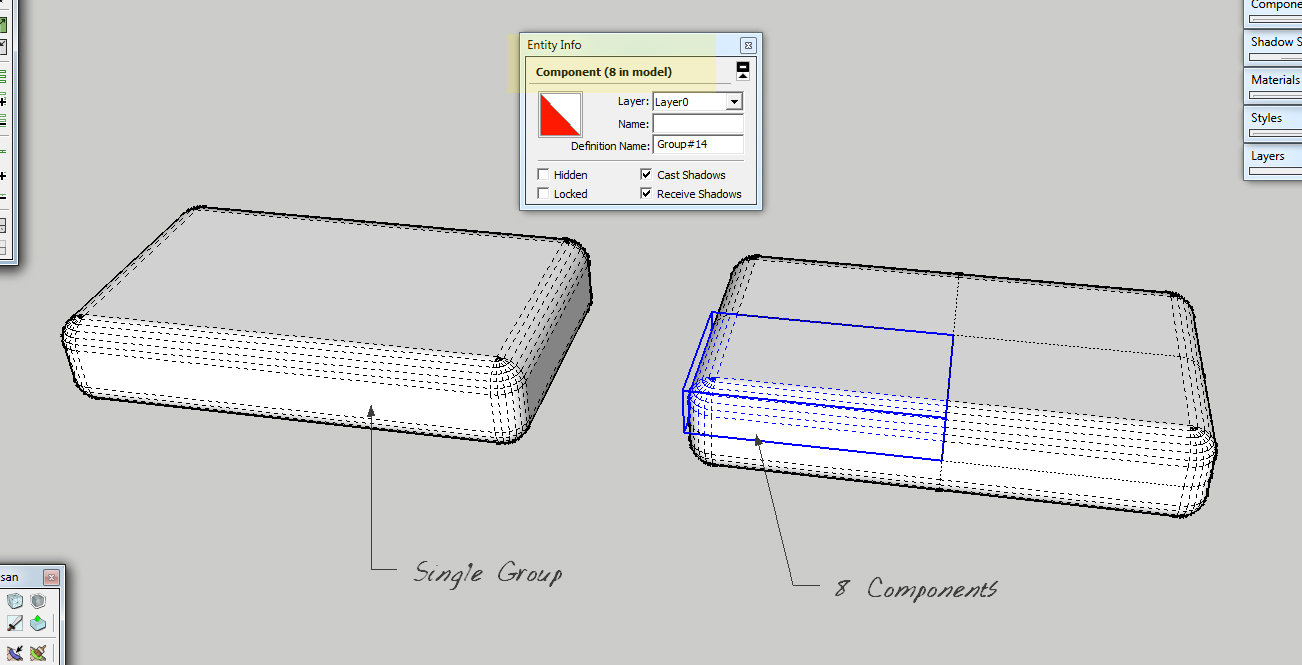
      Upon going through some older models I've made and trying to reduce the file size I was wondering if there would be any interest in writing a plugin that would automatically divide grouped geometry in a number of ways and then replace the divisions with instances of one component.

      For instance the "cushion" in the example below could be optionally divide in half on the red axis, in half on green axis, in half on the blue axis or in any combination. The plugin would then create a component out of the slices and then replace the definitions of the equal parts to become instances of a single subsection.

      Obviously it would only work on things that would be applicable to symmetry, but if one could just model normally and then go back and divide the symmetrical components via plugin, it would make life easier. Just a thought if anyone wants to take a stab at it.


      Divide to Components.jpg

      posted in Plugins
      EarthMoverE
      EarthMover
    • RE: Stone House & Gardens

      Curious how you are working the updated modeling back into Lumion? Are you using the "reload model" button or bringing it in piecemeal?

      It's looking very nice. Personally a tad too much fog for my taste. A little more punch in contrast wouldn't hurt either. Another nice little trick I've discovered is adjusting the fog height to make it less visible and then playing with the fog color to achieve a faked color / white balance.

      posted in WIP
      EarthMoverE
      EarthMover
    • RE: Mental Ray noisy shadows

      Thom have you tried to run the scene through Iray? Not sure what version of Max you have, but the interiors coming out of Iray that I've scene have been superb. Also maybe Max 2 Thea would be a good solution for you Revit models.

      With this MR issue, is your only light source the Daylight system? What is you MR exposure setting set to? If you turn off FG and GI are you still getting noise in the shadows?

      posted in Extensions & Applications Discussions
      EarthMoverE
      EarthMover
    • RE: Stone House & Gardens

      Definitely a mistake to start showing them teasers too early in the game. Keeping it more nondescript in the preliminary phases would help them to focus on general layout and the overall flow. Plus, they may want to make clear with the clients that 3D is a representation of the overall spatial relationships and a rendition of the general feel of how materials fit together, but is still an artists interpretation. I think too, people often feel like just because it comes from a computer that it is just a matter of a few keystrokes and you can manifest an exact replica of the final results. They don't ever consider all the work and effort that goes into it, nor do they see all of the variables involved with how the lighting reacts to the materials. We can get it close, but never exact.

      Perhaps if he does want to show clients "teaser" clips, then you can run them through a filter which will make them less specific to details and better for showing the overall scheme. Even just a B&W or Sepia filter might take their focus off of the colors and materials and see it more as a whole.

      Overall though, if it is helping the client make decisions now, instead of when the construction is underway, then it could be better in the long run. As long as you have a revision clause set and the architect is aware of your extra time being billable, then hey...it's all good!

      posted in WIP
      EarthMoverE
      EarthMover
    • RE: Stone House & Gardens

      Looking great. I think it would look nice to see a double row of cobblestone (sailor coursed) along the perimeter edges of the asphalt. Perhaps also having the cobbles banded through the driveway in front of the house and in front of the garage. It would pull some of the texture from the house into the entrance.

      Also, here is a really great resource for seamless hi-res paving stone images. Toward the lower right is the link to the seamless textures. There are multiple colors a bunch of different styles and patterns. Perhaps you could use them for your stamped concrete texture. - http://www.belgarddesignpro.com/category1.htm?section=12

      posted in WIP
      EarthMoverE
      EarthMover
    • RE: Photo of a tree in plan view for photoshop

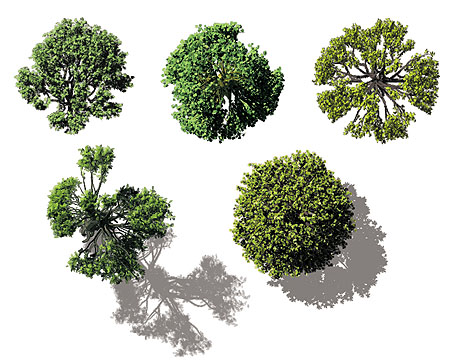
      http://www.doschdesign.com/products/vizimages/Birds_Eye_Trees.html - There is a freebie here in .psd format that may be of use.


      VI-BE-Trees.jpg

      posted in Corner Bar
      EarthMoverE
      EarthMover
    • RE: [Plugin] 2dBoolean ver1.3.1 beta UPDATE 20 dec 2013

      @tig said:

      NO, NO, NO! ๐Ÿ˜’
      ๐Ÿคฃ

      Tough on your students as all great masters are! I'm just picturing the huge face palm from a steamed but brilliant TIG as he has to constantly communicate with us "less brained" folk. ๐Ÿ˜„ Seriously, though your patience and constant help is much appreciated. I've been trying to follow both threads with you and Joel going back and forth and I'm starting to pick up a little of what is going on, although it's still all over my head.

      posted in Plugins
      EarthMoverE
      EarthMover
    • 1 / 1