The models are superb, but the rendering is absolutely wonderful. The tap looks so good 
Oops, your profile's looking a bit empty! To help us tailor your experience, please fill in key details like your SketchUp version, skill level, operating system, and more. Update and save your info on your profile page today!
🔌 Smart Spline | Fluid way to handle splines for furniture design and complex structures. Download
D
Offline
Posts
-
RE: Some high quality 3D models... hope you will find usefull
-
RE: Cutaway problem with sketchup
You seem to be suffering with the problem of clipping.
This can be caused by several reasons.
One of the main causes could be your graphics card. What card do you have.You can try turning of Hardware Acceleration in Window/Preferences/OpenGL Settings and see if that helps.
Other known causes are posted here:
http://sketchup.google.com/support/bin/answer.py?hl=en&answer=36261 -
RE: Version 7 Sky Settings
From what you are trying to do, set sky and ground, I think you need to go to Styles - Edit.
Here you can add/change the sky and ground.See attached image (although this is Mac)

-
RE: Delete unwanted files on a mac
I have no problem dragging SU files into the Trash, or using cmd-delete to trash them.
Maybe you have them locked somehow? I am guessing here.
Try right clicking on file and Get Info. See if it is locked. -
RE: [Plugin] Shape Bender Beta
I for one would love to see this ruby developed further and am willing to pay for this. It really is an extremely useful script.
-
RE: Massive tree patches
@dennis_n said:
interesting? what is it?
Can be found here Component Spray
Check out the included pdf. -
RE: A different way to use TwilightRender...
I agree, that is stunning Majid, a really exceptional looking image.
-
RE: [Tutorial] Render a section cut [English / Español]
Nice simple yet informative tut Miguel, thanks.
-
RE: [Plugin][$] Tools On Surface - v2.6a - 01 Apr 24
Thanks Dan, perfect!
I was trying to replace them in images DanielS. -
RE: A different way to use TwilightRender...
That is a nice style Tom, look forward to hearing how you achieved this.
-
RE: [Plugin][$] Tools On Surface - v2.6a - 01 Apr 24
Thanks, really nice improvement
Can't get Daniels icons to show. If I choose them from Default Parameters and ok it, nothing happens. If I open again, the tick in the box is gone.
-
RE: Who knows something about Sketchupbar.com
They also copy and paste many articles from here to there site.
-
RE: Some high quality 3D models... hope you will find usefull
Nice renders Marumures
Thanks -
RE: Wanted: Stretch tool
@olishea said:
fredo, what does Divider do?
Oli the divider allows you to choose the point you stretch from.
As default it stretches from centre, but you can visibly move this point to anywhere you wish and stretch from this new point. -
RE: Copy along path lock one axis ruby
If I read this correctly, you want to create the walkway or road for the bridge along that path.
You could draw the profile and use FAK (Follow me and keep) Plugin. It does a follow me but without the twisting a normal follow me does.
I once created a similar bridge, before FAK was around.
I offset the line of the bridge path you have shown in your image to the width required. I then used Skin ruby to create a face, which I then extruded up to the required thickness using Joint Push Pull ruby. -
RE: Ruby to Divide a Face?
Laticizer would help a little, but it's not ideal because it creates a frame, including the outer lines of the wall I pick.
A better solution I have just found is in 1001 bit tools and is the 'Create horizontal groove lines on selected surface' tool.
I just need to rotate the face 90 degrees to add vertical grooves.
It would be good to add horizontal and vertical grooves together to stop this happening, as shown in attached image, but I'm not complaining!
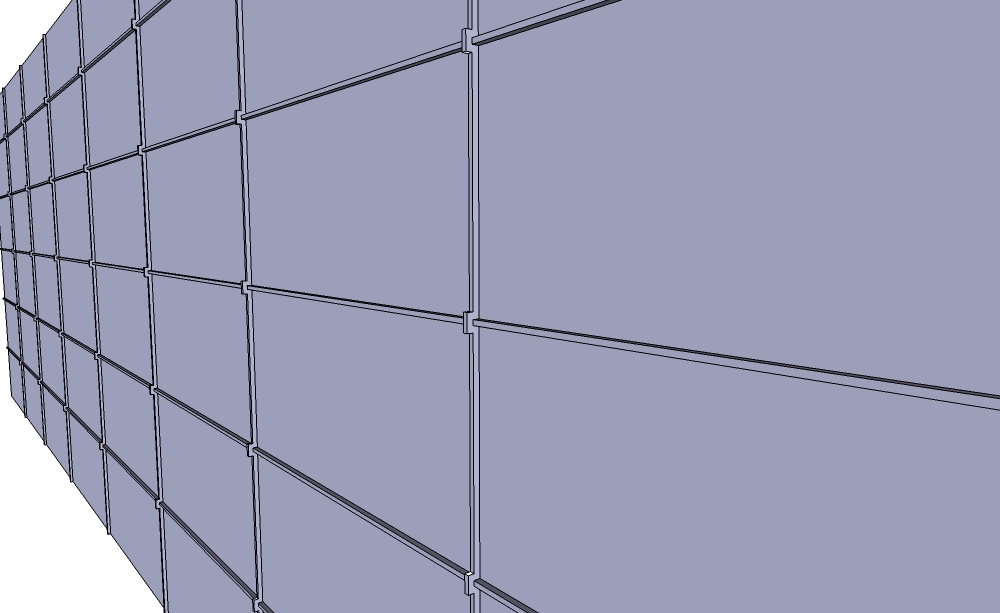
-
Ruby to Divide a Face?
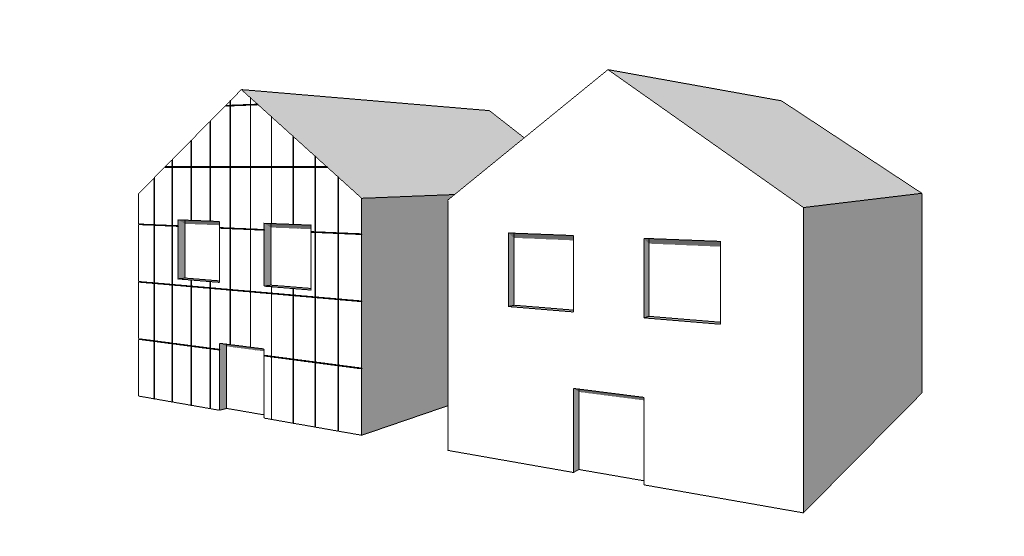
I seem to be modeling buildings that have external cladding panels quite a lot at the moment. These are panels that may be 1000mm wide and 2000mm high for example, with a 15mm gap between boards. Can you think of a Ruby that will help create this.
There is Windowizer, but that just allows me to choose an amount of rows and columns. What I would prefer would be to input, Horizontal Spacing = 1000mm / Vertical Spacing 2000mm / Gap 15mm, as an example.I want to divide a face by selecting it and then adding the required values.
I guess I would preferably also need to choose a start point, otherwise the gap may start at the edge, where I would want a board to start?I have attached a simple example image showing a face without and one with the cladding division I wanted.
Thanks