sketchucation logo sketchucation
    • Login
    1. Home
    2. dukejazz
    3. Posts
    Oops, your profile's looking a bit empty! To help us tailor your experience, please fill in key details like your SketchUp version, skill level, operating system, and more. Update and save your info on your profile page today!
    🚨 Skimp | 25% Off until March 30 Buy Now
    Offline
    • Profile
    • Following 0
    • Followers 0
    • Topics 41
    • Posts 5,755
    • Groups 1

    Posts

    Recent Best Controversial
    • RE: [Plugin] projectEditor_dj v1.8.SU.2013-14

      projectEditor_dj 1.6 || old - dj_plugins v1.5.3
      Copyright Feb 4, 2013
      by DukeJazz: James Cochran

      Feb 4, 2013; projectEditor_dj v1.6 bata
      -change to a toogle tool bar
      Feb 4, 2013 anotherSketchup_dj_loader v1.6

      • add Slect all, delete and paste in place
        Feb 4, 2013; scaleGroupFloat_dj v1.6 bata
        -add cumulativeScaler_dj move around (a step boxpoint)
        -add cumulativeScaler_dj size lenear stepper
        -add cumulativeScaler_dj move lenear stepper
        -fixes
        Feb 4, 2013 anotherSketchupPlus_dj v1.6
      • add explode; to componet; explode now dose both group and componet.
        Feb 4, 2013
        -added more Tips
        Copyright Feb 4, 2013; zoomZoom_dj v1.6
        -grouping to projectEditor_dj v1.6
      posted in Plugins
      dukejazzD
      dukejazz
    • RE: [Plugin] projectEditor_dj v1.8.SU.2013-14

      Now that it's as a hidden file. dj_pligins_loader.rb It can later be excluded from later ver.

      On my compter I have 754 rb files and 550 are hidden in my plugins folder and they won't be loaded unless they are unhidden at sletchup startup

      yes thomthom; thomthom » Today, 4:53 am
      They will load if you call them thou the ruby script loader

      I given you these folders (unhidden and hidden) so you don't need to work throu the mess of finding and changing the plugins loaders (copy and drop the file to plugins folder of what you want to hide)

      yes thomthom; thomthom » Today, 4:53 am
      I did find two desktop.ini files, I will delete them now

      This one dj_plugins folder hold all my tools rb and if updated all platform are too.
      I kind of address them all.

      posted in Plugins
      dukejazzD
      dukejazz
    • RE: [Plugin] projectEditor_dj v1.8.SU.2013-14

      Name change
      you may delete the old if you want
      I didn't want a conflick with old still running

      "Make ruby .rb or.rbs attributes hidden to keep plugins from loading at sketchup startup. ."

      Select ( the hidden or unhidden folder ) files... and copy them to SU plugins folder for a boot startup of each tool.

      posted in Plugins
      dukejazzD
      dukejazz
    • RE: Should Trimble write plugins?

      They can't upgrade for ever
      maybe toolpacks is a better way for them.

      posted in SketchUp Discussions
      dukejazzD
      dukejazz
    • RE: Axis definition - blue first???

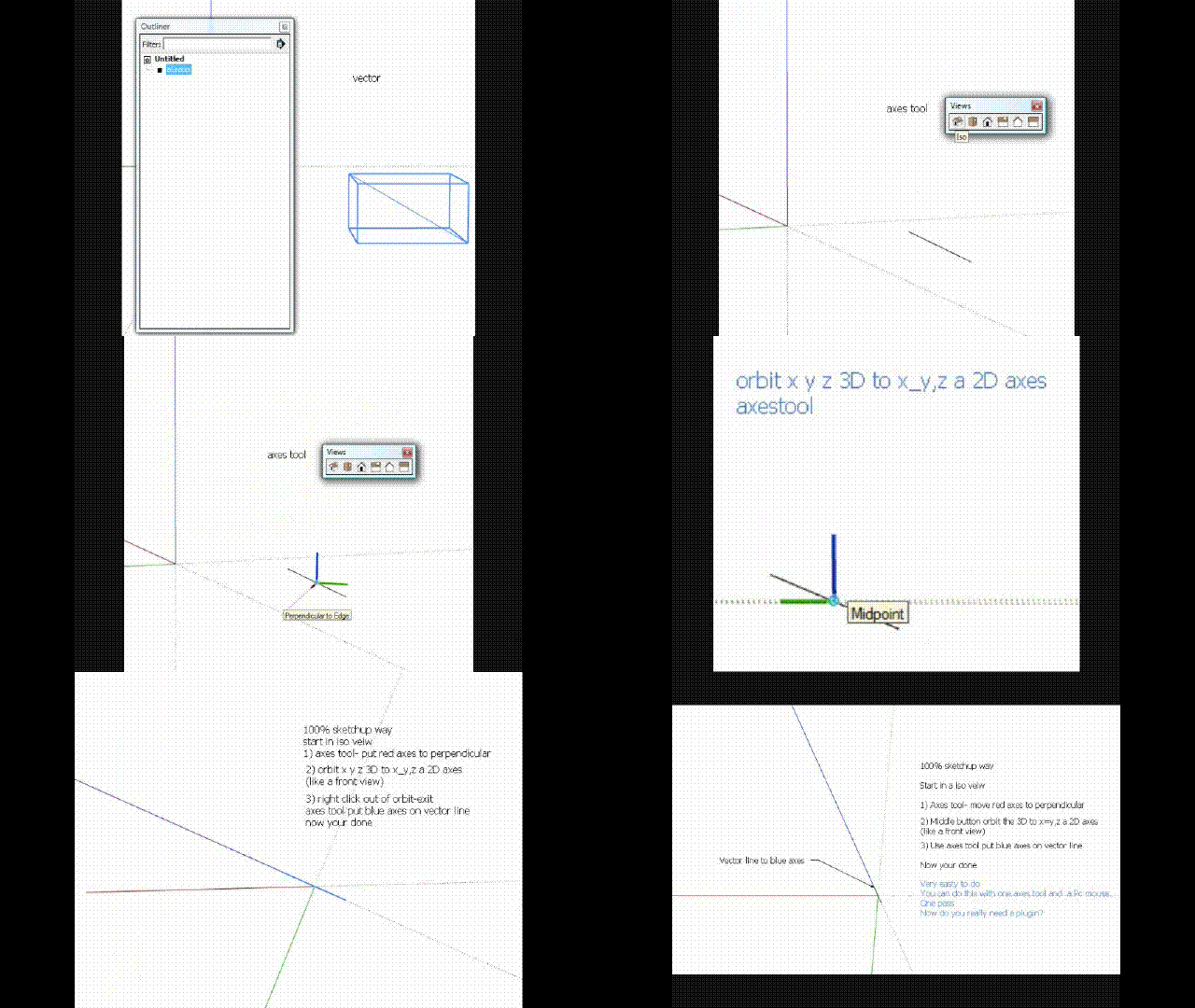
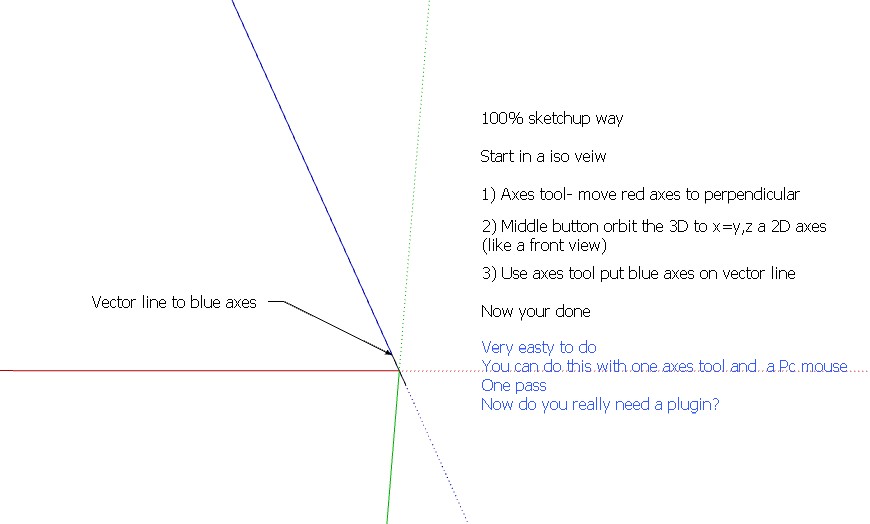
      One last try, this may be something near what you want or just be a another work around

      The inner working of axes tool
      pic_0024.jpg

      I just leaned this today about axes tool, iso view, gives a perpendicular alinement.(cool). Help you to set red axes in step 1

      Correct step 2: I sorry not a front view but a ground view of axis (one axis in front of other) . Rotate axes by orbit tool, the green axis into the red at ground level.

      This help you move the green and blue axis in step 3

      Movie_0003.gif

      posted in SketchUp Discussions
      dukejazzD
      dukejazz
    • RE: Shadow animation

      Not all of us have appple quick time to run untitled.mov

      I did this gif as a aid to your posted format, Dave

      Most of the time I think Apple has a better video output
      I started with apple long ago but never made it to the mac
      so I dont know all the in and outs of is Mac OS

      Now
      answering Peter's question from a pc point of view?

      I have 3 thoughts to add

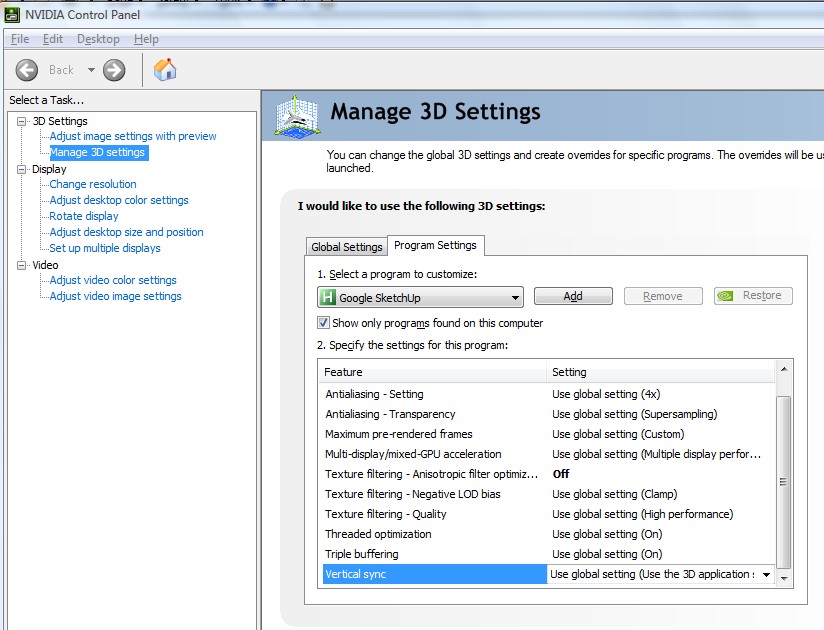
      1} I think, in his case, it maybe the 3d setting of the graph card, if his frame is 10 fps and above for a video 1032 x 774.
      pic_0077.jpg
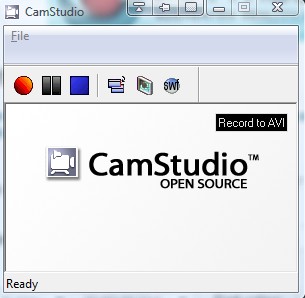
      2) or he may not have the right video grabber or using the right movie format for getting a constant 10fps and above.
      pic_0079.jpg
      3) or if its random and drop frame when he records
      his machine maybe doing things in the background
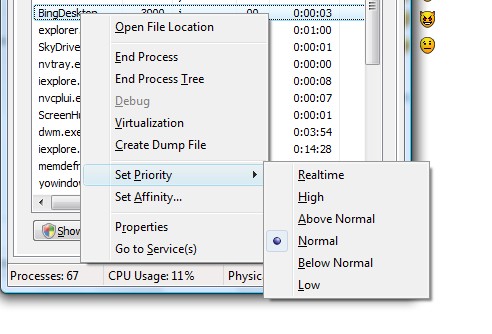
      Task Manager
      Change your SU or Recorder, set priority, to high or real time
      pic_0080.jpg

      posted in SketchUp Discussions
      dukejazzD
      dukejazz
    • RE: Shadow animation

      by Dave R » Today, 5:27 am

      "How big is the animation? I just did a small one on my Mac and got no blinking. I used the 20 second transition and 10 FPS. Dose the shadow jump much on either side of the "blink?" Could you edit out the blinks?"

      Hi
      I just leaning how to make gif animation my gif is 2 FPS. 640 x 320
      untitled.gif
      I make dave untitled.mov to 9 frame for 2 meg file 640 x 320
      untitled1.gif

      posted in SketchUp Discussions
      dukejazzD
      dukejazz
    • RE: Color; Highlighted space or making light

      pic_0032.jpg
      Highlighted space: 100% sketchup done with X ray mode in layers

      highlighted space. 100 % sketchup X ray .skp

      posted in Newbie Forum
      dukejazzD
      dukejazz
    • RE: [Plugin] Another Sketchup Plus update v1.5.4 Dec 29 2012

      pic_0030.jpg

      Update

      Dec 29 2012 v1.5.4

      • plugins wrap in Module DJ::pluginsName.methodDJ(name space)
      • @variable format (name space) dj_variable
      • plugins name are in subject and name order (easy to look up)
      • feature toolbar
      • add group toolbar (agroup)
      • add explode toolbar
      • Big new programs is safe to use, now in module format
      posted in Plugins
      dukejazzD
      dukejazz
    • RE: [Plugin] Another Sketchup v1.6.1 Feb 19 2013

      pic_0029.jpg

      Update

      Dec 26 2012 v1.5.4

      • plugins wrap in Module DJ::pluginsName.methodDJ(name space)
      • @variable format (name space) dj_variable
      • plugins name are in subject and name order (easy to look up)
      • feature toolbar add
      • Big new programs is safe to use, now in module format
      posted in Plugins
      dukejazzD
      dukejazz
    • RE: Axis definition - blue first???

      method 2

      Use circle tool about axes of the line and follow me to end point to make perpendicular surfface plane

      Then by using the axes tool on plane, red and green from c-point to plane edge gives a define a "BLUE axes (vector of the line)"

      earse planial box

      done

      posted in SketchUp Discussions
      dukejazzD
      dukejazz
    • RE: Axis definition - blue first???

      HI

      This may help

      Right click axes - select move
      in rotation box -rotate green axes - 90 deg +-

      now red axes is now blue

      posted in SketchUp Discussions
      dukejazzD
      dukejazz
    • RE: [Plugin] projectEditor_dj v1.8.SU.2013-14

      projectEditor_dj 1.5.4 |new name to fit what job action they do| old - dj_plugins v1.5.3
      Copyright Dec 26 2012
      by DukeJazz: James Cochran

      Big new these programs are safe to use, now in module format
      module DJ
      module Plugins

      History:
      Dec 26 2012 v1.5.4

      • All plugins wrap in Module DJ::pluginsName.method_dj(name space)
      • All @variable format (name space) dj_variable
      • All plugins are in subject and name order (easy to look up)
      • Name changed from dj_plugins_loader to projectEditor_dj
      posted in Plugins
      dukejazzD
      dukejazz
    • RE: [Plugin] projectEditor_dj v1.8.SU.2013-14

      Dec 8, 2012

      update to five of my plugins


      • fix Clipboard undo's, is now a one step process
      • fix My def are now wrap up as _scaleGroupFloat_dj
      • fix var are now wrap up to djscaleGroupFloat_x[][]
      • I recoded some of my varibies table to fix some of my rubies programs
        ========================================================================

      Fix the undo's problems by pairing these statements

      Sketchup.active_model.start_operation "dj_Group",true,true,true
      copy_group = Sketchup.active_model.active_entities.add_group(@djScaleGroupFloat_sents)

      Sketchup.active_model.start_operation "dj_Group",true,true,true
      copy_group.explode

      Then at the end of the program

      Sketchup.active_model.commit_operation

      global namespace - Done

      global methods - Done

      next:
      class
      web ding dong

      posted in Plugins
      dukejazzD
      dukejazz
    • RE: [Plugin] scaleGroupFloat_dj Ver 1.6.5 Feb 15, 2013

      This is a importance new release of scaleGroupFloat_dj and its not a beta

      This ver is 1.5,3 Dec 11, 2012

      list=[,"Group scaling tool for objects, scales along XYZ axes.|
      Drop down menu's for quick and easy use of X, Y, Z, XYZ|
      Scale factor for oversize or undersize objects|
      Group move tool for objects|
      Group resize tool for objects|
      Cumulative dolling|
      Local and orgin axes mode|
      Muli inputbox mode for easy to view|
      Converts units|
      2 box readouts and 2 drawing readouts (small and large) |
      show a vector between local and orgin axes|
      shows a center points of sected object|
      extened option|
      2 levels of target saves|
      2 levels of target move to center of object|
      2 levels of target move and size|
      2 levels of target resize to objects|
      2 levels of line up side to axes|
      2 levels to move to corner of a object|
      Lots of readout formats|
      drawBoxPoint_dj to set up target moves inside and outside of objects|
      repeatUndoTool_dj to move through the undo's|
      Two target tool buttons for move and save|
      It's gives high precision float values"]

      posted in Plugins
      dukejazzD
      dukejazz
    • RE: [Plugin] projectEditor_dj v1.8.SU.2013-14

      Thank you, for the lead I will try this.

      Also all my @varaibles are @dj_name @dj_ you say may varible names maybe to small and use by someone else I thought @H or @@u were global varibles and my initial values @dj_ were not? I can't run my rubies meathods def by another ruby, without sending my own initial values with them. I can go down the heap but not out. I been working with ruby for 6 mo. no classes! so i dont know a whole lot so thank you for your helping head up.

      posted in Plugins
      dukejazzD
      dukejazz
    • RE: [Plugin] projectEditor_dj v1.8.SU.2013-14

      A neat way maybe for me to output a save name.skp then import the name.skp file back after a count of undos for my program block of execution.

      May fast undos is stable as is but it uses the clipboard, I would not like to do this because good data maybe over ridden at some time.

      posted in Plugins
      dukejazzD
      dukejazz
    • RE: [Plugin] projectEditor_dj v1.8.SU.2013-14

      Always room for improvements

      Changes I would like to make:

      Is there a way to turn off undos function in a ruby program?

      A better inputbox with object and mouse usage to drawing model without closing inputbox?

      Make scaling to a local axes?

      Add rotation memory to target to move to a rotation?

      Add more plugins.

      Bata Bata work yes 👍

      posted in Plugins
      dukejazzD
      dukejazz
    • RE: [Plugin] projectEditor_dj v1.8.SU.2013-14

      sep 16 2012

      update - plugins_dj v1.4 = projectEditor_dj v1.1

      update - scaleGroupFloat_dj Ver 1.5 Big changes here
      bbox to local axes readout
      also method to aline to orgin axes

      update - moveSize2Target_dj Ver 1.1

      update - another Sketchup v1.5.1

      update - repeatUndoTool_dj v1.2.1

      update - drawBoxPoint_dj.rb v 1.1

      posted in Plugins
      dukejazzD
      dukejazz
    • RE: Problems moving along various axes

      Here is a aid that may help you to understand
      by useing Windows - styles - edit - background and then checking sky and ground to on

      Now view, when you see mostly the sky background then SU locks on orgin blue axes hieght,
      also when you view, mostly ground background then SU locks on orgin width and depth axes.

      use the draw tool to see this

      but you say its the move tool

      its simular

      When a move is being done

      it can be directed by moving or draging on axes but sometime the control seem to get lost
      due to this background view
      to fix this click on axes (0) frist then do your move on axes

      Also type of alinement can be found here
      by useing Windows - model info - file - alinement - glue to

      posted in Newbie Forum
      dukejazzD
      dukejazz
    • 1 / 1