yes sometimes
look here
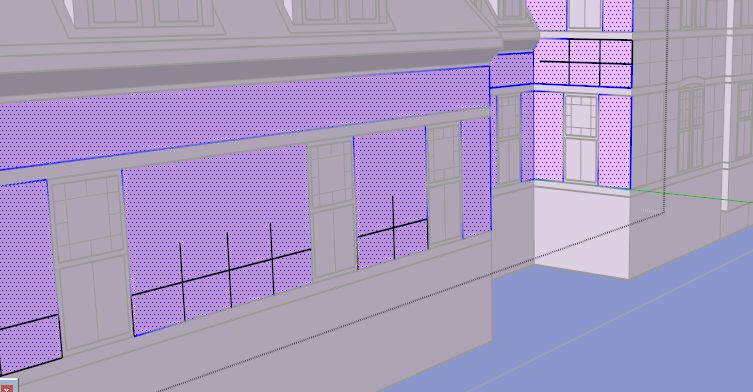
the lines going sometimes not to the end.
 Offline
yes sometimes
look here
the lines going sometimes not to the end.
hello cotty look here
is an other model however the same problem
the models you can find here

3D Warehouse is a website of searchable, pre-made 3D models that works seamlessly with SketchUp.
(3dwarehouse.sketchup.com)
the texture resolution is the main problem..i would safe this in a game.
here the sketchup result
reimported
Web word processing, presentations and spreadsheets
(drive.google.com)
hello i search a plugin that split me faces in meter etc.
when i try to render objects in lightup4sketchup and than export this to fbx. the result is more than bad.
for example
3D Warehouse is a website of searchable, pre-made 3D models that works seamlessly with SketchUp.
(3dwarehouse.sketchup.com)
this building i would have to split.
faces vertical and horizontal
V in Meter H in Meter.
all selected faces
Thank you
hi, i have found a good site for leafes and other think.
oh yes this is really important. i think google map is only an orientation.
you could switch in the time line back and look is your house exactly on the same location or not. i dont know, could be for sketchup exist a plugin for inserting exact cordinates from GPS. when you will realy work exact, i think you need a very exact GPS and compass.
here a link to an exact GPS (1 inch)
http://www.popsci.com/technology/article/2013-08/global-positioning-down-inches
i make it easy for me
i add location (for example Berlin Brandenburg Gate) and use a compass to see where is north. compare this with the picture what google giving me. normaly the top is north.
doing sketchup different?
could be i have misunderstand you, too
http://sketchucation.com/plugin/798-ae_scenenorthangletool
http://www.pveducation.org/pvcdrom/properties-of-sunlight/solar-radiation-on-tilted-surface
@kathryng said:
A lot to digest here, and you went through a lot of work to link all those articles for me. Thank you.
help is my second name 
the most 3d programs provide IES--this can rendered and you can see how looks on ground
here in cinema4d

demo download here
http://www.maxon.net/en/products/demo-version/download-form.html
http://www.caddpower.com/viewing-IES-files-in-mac-os-x.htm
http://appledailyreport.com/lighting-source-manager-1-0-lets-you-manage-photometric-files-on-os-x/
http://www.macupdate.com/app/mac/31441/ltb-light
Bootcamp and a Windows Installation could be your friend.
ok i could write
Reichs-Ausschuss für Lieferbedingungen
however outside of germany nobody know this word combination
the RGB value for RAL i have found on the Website
the NSC color i have found on the Website
I will respect all copyrights, however if RAL show the RGB Value on the own Website, i think i can use this.
@ roland joseph
how do you have make your pictures? with photoshop or inside of sketchup.
Thank You
profile builder doing this,too..for the old version 1.x you can find a free version


Hello,
in this thread
http://sketchucation.com/forums/viewtopic.php?f=323%26amp;t=1089%26amp;p=571716%26amp;hilit=material#p5357
i have found a plugin that change Material to texture.
ok, however this plugin change the given name of material to "no name" (Name/Texture Name)
is it possible, to have a given name for material and texture name?
Thank you
Edit(solved):
only at the first time if i import colors or colors in model i have named colors/materials
hi Al Hart, i would love if you change your plugin by reading the color name and than naming the textures. this would be cool
thank you
Hello i have now edit some colors for sketchup via CSV
(Thank you Sam)
if anybody find colors as XLS, CSV or HTML-Table could write here the links.
in the attachement i have insert some colors
like Pantone, HKS HEX etc.
if anybody have textfiles in the format
Name,R,G,B,
let me know via PM
i´ll hope we have than all possible color standards world wide in sketchup.
if any body know a way to convert adobe swatch files to xls or csv
PM me,too
tnx Dean
ALL COPYRIGHTS BY THE RESPECTIVE OWNER
**%(#BF0000)[**ALL ABBREVIATIONS AND NAMES IS COPYRIGHT PROTECTED.
THIS IS ONLY FOR ORIENTATION.
ALL INFORMATIONS ABOUT COLORS
LIKE HERE YOU CAN FIND IN THE INTERNET,TOO
ALL VALUES WAS N O T RECOMPILED**]**
@ pilou you are a creative funny guy 
