sketchucation logo sketchucation
    • Login
    1. Home
    2. brewsky
    3. Posts
    Oops, your profile's looking a bit empty! To help us tailor your experience, please fill in key details like your SketchUp version, skill level, operating system, and more. Update and save your info on your profile page today!
    ⚠️ Important | Libfredo 15.8b introduces important bugfixes for Fredo's Extensions Update
    Offline
    • Profile
    • Following 0
    • Followers 0
    • Topics 6
    • Posts 163
    • Groups 2

    Posts

    Recent Best Controversial
    • RE: Nested Attribute Dictionaries

      @jim said:

      So not only can you add attributes to Drawingelements like Faces, Edges, Groups, etc, but also to things like the Layers and Materials collection.

      Yeah, but nesting "attribute dictionaries" under "attribute dictionaries" seems to create a perfect tree-structure for storing (for example) xml data.

      @jim said:

      Just be aware that adding too many dictionaries can bloat the .skp file size tremendously.

      That would be a problem here, because storing data like this would create a LOT of additional attributes.

      Would serializing the data(using marshall) and storing this all inside a single attribute be more filesize-efficient?
      I can't seem to find a maximum length for an attribute string...

      posted in Developers' Forum
      brewskyB
      brewsky
    • RE: Nested Attribute Dictionaries

      @dan rathbun said:

      Basically a tree structure of dictionaries.

      Wow, I didn't realize this...
      Doesn't really seem intended behaviour, but you could write an entire XML structure within a single attribute!

      posted in Developers' Forum
      brewskyB
      brewsky
    • RE: Ruby Protocol Buffers

      Hi Dan,

      Thanks for looking into this!
      Too bad it's not easy to use from SketchUp.

      A single protocol buffers class for ruby does indeed seem much better than all these modules.
      Writing my own class for this seems way over my head(figuring out how the data is "serialized" and all).

      JSON seems to have a similar purpose, and could be a good alternative.

      But there are only a few ways to communicate with the TNO bimserver, from which protocol buffers seems to be the preferred solution.
      Check out this page: http://code.google.com/p/bimserver/wiki/Interfaces
      So in this case I don't think I can use JSON...(and would that be easy to load in SketchUp?)

      (interesting subject though "serialization"(YAML, Marshall, JSON), using this I might be able to store my complete "wall"/"floor" objects in a sketchup attribute. Re-load an object instead of re-creating it!)

      I hope I can find SOME way to communicate with bim-server, would be great if I could make a direct connection!

      posted in Developers' Forum
      brewskyB
      brewsky
    • RE: Maxwell (fire) plugin rendering HELP

      We too are using the Maxwell fire plugin at work, great renderer!
      I didn't do any interiors yet, so I'm not much help here.

      What about the maxwell forum? Might be a better place for these specific plugin settings?
      http://www.maxwellrender.com/forum/viewforum.php?f=107

      posted in Newbie Forum
      brewskyB
      brewsky
    • RE: Ruby Protocol Buffers

      I am trying to make an interface from my Sketchup BIM-Tools plugin, to a BIMserver(BIMserver.org) using protocol buffers.

      These Ruby Protocol Buffers are exactly what I need!

      I have been trying to copy parts of the code into my plugin folder, but frankly I have no idea what I'm doing here πŸ˜•

      Is there anyone with some experience in using this "library"?
      Or maybe a few tips on "plugging" external libraries into the sketchup-ruby installation?

      Any help is greatly appreciated!

      Cheers!
      Jan

      posted in Developers' Forum
      brewskyB
      brewsky
    • RE: SU 8 Update??

      For now I can only find some cosmetic changes...

      posted in SketchUp Discussions
      brewskyB
      brewsky
    • RE: Trimble Version

      It works here!
      Just posted a screenshot from the about box in this topic:

      http://forums.sketchucation.com/viewtopic.php?f=15&t=47419#p424202

      posted in SketchUp Discussions
      brewskyB
      brewsky
    • RE: SU 8 Update??

      New sketchup logo!

      posted in SketchUp Discussions
      brewskyB
      brewsky
    • RE: SU 8 Update??

      A new logo!

      posted in SketchUp Discussions
      brewskyB
      brewsky
    • RE: [Plugin] bim-tools 0.13.4(june 22, 2015)

      I have just uploaded a new version of the plugin, now with a working IFC exporter!

      The export is still very basic(not much building properties yet), but expanding it should be easier and faster now!

      Anyone willing to test it? Please comment! πŸ˜„

      posted in Plugins
      brewskyB
      brewsky
    • RE: [Plugin] bim-tools 0.13.4(june 22, 2015)

      Hi everyone,

      It has been a while since my last post.
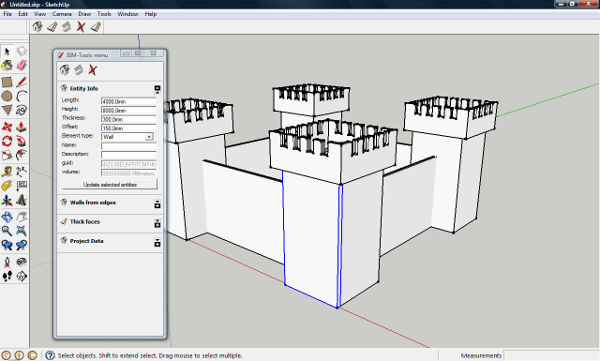
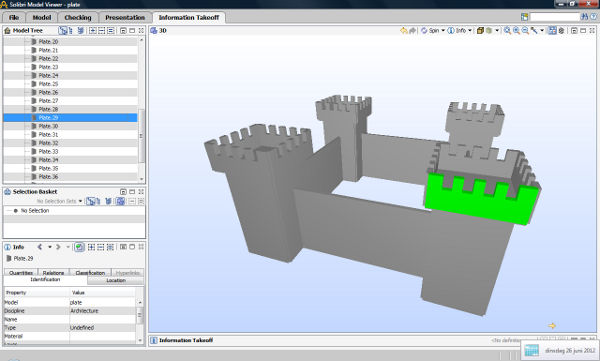
      Just dropping in to share a few screenshots of my latest endeavour:
      re-build the IFC exporter

      It does not yet contain a lot of BIM-information, but finally I can generate some "working" IFC files again! πŸ˜„

      Cheers!
      Jan


      IFC test original in SketchUp


      IFC test in IFC-viewer

      posted in Plugins
      brewskyB
      brewsky
    • RE: [Plugin] bim-tools 0.13.4(june 22, 2015)

      New version uploaded! 0.10.6

      Please let me know if this latest addition adds value.
      The results of changing multiple lengths/heights at the same time can be weird.
      Length and Height could also be shown as a "read-only"-property, so they can only be changed indirectly through the source-faces.

      posted in Plugins
      brewskyB
      brewsky
    • RE: [Plugin] bim-tools 0.13.4(june 22, 2015)

      @jql said:

      SKIM - Skimmed down version of BIM

      Hmmm, I kinda like this one πŸ˜„

      I have to think about how renaming the tool would work out though.
      I agree that "bim-tools" is very boring and unimaginative πŸ˜‰ but on the other hand it's very descriptive...

      What it would do is give the plugin a bit of... how do you say that in english; character/personality/"uniqueness"?

      posted in Plugins
      brewskyB
      brewsky
    • RE: [Plugin] bim-tools 0.13.4(june 22, 2015)

      I really appreciate that you have taken the time to read it all and explain your ideas!
      I started this project in the first place to enhance my own workflow(I work at an architect's office as draughtsman/engineer), but it wouldn't be much fun making it if I would be the only one that would use it. If I can include another's wishes it will only make the project better!

      You correctly noticed the absence of a clear visible goal for the project. There are so many interesting side steps(and lack of time to do everything) that a good focus on the essential parts is very important. Maybe your ideas(and others), and some discussion on this topic can help me out here πŸ˜‰.

      I agree with you that SketchUp is not CAD, but how to define BIM? Is it the revit/archicad-style-workflow? I don't think so. It's all about collecting, merging and sharing useful information with other parties in a building process. And that can be done in so many ways!

      I think it would be a great experience to be able to draw the initial design using "unburdened" Sketchup, and in a next stage, when more information becomes available, and wall thickness and sections become useful, you could just enhance this basic model.
      When basic elements such as walls/spaces/materials are defined, there is already so much information collected that it becomes useful to share it with other parties or more technical software. And of course when it comes to BIM data, the best way of sharing would be through the IFC file format.
      But also the spreadsheet-like approach can be very useful, and way easier to implement(b.t.w. have you tried the Sketchup-pro built-in generate-report feature?).

      Sketchup by itself is a modeller, and in that light I don't think this plugin must be anything else, I want to stay clear of anything "layout".

      The most important thing for this plugin is, add as much useful information to a model as possible, but keep it simple!

      And I also like the idea of removing properties, take a step back, "flatten" the wall to a face and start sketching again!

      The following summary describes what I currently think should be the "roadmap", please comment!

      • planar entities (starts to come together, needs bugtracking)
      • project properties(name/description)
      • material properties(add more properties(like weight? transmission?) to default sketchup materials)
      • IFC export planar entities
      • CSV export (for spreadsheets) (or should this be before IFC?)
      • building storeys
      • IFC export storeys
      • spaces (rooms)
      • IFC export spaces
      • lineair entities (like columns)
      • IFC export lineair entities
      • merge planar entities(curved walls, combined roofs)
        A long way to go! But I am trying to make small by themself usable sub-tools. First create an exporter for one tool before starting on the next tool.

      P.S. On your "jumping from one software to another". Wouldn't it be great if you COULD easily jump from one to another, enhancing your model, instead of losing information every step of he way? Lately I'm using more and more small open source tools to do a single job, instead of using the big expensive software tools. I rather like this philosophy but it's heavily dependent of open standards.

      posted in Plugins
      brewskyB
      brewsky
    • RE: [Plugin] bim-tools 0.13.4(june 22, 2015)

      Hi Guanjin,

      I have re-implemented the "walls-from-edges" tool as you requested.
      It needs a bit of polishing but it seems to work pretty well!

      Let me know what you think!

      Cheers!
      Jan

      posted in Plugins
      brewskyB
      brewsky
    • RE: [Plugin] bim-tools 0.13.4(june 22, 2015)

      @tig said:

      various create sub-functions etc are/could-be in collapsible parts of the principal dialog

      Yeah, I guess for now it's best to just make some more collapsible parts in the dialog and reorganise things once this list gets too long...

      posted in Plugins
      brewskyB
      brewsky
    • RE: [Plugin] bim-tools 0.13.4(june 22, 2015)

      I understand what you mean, the old create-walls-from-edges tool is easier when you just want to make a floorplan.
      I think it could be easily re-implemented.

      The only thing is, I am a bit apprehensive to "clutter" the interface with too many buttons.

      Anyone ideas on this?

      Maybe two separate toolbars? one with basic functions to create thick faces and one with things like a walls-from-edges tool and maybe a roof tool?

      posted in Plugins
      brewskyB
      brewsky
    • RE: [Plugin] bim-tools 0.13.4(june 22, 2015)

      @jql said:

      I just downloaded it and it's impressive.

      Thanks! And thanks for your input! I have already added a few of your ideas!

      @jql said:

      The main difference is I create a group for all exterior walls/roofs and if I need to edit one or more specific walls/roof slabs, I then divide those groups.

      I think I normally work in a similar way, but that's one of the things in my workflow I would like to change with this plugin, if it works right the plugin could reduce the number of groups/components that you have to edit/keep up-to-date.

      @jql said:

      Setting it to zero makes it very simple to work volumes, extruding them in.

      Great idea! didn't think of using it like that but it gives more direct control over the walls.

      @jql said:

      However, when you toggle to element view, I think it should hide the source faces.

      It should hide the source faces, only edges should be visible. I think I can easily hide them but didn't work on that yet because i have some ideas for the edges I didn't get to yet. But maybe it's a good idea to temporarily fix this!

      @jql said:

      This is also true for corners. The plugin also creates border faces for each wall/slab corner wich should not appear when you create a section. It would be nice if these border faces could also be hidden.

      Great idea! fixed in the new 0.10.4 version!

      @jql said:

      It would be wonderful if there would be also a button to disconnect/reconnect the faces created.

      I have to think a bit about the disconnect button, wouldn't it be better to just disconnect a single edge? For example when a wall must connect to another wall, but not to the roof?
      Meanwhile I have created a button for "deleting BIM properties", works great for fixing bugs!

      @jql said:

      The main inconvenience I found is that if the user doesn't follow the specific steps to make it work right, faces and elements start to fail and some of them disappear. In a creative and interactive process, specially on early stages of a project, this might mean that sometimes you will have to discard the whole model and start over for it to work.

      Yes, that's the biggest reason why it's not "production-ready", but this new button helps a bit in the "fixing".
      One thing that fixes some problems is just save your work and re-start SketchUp, the plugin will then re-load the "BIM-properties".
      A big problem is still that you have to close SketchUp between switching models, otherwise relations are lost.

      Let me know what you think of this new button πŸ˜„

      posted in Plugins
      brewskyB
      brewsky
    • RE: [Plugin] bim-tools 0.13.4(june 22, 2015)

      New version 0.10.3 uploaded!

      I wonder what you think, especially about the workflow!
      Is it intuitive, sketchup-like? What must be improved?

      I made the interface as lean as possible, not a separate button for walls/roofs/floors, just thick faces with properties.
      Is this the way to go?

      I know it still has bugs(losing relations, sometimes crashing), "bugreports" are also welcome!

      Cheers!
      Jan

      posted in Plugins
      brewskyB
      brewsky
    • RE: A new home for SketchUp

      Indeed a bit scary this change.
      But on the other hand, I worried about SketchUp's future within Google.
      With the focus on "core-business" these days, the investments in SketchUp would have at least diminished to a bare minimum.

      I don't really know Trimble, but I believe their "vision" for BIM is O.K. from what I have read about Tekla.
      I am also really glad it's not Autodesk!!!

      Good luck to the SketchUp team, and I agree "keep the focus on user-prowdness"!
      Untill now I always tell anyone that SketchUp is the most fun piece of software I've ever used πŸ˜„
      I hope to be able to say that a year from now!

      Jan

      posted in SketchUp Discussions
      brewskyB
      brewsky
    • 1
    • 2
    • 3
    • 4
    • 5
    • 6
    • 7
    • 8
    • 9
    • 5 / 9