sketchucation logo sketchucation
    • Login
    1. Home
    2. brewsky
    3. Posts
    Oops, your profile's looking a bit empty! To help us tailor your experience, please fill in key details like your SketchUp version, skill level, operating system, and more. Update and save your info on your profile page today!
    ⚠️ Important | Libfredo 15.8b introduces important bugfixes for Fredo's Extensions Update
    Offline
    • Profile
    • Following 0
    • Followers 0
    • Topics 6
    • Posts 163
    • Groups 2

    Posts

    Recent Best Controversial
    • RE: [Plugin] bim-tools 0.13.4(june 22, 2015)

      Thanks John! It's getting somewhere!

      For the new version I simplified the layout(less css), so that might already improve the looks...
      I'll try to implement your trick in the new version.
      And if it's a security feature... would it not be best to use the same temp file on windows? It might be marginally slower but would be a more "universal" solution...

      For everyone interested... I have put another small video on youtube showing the progress on the new 0.10 version. http://youtu.be/J59EgH7LICs
      bim-tools-120224.png
      The video is bad quality without comments or audio and the plugin is still buggy, but as you can see in the video that it's quite easy to convert existing sketchup faces to "BIM" elements, and these already move and stretch with the source faces!

      posted in Plugins
      brewskyB
      brewsky
    • RE: [Plugin] bim-tools 0.13.4(june 22, 2015)

      @driven said:

      I got half of your script working with a little aditional ruby to write a temp file and then use .set_file on mac.

      Ha! good idea! a bit of a dirty hack, but sounds like a great solution while waiting for the sketchup team to fix the direct set_html method!

      Thanks! when it works I'll gladly use it!
      Cheers! Jan

      posted in Plugins
      brewskyB
      brewsky
    • RE: [Plugin] bim-tools 0.13.4(june 22, 2015)

      @thomthom said:

      I had a quick look at the code - see it uses .set_html - which is bugged under OSX after Safari 5.0.6 update.

      Too bad .set_html is bugged, I rather liked this method for updating my webdialog. Do you have any suggestions on how to replace it? The only thing I can think of is a whole lot of javascript...

      @thomthom said:

      Made inline-comment in the Google repository for file: bt_dialog.rb
      also made a couple of other notes.

      Thanks for looking into it, unfortunately I can't seem to find your comments in the google-code project. πŸ˜• I don't have any experience yet with the code review functionality. Can you point me in the right direction? Any comments are most welcome!

      posted in Plugins
      brewskyB
      brewsky
    • RE: [Plugin] bim-tools 0.13.4(june 22, 2015)

      @fionmacool said:

      However, all I got was a dialogue that didn't seem to work. Did I miss anything? Check out the image below.

      Too bad I can't test it myself, the dialog is a webdialog, only tested on internet explorer.
      I can however download safari for PC to test the javascript/html, I'll look into that.

      During the past months I have re-written my bim-tools plugin from scratch, I think the new concept is a very solid foundation for expanding it into a great BIM-modeller in the SketchUp way of modelling.(I also simplified the dialog, hope it works on mac out of the box...)

      The latest code is on google-code: http://code.google.com/p/bim-tools/

      I'm currently hunting for bugs, brave people can give it a try πŸ˜‰ , preview added to the post.

      At this moment there is a toolbar with 3 buttons:

      • The first opens the webdialog with options for BIM elements.
      • the second cobnverts selected faces into "BIM objects"
      • the third, switches the display between the original "source faces," and generated "BIM" geometry.
        The contents of the webdialog adapts to the selected BIM elements(will go wrong once in a while). BIM elements will transform with the source faces...

      It is still very easy to screw up the model, for example:

      • scaling faces
      • "Splitting" of faces
      • simultaneously change "name" or "description" for several elements at once.
      • each edge can only have two faces
      • also connecting faces on the same plane still give an error message.

      The project is getting much fun!!! πŸ˜„


      Preview, not ready for real use!

      posted in Plugins
      brewskyB
      brewsky
    • RE: "refresh" Group BoundingBox

      Thanks Guys!

      @tig said:

      You can 'refresh' the bounds of a group by invalidating the bounds of its definition thus:
      group.entities.parent.invalidate_bounds

      This did the trick!

      I think I'm handling the groups(first made a group, then added new entities πŸ˜„ ) and transformations in the right way after fiddling around for a couple of months, but there still is much to learn.

      For example I didn't know that group.entities.parent returns a "definition", instead of just the group-object itself as I suspected. But when I re-read the documentation i noticed it was all documented! Now I also now where to use ComponentDefinition.group? for!

      I'll have a look at the slicer5 code, looks interesting πŸ˜„

      Jan


      Wall-groups correctly aligned!

      posted in Developers' Forum
      brewskyB
      brewsky
    • "refresh" Group BoundingBox

      For my BIM-Tools plugin I'm creating lots of Group-objects for walls and the like, all with different orientations.

      The problem I'm having is that I generate geometry "in place", based on surrounding entities.
      The easy way is to just add the newly created geometry directly into a new group.
      But that way the group-origin is not the base-point of the wall object, and for rotated walls the bounding box does not line up with the wall.
      A method "set_axes" would solve this, but I can't find something like that...

      I've been trying to, first; transform the empty group in position and, second; inverse-transform all created geometry so everything is in the correct place. But then something weird happens; the bounding box does not get refreshed and is still placed in the "old" geometry position? Anyone an idea how to "refresh" the bounding box? When i manually open and close the group it correctly realigns...

      I could also use components because they have more methods, but these also have limitations:
      A component does have a method for setting the insertion point, but no way to set direction?
      An other problem with components is that I would "spam" the component browser with way too many walls...

      I really think it's fastest to create the geometry "in place", but I'm almost to a point to translate everything to the origin, there create a group, and translate the group back in place.

      I hope I'm just missing the logical way to do this πŸ˜„

      Thanks for any advise!
      Jan

      posted in Developers' Forum
      brewskyB
      brewsky
    • RE: BIM for SketchUp - again?

      Hi Peter,

      You are right, the video needs some clarification.

      @pbacot said:

      I don't understand exactly what the video is doing and its relation to BIM DATA, but I like the quick manipulation of shells that is apparent.

      The video shows the first visual part of the re-builded plugin: converting SketchUp faces to builing elements. What's still missing is an interface, and a way to show the created building data.

      @pbacot said:

      I think the above statement is most impressive. Is the object a solid. or is the model just "solid", and what is the link to data? Are walls identifiable for further description or something like that?

      The basic idea is to use pre-drawn sketchup elements(faces/edges) as source for the building elements. Apart from the source-face, a group holding the complete wall-geometry is created.
      These are linked through a new building-element-class. The source face remains the basis, and holds all attribute data. This way the geometry can always be re-created from the source.

      I have created a set of new classes parallel to the common sketchup elements, among others:

      • A project-class, that manages a separate library of building elements, and will take care of things like IFC-export.
      • A planar-class(for walls/floors/roofs, might be needed to add separate classes), linked to the source face and the created wall-geometry. And contains all object data, like width, height, material-properties.
      • A lineair-class(for columns and other profiles), linked to a source edge and the created geometry.

      Cheers,
      Jan

      posted in Plugins
      brewskyB
      brewsky
    • RE: BIM for SketchUp - again?

      Hi everyone,

      I have made a small video that shows the current progress on my bim-tools plugin.
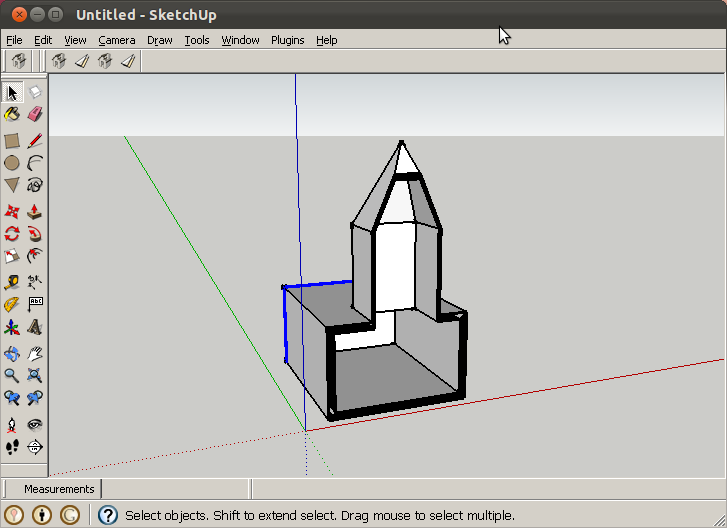
      It shows basic ability to create "thick-faces"(filled with the needed BIM-data) from an existing SketchUp model.

      thick-faces.png
      http://youtu.be/ozci5OH8Rj0

      I think the plugin now has a solid and extendable data-model, ready for the next steps!

      A lot of work needs to be done but I would like some comments on things like:

      • would anyone like to work in this way(draw a model as flat faces(shell) and when a design becomes somewhat "real", select faces that need to be converted to (exportable) BIM objects.
      • do you think this is a good approach to BIM-modelling? The method differs somewhat from revit and the like
      • can it be done this way? A lot of difficulties lie ahead(solving corners, conversion to IFC)

      Please comment!

      Cheers!
      Jan
      http://forums.sketchucation.com/viewtopic.php?t=34007

      P.S. made the video on ubuntu Linux!

      posted in Plugins
      brewskyB
      brewsky
    • RE: [Plugin] SketchUpBIM: Building Modeling made easy!

      Hi D_e_x,

      I accidentally placed my post about my bim-tools plugin in the wrong thread. I wanted to place it in the thread about general BIM discussion.
      I moved it:
      http://forums.sketchucation.com/viewtopic.php?f=323&t=37979&p=378696#p378696

      Sorry!

      Jan

      posted in Plugins
      brewskyB
      brewsky
    • RE: BIM for SketchUp - again?

      @tig said:

      You should never get two the same!

      That sounds great! When i saw the guid guidelines for IFC it looked like a difficult thing to get to work on both Mac and PC... There seems to be some kind of standard, made by "open group"?
      http://buildingsmart-tech.org/implementation/get-started/ifc-guid
      http://buildingsmart-tech.org/ifc/IFC2x4/alpha/html/ifcutilityresource/lexical/ifcgloballyuniqueid.htm

      But if your method is equally random(and i don't really see the difference between one random string of characters and another) it should not be a high priority task to try and make an "official" guid...

      posted in Plugins
      brewskyB
      brewsky
    • RE: BIM for SketchUp - again?

      @pout said:

      Based on your comments, there are two possible pathways:
      BIM as in: be able to attach BIM properties and parameters to an entity. That's it, these parameters do not influence the entity when changed.
      BIM as in: when changing IFC parameters/properties teh entity is changed accordingly, even more, when adjectent entities are influenced they also change if needed (bit like Revit)

      I agree, the more information you've got, the more usable it becomes...
      This goes for every bim-plugin, but also for a basic common framework...

      But even if you just have 4 labels; "width=100", "length=6000", "height=3000", ifctype="IfcWallStandardcase" AND the default sketchup information of a group/component; "placement point" and "placement vector", can tell you a whole lot about the wall!

      The more "standard definitions" we as plugin builders can agree on, the better it gets. You could even agree on a basic Sketchup::Ifc module that contains a few classes for maybe ifc-export/import, generating globally unique id's(guid) and managing ifc-units...

      posted in Plugins
      brewskyB
      brewsky
    • RE: BIM for SketchUp - again?

      @tig said:

      To make separate 'solid' 3d sides look at the shell tools by Jim and Thomthom [also Fredo's JointPP].

      Thanks! I'll check them out.
      The way I'm building it right now(even the parts in the image are no push-pulls)is:
      Get the plane of the "base"-face, offset this to bottom and top, calculate a perpendicular plane for every edge(and I need to improve this to "half the angle" between this and the connecting face). Then intersect the planes and create vertices(and faces) on the intersection points. That way I think I can generate the entire geometry in one go.

      What do you think? (I hope my ramblings make sense πŸ˜„ )

      posted in Plugins
      brewskyB
      brewsky
    • RE: BIM for SketchUp - again?

      @bigstick said:

      I think the 'thick faces' approach sounds great!

      There are a number of ways you could create them though. Tools which specifically create the wall and slab objects would automatically set up the relevant tags/labels sound to me to be the most efficient solution.

      However - ultimately there may be more complex wall types to build though. Angled, curved, stepped, tapering walls are all not that unusual. It may be that the 'thick faces' approach won't quite work with stepped, angled or tapering walls. If you could maybe allow each wall to be created in native SU geometry, and made into a group and tagged with an attribute, it gives you the benefit of modelling however you want, with flexibility to do pretty much what you want.

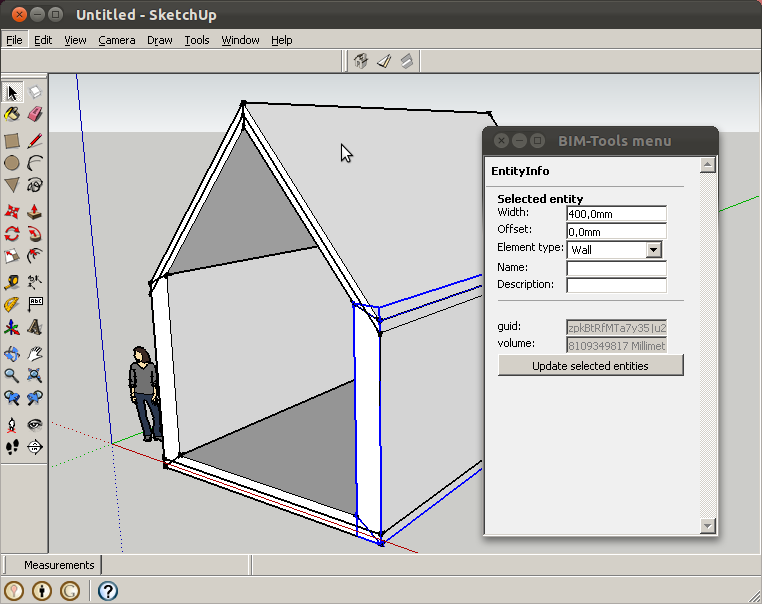
      You are right, for new geometry a button "create wall" would be best, that could create the geometry AND add the labels. But the reason I think the approach of selecting faces would also be great is with complex shapes and for upgrading an existing design to BIM. Check the example image(made with my demo plugin, still need to solve corners)geometry.jpg

      @bigstick said:

      If you extended the attribute tagging principle and defined an open schema, any of the plugin authors here could build an integrated set of tools for all sorts of BIM elements, based on some of the plugins that they already have. A true community approach!

      I would like that very much! Some opinions from other plugin developers or IFC experts would come in handy!

      @bigstick said:

      Someone would need to create an IFC export script though.

      I'm also working on that, the previous version of my plugin DOES IFC export, but it only makes walls and windows.
      For the future version I would like to work together with http://ifcopenshell.org/, if that works we don't have to build the full IFC framework in sketchup/ruby but just the translation to SketchUp! And even better, all contributions to that project would also be usable in blender and the like!

      @bigstick said:

      I have just checked out bimserver, sounds great! Would it work with large/complex models?

      bimserver.org is a great project! I think it does work on large models because the principle is simple, as far as I understand it.

      posted in Plugins
      brewskyB
      brewsky
    • RE: BIM for SketchUp - again?

      @bigstick said:

      Recently I have experienced an interesting situation which gives me reason to hope (again) that someone will implement a BIM framework for SketchUp using IFC.

      I've been thinking on this BIM-framework.
      The most simple(simple to implement, simple to agree on to get to a sketchup wide standard) way for cross-plugin usage of BIM data would just be to use Attributes to label SketchUp-objects in a uniform way. This uniform way should lie as close as possible to the official IFC notation.

      By example:
      you could give every BIM object an AttributeLibrary called "ifc". And then fill it with IFC properties.
      The AttributeLibrary for the bim-project(Sketchup.active_model) could get all properties as officially available in the IFC specs http://buildingsmart-tech.org/ifc/IFC2x4/alpha/html/ifckernel/lexical/ifcproject.htm

      AttributeLibrary "ifc" for Sketchup.active_model could contain:

      • IfcProject_GlobalId = Globally unique id number for the project(even after exporting en importing)
      • IfcProject_Name = Test Project name
      • IfcProject_Description = Test Project description

      http://buildingsmart-tech.org/ifc/IFC2x4/beta1/html/ifcsharedbldgelements/lexical/ifcwallstandardcase.htm
      AttributeLibrary "ifc" for a wall group(or component) could contain something like:

      • IfcWallStandardCase_Name = Wall name
      • IfcWallStandardCase_Description = Wall description
      • IfcWallStandardCase_IfcQuantityLength_width = 300.mm

      Every BIM-plugin can then add and read possible labels according to the agreed standard.

      Please comment....

      posted in Plugins
      brewskyB
      brewsky
    • RE: BIM for SketchUp - again?

      I think SketchUp is at its most powerful in the design process when the building is still simply a hollow shell. No thickness in walls and all openings as self-cutting-components.

      The best addition to basic SketchUp for me I think, would be "thick-faces". This would make parametric elements a whole lot easier to make, and in the process exporting to meaningful building parts. The greatest difficulty lies in how these faces connect...

      Making building parts in that way could be

      • draw a building as a hollow shell.
      • Select faces that need thickness, and start the "thick-faces" function.
      • Label the thick elements "wall" or "floor"(and holes as window/door).
      • Export to IFC(or maybe even better, sync with bimserver.org)

      Wouldn't this workflow be really SketchUp like?

      This is how I'm trying to build the next version of my bim-tools plugin. I've got something basic working, but it will still be a hell-of-a-lot-of-work to make it fully functional πŸ˜‰
      Topic: http://forums.sketchucation.com/viewtopic.php?t=34007

      I also think IFC really is the key! Although it does have it's weaknesses, I think it's the only really open and interchangeable solution we've got.

      Cheers!
      Jan

      posted in Plugins
      brewskyB
      brewsky
    • RE: [Plugin] bim-tools 0.13.4(june 22, 2015)

      Hi Toby!

      I just posted a new version(0.9.2), I hope it runs on mac! (sorry can't test it myself).

      I removed all backslashes from filepaths as John sugested.

      Cheers!
      Jan

      posted in Plugins
      brewskyB
      brewsky
    • RE: [Plugin] SketchUpBIM: Building Modeling made easy!

      @elibjr said:

      If the slabs were generated as components and not just groups that would be even better ... maybe.

      I've been thinking about the same thing, but I think using groups is the best thing here, otherwise the component-selector gets cluttered with sooo many walls and slabs...
      Maybe the best approach is to after creating the building-parts to combine the slab-group and railing-components as one big component if you need this repetition?

      d_e_x, what are your thoughts on this?

      Cheers,
      Jan

      posted in Plugins
      brewskyB
      brewsky
    • RE: [Plugin] bim-tools 0.13.4(june 22, 2015)

      @didier bur said:

      Hi,
      Just a side note: to install, create a folder "bimtools" in the Plugins folder, and put the html file in it.

      Hi Didier! Thanks for the explanation. I forgot to mention how to install and use it.

      Here some additional info:

      • The plugin creates a "BIM Tools" option in the plugins menu.
      • When you select this, a webdialog appears with options(wall-width and wall-height).
      • Select some edges(they must be horizontal) and click the button in the dialog, it will generate a wall section on every edge with the given width and height.

      It nicely fixes the corners of all connecting edges, except for walls with different widths/heights and for very short edges.
      intersecting-walls.jpg
      I was browsing the forum today and noticed that Thomthom's street generator uses a similar principle. the biggest difference seems to be that my walls are separate objects and the streets are nicely glued together(and have a lot more options).

      posted in Plugins
      brewskyB
      brewsky
    • RE: [Plugin] bim-tools 0.13.4(june 22, 2015)

      Hi Tobi,

      I'm sorry, I didn't see your post until now. I'm reading all over the forum, and missing this 😳 . Somehow I got unsubscribed from the thread...

      I will look into the problem, as John says, it probably has to do with the backslashes.

      Does anyone have tips on how to best implement the (back)slashes in file-paths cross-platform?
      I've tried a few different things, but don't now what's best...

      Cheers,
      Jan

      posted in Plugins
      brewskyB
      brewsky
    • RE: [Plugin] SketchUpBIM: Building Modeling made easy!

      @d_e_x said:

      b/w SketchUpBIM uses the BSD license which in my knowledge, is the most lenient license in the industry today!

      Hi Dex,

      I'm no license expert, but BSD sounds ok.

      You might want to check your license file's exact contents, the way I read it it seems to be a bit more restrictive than you meant it to be πŸ˜‰. It says "is not permitted" where I would expect "are permitted provided that..."

      Cheers,
      Jan

      posted in Plugins
      brewskyB
      brewsky
    • 1
    • 2
    • 5
    • 6
    • 7
    • 8
    • 9
    • 7 / 9