sketchucation logo sketchucation
    • Login
    1. Home
    2. brewsky
    3. Posts
    Oops, your profile's looking a bit empty! To help us tailor your experience, please fill in key details like your SketchUp version, skill level, operating system, and more. Update and save your info on your profile page today!
    ⚠️ Important | Libfredo 15.8b introduces important bugfixes for Fredo's Extensions Update
    Offline
    • Profile
    • Following 0
    • Followers 0
    • Topics 6
    • Posts 163
    • Groups 2

    Posts

    Recent Best Controversial
    • RE: BIM for SketchUp - again?

      Hi bigstick!

      Count me in on this!
      With a basic framework, anyone can create a building-part-exporter(whether it is for IFC, Revit-api or Archicad-api), without having to assign ALL that building-meta-data themselves!

      In my opinion a greatly needed part is some sort of thick-faces-class.
      Then you have basic properties for all planar-building-elements(wall, floor, roof). And an extrusion-class(based on the follow me principle) for all lineair elements(columns, window frames, architraves).

      And only after these basic classes, start designing the upper level classes(with properties), like walls etc.

      That's the way I'm trying to design the new version of my plugin.
      But it would be great to create a common sketchup module that contains all that!

      Cheers,
      Jan

      posted in Plugins
      brewskyB
      brewsky
    • RE: [Plugin] SketchUpBIM: Building Modeling made easy!

      Hi Dex!

      Nice set of features!
      I'm working on a similar project(less complete but it does IFC export). I'm currently in the process of a complete re-write(improving design/structure/readability).
      http://forums.sketchucation.com/viewtopic.php?f=323&t=34007&p=299107(just updated with a small revision).

      Maybee we could join forces?

      The most important thing for me is to make all my work open source... reading your license... I hope you can be persuaded to change that, would be great if defining BIM could really be a community thing 😄
      Also check out: http://osbim.org/, a collection of free BIM projects...

      Cheers, and keep up the good work!
      Jan

      posted in Plugins
      brewskyB
      brewsky
    • RE: [Plugin] bim-tools 0.13.4(june 22, 2015)

      @jim said:

      Would you put the download in the first post of this topic, and update the Subject: to reflect the new version and/or date?

      Hi Jim,

      Thanks for your help! I'm still a bit of a newbie on the forum 😄
      I had no idea the plugins list was generated from the topic-subjects!

      The reason I didn't post the download in the first post is that the exporter is not fully functional, but I realise now that in this way it's not easy to find the latest version...

      I'll update to the first post!

      posted in Plugins
      brewskyB
      brewsky
    • RE: [Plugin] bim-tools 0.13.4(june 22, 2015)

      Thanks! 😄
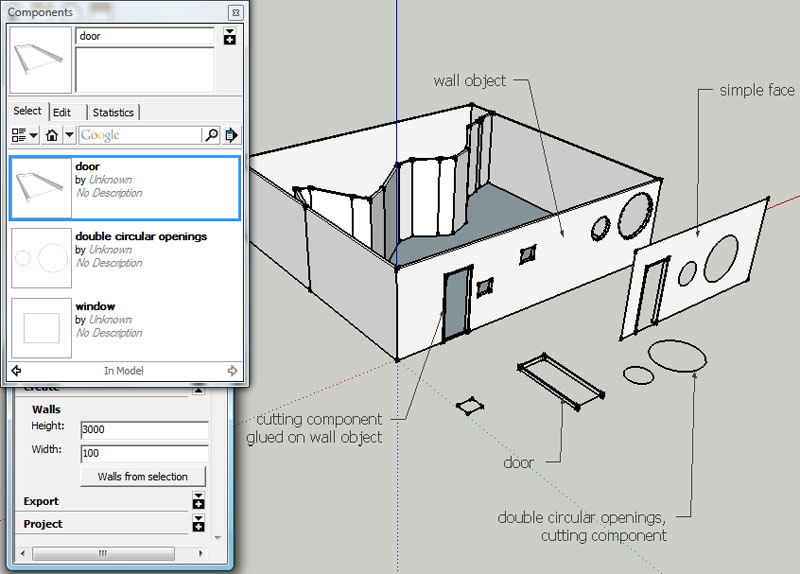
      Here is the first demo version with wall-openings:
      BIM Tools for SketchUp - demo wall opening
      It cuts openings, AND you can copy and move them around on the wall!

      How to use:

      • draw some lines and select them
      • open bim-tools plugin
      • open "create" menu
      • click "walls from selection"
      • create a new component with the options "Glue to": Any or Vertical, "Cut opening". And make sure you draw a face or closed profile on the X/Y plane, just like any cutting component.
      • Glue the component to the side of the wall
      • Now it should cut a hole in the wall in the shape of the outer profile(s).

      Best use a nested group/component if you don't want geometry other than the profile interfering with the hole.

      Known bugs/limitations:

      • It's still slow with complex wall openings
      • you can still move opening geometry outside of wall
      • moving multiple openings together will only cut 1 hole
        Please let me know if you find more...

      The IFC exporter does not yet include the wall openings.

      posted in Plugins
      brewskyB
      brewsky
    • RE: [Plugin] bim-tools 0.13.4(june 22, 2015)

      It's getting real fun now!
      demo image of current wall opening options
      I have improved the walls, so that a component with the options "glue" and "cut opening" will cut a hole through the wall just like it would in a simple face!

      I still have to figure out how to best link the hole with the cutting component, so they move together... and add IFC data so I can update the exporter...

      posted in Plugins
      brewskyB
      brewsky
    • RE: [Plugin] bim-tools 0.13.4(june 22, 2015)

      @unknownuser said:

      I think need change this name bim-tools to skp2ifc ,BIM is very very big !

      I know the scope of a project like this is huge, and probably way to much for one person in his spare time.
      It depends on the interpretation of the term "BIM", but IFC alone(and all the necessary tools for defining the objects) is probably equally big...

      If anyone has some spare time they are welcome to help out 😄.

      The IFC export is an important part of the project, but not it's only purpose.
      I would like a designer to be able to assign building properties to faces of a simple building model. Just by way of: "click side-face" = "wall", "click top-face" = "roof".
      Every face with an "IFC-label" can be exported to IFC, and then be re-used in a "real" BIM-model.

      posted in Plugins
      brewskyB
      brewsky
    • RE: [Plugin] bim-tools 0.13.4(june 22, 2015)

      Thanks Jim!

      Although a lot of work needs to be done before it can handle a full building model, I'm trying to add small functional pieces to the program so it can be used without being complete.

      I just figured I have been updating the google-code project without reporting back here, I will try to post my progress more often!

      I recently added the ability to provide some IFC meta-data(such as project name and description), and improved the menu so sections can be folded, to remove some of the noise/clutter.

      Currently I'm working on a wall-opening function.
      When that's finished(and has a functional IFC-exporter), I think it's a good demo of the idea, and maybe even usefull for some people(simple building interior walls?).

      posted in Plugins
      brewskyB
      brewsky
    • RE: Creating walls from lines

      I've been working on a plugin for the creation of walls.
      Mainly an experiment to collect some BIM data and export them to IFC.

      But it does create walls, although the options are still limited...

      http://forums.sketchucation.com/viewtopic.php?f=180&t=34007
      http://code.google.com/p/bim-tools/

      Cheers!
      Jan

      posted in Plugins
      brewskyB
      brewsky
    • RE: [Plugin] bim-tools 0.13.4(june 22, 2015)

      I have made a first attempt at an export-to-IFC script for the walls plugin I posted earlier.
      The method used to generate the required IFC data is quite "crude", and it's still only simple walls, but is't a start!

      I've been able to open the resulting files in a couple of viewers:

      • Nemetschek IFC Viewer
      • Solibri Model Viewer
      • TNO IFC Engine Viewer

      Check out the google-code page for download and brief tutorial:
      http://code.google.com/p/bim-tools/

      Maybe there's someone with the ability to try the exporter on one of the big BIM programs?
      I would love to hear what they make of it!

      • Jan
      posted in Plugins
      brewskyB
      brewsky
    • RE: [Plugin] bim-tools 0.13.4(june 22, 2015)

      @dan rathbun said:

      I didn't think it was worth it.. as IFC is an XML data file. Ruby already has libraries to work with XML files, that are cross platform.

      Hi Dan,

      It seems no ruby XML libraries are included with SketchUp, is this correct?
      Is there an easy way to add, for example, REXML to my plugin directory instead of requiring a full ruby install for every user?

      -Jan

      posted in Plugins
      brewskyB
      brewsky
    • RE: [Plugin] bim-tools 0.13.4(june 22, 2015)

      @dan rathbun said:

      For a project like yours... during the development, a google code site, github site, or a project site at RubyForge may be needed.

      I've set up a repository at google-code
      http://code.google.com/p/bim-tools/

      And spent a couple of evenings figuring out what-the-heck this Mercurial thing was. And found out I've been using it partly myself way earlier while trying to merge linux config files 😄

      I've uploaded my plugin. Now on to something usefull...

      posted in Plugins
      brewskyB
      brewsky
    • RE: [Plugin] bim-tools 0.13.4(june 22, 2015)

      @chrisglasier said:

      In other words your main focus is essentially on paperwork type processes.

      Not essentially, but all my experiences and day-to-day "annoyances" are related to the "paperwork type process". So the first ideas that come to mind are very practical and probably narrow-minded ways to improve the existing process.
      When modelling a building it's very important to create an interlinked relational model instead of a "loose" collection of walls and floors.
      Probably the most effective way would be to write a long list of relations(following a list of demands) and have a piece of software generate the "best" building.
      But also a reversed(intuitive) process should work. In the old-school-way draw lines, define them as walls/spaces. Think about the "why" of every element and link all parts together. The greatest difficulty here is that because the plan originated from an intuitive process it can be hard to figure out exactly why you chose to place an element in a specific place. Although i'm confident that there is allways a reason AND a relation in the choice.

      @chrisglasier said:

      You know it just might be site owners demand use of OOIT for its transparency and accountability, and designers have to comply.

      I spoke about this subject with some architects and they thought it could be "fun" designing by setting relations and let the computer solve the puzzle. They liked to see if it would find the same solution.

      @chrisglasier said:

      "Buy this; put it here"

      I do think that "a picture is worth a thousand words". "Buy this; put it here" would create an immense list for even the simplest building. An interesting visualized variation could be to create LEGO-like building instructions(I believe the guys at LDraw.org have nicely automated that!)

      Chris, thanks for your replies, every one of them gives me something to think on 😄

      posted in Plugins
      brewskyB
      brewsky
    • RE: [Plugin] bim-tools 0.13.4(june 22, 2015)

      Oh and another question pops into my mind.
      it seems regular practice to host source files her on the forum.
      Woudn't it be easier to use google code or sourceforge to manage all the different versions?

      posted in Plugins
      brewskyB
      brewsky
    • RE: [Plugin] bim-tools 0.13.4(june 22, 2015)

      @dan rathbun said:

      I didn't think it was worth it.. as IFC is an XML data file. Ruby already has libraries to work with XML files, that are cross platform.

      Do you advise using IFC XML? I read somewhere that using the original "step" variant was faster...

      posted in Plugins
      brewskyB
      brewsky
    • RE: [Plugin] bim-tools 0.13.4(june 22, 2015)

      @dan rathbun said:

      This is why your IFC objects will really be Groups (or Components) "owning" primitives or other nested Groups (or Components.)

      @dan rathbun said:

      NO. When restarted, even Sketchup has to recreate the Ruby Sketchup API objects after loading the Ruby Interpreter, and then it's C++ model objects (which are exposed to Ruby via the API,) by reading in a SKP file from disk.

      Ok very clear, thanks!
      I thought about it because I heard Java can write full class-instances to disk...

      posted in Plugins
      brewskyB
      brewsky
    • RE: [Plugin] bim-tools 0.13.4(june 22, 2015)

      @dan rathbun said:

      So.. would your project be a pay-for plugin, or a free open source project?

      Currently I have put in a reference to the GPL in the header of the script(default from the Geany-editor). Seems to me to be the best licence. I want to make it open source. I didn't do a lot of research, for one I don't know if there are restrictions in the GPL for using the licence for plugins that only work wit proprietary software? I'd like to keep it open source, so MIT does not seem the best choice. I need to read some more on that!

      Oh, and another question:
      How do you keep class instances through multiple sketchup sessions? Is it possible to create a class "wall", fill an instance with properties, and make a sketchup object "part" of the instance(or vice versa)? And still be able to call methods from that class after restarting sketchup without recreating the class-instance from the sketchup geometry(and attributes)?

      posted in Plugins
      brewskyB
      brewsky
    • RE: [Plugin] bim-tools 0.13.4(june 22, 2015)

      @dan rathbun said:

      It likely to clash with other plugins using that identifier.

      And Dan, thanks for your tips on namespaces, I will really need that. Especially when things get a bit more complex, with possibly separate modules. And of course names that other people might have used!

      posted in Plugins
      brewskyB
      brewsky
    • RE: [Plugin] bim-tools 0.13.4(june 22, 2015)

      @chrisglasier said:

      As I see it the intent of your plugin is to automate part of the creation of a model.

      This plugin in itself is meant to automate the creation of simple wall objects. But the reason I made it is to have the ability to easily create some meaningful objects that can be used as testcase for an IFC exporter.

      @chrisglasier said:

      Your edges ... where do they come from?

      They are indeed the result of design.
      I don’t think designers want a tool that generates floorplans/buildings from a set of rules/demands. Although it would be really cool to compare your design with “the perfect” computer generated floorplan 😄.

      But they DO like the ease of drawing in sketchup! If you could just make the creation of meaningful objects really easy even the building industry should not object 😄

      I have been thinking that it would be really neat to just be able to select all the faces of a low poly concept-model representing for instance the “roof”, and than “with a click” convert these to a slab with thickness and all the necessary attributes of a “roof-object”. And than do the same for exterior walls etc.

      But all these attributes have no use without the ability to export them.

      @chrisglasier said:

      In other words would it be better to select criteria from existing know-how and get technology to search for and display possible solutions

      I think we will need the software that advises in all kinds of areas like fire-compartiments, sound and the like you mentioned. But shouldn’t that be a different project altogether? Or even separate projects based on the area of expertise?
      Isn’t that the meaning of BIM, create a model out of meaningful objects so other parties or tools can read it and add the requested extra information from the area of expertise(or check it for problems)?
      These tools themselves would be great projects to work on! What if this existing know-how could be made available freely using “semantic web”. And could have your spaces-tool(by example) search by itself for the minimum dimensions of a functional “livingroom”. I see a lot of possibilities. Big problem remains that a lot of the needed know-how is corporately owned and people rather pay them than use some “unofficial” source. I don’t know how it is in other countries, but over here in the Netherlands even a large part of the regulations are written in copyrighted books!!!

      Interesting topic to discuss! 😄

      And now to the point I was getting to!

      The reason I got myself into Sketchup scripting was because I have a couple of BIM-related things on my mind on which I would like to do some research...

      • Be able to just select some faces(together with cutting-components) to generate walls/floors/roofs, or lines(together with a profile-component) to generate colums/walls etc. I don’t like the concept of most BIM systems that a wall has to be defined “this way” and a roof “that way”, and that while they are not fundamentally different. The greatest difference is the “label”, and then, because of the label, the way they react to other objects.
      • Why do they tell it’s not possible(or advisable) to model every part of a building including tiny details? Things you WOULD add in a 2d detail drawing... The first thing you would need than is an easy way to define what’s visible at a given view because it would not be a workable model. But after that, allmost every detail could be is just an extrusion of a “profile-component” along a path. With some basic rules to solve the corners(based on properties/materials) drawing them in 3d should not be that much more complicated than drawing them in 2d. If a window could be defined by a square drawn on a sketchup face, than the square itself could be given the properties of “glass”, the base face could be wall, and the 4 adges of the window could be extrusion paths for the “window-frame+every-bit-of-detail-you-need”. And as long it is linked (with observers) to the original profile-component it would be editable as well. Just regenerate it after the profile is edited...
      • Export all...

      Your opinions please 😄

      posted in Plugins
      brewskyB
      brewsky
    • RE: [Plugin] bim-tools 0.13.4(june 22, 2015)

      @dan rathbun said:

      See the API on AttributeDictionaries collection and AttributeDictionary class objects.

      They can be attached to almost anything, including Layers, Scenes, etc. as well as base geometry, and Groups and Components.

      These attributes are indeed exactly what you need to export meaningful data. I knew something like that existed but didn't check it out jet. Sounds really useful, especially when you can also use it on layers and the like...

      Here in the Netherlands we have the TNO research institute(I don't know how well known they are internationally?), and they do a lot of good work on the IFC standard.
      They also make the "IFC Engine DLL", a freely(as long as the project is not commercial) usable library for IFC files.
      http://www.ifcbrowser.com/ifcenginedll.html
      I read something about the ability to use "Windows 32 API" functions in sketchup, AND the ability to use DLL's from ruby.
      Does anyone know if this could be "do-able", or does it have a lot of implications (MAC???).
      It might make exporting IFC from Sketchup a bit easier...

      posted in Plugins
      brewskyB
      brewsky
    • RE: [Plugin] bim-tools 0.13.4(june 22, 2015)

      @pbacot said:

      On a practical note, have you been using this tool in design?

      Not yet, and I wonder if it would be really useful at this moment without the ability to simply insert doors/windows.

      I started with this test case because at work we use sketchup a lot for concept-design for the exteriors of buildings. Drawing an interior is much more work, especially because you need "thick" walls, and cutting openings isn't that simple anymore. Very often a rough floor plan is drawn as single-line-drawn spaces to get an idea of dimensions.
      I figured that it would be handy to be able to instantly convert this "floorplan" to interior walls to put inside the model.

      I wrote the script with the idea to replace the wall-height/wall-width with a profile component. In this case it would be possible to create a left or right aligned wall if that's preferred to placement on the centerline.

      This plugin is for me a starting point to experiment with simple ways to create meaningful building information inside Sketchup, and get it out again! 😄

      In my next post I will outline my ideas and try to answer some of the other questions, I have to think about that a bit 😄

      • Jan
      posted in Plugins
      brewskyB
      brewsky
    • 1 / 1