@sdmitch hey, so, uhh.... I'm about ten years late, but that plugin you demonstrated looks pretty much PERFECT for what I think I need (yes, still have this issue!)
Is it one of yours? I'm having trouble finding it...
Thank you!
@sdmitch hey, so, uhh.... I'm about ten years late, but that plugin you demonstrated looks pretty much PERFECT for what I think I need (yes, still have this issue!)
Is it one of yours? I'm having trouble finding it...
Thank you!
Hello everyone, I hope you're all doing well.
I am wondering if there is a plugin that will take the left hand linework and auto extrude it such that the outermost frame is extruded to 100mm depth, then the second level frame is extruded 50mm, and finally the glass is not extruded. All are centered relative to each other.
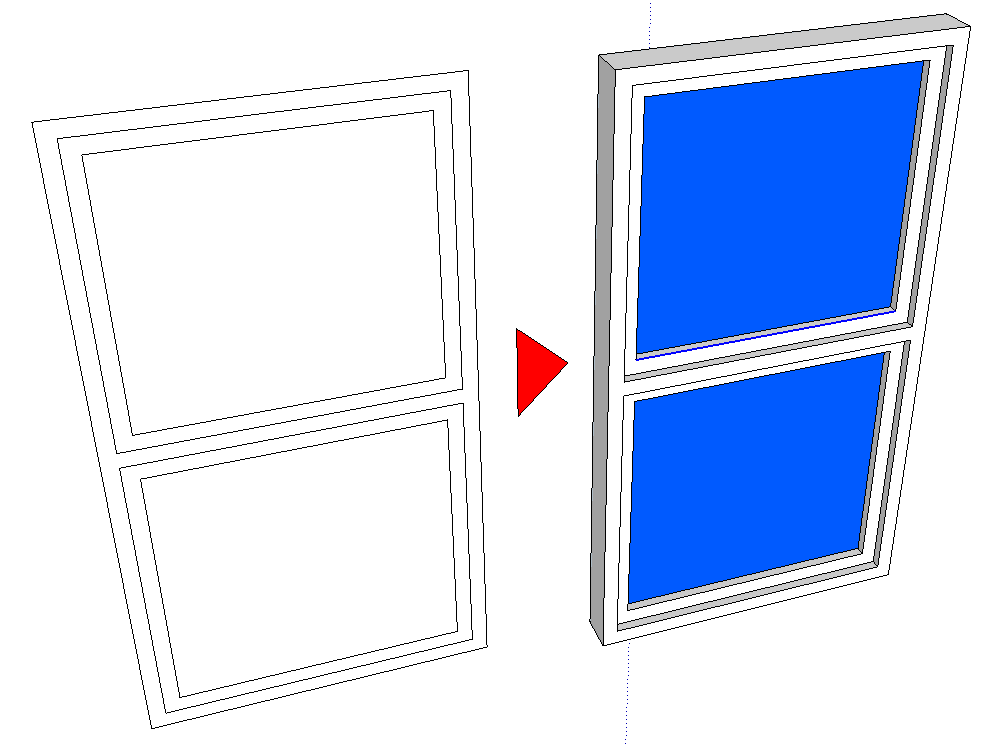
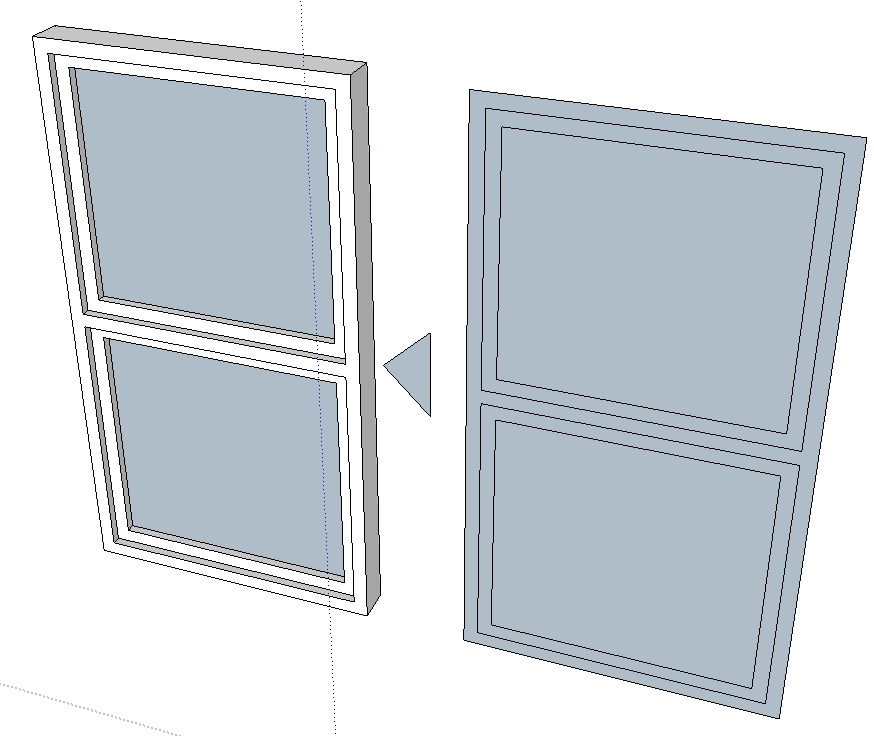
Bonus points for auto application of glass material!
Does such a thing exist already, or should I request it?
I'm still using SU2017 by the way 
Thanks.
BC
Thanks Dave - I'm using SU16 Pro!
I guess issues with intel GPU drivers would be mitigated if one were using an nvidia card? Hmm, guess I'm going to do some testing.
How are you finding W10 in day to day terms? Did it take a lot of adjustment or do you sometimes miss the old way of doing things?
Thanks for your time!
Hi Everyone,
So Windows 10 has been out for a while now and I'm considering "upgrading" from Windows 7.
How does everyone feel about W10? I've seen some threads reporting bugs, so I'm curious as to what the current consensus is, especially if using Podium or Thea.
Thanks!
BC
@sdmitch said:
@brad.curnow said:
- Choose Component (drop down list?)
- Get Insert point (click 0,0,0)
- Get Second point (click 0,400,0)
- Insert component (origin 0,0,0 scale Y to 0,400,0)
Something like that??
Did you just make that? It's perfect!
Can I try it?!
@sdmitch said:
No it wouldn't be that difficult but be advised that 'everything' in the component's definition gets stretched or shrunk. If you only want the length of the table top to change, that would require creating it 'on the fly'
What were your expectations?
Yeah I think that's OK - I guess we could do it with a dynamic component to cater for that? This plugin would just select the component to use (from a list of all components in model?), then first click sets insertion point (axes of component) and then second click establishes length of component and scales on one axis only.
I don't know how the SU universe works but I imagine it would be something like:
Something like that??
Hi Team,
Does anyone know of a plugin that will insert a component following drawing/measuring a particular length?
Something like profile builder, but the inserted geometry would be a component scaled to whatever length is specified. For example, I could select say, a table component, then "draw" the length of 2100mm and viola! The component appears at that length.
Does such a thing exist? If not, do you think it would be hard to make this? Would be a huge help for me in my work!!
Many thanks in advance,
BC
Thank you for the feedback team, I will study this more very shortly and report back soon!
Hi everyone!
Long time Sketchup user and forum lurker here - I love and appreciate so much of the work you guys have done. You really make Sketchup fantastic!
I'm a freelance archviz-er and currently am considering splitting time between my home town of Perth, Australia and Rio de Janeiro (I have a lovely lady there!). The great thing of course is that I can take my work with me fairly easily, thank God!
My plan at present is to leave my semi-powerful desktop in Perth for rendering purposes and just take my laptop with me to Rio for modelling. It would be wonderful if I could work up models with low-level detail instances of components (2D versions or low poly 3D), and then send the model back to my computer in Perth, and run an extension which would automatically find high-poly versions of those components and swap them in place of the low poly ones.
Perhaps we have component file definitions like "Basic_tree_LD.skp" and "Basic_tree_HD.skp" in the same folder, and we can ask the plugin to switch HD for LD and visa-versa?
I'm not sure if an extension that can do this already exists? If not, I would be happy to help pay for some development on this if anyone would like to take on the task.
I think this would really help me and anyone else who needs a bulk component replace solution.
Thanks in advance for your help and all your great work to date!
BC
The scene delay should be 0 (almost always, unless you WANT there to be a pause between scenes)
The rest is trickier. 30 frames per second will give you nice, smooth animation, so generally leave it at 30 if you can.
To get an idea of how many frames Vray will have to render, multiply the number of scenes by the scene transition - i.e. if you have 12 scenes and the transition time is 3s, then the length of the animation will be 3x12=36s long.
The number of frames then is 36x30=1080.
Obviously you can tailor the length of your animation to suit, (1 minute / 12 scenes: 60/12=5 - scene delay should be 5 seconds). You can then adjust the frames per second in Vray to suit your needs whether it's a draft, nice and smooth, or in a hurry for a crit
The higher the FPS the nicer the animation, but the longer the render time. Human eyes cant really notice anything higher than 30fps.
Hope that helps, sorry for late reply! I have some time now so will hang out here a bit more frequently
For future reference, the quick answer is the "scene delay" in the animation properties of the model.
If this is set to say, 2 seconds, then the first scene will show for 2 seconds before moving on... Which means that at 30fps Vray will render 60 images that are exactly the same before it starts moving.