sketchucation logo sketchucation
    • Login
    1. Home
    2. bjanzen
    3. Posts
    Oops, your profile's looking a bit empty! To help us tailor your experience, please fill in key details like your SketchUp version, skill level, operating system, and more. Update and save your info on your profile page today!
    πŸ”Œ Easy Offset | Offset selected faces in SketchUp in positive and negative offsets. Download
    B
    Offline
    • Profile
    • Following 0
    • Followers 0
    • Topics 13
    • Posts 367
    • Groups 1

    Posts

    Recent Best Controversial
    • RE: Electrical symbols for LO?

      I made one, also, and my only suggestion is to look at the ones we have for architecture, and try to size in the same manner. Make paper 5" x 5", and make the symbols about 1/4", so folks wont have to resize them. I'm asking if I can share mine without getting into trouble.

      b

      posted in LayOut Discussions
      B
      bjanzen
    • RE: Text area tables are infinite width

      And source is probably less likely than an API. In SketchUp and Earth, there are API's to give access to functionality (see http://code.google.com/apis/sketchup/ and http://code.google.com/apis/earth/). I'd start filling out a list of "I'd like to see this in a LayOut API" and we'll take it as a feature request.

      b

      @tim said:

      Interestingly if I import a TextEdit file and use text>table.. in the resulting text area it works just as I would expect.

      Playing with that lead me to notice the context menu option 'make unbounded' which indeed makes the width of the text area .... unbounded. Sadly the 'make bounded' option available after doing that doesn't seem to do anything terribly helpful; perhaps it puts a right edge on the text area but since it is infinitely to the right I find it hard to scroll over to it.

      Hazarding a guess, some flag about left-right bounds is not being used appropriately. Yet another case where having at least read access for the source would enable me to suggest a fix.

      posted in LayOut Bug Reporting
      B
      bjanzen
    • RE: Text area tables are infinite width

      This speaks to unbounded versus bounded text boxes, something you can't do in a text editor. If you hit command-t (Mac), you see that we've added some buttons on the bottom in addition to justification: there are buttons for anchoring text to top / middle / bottom, and buttons for bounded / unbounded text. A click to add text will create an unbounded text box. Draw a box to size the text and you get text bounded to that box. If you want the table to be limited in size, use bounded text. Otherwise, we're predicting (to edge of paper) that that's how big you want the table to be.

      b

      @tim said:

      Interestingly if I import a TextEdit file and use text>table.. in the resulting text area it works just as I would expect.

      Playing with that lead me to notice the context menu option 'make unbounded' which indeed makes the width of the text area .... unbounded. Sadly the 'make bounded' option available after doing that doesn't seem to do anything terribly helpful; perhaps it puts a right edge on the text area but since it is infinitely to the right I find it hard to scroll over to it.

      Hazarding a guess, some flag about left-right bounds is not being used appropriately. Yet another case where having at least read access for the source would enable me to suggest a fix.

      posted in LayOut Bug Reporting
      B
      bjanzen
    • RE: Electrical symbols for LO?

      Great suggestions, I'll look into it. And I'm glad someone independently discovered the joke I've been making internally about a 2D warehouse. But why stop there? 4D warehouse could contain both Euclidian and Minkowski space models, and the 5th Dimension warehouse could contain recordings from the band I listened to in junior high. πŸ˜„.

      b

      posted in LayOut Discussions
      B
      bjanzen
    • RE: Creating filled shapes with holes in them

      Nothing much to add to a great suggestion, but maybe put different colors on different layers so you could easily hide/show them.

      b

      posted in LayOut Discussions
      B
      bjanzen
    • RE: SUpro 7 on OSX 10.5.6 locks up entire UI for all apps

      My first thought would be to move the ruby plugins aside for a bit and see if you still see crashing in 10 minutes. That should be easy to try. If crashes go away, add in 1/2 and retry, then add 1/2 again, and binary tree the sucker until you find the culprit.

      If you do crash without any ruby scripts in your plugins directory, I'd send the crash report (copy it in an e-mail, don't send to Apple) either here or to SketchUp's Help menu->Contact Us with a bug.

      Tim's issue is still puzzling because we still can't reproduce it, but we're getting closer, and Nicoloco, glad to see you're running better these days.

      b

      @outersketcher said:

      I'm running the free version on SketchUp 7 on my 24" screen imac with system 10.5.7.

      I can't run SketchUp 7 for more than 10 minutes before it crashes.

      SketchUP 6 ran GREAT on my system. But SketchUp 7 crashes consistantly within minutes of opening up a file. Sometimes I lose all access to the rest of the computer and sometimes just SketchUp crashes.

      I'm using several ruby plugins... specifically the following...

      Unfold
      Joint Push/Pull
      Set Center Point
      Skin
      Bezier tools

      The only thing that has changed is the introduction of SketchUp 7.

      Would love to go back to the previous version. Where the program ran strong and dependably. Is it possible to save a version7 file down to a version6?

      I sifted through my consule window and pulled out the common error lines immediately after the last crash.

      7/13/09 11:34:38 AM [0x0-0x46046].com.google.sketchupfree7[1014] SketchUp(1014,0xa01c1720) malloc: *** error for object 0xa005e6d8: pointer being freed was not allocated

      7/13/09 11:36:29 AM SketchUp[1014] _NXPlaceWindow: error setting window shape (1000)

      7/13/09 11:36:29 AM SketchUp[1014] _NSShapePlainWindow: error setting window shape (1000)

      7/13/09 11:36:30 AM [0x0-0x46046].com.google.sketchupfree7[1014] /Library/Application Support/Google SketchUp 7/SketchUp/Plugins/bezierspline.rb:2223: warning: parenthesize argument(s) for future version

      7/13/09 11:36:30 AM [0x0-0x46046].com.google.sketchupfree7[1014] /Library/Application Support/Google SketchUp 7/SketchUp/Plugins/libtraductor.rb:59: warning: don't put space before argument parentheses

      7/13/09 11:36:30 AM [0x0-0x46046].com.google.sketchupfree7[1014] /Library/Application Support/Google SketchUp 7/SketchUp/Plugins/LibTraductor.rb:25: warning: already initialized constant LBT__DEF

      7/13/09 11:36:30 AM [0x0-0x46046].com.google.sketchupfree7[1014] Bus Error

      7/13/09 11:36:43 AM com.apple.launched[72] ([0x0-0x46046].com.google.sketchupfree7[1014]) Exited abnormally: Abort trap

      The most common line is the one about "pointer being freed was not allocated" whatever that means..

      I know that error code lines I've posted are similar to those posted by Tim. But, I dunno... I doubt that it's a hardware thing since SketchUp 6 ran just fine. I began experiencing these miserable crashes only after I downloaded and installed SketchUp 7.

      Any ideas from you more computer savvy folks?

      David

      posted in SketchUp Bug Reporting
      B
      bjanzen
    • RE: MAC: Getting Rid of Getting Started Toolbar

      I worked for Apple. If you have a problem with iTunes, iMovie, etc... and you happen to get ahold of someone from Apple via phone or e-mail, want to know what their first response will be? Where's your nearest Apple Store. Really, you should try the Apple Store. It's free, educational, and you always learn something new every time you go in there.

      b

      posted in SketchUp Discussions
      B
      bjanzen
    • RE: MAC: Getting Rid of Getting Started Toolbar

      That wasn't sarcasm.

      posted in SketchUp Discussions
      B
      bjanzen
    • RE: MAC: Getting Rid of Getting Started Toolbar

      http://maps.google.com/maps?hl=en&rls=en-us&um=1&ie=UTF-8&q=Thornhill,+ON+Canada+Apple+Store&fb=1&split=1&gl=us&view=text&ei=ECEtSrr9AZHstAPEsKGhBg&sa=X&oi=local_group&ct=more-results&cd=1&resnum=1

      posted in SketchUp Discussions
      B
      bjanzen
    • RE: MAC: Getting Rid of Getting Started Toolbar

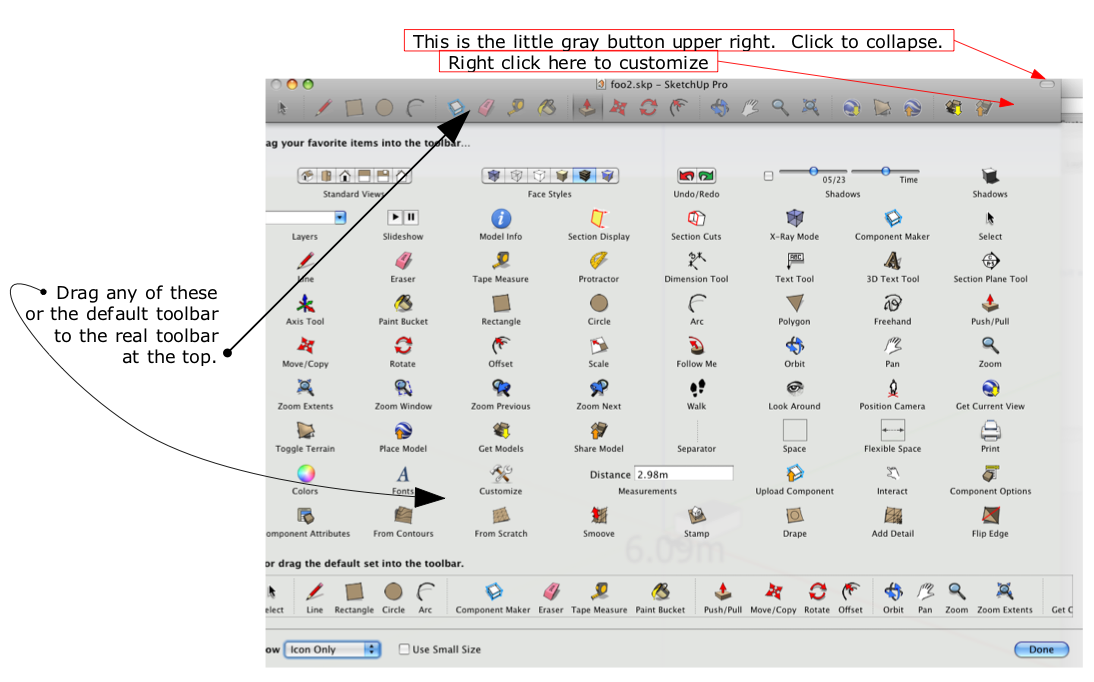
      Here's the image. If we can't figure it out from here, I think you need to go buy a Mac...


      SketchUpMac.png

      posted in SketchUp Discussions
      B
      bjanzen
    • RE: MAC: Getting Rid of Getting Started Toolbar

      How many buttons do you need? http://www.youtube.com/watch?v=00uDLRzJViE

      b

      posted in SketchUp Discussions
      B
      bjanzen
    • RE: MAC: Getting Rid of Getting Started Toolbar

      Oh, and right click on the toolbar and select "Customize Toolbar" for SketchUp (or any Mac application).

      b

      posted in SketchUp Discussions
      B
      bjanzen
    • RE: MAC: Getting Rid of Getting Started Toolbar

      Ah, I see. On Mac, all toolbars are turned off via the upper right gray button on all windows. Try it in ANY window with a toolbar: Finder, SketchUp, anything.

      b

      posted in SketchUp Discussions
      B
      bjanzen
    • RE: MAC: Getting Rid of Getting Started Toolbar

      The "Welcome to SketchUp" panel? That has a check mark to always show on startup. Uncheck that. If someone every wants it back, it's under "displayWelcomeOnStartup", so "defaults delete com.google.sketchuppro7 displayWelcomeOnStartup" will reset it.

      I don't have a "Getting Started" one under View->Tool Palettes. Maybe someone adding something; check Preferences->Extensions for added extensions.

      b

      posted in SketchUp Discussions
      B
      bjanzen
    • RE: Layout, External Reference

      I responded in Google groups as well:

      Make sure your model is rendered if necessary (Auto, or Render button). Make sure the scene is correct. And relink if necessary.

      b

      posted in LayOut Discussions
      B
      bjanzen
    • RE: Layout Issues

      Oops - I tried posting and I think my session expired.

      I was close. It COULD be the last shape style or text style that you used before saving your template. It's really the last shape style or text style you chose before choosing the tool (a shape, or the text tool). Here's some examples I tried.

      1. Open a blank document. Change line color to red, no fill, then select the rectangle tool. Draw a red rectangle. Select the circle tool. Draw a red circle. Use the select tool and change the circle to blue. Save as Template. Open new from template and the default line color is.... (red / blue). A - Red.

      2. Open a blank document. Change line color to red, no fill, then select the rectangle tool. Draw a red rectangle. Change the line color to blue. Select the circle tool. Draw a blue circle. Save as Template. Open new from template and the default line color is.... (red / blue). A - Blue.

      Same thing goes for fonts. It's not necessarily the last one used, it's the last one selected before selecting the text tool.

      Hope that helps.

      b

      posted in LayOut Discussions
      B
      bjanzen
    • RE: Layout Issues
      1. Could you clarify the section cuts point? I'm not seeing it, either.
      2. The "default settings" are picked up from your template, so if you create a template with Helvetica, you should get Helvetica the first time you select a text box. Likewise Shape Style inspector should pick up it's information from the template. I don't recall off the top of my head if it's the first font and shape style you use to create the template or the last one. I'll check.
      3. Tables and Lists are built into the text system on Mac. On PC, you need to do as Dave said and create them in another program and save as RTF, then insert. On Mac, the List and Table menu items are under the Text menu.

      b

      posted in LayOut Discussions
      B
      bjanzen
    • RE: Dpi resolution in Layout2

      In LayOut 1, we had 300, 200, 150, 96 and 72 dpi. Too confusing for some people who hadn't done DTP.

      In LayOut 2, we split Edit and Output resolution to have their own settings, High = 300, Medium = 150, and Low = 92 dpi ? (I believe; I'll confirm that).

      posted in LayOut Discussions
      B
      bjanzen
    • RE: Leopard hang fix
      1. Make sure you're not affected by http://support.apple.com/kb/TS2377.

      2. We also look at http://developer.apple.com/graphicsimaging/opengl/capabilities/ but you should be OK with that list.

      3. Send me the model, steps to test, and time, and I'll write an automation script to repeat it and time it with multiple tries.

      4. Look at Mitchel's 3D Basecamp presentation on working with large models: http://www.youtube.com/watch?v=hnhkei2dSrY if it's not hardware related.

      Hope that helps.

      b

      posted in SketchUp Bug Reporting
      B
      bjanzen
    • RE: How to enable "create PDF Layers from Layout"

      I've used it when I don't have PS, by drawing a circle around the image I want to crop, creating a clipping mask, then adjusting the bezier controls (double click on the circle, add / delete points, adjust curvature, etc..). Not a PS replacement, but works in a pinch.

      b

      posted in LayOut Discussions
      B
      bjanzen
    • 1
    • 2
    • 13
    • 14
    • 15
    • 16
    • 17
    • 18
    • 19
    • 15 / 19