sketchucation logo sketchucation
    • Login
    1. Home
    2. Berserk
    Oops, your profile's looking a bit empty! To help us tailor your experience, please fill in key details like your SketchUp version, skill level, operating system, and more. Update and save your info on your profile page today!
    🚨 Skimp | 25% Off until March 30 Buy Now
    B
    Offline
    • Profile
    • Following 0
    • Followers 0
    • Topics 2
    • Posts 7
    • Groups 2

    Berserk

    @Berserk

    11
    Reputation
    2
    Profile views
    7
    Posts
    0
    Followers
    0
    Following
    Joined
    Last Online
    SketchUp version 2026
    Operating System Windows
    Knowledge of SketchUp Advanced
    What do you use Sketchup for? architecture, landscape architecture, urban planning, engineering and mechanical design, film and stage, shadow analysis, hobby
    Location Planet Earth

    Berserk Unfollow Follow
    Extension Creator registered-users

    Best posts made by Berserk

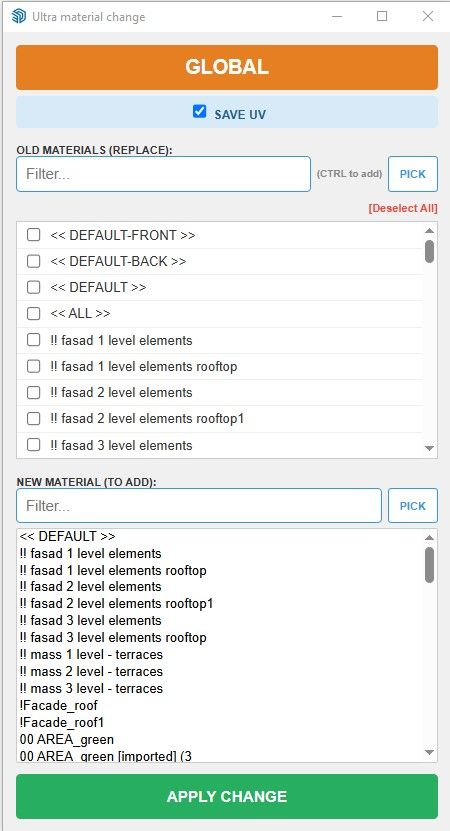
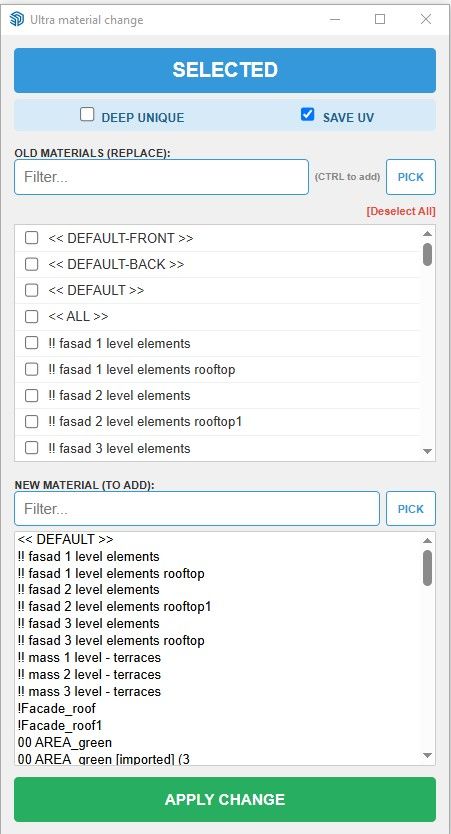
    • [Plugin] Extension Material Replacer

      Hi everybody!

      I am pleased to present my first Sketchup extension.
      This is an advanced synthesis of two already existing great plugins Global Material Changer and Material Tools, plus a few of my ideas.
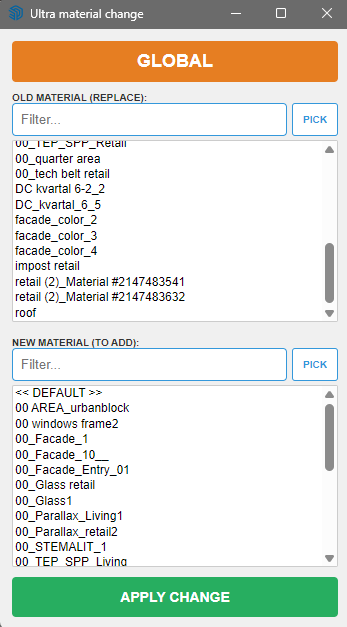
      Here are functions:
      1 - Filtering by lists of replacement and new material
      2 - The ability to select materials with a pipette
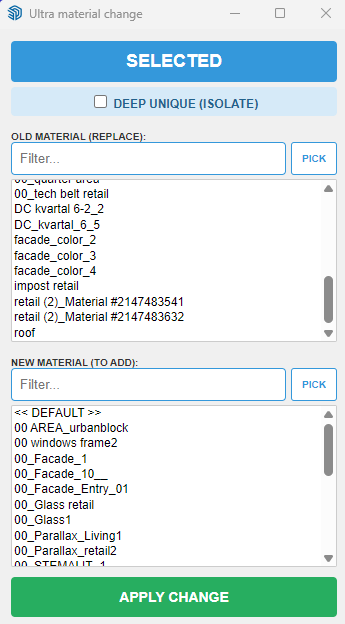
      3 - Work globally or only on selected objects
      4 - The ability to isolate the selected by making it unique. At the same time, the connection between the copies of the components inside the selection remains
      5 - Rubber web dialog
      6 - When selecting the "Unique" mode, the object isolation operation is displayed withe a progress bar

      Many thanks to authors of GMC and MT.

      My main activity is large architectural design, and thanks to AI I was able to create tools for work and just as a hobby.

      If errors or suggestions are found I will try to update ASAP

      The plugin was written for SU 2026 on Windows 10/ 11.

      Launches from the Extension menu - Ultra Material Change

      I'm ashamed, but I haven't figured out how to properly upload plugins here yet! Can someone please tell me?
      c8bb29ba-b87a-4431-9708-8897c3dba2e8-image.png
      e0bccf9d-f49c-4445-8902-c1c70daa0ef6-image.png

      ultra_mat_change.rbz

      posted in Developers' Forum
      B
      Berserk
    • RE: [Plugin] Extension Material Replacer

      @Rich-O-Brien Thank you! I'm ashamed, but I haven't figured out how to put the plugin there yet! Can you tell me?

      posted in Developers' Forum
      B
      Berserk

    Latest posts made by Berserk

    • RE: [Plugin] Extension Material Replacer

      @Rich-O-Brien Thank you a lot! I was able to Dev Tools and will study it!

      posted in Developers' Forum
      B
      Berserk
    • RE: [Plugin] Extension Material Replacer

      @Rich-O-Brien Thank you! I'm ashamed, but I haven't figured out how to put the plugin there yet! Can you tell me?

      posted in Developers' Forum
      B
      Berserk
    • [Plugin] Extension Material Replacer

      Hi everybody!

      I am pleased to present my first Sketchup extension.
      This is an advanced synthesis of two already existing great plugins Global Material Changer and Material Tools, plus a few of my ideas.
      Here are functions:
      1 - Filtering by lists of replacement and new material
      2 - The ability to select materials with a pipette
      3 - Work globally or only on selected objects
      4 - The ability to isolate the selected by making it unique. At the same time, the connection between the copies of the components inside the selection remains
      5 - Rubber web dialog
      6 - When selecting the "Unique" mode, the object isolation operation is displayed withe a progress bar

      Many thanks to authors of GMC and MT.

      My main activity is large architectural design, and thanks to AI I was able to create tools for work and just as a hobby.

      If errors or suggestions are found I will try to update ASAP

      The plugin was written for SU 2026 on Windows 10/ 11.

      Launches from the Extension menu - Ultra Material Change

      I'm ashamed, but I haven't figured out how to properly upload plugins here yet! Can someone please tell me?
      c8bb29ba-b87a-4431-9708-8897c3dba2e8-image.png
      e0bccf9d-f49c-4445-8902-c1c70daa0ef6-image.png

      ultra_mat_change.rbz

      posted in Developers' Forum
      B
      Berserk
    • RE: [Plugin] MatSim (Material Simulation) - v1.7a - 17 Dec 25

      @fredo6 The extension is very useful. But in the large model there is a limit on the number of materials supplied, and the color theme change takes a very long time (2 min.) on a modern computer (AMD 16 honest cores up to 5 GHz, 128GB RAM, RTX 2080 Super 12 GB). A model of a city with 80,000 inhabitants. Unfortunately, I can't share the model.2025-07-09 165343.png

      posted in Plugins
      B
      Berserk
    • RE: [Plugin] FredoConnect - v1.4a - 19 Dec 25

      Great work! For not large model work perfectly! But for big models (see attachment) unuseble, because too slow. Аннотация 2024-11-19 141452.png
      Sending changes - 5 minutes
      Receiving changes - 30 minutes
      Link to model:
      https://drive.google.com/file/d/1Lk5D2pn70A17AFaocPMWhC5-Oh9nTlNf/view?usp=sharing

      Sketchup 2023
      Windows 10
      RTX 2080 super 11 GB
      AMD Ryzen 9 5950X
      RAM 128 GB

      posted in Plugins
      B
      Berserk
    • RE: [Plugin][$] S4u_Transformer

      This is incredible

      posted in Plugins
      B
      Berserk
    • RE: [Plugin] Smooth Zoom 2.1.0 - 24 October 2021

      Very nice idea! And it will be better if add scrolling speed dependence.

      posted in Plugins
      B
      Berserk