sketchucation logo sketchucation
    • Login
    Oops, your profile's looking a bit empty! To help us tailor your experience, please fill in key details like your SketchUp version, skill level, operating system, and more. Update and save your info on your profile page today!
    Urasik Extensions | Lots of new extensions to check out Learn More

    [Plugin] Extension Material Replacer

    Scheduled Pinned Locked Moved Developers' Forum
    1 Cross-posts 20 Posts 5 Posters 564 Views 5 Watching
    Loading More Posts
    • Oldest to Newest
    • Newest to Oldest
    • Most Votes
    Reply
    • Reply as topic
    Log in to reply
    This topic has been deleted. Only users with topic management privileges can see it.
    • B Offline
      Berserk
      last edited by TIG

      Hi everybody!

      I am pleased to present my first Sketchup extension.
      This is an advanced synthesis of two already existing great plugins Global Material Changer and Material Tools, plus a few of my ideas.
      Here are functions:
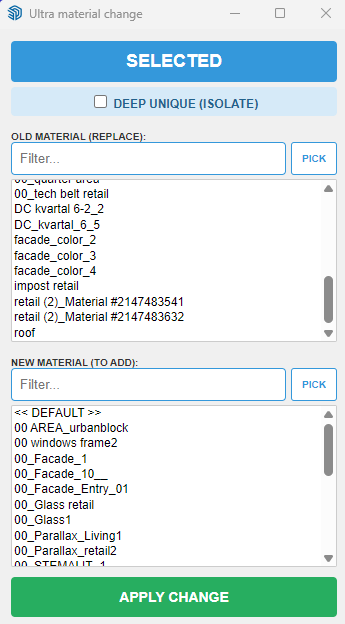
      1 - Filtering by lists of replacement and new material
      2 - The ability to select materials with a pipette
      3 - Work globally or only on selected objects
      4 - The ability to isolate the selected by making it unique. At the same time, the connection between the copies of the components inside the selection remains
      5 - Rubber web dialog
      6 - When selecting the "Unique" mode, the object isolation operation is displayed withe a progress bar

      Many thanks to authors of GMC and MT.

      My main activity is large architectural design, and thanks to AI I was able to create tools for work and just as a hobby.

      If errors or suggestions are found I will try to update ASAP

      The plugin was written for SU 2026 on Windows 10/ 11.

      Launches from the Extension menu - Ultra Material Change

      I'm ashamed, but I haven't figured out how to properly upload plugins here yet! Can someone please tell me?
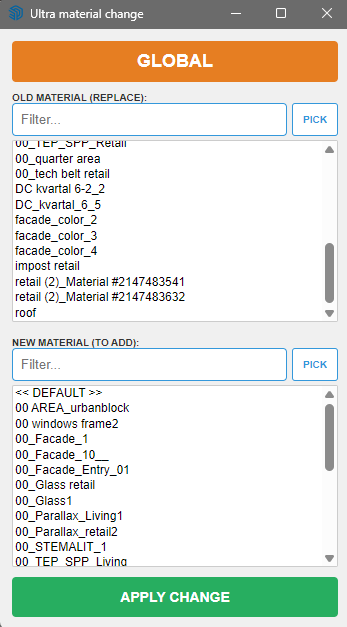
      c8bb29ba-b87a-4431-9708-8897c3dba2e8-image.png
      e0bccf9d-f49c-4445-8902-c1c70daa0ef6-image.png

      ultra_mat_change.rbz

      KrassK 1 Reply Last reply Reply Quote 2
      • Rich O BrienR Offline
        Rich O Brien Moderator
        last edited by TIG

        These AI vibe coding extensions are getting pretty solid. Amazing to see what people are creating.

        If you want to add it to out ExtensionStore let me know.

        Download the free D'oh Book for SketchUp πŸ“–

        B 1 Reply Last reply Reply Quote 0
        • B Offline
          Berserk @Rich O Brien
          last edited by

          @Rich-O-Brien Thank you! I'm ashamed, but I haven't figured out how to put the plugin there yet! Can you tell me?

          1 Reply Last reply Reply Quote 1
          • Rich O BrienR Offline
            Rich O Brien Moderator
            last edited by

            No need for shame. It is not accessible directly.

            I have reset some privileges on your account to give you access. You need to sign out of your account.

            Then visit Sketchucation.com homepage and login. You should see Dev Tools in the header.

            image.png

            Have a look there. Extensions need to be approved before going live but feel free to look around.

            Download the free D'oh Book for SketchUp πŸ“–

            B L 2 Replies Last reply Reply Quote 0
            • B Offline
              Berserk @Rich O Brien
              last edited by

              @Rich-O-Brien Thank you a lot! I was able to Dev Tools and will study it!

              1 Reply Last reply Reply Quote 0
              • Didier BurD Offline
                Didier Bur
                last edited by

                Hi,
                Thanks for this smart plugin!
                FYI it works on SU2023.
                Regards

                DB

                1 Reply Last reply πŸ™ Reply Quote 0
                • L Offline
                  LAGAUCHI Newcomers @Rich O Brien
                  last edited by

                  @Rich-O-Brien
                  Hi Rich, apologies for jumping into this thread! I noticed you were helping with developer privileges here.
                  I also submitted a request a few days ago (via email and PM) to set up a vendor account and access the Dev Tools for my new plugin, "Area Divider Plus".
                  Could you please check my account as well when you have a free moment? Thank you so much for your help!

                  1 Reply Last reply Reply Quote 0
                  • KrassK Offline
                    Krass
                    last edited by

                    very good, this is what I was looking for, whereas Material Replacer changes all the model colors! Thanks!

                    Krass

                    1 Reply Last reply Reply Quote 0
                    • KrassK Offline
                      Krass @Berserk
                      last edited by

                      @Berserk said:

                      The ability to isolate the selected by making it unique. At the same time, the connection between the copies of the components inside the selection remains

                      this won't work on my SU 2024...
                      Sketchup says in the entity information that they are still the same components, but in reality they are no longer linked; the geometry modifications I apply after choosing the Deep Unique mode to change the color do not take effect....

                      Krass

                      B 2 Replies Last reply Reply Quote 0
                      • KrassK Offline
                        Krass
                        last edited by

                        It's a shame it doesn't take into account the scale and orientation of the materials, or that these have been modified. Would that be possible?

                        Krass

                        B 1 Reply Last reply Reply Quote 0
                        • B Offline
                          Berserk @Krass
                          last edited by

                          @Krass Thanks for the report, I'll see what I can do about it.

                          1 Reply Last reply Reply Quote 0
                          • B Offline
                            Berserk @Krass
                            last edited by

                            @Krass yes, that would be good and right. I'll try to add it next weekend.

                            1 Reply Last reply Reply Quote 0
                            • B Offline
                              Berserk @Krass
                              last edited by

                              @Krass Hello! Can you please make a video of it wrong work of the extension? I don't see problems in my Sketchup 2026, but I can just misunderstand you.

                              1 Reply Last reply Reply Quote 0
                              • B Offline
                                Berserk
                                last edited by

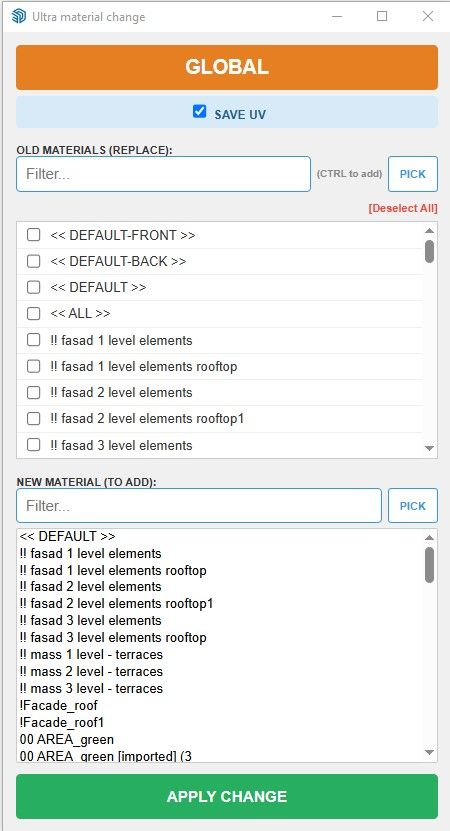
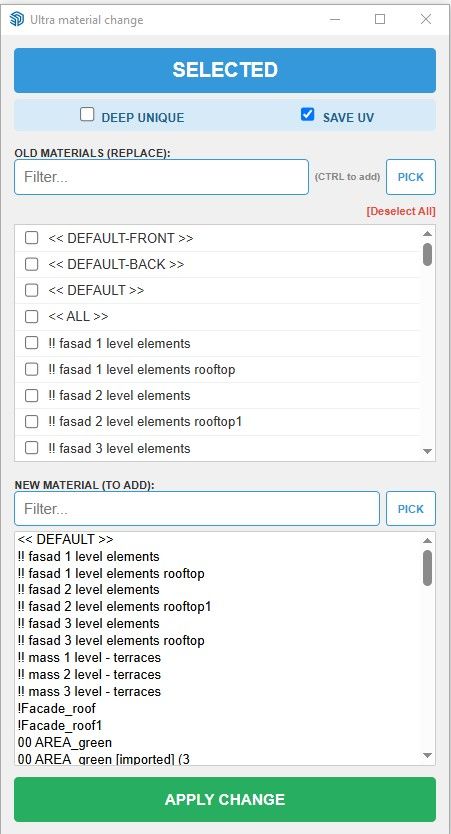
                                Updated the Material Change plugin. Changes:

                                • Added the ability to replace several materials at a time (using a selection in the list or with a pipette when pressing Ctrl)
                                • Now the plugin can save texture transformations or reset them.
                                • Added a reset button for selecting old materials so as not to uncheck manually.
                                • Hints have been added to the status bar at the bottom of the sketchup window to understand whether you are currently choosing old or new material.
                                • Now the plug-in window will not close after pressing Apply (convenient when you need to make several substitutions in a row)
                                • I drew my own eyedropper, otherwise I used to have a pencil))))

                                Materil Change Global v02.jpg
                                Materil Change SELECTED v02.jpg
                                Material Change v02.mp4
                                Urasik Material Change v02.rbz

                                1 Reply Last reply Reply Quote 0
                                • KrassK Offline
                                  Krass
                                  last edited by

                                  parfait, wonderfull ! Un grand merci, thank you !

                                  Krass

                                  1 Reply Last reply 🀝 Reply Quote 0
                                  • KrassK Offline
                                    Krass
                                    last edited by

                                    I have the impression that the function I wanted isn't available: I want to be able to preserve the mapping of a modified texture.

                                    For example, I have a texture A that I apply and rotate 90 degrees.

                                    I have a textured geometry with B onto which I want to be able to apply the modified texture A, already rotated 90 degrees.
                                    Is this already possible with your update? I can't seem to get it to work. I did manage to preserve the mapping on texture B after applying texture A.

                                    Krass

                                    1 Reply Last reply Reply Quote 0
                                    • KrassK Offline
                                      Krass
                                      last edited by

                                      video example
                                      SketchUp_DKYU631sqm.mp4

                                      Krass

                                      B 1 Reply Last reply Reply Quote 0
                                      • B Offline
                                        Berserk @Krass
                                        last edited by

                                        @Krass Thanks for the video! Attach this part of your model, please, I'll make some tests.

                                        1 Reply Last reply Reply Quote 0
                                        • KrassK Offline
                                          Krass
                                          last edited by

                                          I can send a skp file with two textured rectangles if you want..
                                          test textures.skp

                                          Krass

                                          B 1 Reply Last reply Reply Quote 0
                                          • B Offline
                                            Berserk @Krass
                                            last edited by

                                            @Krass Now i understand what's goin on. You need the material you are changing to to convey your transformations. It only makes sense for rotation. For this purpose, it is better and more right way to use additional extensions such as Eneroth Texture Positioning Tools already on the target geometry, or make a new material with rotated texture (in any external image editor) and then use my plugin.


                                            1 Reply Last reply Reply Quote 0

                                            Hello! It looks like you're interested in this conversation, but you don't have an account yet.

                                            Getting fed up of having to scroll through the same posts each visit? When you register for an account, you'll always come back to exactly where you were before, and choose to be notified of new replies (either via email, or push notification). You'll also be able to save bookmarks and upvote posts to show your appreciation to other community members.

                                            With your input, this post could be even better πŸ’—

                                            Register Login
                                            • 1 / 1
                                            • First post
                                              Last post
                                            Buy SketchPlus
                                            Buy SUbD
                                            Buy WrapR
                                            Buy eBook
                                            Buy Modelur
                                            Buy Vertex Tools
                                            Buy SketchCuisine
                                            Buy FormFonts

                                            Advertisement