sketchucation logo sketchucation
    • Login
    Oops, your profile's looking a bit empty! To help us tailor your experience, please fill in key details like your SketchUp version, skill level, operating system, and more. Update and save your info on your profile page today!
    ⚠️ Update | Sketchucation Tools 5.0.8 released with licensing improvements and bugfixes Download

    Getting Started

    Scheduled Pinned Locked Moved Newbie Forum
    sketchup
    75 Posts 45 Posters 192.7k Views 45 Watching
    Loading More Posts
    • Oldest to Newest
    • Newest to Oldest
    • Most Votes
    Reply
    • Reply as topic
    Log in to reply
    This topic has been deleted. Only users with topic management privileges can see it.
    • emerald15E
      emerald15
      last edited by

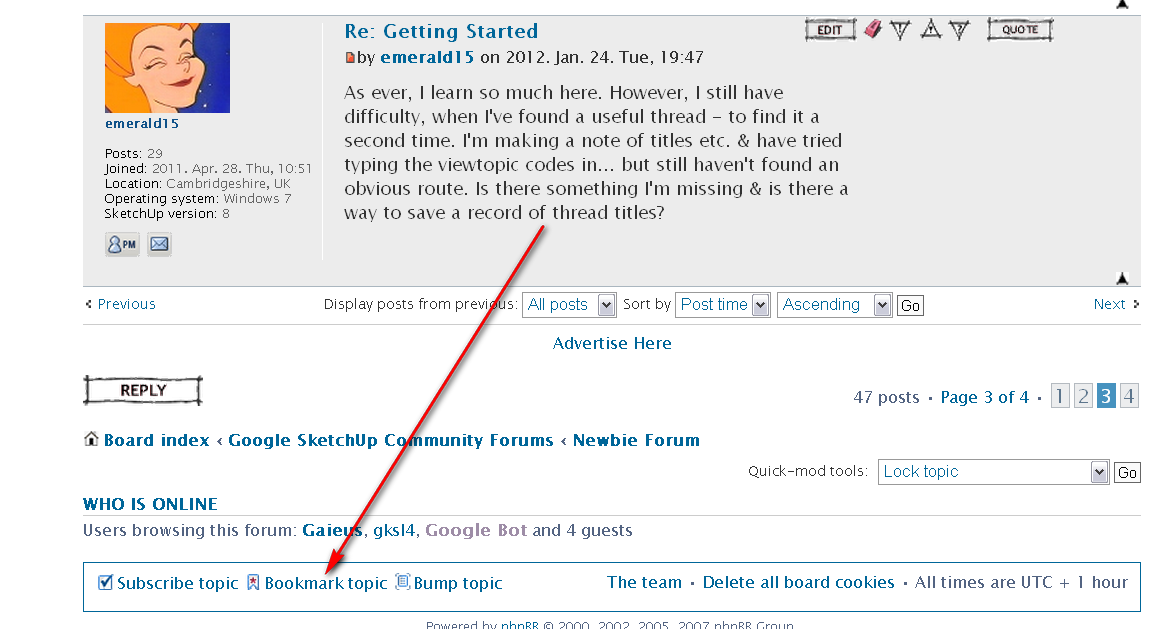
      As ever, I learn so much here. However, I still have difficulty, when I've found a useful thread - to find it a second time. I'm making a note of titles etc. & have tried typing the viewtopic codes in... but still haven't found an obvious route. Is there something I'm missing & is there a way to save a record of thread titles?

      1 Reply Last reply
      Reply Quote 0
      • BoxB
        Box
        last edited by

        At the bottom of the page you will find, Subscribe topic and Bookmark topic.

        1 Reply Last reply
        Reply Quote 0
        • emerald15E
          emerald15
          last edited by

          Ah Haaa! Thankyou!

          1 Reply Last reply
          Reply Quote 0
          • GaieusG
            Gaieus
            last edited by

            You can always bookmark a topic.

            bookmark.png
            Then here you can manage your bookmerks:
            http://forums.sketchucation.com/ucp.php?i=main&mode=bookmarks

            Gai...

            1 Reply Last reply
            Reply Quote 0
            • T
              tireboy
              last edited by

              thanks this really helps

              1 Reply Last reply
              Reply Quote 0
              • F
                FoamHeadMike
                last edited by

                This helps a lot Thanks

                C Ya Round Like A Doughnut

                1 Reply Last reply
                Reply Quote 0
                • V
                  victor hugo
                  last edited by

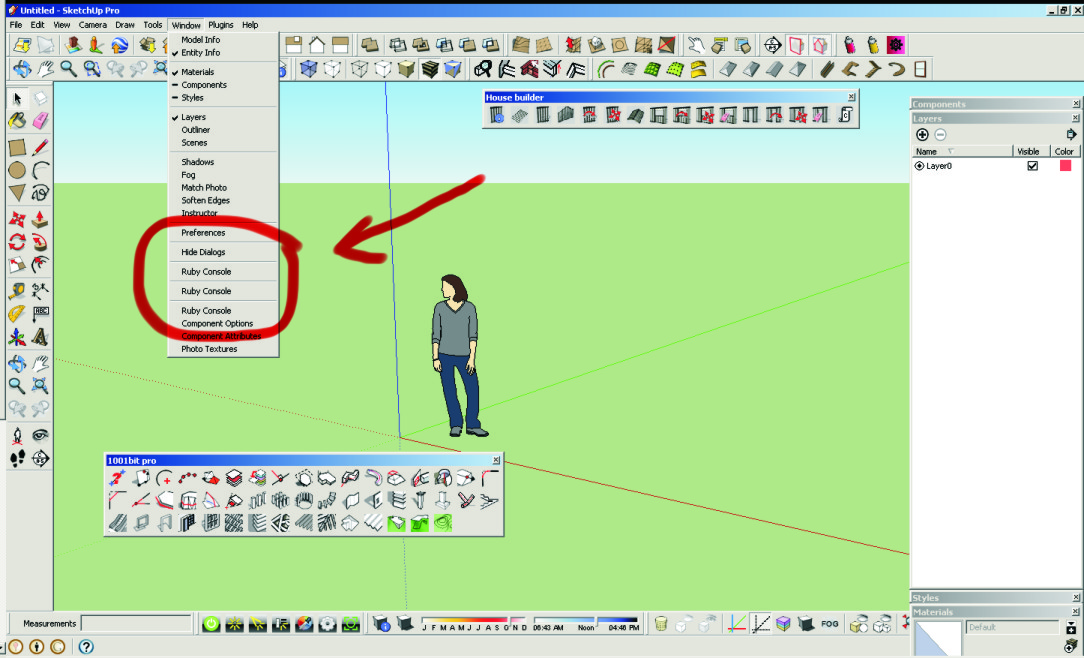
                  HELLO CAN ANYONE TELL ME HOW TO REMOVE THE MULTIPLE OR REPEATED "RUBY CONSOLE" FROM THE WINDOW DROP DOWN MENUS?

                  GRACIAS.

                  SU_RUBY_CONSOLE.jpg

                  1 Reply Last reply
                  Reply Quote 0
                  • thomthomT
                    thomthom
                    last edited by

                    @unknownuser said:

                    HELLO CAN ANYONE TELL ME HOW TO REMOVE THE MULTIPLE OR REPEATED "RUBY CONSOLE" FROM THE WINDOW DROP DOWN MENUS?

                    GRACIAS.

                    It's related to plugins you have installed. Can you post a screenshot of your plugins folder?

                    (Also, please do not use all CAPS. It's usually read as if you are shouting and generally considered bad manners on most forums. Of you do not care for proper capitalisation of word then use lower caps instead of upper caps.)

                    Thomas Thomassen — SketchUp Monkey & Coding addict
                    List of my plugins and link to the CookieWare fund

                    1 Reply Last reply
                    Reply Quote 0
                    • V
                      victor hugo
                      last edited by

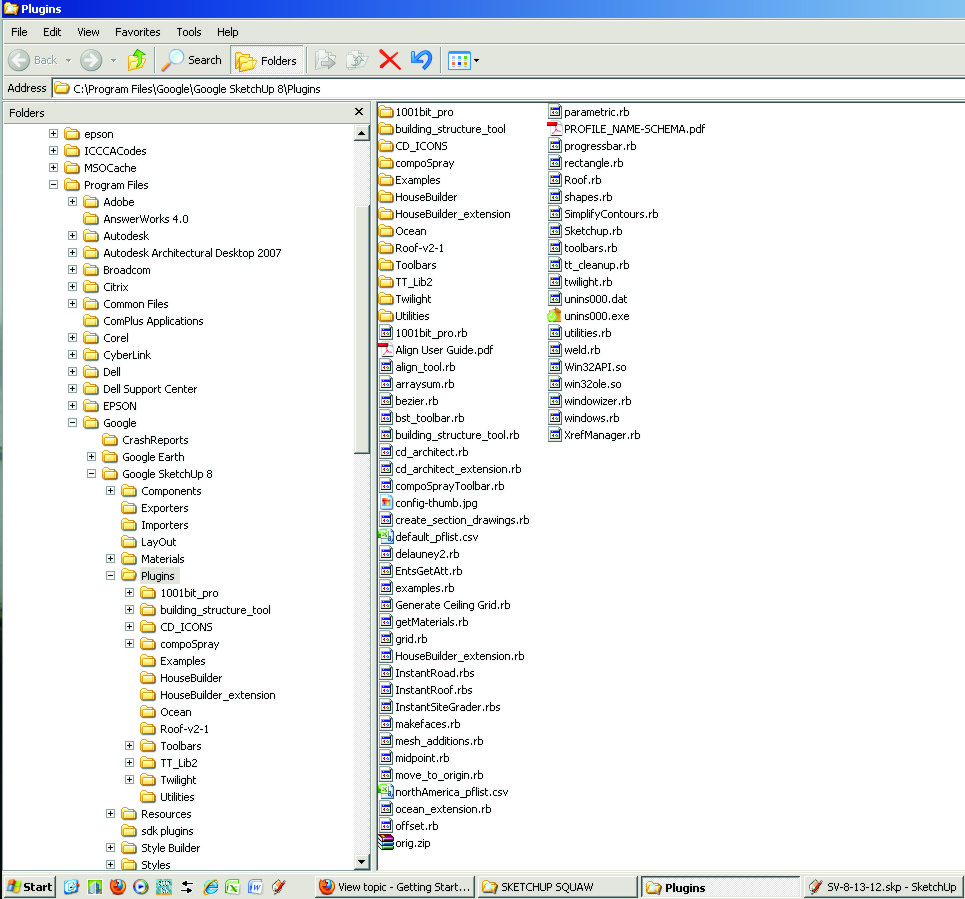
                      Sorry for the CAPS, I was doing also Autocad and forgot to change it, but attached is the list.

                      Gracias.

                      SU_RUBY_CONSOLE-PLUG_IN_LIST.jpg

                      1 Reply Last reply
                      Reply Quote 0
                      • TIGT
                        TIG Moderator
                        last edited by

                        You should NOT have 'sketchup.rb' in Plugins, the current one is installed with Sketchup and it's in Tools.
                        Remove it from Plugins.

                        There are one or two other files I don't recognize, but nothing that should cause an issue...

                        TIG

                        1 Reply Last reply
                        Reply Quote 0
                        • V
                          victor hugo
                          last edited by

                          Thanks TIG ruby console duplicates are kaput now!!

                          I'm new with sketchup, is there a plug in to intall plug-ins?

                          1 Reply Last reply
                          Reply Quote 0
                          • TIGT
                            TIG Moderator
                            last edited by

                            Unfortunately there are still a few rogue scripts around that install out of date things in the wrong places... BUT very few...
                            To simplify installation I suggest that you install Thomthom's 'Simple Installer' available in the 'Plugins Index' link...

                            TIG

                            1 Reply Last reply
                            Reply Quote 0
                            • J
                              Jim
                              last edited by

                              @tig said:

                              Unfortunately there are still a few rogue scripts around that install out of date things in the wrong places

                              Another victim of the Quarr-IT plugin compilations...

                              Hi

                              1 Reply Last reply
                              Reply Quote 0
                              • V
                                victor hugo
                                last edited by

                                Could not find the Twilight post but I've installed the 1.5 version and when I try to render an image it crashes everytime.

                                Has anyone had this problem?

                                Thanks.

                                1 Reply Last reply
                                Reply Quote 0
                                • V
                                  victor hugo
                                  last edited by

                                  This maybe simple but I don't know why when I draw a rectangle it shows the face reversed, is there a setting to draw all new to front faces?

                                  Thanks.

                                  1 Reply Last reply
                                  Reply Quote 0
                                  • TIGT
                                    TIG Moderator
                                    last edited by

                                    When you draw a rectangle flat on the ground it always faces down [reversed] because Sketchup assumes you'll want to PushPull it into a solid box - if it did face the other way you might end up with a box, but with no bottom face.
                                    When you draw rectangles in any other plane the direction [clockwise/ccws] determines which way a face is oriented. However, flat faces on the ground always face down irrespective of their 'loop' direction.
                                    BUT all is not lost - it's dead easy to reverse a face - use the Select tool and click the face so that it's highlighted - now right-click context-menu 'Reverse' to flip the face to be the other way round.
                                    The Orient tool is similar, but then you select a face that's the right way round and all other faces connected to it will flip to match that face's orientation, if they can - it's not always possible if any edge has more than two faces it'll fail somewhere, as there'll always be one face 'out of step' with it's neighbors...

                                    TIG

                                    1 Reply Last reply
                                    Reply Quote 0
                                    • SimFonIA_teamS
                                      SimFonIA_team
                                      last edited by

                                      Hello All,

                                      I am not sure it is the right place to ask this question, sorry if I am wrong.

                                      So, I would like to know if a personal-message is really sent when it appears in the "outbox" of my profile?

                                      Give life to your ideas : http://www.simfonia.fr/SAT/

                                      1 Reply Last reply
                                      Reply Quote 0
                                      • GaieusG
                                        Gaieus
                                        last edited by

                                        If it's in the outbox, it is sent but not read yet. If it's under "Sent messages", it has already been delivered and read by the recipient.

                                        Gai...

                                        1 Reply Last reply
                                        Reply Quote 0
                                        • SimFonIA_teamS
                                          SimFonIA_team
                                          last edited by

                                          Perfect, thank you for your answer Gaieus.

                                          Give life to your ideas : http://www.simfonia.fr/SAT/

                                          1 Reply Last reply
                                          Reply Quote 0
                                          • J
                                            Jehphg
                                            last edited by

                                            Hi guys, my name is Jéssica, i'm a newbie and i am loving the forum already!

                                            1 Reply Last reply
                                            Reply Quote 0

                                            Hello! It looks like you're interested in this conversation, but you don't have an account yet.

                                            Getting fed up of having to scroll through the same posts each visit? When you register for an account, you'll always come back to exactly where you were before, and choose to be notified of new replies (either via email, or push notification). You'll also be able to save bookmarks and upvote posts to show your appreciation to other community members.

                                            With your input, this post could be even better 💗

                                            Register Login
                                            • 1
                                            • 2
                                            • 3
                                            • 4
                                            • 4 / 4
                                            • First post
                                              Last post
                                            Buy SketchPlus
                                            Buy SUbD
                                            Buy WrapR
                                            Buy eBook
                                            Buy Modelur
                                            Buy Vertex Tools
                                            Buy SketchCuisine
                                            Buy FormFonts

                                            Advertisement