sketchucation logo sketchucation
    • Login
    Oops, your profile's looking a bit empty! To help us tailor your experience, please fill in key details like your SketchUp version, skill level, operating system, and more. Update and save your info on your profile page today!
    Check out Febhouse | New extensions for Shadow Analysis in SketchUp Download

    [Plugin] FredoBend - v1.5a - 30 Jun 26


    Scheduled Pinned Locked Moved Plugins
    72 Posts 14 Posters 7.1k Views 14 Watching
    Loading More Posts
    • Oldest to Newest
    • Newest to Oldest
    • Most Votes
    Reply
    • Reply as topic
    Log in to reply
    This topic has been deleted. Only users with topic management privileges can see it.
    • TIGT Offline
      TIG Moderator
      last edited by

      @fredo6
      I think it's best for a bent object's geometry to follow a 'curve' and start perpendicular to the start/end segment. But if the path is a full circle the bending should start perpendicular to a mid-segment, to keep the objects 'endmost' dimensions correct: and if it's around an arc [partial circle] that's user-defined it should be treated like any other curve: but if it's a swept form around a notional partial-circular path, that should then start/end perpendicular to a half-segment - that way the bent form stays as dimensionally true as it can be.

      TIG

      1 Reply Last reply Reply Quote 0
      • fredo6F Offline
        fredo6
        last edited by

        NEW RELEASE: FredoBend v1.4a - 20 Jun 26

        Requirements

        • LibFredo6: v15.9a or above
        • Sketchup version: SU2017 and above

        FredoBend 1.4a is a maintenance release including:

        • Bug fixing
        • Technical adjustments
        • functional adjustments

        Note that applying the Circular Bend tool to a component will impact all other instances. So, if this is not intended, please make sure you make the component instance unique before.


        Home Page of FredoBend for information and Download.

        Main post of this FredoBend thread.

        1 Reply Last reply Reply Quote 0
        • fredo6F Offline
          fredo6
          last edited by

          NEW RELEASE: FredoBend v1.5a - 30 Jun 26

          Requirements

          • LibFredo6: v15.9a or above
          • Sketchup version: SU2017 and above

          FredoBend 1.5a is a major release including:

          • Introduction of the Dome tool
          • Bug fixing
          • Technical adjustments
          • functional adjustments

          Note that applying the Circular and Dome Bend tool to a component will impact all other instances. So, if this is not intended, please make sure you make the component instance unique before.


          Home Page of FredoBend for information and Download.

          Main post of this FredoBend thread.

          1 Reply Last reply Reply Quote 0
          • Rich O BrienR Offline
            Rich O Brien Moderator
            last edited by

            @fredo6 Dome works great. Do you plan to add support to maintain UVs?

            Download the free D'oh Book for SketchUp πŸ“–

            fredo6F 1 Reply Last reply Reply Quote 0
            • fredo6F Offline
              fredo6 @Rich O Brien
              last edited by

              @Rich-O-Brien said:

              @fredo6 Do you plan to add support to maintain UVs?

              Maybe, although I am not entirely sure there is a technical solution. What is sure is that it is not trivial and there will be an impact to performance.

              1 Reply Last reply πŸ‘ Reply Quote 0
              • fredo6F Offline
                fredo6
                last edited by

                I really need to investigate deeper what is going on.

                The generation is done by deformation, that is, without creating geometry, just moving vertices.

                In the meantime, there is ThruPaint to correct the issues.

                FredoBend and UVs.mp4

                1 Reply Last reply Reply Quote 0
                • J Offline
                  jonorman
                  last edited by

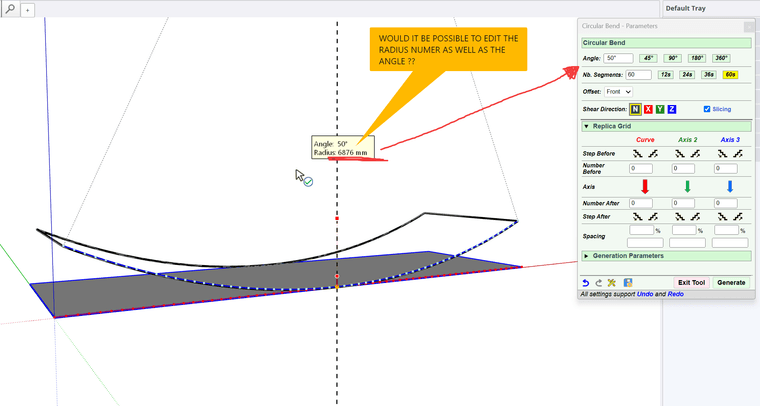
                  Hi. Would editing radius be a possibility as well as angle ??
                  7et9Bw0bia.png

                  fredo6F 1 Reply Last reply Reply Quote 0
                  • fredo6F Offline
                    fredo6 @jonorman
                    last edited by

                    @jonorman said:

                    Hi. Would editing radius be a possibility as well as angle ??

                    Yes. But are you sure you know what the radius value would be?

                    J 1 Reply Last reply Reply Quote 0
                    • J Offline
                      jonorman @fredo6
                      last edited by

                      @fredo6 Yes, it would be nice to either give angle value, or radius. Maybe following: If you change angel in the angle value, the radius automaticly update, and if you then if you change the radius value the angle value would update.. If that is possible. If this make sense πŸ™‚

                      1 Reply Last reply Reply Quote 1
                      • fredo6F Offline
                        fredo6
                        last edited by

                        Yes, indeed. Rdaius and angle are related. My question is whether you know in your model what value of radius you would enter?

                        panixiaP 1 Reply Last reply Reply Quote 0
                        • panixiaP Offline
                          panixia @fredo6
                          last edited by panixia

                          @fredo6 said:

                          whether you know in your model what value of radius you would enter

                          To be fair, I see quite a lot of real world use cases where it's easier to know which radius is needed, rather than the angle.
                          Sounds like a reasonable feature request.

                          1 Reply Last reply Reply Quote 0
                          • fredo6F Offline
                            fredo6
                            last edited by

                            This is a reasonable feature request for sure. I did not include it because personally, I did not see cases where I would have to specify the radius rather than the angle.

                            Actually the angle is an absolute parameter, that will stay the same, even if the shape changes.

                            In contrast, the radius depends on the total length of the shape along the bending direction. If you change the shape, the radius will change. Somehow, input of the radius is a one-time specification to compute the equivaleent angle for the given shape.

                            1 Reply Last reply Reply Quote 0
                            • J Offline
                              jonorman
                              last edited by

                              Yes, In example: We are buliding a big tank, 30 meters in diameter. This is made of rolled plates. I don`t allways know the length of the plate, but i know the diameter of the tank, so it would be easy to just punch in that number.

                              1 Reply Last reply Reply Quote -1
                              • fredo6F Offline
                                fredo6
                                last edited by

                                Ok. This is not complex to add in FredoBend, both for the Circular tool and the Dome tool.

                                However, there is question of the precedence of the angle versus the radius, since they are both related by a formula which also includes the length of the original shape along the bending direction.

                                1) Should the angle always prevail? that is, when you specify a radius, it calculates the angle and keep the angle as the main parameter. So, entering a radius is just a transient way to specify the angle.

                                2) or should the input mode be remembered? that is, if you specify a radius, FredoBend remembers that you specified a radius and will keep your radius value and adjust the angle dynamically, should the original shape change. Same if you specify an angle, it remembers that you specified than angle and will adjust the radius accordingly.

                                I also have to find a way to specify the radius in the VCB. Currently, a simple float value is for the angle. So, I'll probably set the convention for radius to be a flaot followed by a 'r' (ex: 3.5r, means 3.5 in current model unit), or a float with unit specification (ex: 3.5m or 3.5').

                                panixiaP 1 Reply Last reply Reply Quote 0
                                • panixiaP Offline
                                  panixia @fredo6
                                  last edited by

                                  @fredo6 said:

                                  there is question of the precedence

                                  I guess option 2 is the correct one.

                                  @fredo6 said:

                                  I also have to find a way to specify the radius in the VCB

                                  I guess r3,5 should be model uinits
                                  And r3,5 plus units should set an arbitrary unit (different from the default model unit)

                                  If you put the "r" BEFORE the number I guess that you can safely assume that it will be radius based.
                                  If there's no "r" in front, then the number specify the angle.

                                  If you put it after the number how do you specify the arbitrary unit?
                                  In your example should be something like 3,5rcm (wich is weird compared to r3.5cm in my opinion).

                                  1 Reply Last reply Reply Quote 0
                                  • J Offline
                                    jonorman
                                    last edited by

                                    Opjtion 2 sounds good.

                                    1 Reply Last reply Reply Quote 0
                                    • fredo6F Offline
                                      fredo6
                                      last edited by

                                      For information, you CANNOT put 'r' in front of the number. If you type 'r' as first character, then Sketchup will switch to whatever command has a shortcut 'r'.

                                      The distinction between radius, angle and number of segments is based on whether a letter follows the number:

                                      • if no character or 'd', this is an angle
                                      • if 's', this is a number of segments
                                      • if 'r' this is a radius
                                      • if something else that can be interpreted as a unit (', ", m, cm, mm, etc...), then it is also a radius with specified units
                                      • otherwise, it is ignored

                                      Note that in the case of the Dome tool, you can add a digit 1 or 2 after, to specify whether this relates to the first or second curve.

                                      • 33s2 will set 33 segments for the second curve
                                      • 45.3d2 will set the angle to 45.3 degrees for the second curve
                                      • so, 35.6r2 will set the radius to 35.6 model unit for the second curve
                                      • and 35.6m2 will set the radius to 35.6m for the second curve

                                      To finish with the VCB convention, if you type 2 values that are of the same categories, they apply to the curve1 and then the curve2. For instance: '33.4 45.6' will set the angles to 33.4 deg. for curve1 and 45.6 deg. for curve 2.

                                      panixiaP 1 Reply Last reply Reply Quote 0
                                      • panixiaP Offline
                                        panixia @fredo6
                                        last edited by

                                        @fredo6 said:

                                        For information, you CANNOT put 'r' in front of the number. If you type 'r' as first character, then Sketchup will switch to whatever command has a shortcut 'r'.

                                        Doh, that's right!

                                        45f3d30d-6196-426c-b13e-361eb93d0e13-image.jpeg

                                        1 Reply Last reply Reply Quote 0

                                        Hello! It looks like you're interested in this conversation, but you don't have an account yet.

                                        Getting fed up of having to scroll through the same posts each visit? When you register for an account, you'll always come back to exactly where you were before, and choose to be notified of new replies (either via email, or push notification). You'll also be able to save bookmarks and upvote posts to show your appreciation to other community members.

                                        With your input, this post could be even better πŸ’—

                                        Register Login
                                        • 1
                                        • 2
                                        • 3
                                        • 4
                                        • 2 / 4
                                        • First post
                                          Last post
                                        Buy SketchPlus
                                        Buy SUbD
                                        Buy WrapR
                                        Buy eBook
                                        Buy Modelur
                                        Buy Vertex Tools
                                        Buy SketchCuisine
                                        Buy FormFonts

                                        Advertisement