[Plugin] FredoBend - v1..2c - 25 Mar 26




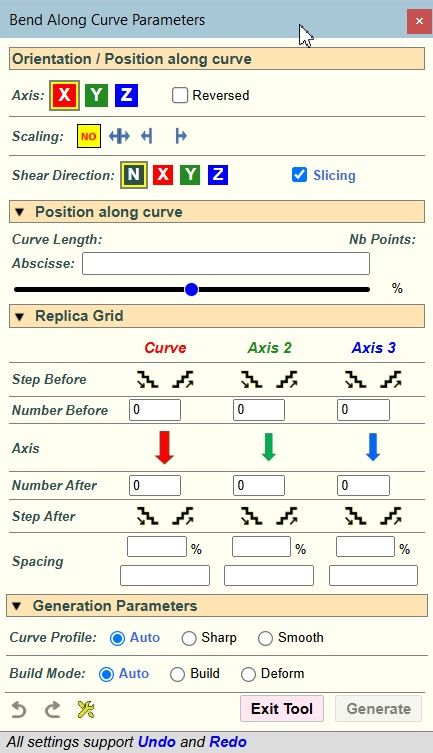
-
Я не понимаю, что вы имеете в виду.
Свойство компонента/группы сохраняется. Если вы изгибаете компонент, на выходе получается компонент. То же самое относится и к подкомпонентам.
Однако всё содержимое контейнера уникально, поскольку изгибание — это не трансформация, а создание геометрии. Это не имеет ничего общего с разрезанием.
Perhaps I did not state my thought correctly, perhaps I got confused in the terms, or perhaps my translator did not translate it correctly) I want to say the following: when we use a plugin, is it possible not to deform the component so that the component does not lose its connection with its own kind? As an example in the video, I used the Copy Along Curve plugin. He arranged the components in an arc without deforming or making the components unique.
-
Plugins like Copy Along Curve just move and rotate the objects to position them along the curve. So, this is not really bending and it is another use case.
For FredoBend, it is possible to add an option where only the top container is modified, leaving the sub-container not deformed.
-
It doesn't work for me. With my sketchup 2025 full of plugins, it doesn't work. In practice, if I place the object on a line or a curve, it doesn't get curved. While if I install it on sketchup 2026 with very few plugins, it works. There are some incompatibilities, but it doesn't give me any errors. Anyway, congratulations, it's fantastic.
[link text](Here is a video In the first case it is that if up 2025 and in the second scatchup 2026
https://community.sketchucation.com/post/1620017) -
It doesn't work for me
If there are errors in the Ruby Console you should post those to help Fredo determine the cause.
I presume you have an updated LibFredo installed.
Download the free D'oh Book for SketchUp 📖
-
@Rich-O-Brien Latest version of FredoBend 1.2b and FredoLib 15.9a. Everything is up to date.
Ruby console
[#Sketchup::ComponentInstance:0x0000018ac36785f0]
[#Sketchup::Group:0x0000018aca8649c0]
[#Sketchup::Group:0x0000018aca8649c0]
[#Sketchup::Group:0x0000018aca8649c0]
#<NameError: uninitialized constant Array::Fixnum>
C:/Users/roberto.bolletta/AppData/Roaming/SketchUp/SketchUp 2025/SketchUp/Plugins/mx_constructtools/mx_constructtools.rb:12:inblock in sum' C:/Users/roberto.bolletta/AppData/Roaming/SketchUp/SketchUp 2025/SketchUp/Plugins/mx_constructtools/mx_constructtools.rb:11:inupto'
C:/Users/roberto.bolletta/AppData/Roaming/SketchUp/SketchUp 2025/SketchUp/Plugins/mx_constructtools/mx_constructtools.rb:11:insum' c:/users/roberto.bolletta/appdata/roaming/sketchup/sketchup 2025/sketchup/plugins/fredo6_fredobend/fredobendcurvetool.rbe:1792:incourbe_register'
c:/users/roberto.bolletta/appdata/roaming/sketchup/sketchup 2025/sketchup/plugins/fredo6_fredobend/fredobendcurvetool.rbe:1693:inplacement_manage' c:/users/roberto.bolletta/appdata/roaming/sketchup/sketchup 2025/sketchup/plugins/fredo6_fredobend/fredobendcurvetool.rbe:1667:inplacement_dragging_move'
c:/users/roberto.bolletta/appdata/roaming/sketchup/sketchup 2025/sketchup/plugins/fredo6_fredobend/fredobendcurvetool.rbe:424:inonMouseMove' #<NameError: uninitialized constant Array::Fixnum> C:/Users/roberto.bolletta/AppData/Roaming/SketchUp/SketchUp 2025/SketchUp/Plugins/mx_constructtools/mx_constructtools.rb:12:inblock in sum'
C:/Users/roberto.bolletta/AppData/Roaming/SketchUp/SketchUp 2025/SketchUp/Plugins/mx_constructtools/mx_constructtools.rb:11:inupto' C:/Users/roberto.bolletta/AppData/Roaming/SketchUp/SketchUp 2025/SketchUp/Plugins/mx_constructtools/mx_constructtools.rb:11:insum'
c:/users/roberto.bolletta/appdata/roaming/sketchup/sketchup 2025/sketchup/plugins/fredo6_fredobend/fredobendcurvetool.rbe:1792:incourbe_register' c:/users/roberto.bolletta/appdata/roaming/sketchup/sketchup 2025/sketchup/plugins/fredo6_fredobend/fredobendcurvetool.rbe:1693:inplacement_manage'
c:/users/roberto.bolletta/appdata/roaming/sketchup/sketchup 2025/sketchup/plugins/fredo6_fredobend/fredobendcurvetool.rbe:1667:inplacement_dragging_move' c:/users/roberto.bolletta/appdata/roaming/sketchup/sketchup 2025/sketchup/plugins/fredo6_fredobend/fredobendcurvetool.rbe:424:inonMouseMove' -
Looks great Fredo. This is destructive one, isn't it? No way to edit afterwards
-
Для FredoBend можно добавить опцию, при которой изменяется только верхний контейнер , а подконтейнер остается недеформированным.
I think that's what you need. At least it would be great to experience it. Thank you.
-
mx_constructtools
It looks like the plugin mx_constructtools is redefining a base method (Array#sum), which is not a good practice and is dangerous for other plugins. This is causing the error.
-
Looks great Fredo. This is destructive one, isn't it? No way to edit afterwards
The bent object is of course new geometry.
However, as shown in the main video:
- the original object is untouched
- If you modify this original object, you can update the bent object in one click.
- you can also edit the bent object and change the bending parameters. If the original object has been modified, the new bent object will be updated.
- there is an option to save a copy of the original object to an external file. This is for the case where you delete the original object in the model, including its definition.
-
Hi all,
running FredoBend v1.2b with LibFredo v15.9a on SU 2019 / Win11 and i've got an issue on the bend generation step with this error log :"Date: 27-Mar-26 09:24:41 - SU2019.3 - LibFredo6 - v15.9a
Une erreur s'est produite dans
Error in Bend Generationundefined method `save_copy' for #<Sketchup::ComponentDefinition:0x0000023c3844c1d8>
fredobendcurvetool.rbe: 1195 -- saver_solid_comp
fredobendcurvetool.rbe: 2425 -- generation_step_prepare
fredobendcurvetool.rbe: 3270 -- job_perform
fredobendcurvetool.rbe: 3212 -- job_notification
body_lib6webprogress.rbe: 104 -- call
body_lib6webprogress.rbe: 104 -- process_notify
body_lib6webprogress.rbe: 388 -- fast_process_next_step
body_lib6webprogress.rbe: 358 -- fast_process_start
body_lib6webprogress.rbe: 370 -- fast_process_next
body_lib6webprogress.rbe: 346 -- fast_process_top
body_lib6webprogress.rbe: 123 -- invoke
fredobendcurvetool.rbe: 3158 -- job_start
fredobendcurvetool.rbe: 2392 -- block in generation_launch"In the Parameters window / Generation parameters, i don't see the build options as shown in the tuto :
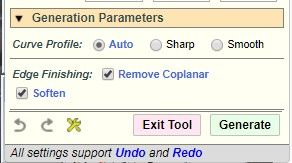
Is that the problem ?
Thanks for response
-
NEW RELEASE: FredoBend v1.2c - 27 Mar 26
Requirements
- LibFredo6: v15.9a or above
- Sketchup version: SU2017 and above
FredoBend 1.2c is a maintenance release including:
- Bug fixing
- Evolution of the Save Original objects with 3 options and the capability to retrive the original object, even if it is not present in the model any longer.
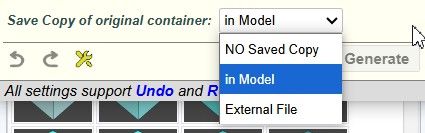
Home Page of FredoBend for information and Download.





Hello! It looks like you're interested in this conversation, but you don't have an account yet.
Getting fed up of having to scroll through the same posts each visit? When you register for an account, you'll always come back to exactly where you were before, and choose to be notified of new replies (either via email, or push notification). You'll also be able to save bookmarks and upvote posts to show your appreciation to other community members.
With your input, this post could be even better 💗
Register Login


Advertisement