Rayscaper New Releases
-
Hello,
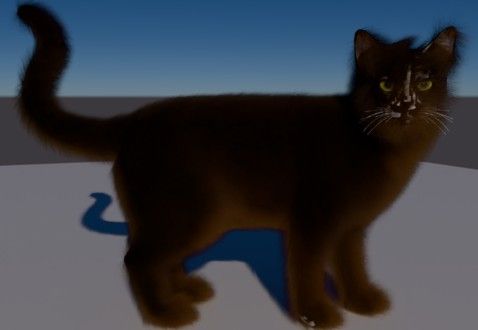
It seems that your "animal fur" preset doesn't take the SketchUp texture into account. If I apply the "carpet" preset, it works... but... what would you recommend? It would have been great to be able to use the texture for this cat—which is actually quite good—while still being able to take advantage of the "animal fur" preset.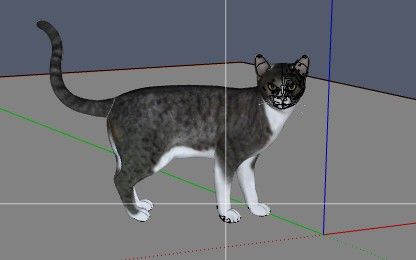
Krass
-
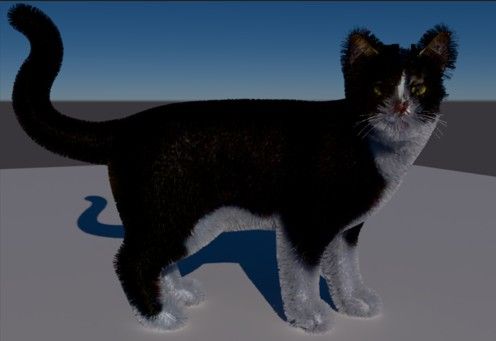
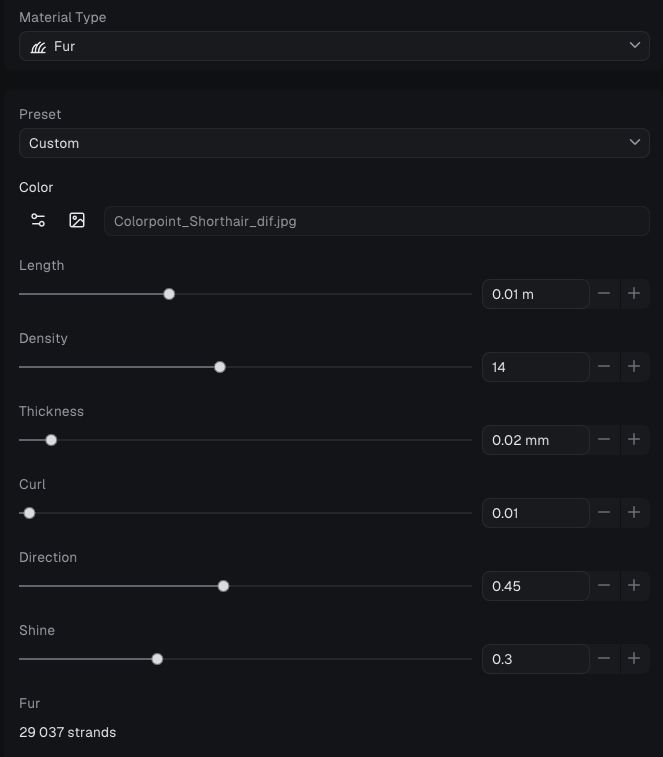
You have to really pull those values down, fur on most animals is 'suggested' rather than being a huge feature. Cats, unless a long hair variant look like caricatures otherwise.
-
Thomas,
Hi,
Connecting Codex to Rayscaper is easy—and since I’m a bit lazy, I asked it to handle that part for me, too.
It works really well; I think it can be a real time-saver for exterior scenes.
Here’s an example of an interior scene.
I’m quite familiar with modeling using Codex in SketchUp, and I find it’s often best to keep the MCP SketchUp server active alongside the Rayscaper connection.
For instance, it’s highly efficient for placing spotlights—a genuine time-saver, as you can ask it to distribute the lights while simultaneously adding the necessary mounting hardware to your SketchUp geometry.
It understands commands well, though you have to wait a moment before telling it to "stop!"—it carries out the modifications in successive stages.
All of this is great, but I quickly hit my daily token limit (I’m on the entry-level ChatGPT plan), and I’ve likely already used up the available resets for this month.
The process can be quite lengthy, and when you’re already fairly proficient with Rayscaper, you sometimes realize you could have done it faster "by hand."
That said, I want to highlight how useful it is for distributing lights—it’s excellent. I also imagine that for exterior projects—I’m saving my tokens for client work—being able to place vegetation and set up the lighting must be truly impressive.
Looking forward to my next experiments!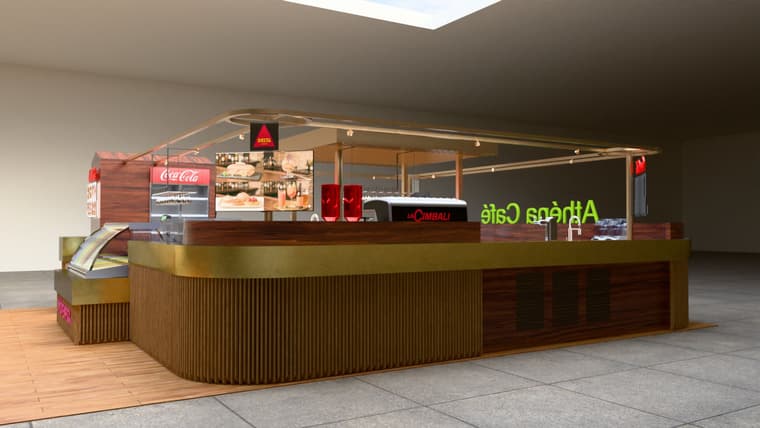
-
@Krass, glad to hear that it's working well for you! I hope this feature entices the AI crowd. You can let the AI agent automate a lot of stuff and do the things you want to do by hand. The advantage is that you have 100% control over the outcome, which is not always the case with AI rendering solutions.
Yes, you can use it for exteriors too. You can let it configure scattering for you. It might also be a good starting point for people who aren't proficient with the software; let the AI agent help. My goal is still to have good documentation and to make it intuitive.
-
@pixelcruncher can this be made to work with a locally hosted model like Ollama?
-
It would certainly be great if we could use open-source models for designing in SketchUp... since it’s so expensive. I know they aren’t covering their costs yet, but still...
-
It should work with any model that supports MCP (Model Context Protocol). For the AI agent, Rayscapers simply offers a set of tools (e.g., adjust_material, set_camera, ...). It's just that with smarter models, the results you get will be a lot better. I don't have the hardware to run open-source models, so I'm very happy to hear what the results are. If there are setup problems, happy to help you guys debug them.
-
Hello,
I’m wondering how to perform a "batch" render for animations. I have everything prepared—several scenes—but for the time being, I don’t see a way to take advantage of the time when I’m away from home: I would like to set up a batch render for multiple SketchUp or Animator scenes, but currently, I can only initiate a render for a single sequence. Regarding SketchUp transitions, that’s expected given how the software works; however, Animator allows for saving and storing multiple films. It seems that with Rayscaper, it is currently only possible to render one animation at a time. -
@krass - I can add that. Instead of selecting a single clip, use a list of clips. Stay tuned; I will try to squeeze it into the next release.
-
Thanks a lot,
I’m unsure about the best settings for resolution and samples-per-pixel (SPP) for animation rendering. I keep getting flickering in my footage—likely due to the denoiser combined with low light levels. I’ve attached a 1080p clip rendered at 1024 SPP.
https://www.swisstransfer.com/dl/01a22190-1f4b-749b-a5c4-a26a0d3091e9 -
@Krass, thanks for the clip, that helps a lot.
I'd like to reproduce this here and see what I can improve on my side. Could you send me the scene?
Cheers,
ThomasI'm the developer of Rayscaper: https://rayscaper.com/ - Fast and easy rendering for SketchUp.
-
@pixelcruncher
Hi Thomas
Firstly, I have recently created some of my own materials, but I have discovered some bugs. When I use the material I made myself, the first drag of the material can accurately fit into the surface of the object, but when I continue to change to another material, the surface of the object will maintain the state of the material I first imported..
Secondly, some users around me have discussed that material management requires custom file paths, and the practice of saving all created materials in the system drive letter by default is too demanding on the system drive space. This is a highly needed feature!
Thirdly, can the batch rendering function generate separate parameter settings for each camera perspective? Including resolution and aspect ratio for each perspective, exposure and tone mapping settings, rendering sampling settings, etc.. Only in this way can batch rendering be used to achieve differentiated rendering output for each perspective at once!
The first question is shown in the picture: Starting from the colorful carpet, replacing the gray white carpet resulted in the loss of texture; Replacing the blue fabric again resulted in jumping back to the colorful carpet.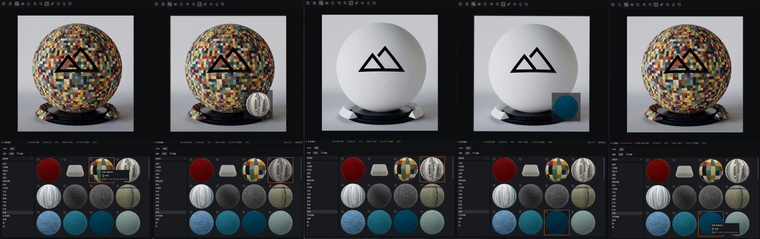
-
@pixelcruncher
Looking forward to your reply. This is very important to me. I have been making teaching videos for Rayscaper recently, and the self-made material library is a key feature that needs to be used in the teaching videos. Some of my demonstrations and explanations cannot proceed smoothly -
@pixelcruncher
I sent you the scene by email
ThanksI'm trying other settings, adding light panels in the windows and other spp level and image size
-
@lightscape
hello,
did you try to restart rayscaper? Sometimes it helps -
Thanks for the clear report and the screenshots, and for making Rayscaper tutorials! Send me the links when you are done! Would love to check it out in Chinese.
1. Your own materials keep the first material's texture
Thanks, your screenshots show the problem well. This is a bug, and I'm working on a fix. I'll let you know here when it's in a release.
2. Choosing where the material library is stored
That's a good point. Right now your saved materials and the downloaded textures and HDRIs go to the Rayscaper folder in AppData on the system drive, and you can't change that. I've added this to the list: a setting to choose the folder.
Until then, there's a workaround on Windows: close SketchUp, move the folder
%APPDATA%\Rayscaper\AssetCache(the downloads, usually the biggest part) to another drive, and put a link in its place, for example:mklink /J "%APPDATA%\Rayscaper\AssetCache" "D:\Rayscaper\AssetCache"3. Different settings for each view in Render Scenes
This is planned: each SketchUp scene will be able to keep its own Rayscaper settings, and Render Scenes will render every scene with its own settings. The first version will cover the environment and the camera, including resolution and aspect ratio. Exposure and tone mapping come after that. I've also noted that you want different sample settings for each view.
Cheers,
Thomas -
The Animal Fur preset sets Coloring to Natural: the hairs get a natural brown color, like a real animal's coat, and the texture only tints that brown. So your gray and white cat turns brown. The surface under the fur uses a darker version of the same color, which is why it looks brown even without fur.
To keep the texture, choose Animal Fur, then open Advanced in the Fur settings and change Coloring (under Color) to Dyed. The hairs then take the colors of your texture.
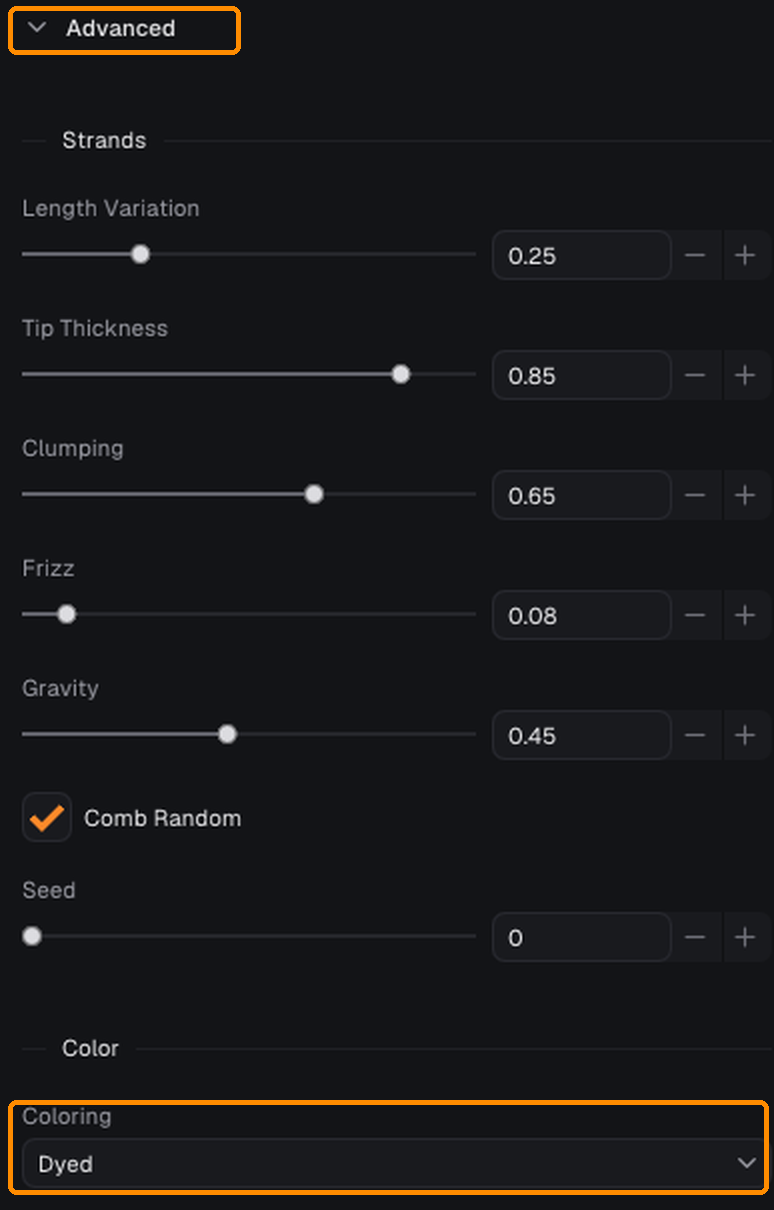
As Mike says, for a short-haired cat, also make the fur much shorter and less dense.
I think a textured animal should just work with Animal Fur, so I'll change that. If it does not work, can you send me the cat model? Then I can test with it.
Cheers,
ThomasI'm the developer of Rayscaper: https://rayscaper.com/ - Fast and easy rendering for SketchUp.
-
@pixelcruncher
Thank you for your work. My tutorial will be released gradually, and I will send you the video link. -
@Krass
I also found a model of eating cats, but I couldn't handle its face well. Fur always affects its mouth and eyes, so I asked it to turn around and look back at the grass.. Fur needs to be very short to show the state of a cat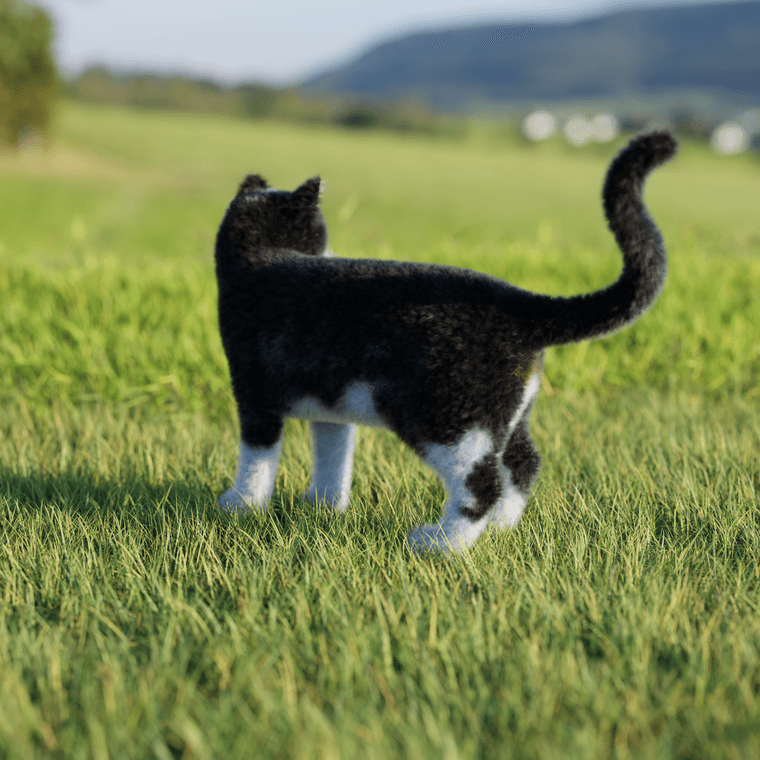
@pixelcruncher
I have also submitted this test to the Showcase
-
@Krass
Yes, I have tried restarting Rayscaper and still encounter this issue



Hello! It looks like you're interested in this conversation, but you don't have an account yet.
Getting fed up of having to scroll through the same posts each visit? When you register for an account, you'll always come back to exactly where you were before, and choose to be notified of new replies (either via email, or push notification). You'll also be able to save bookmarks and upvote posts to show your appreciation to other community members.
With your input, this post could be even better 💗
Register Login


Advertisement