sketchucation logo sketchucation
    • Login
    Oops, your profile's looking a bit empty! To help us tailor your experience, please fill in key details like your SketchUp version, skill level, operating system, and more. Update and save your info on your profile page today!
    Mac User? | Join the Rayscaper Beta for Mac Learn More

    Rayscaper New Releases

    Scheduled Pinned Locked Moved Extensions & Applications Discussions
    rayscaperrender
    785 Posts 14 Posters 363.4k Views 15 Watching
    Loading More Posts
    • Oldest to Newest
    • Newest to Oldest
    • Most Votes
    Reply
    • Reply as topic
    Log in to reply
    This topic has been deleted. Only users with topic management privileges can see it.
    • KrassK
      Krass @Krass
      last edited by Krass

      Rayscaper

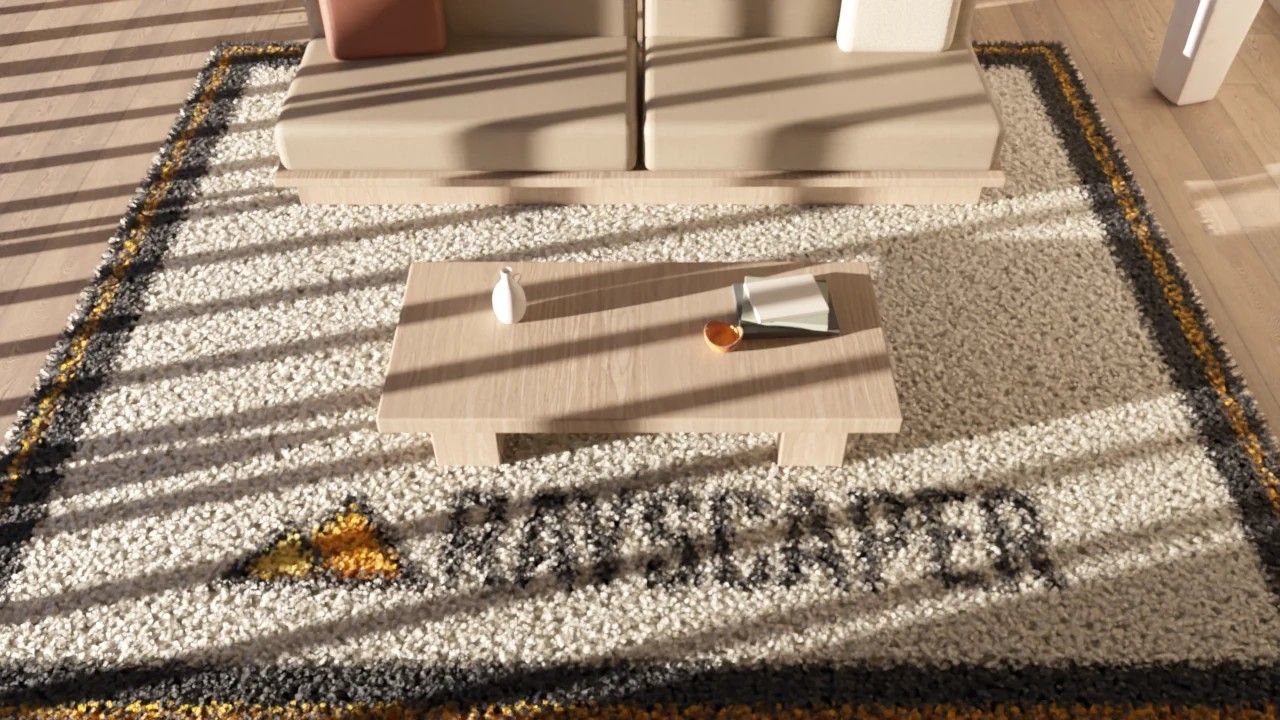
      The grass settings are absolutely perfect. I'm now going to try to repurpose this function to generate carpets. The presets are good; the hue is very natural, whereas in many other programs you get an unrealistic, vivid green.

      Krass

      1 Reply Last reply ♥
      Reply Quote 1
      • KrassK
        Krass
        last edited by

        I’ve just realized that it’s the material color that determines the color of the grass blades—much like in V-Ray—which is a really great feature.
        However, the limit slider for the density parameter currently prevents this "grass material" from being effectively used as "fur." ​​The density in "synthetic grass" mode is the highest (likely due to the shape of the blades).
        Would it be possible to lift this density limit in the future, or perhaps create a "fur" preset that’s better suited for that purpose?
        In any case, well done!
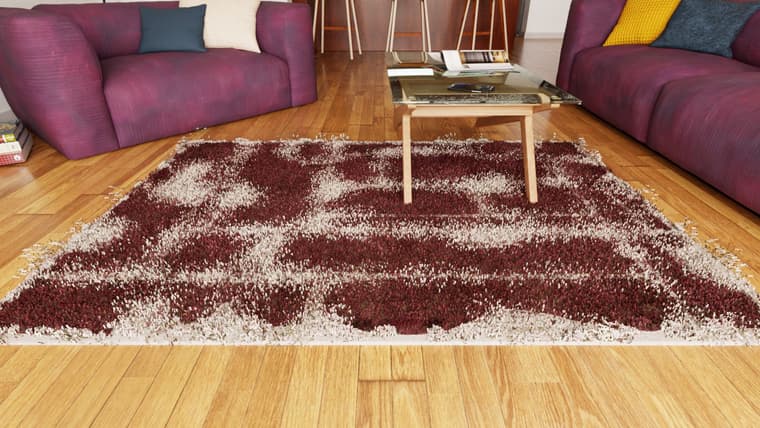
        TAPIS.jpg

        Krass

        1 Reply Last reply
        Reply Quote 1
        • pixelcruncherP
          pixelcruncher Extension Creator
          last edited by pixelcruncher

          @krass - I'm not sure how it works in V-Ray, but in Rayscaper, the grass creates a scatter behind the scenes on the surface and then assigns UVs so your textures also work on the grass surface. We have some hard-coded grass patches in the software. The density limit is there for performance reasons; making it too dense could crash your GPU if it's not beefy enough, so there's a limit.

          Way back, when I was a developer on the OctaneRender team, we implemented hair and fur using special hair "geometry," which is like tiny strings of geometry next to your normal triangles. I can also look at this method in Rayscaper. It's a bit of work, so I can't really promise this in the 1.0 release (which I wanna get out, because people think Rayscaper is crap because it's still in beta).

          edit: I'll increase the density limit a bit in the next release anyway, then you are unblocked for creating carpets until we have something better.

          I'm the developer of Rayscaper: https://rayscaper.com/ - Fast and easy rendering for SketchUp.

          L 1 Reply Last reply
          Reply Quote 0
          • KrassK
            Krass
            last edited by

            Thanks, does it chage anything if I subdivide th rug face?

            Krass

            pixelcruncherP 1 Reply Last reply
            Reply Quote 0
            • L
              lightscape Newcomers @pixelcruncher
              last edited by

              @pixelcruncher
              Even in the beta phase, Rayscaper is still excellent, and the designers around me are looking forward to Rayscaper surpassing Thea Render in SketchUp

              L 1 Reply Last reply
              Reply Quote 2
              • L
                lightscape Newcomers @lightscape
                last edited by

                lightscape said:

                @pixelcruncher
                Even in the beta phase, Rayscaper is still excellent, and the designers around me are looking forward to Rayscaper surpassing Thea Render in SketchUp

                I just completed a test scenario with a small resolution, and I used AI to remove the watermark (not for commercial use, just for the sake of visual appeal). Rayscaper's rendering capabilities are currently outstanding72eec337-7b22-4b78-978c-6c1f15f5a54a.png

                1 Reply Last reply
                Reply Quote 3
                • pixelcruncherP
                  pixelcruncher Extension Creator @Krass
                  last edited by

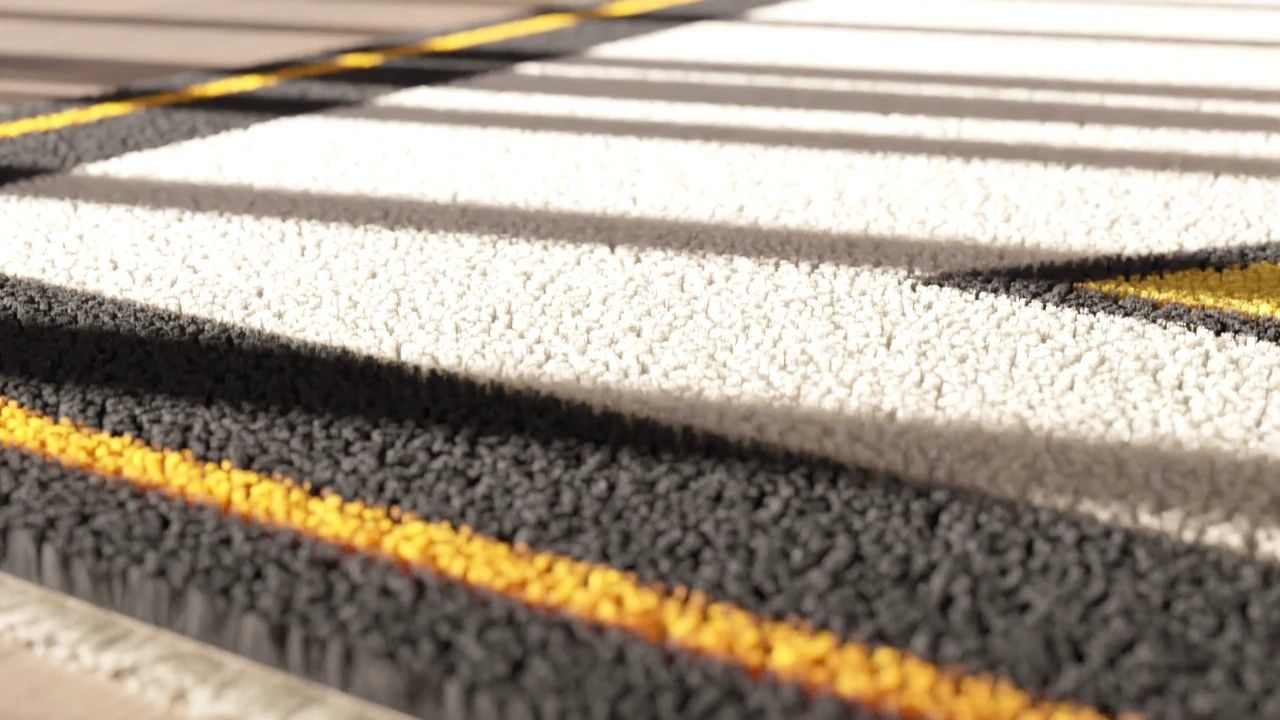
                  @Krass No, it wouldn't really help. Rayscaper scatters the patches with the configured density over the faces. More faces means just more work for the scattering engine.

                  We did some experimenting this afternoon, and might have something better soon(-ish).
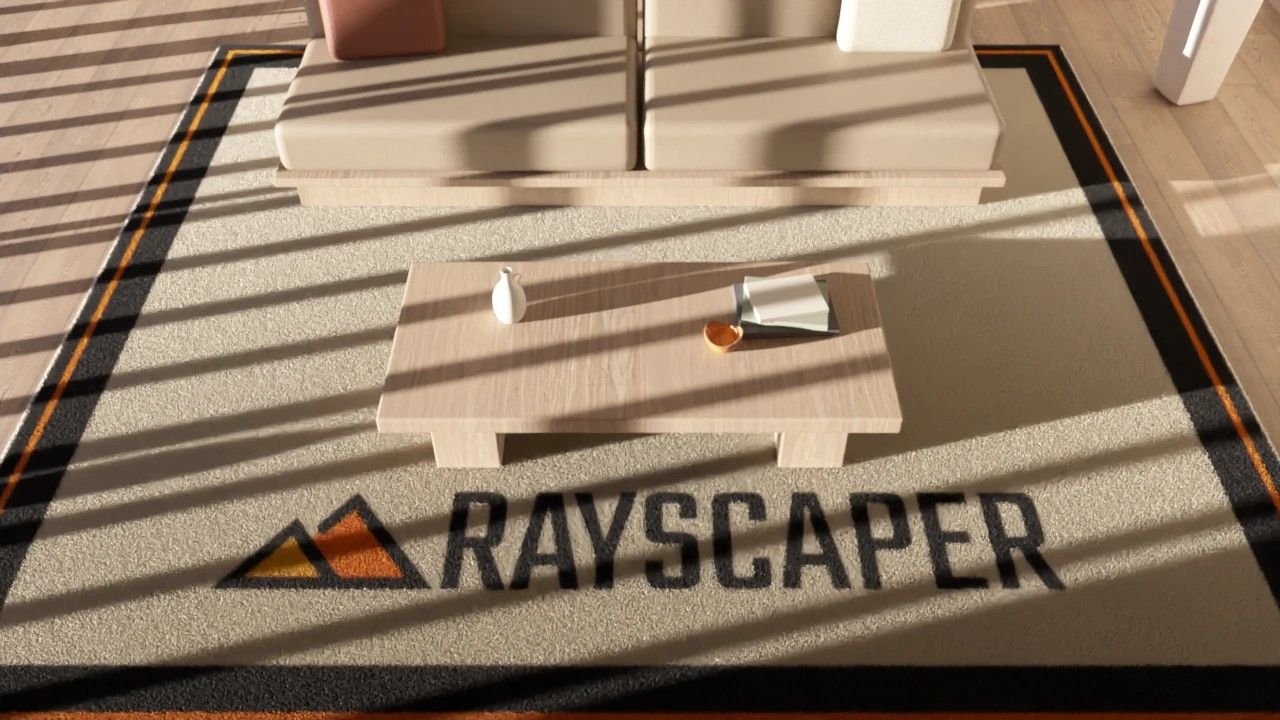
                  image.jpeg

                  image.jpeg

                  image.jpeg

                  Stay tuned!

                  Cheers,
                  Thomas

                  I'm the developer of Rayscaper: https://rayscaper.com/ - Fast and easy rendering for SketchUp.

                  1 Reply Last reply
                  Reply Quote 2
                  • KrassK
                    Krass
                    last edited by Krass

                    it's very good !
                    I believe you used synthetic grass with large blade size...

                    Krass

                    1 Reply Last reply ♥
                    Reply Quote 2
                    • A
                      Alattab
                      last edited by Alattab

                      when grass type changes to meadow there is a bug fix (crush) in sketchup 2025 , in sketchup 2026 is fine work

                      1 Reply Last reply
                      Reply Quote 0
                      • A
                        Alattab
                        last edited by

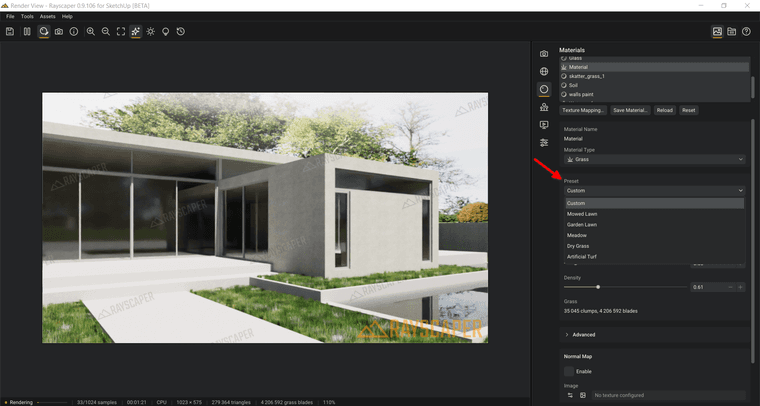
                        Using a texture as a scattering map—as well as deriving color from that texture—is a fantastic idea. However, I hope the issue regarding the inability to select a preset gets resolved; it’s a bug that causes a fatal error in SketchUp.
                        ksnip_20261009-131239.png

                        pixelcruncherP 1 Reply Last reply
                        Reply Quote 0
                        • majidM majid referenced this topic
                        • KrassK
                          Krass
                          last edited by Krass

                          Hello,
                          Thomas
                          Could you share the Rayscaper rug model so I can understand how you made it? Is the logo an image, or was it drawn in SketchUp?

                          Krass

                          pixelcruncherP 1 Reply Last reply
                          Reply Quote 0
                          • pixelcruncherP
                            pixelcruncher Extension Creator @Alattab
                            last edited by

                            @Alattab, yes, thanks for the report. We were able to reproduce this. We'll include a fix in the next version.

                            Cheers,
                            Thomas

                            I'm the developer of Rayscaper: https://rayscaper.com/ - Fast and easy rendering for SketchUp.

                            1 Reply Last reply 😊
                            Reply Quote 0
                            • pixelcruncherP
                              pixelcruncher Extension Creator @Krass
                              last edited by pixelcruncher

                              @Krass, I figured out how to hack the grass material to make rugs too. However, that required code changes in Rayscaper, so it will be available only in the new version. Stay tuned for this. I will share the skp file as well with the new version so you can have the same results.

                              Cheers,
                              Thomas

                              I'm the developer of Rayscaper: https://rayscaper.com/ - Fast and easy rendering for SketchUp.

                              1 Reply Last reply
                              Reply Quote 0
                              • A
                                Alattab
                                last edited by

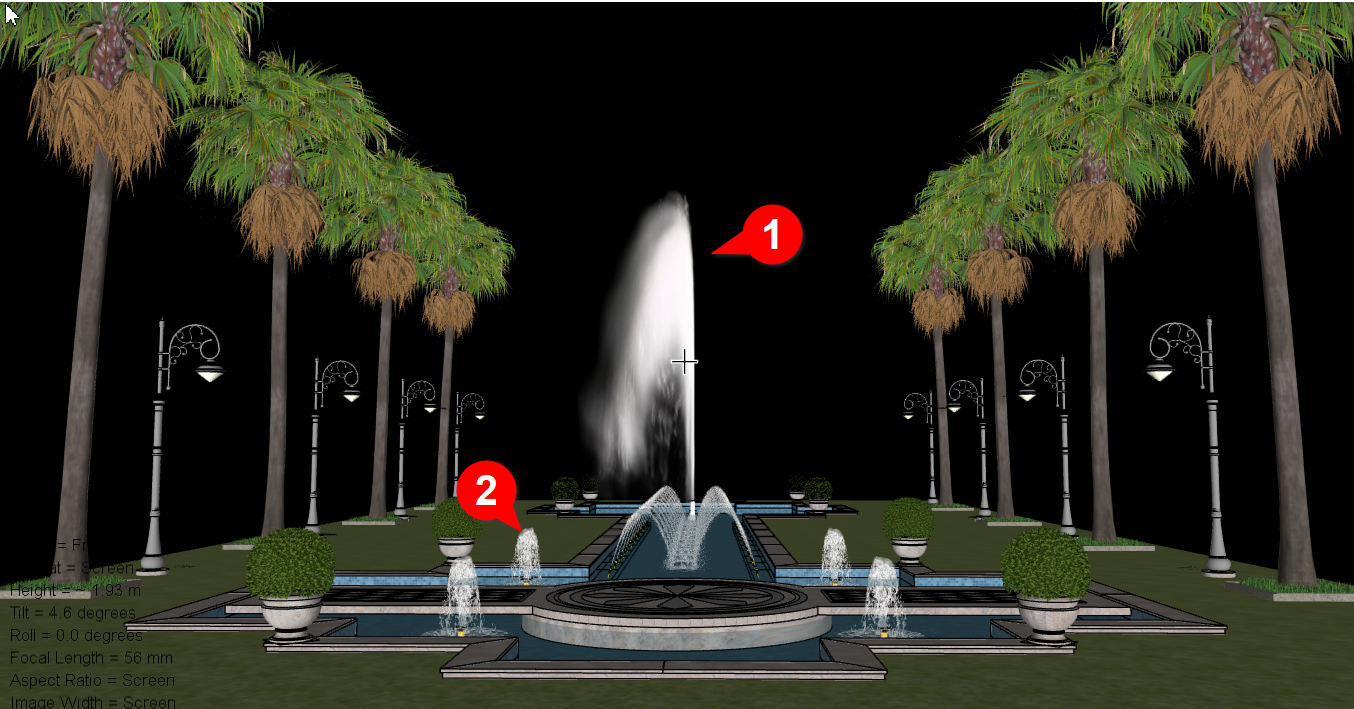
                                I believe it is necessary to add a "mask map" alongside the alpha and opacity maps; otherwise, I cannot properly render the appearance of the fountain water—indicated by the number 1 in the image—as required. Furthermore, I think it is essential to include specific fluid presets—such as those for milk, carbonated water, aerated water, etc. In the image, the element marked with the number 2 represents the aerated water produced by a bubbler nozzle.
                                Fountain water.png

                                A 1 Reply Last reply
                                Reply Quote 0
                                • ntxdaveN
                                  ntxdave
                                  last edited by

                                  Interesting image. What software did you use to add the 1 and 2 highlights?

                                  Press F1...thank me later

                                  A 2 Replies Last reply
                                  Reply Quote 0
                                  • A
                                    Alattab
                                    last edited by

                                    Water fountain_.png
                                    Water fountain.png

                                    1 Reply Last reply
                                    Reply Quote 0
                                    • A
                                      Alattab @ntxdave
                                      last edited by

                                      @ntxdave it is calld" Franzis cutout profistional "

                                      1 Reply Last reply
                                      Reply Quote 0
                                      • A
                                        Alattab @ntxdave
                                        last edited by

                                        @ntxdave if you mean number bubble tag , use softwear calld Ksnip it is freecharge , open source kind type

                                        1 Reply Last reply
                                        Reply Quote 0
                                        • pixelcruncherP
                                          pixelcruncher Extension Creator
                                          last edited by

                                          @Alattab, thanks for the clear example. You can render the spray (1) already today, without a separate mask map: the Opacity of a material takes any image and can read its brightness instead of its alpha, which is exactly what your black and white image is.

                                          I tried it with your two images on a single upright face in a quick test scene:
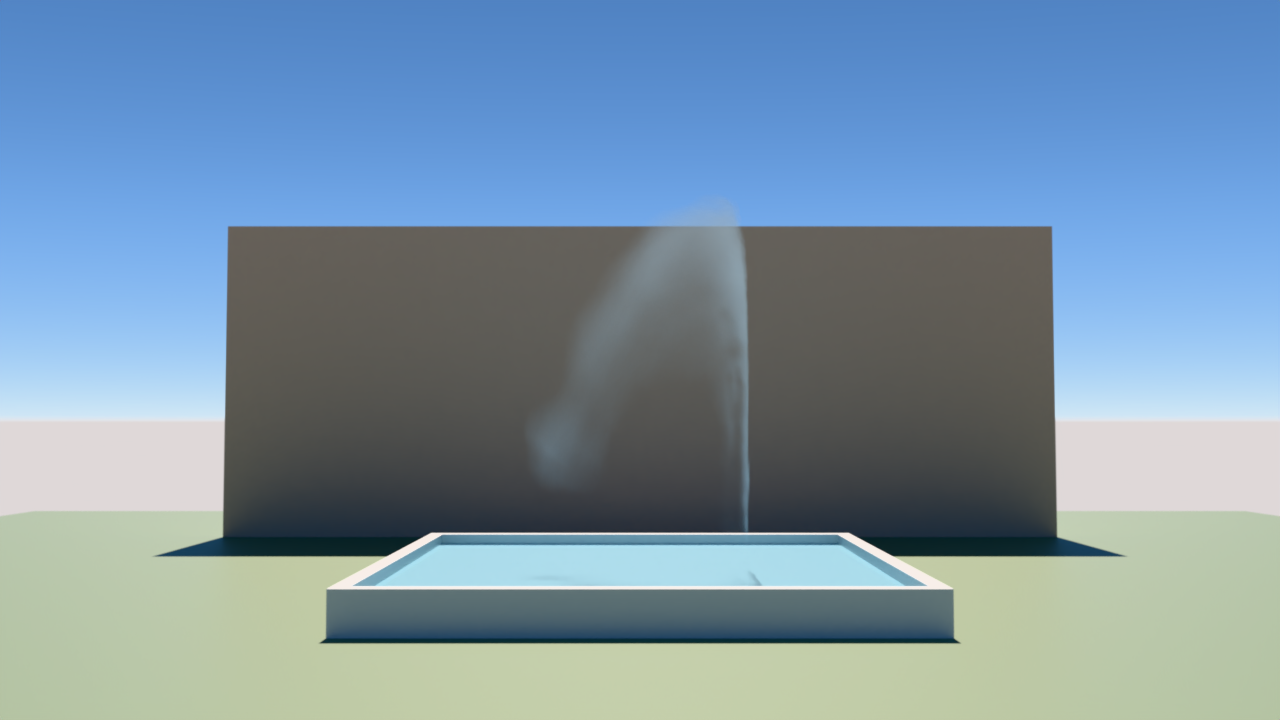
                                          fountain_render.png

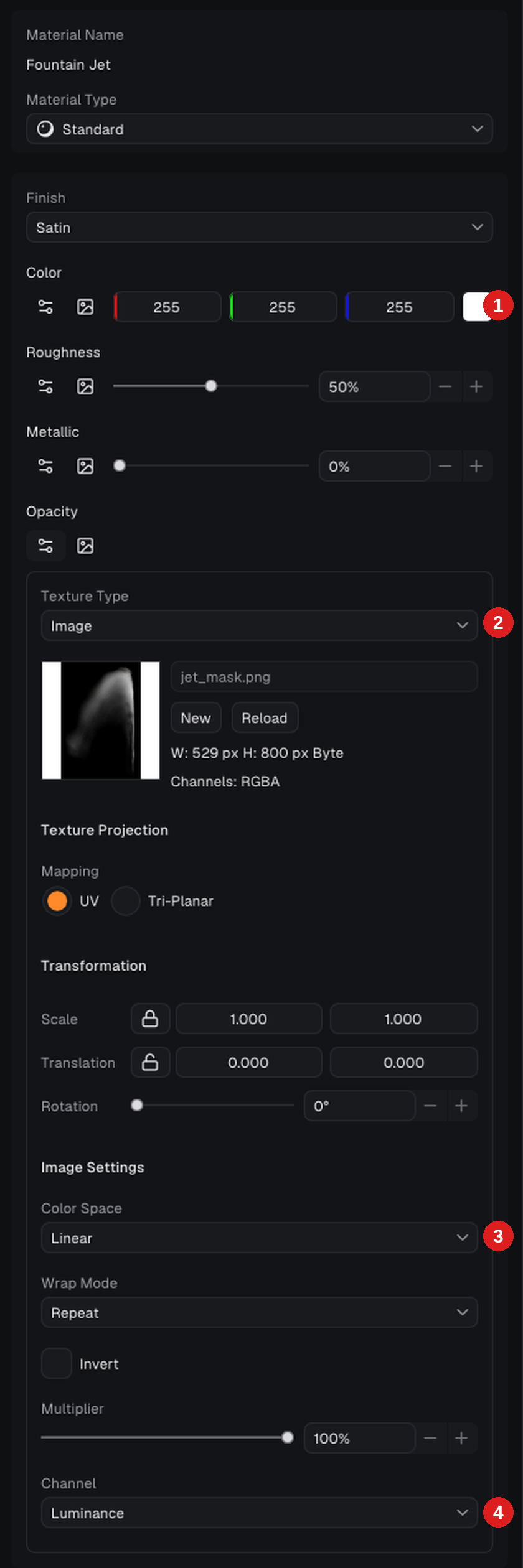
                                          Select the material of the jet in the material editor and set:

                                          1. Color: white, or a very light blue.
                                          2. Opacity: click the image icon, choose Image as the Texture Type and load the black and white image.
                                          3. Color Space: Linear.
                                          4. Channel: Luminance.

                                          Black is then fully transparent, white is solid and the greys in between are partly see-through, so the soft edges of the spray stay soft. You don't need the colored PNG for this.
                                          fountain_settings.png

                                          The fluid presets (milk, carbonated, and aerated water) are noted as a feature request. For the bubbler jets (2), the same trick with a picture of foamy water works best for now.

                                          Cheers,
                                          Thomas

                                          I'm the developer of Rayscaper: https://rayscaper.com/ - Fast and easy rendering for SketchUp.

                                          A 1 Reply Last reply
                                          Reply Quote 0
                                          • A
                                            Alattab @pixelcruncher
                                            last edited by

                                            @pixelcruncher
                                            With all due respect, Mr. Thomas, I appreciate your valuable efforts. I will keep you updated on any insights or feedback I come across as they arise. My only suggestion is to establish a set schedule for releasing new versions; this would allow us to thoroughly explore previous versions and, in turn, provide more comprehensive feedback.

                                            pixelcruncherP 1 Reply Last reply
                                            Reply Quote 0

                                            Hello! It looks like you're interested in this conversation, but you don't have an account yet.

                                            Getting fed up of having to scroll through the same posts each visit? When you register for an account, you'll always come back to exactly where you were before, and choose to be notified of new replies (either via email, or push notification). You'll also be able to save bookmarks and upvote posts to show your appreciation to other community members.

                                            With your input, this post could be even better 💗

                                            Register Login
                                            • 1
                                            • 2
                                            • 33
                                            • 34
                                            • 35
                                            • 36
                                            • 37
                                            • 38
                                            • 39
                                            • 40
                                            • 35 / 40
                                            • First post
                                              Last post
                                            Buy SketchPlus
                                            Buy SUbD
                                            Buy WrapR
                                            Buy eBook
                                            Buy Modelur
                                            Buy Vertex Tools
                                            Buy SketchCuisine
                                            Buy FormFonts

                                            Advertisement