Rayscaper New Releases
-
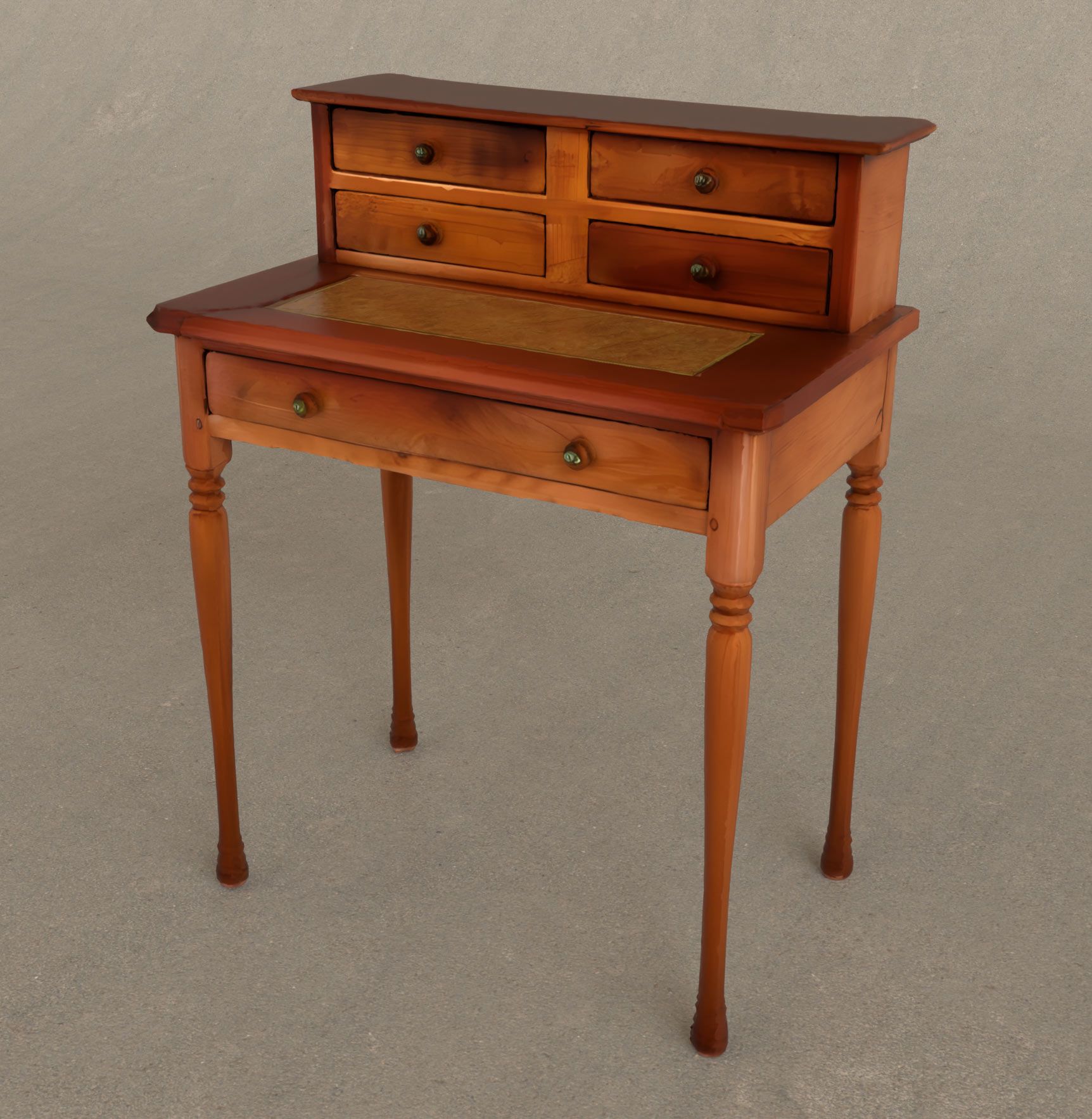
thanks, great !
-
@pixelcruncher thank you so much!
-
I had to uninstall the extension store and I got an error message from Rayscaper.
And now I'm having the same problem again after reinstalling Rayscaper 9.77.
-
@Krass Can you post the error message from Rayscaper? Looking into this, sorry about that.
-
No, I did get a window indicating a problem loading the Rayscaper extension, but it hasn't reappeared.
Krass
-
However, I had installed it correctly without any problems before.
-
I have a question regarding material libraries. I have prepared a Carpaint collection and am also going to prepare a water material pack. The question is that if the same name materials will be replaced? i.e. a car paint in my library is called 001red. Imagine there is another material in the Sketchup model by user and called 001red, I am wondering if RS will replace the same name with my material? To be more precise: How do material libraries in RS work?
-
I must admit to being more than a little biased here, Majid's contributions in this department have been extremely helpful. Personally, I would like to see all the finish items from twilight included in Rayscaper, they would much improve the goal of simplicity with speed.
Absentia mortis praesentiam vitae probat, vita autem est argumentum constantiae.
-
@majid said in Rayscaper New Releases:
I have a question regarding material libraries. I have prepared a Carpaint collection and am also going to prepare a water material pack. The question is that if the same name materials will be replaced? i.e. a car paint in my library is called 001red. Imagine there is another material in the Sketchup model by user and called 001red, I am wondering if RS will replace the same name with my material? To be more precise: How do material libraries in RS work?
Nice, users will love those material packs!
No — naming your materials isn’t essential for Rayscaper. Names only matter for finding them in the material library. They are necessary for the user, not for the software.
Behind the scenes, Rayscaper stores each material as a material pack, which is simply a ZIP file. This pack includes a human-readable configuration file and all the texture images used by the material. I will add this format to my documentation. I hope that, in the age of AI vibe-coding, people can build tools to convert materials from other renderers into Rayscaper, and vice versa.
When you apply a material in Rayscaper to any material in your SketchUp model, Rayscaper doesn’t replace the SketchUp material. Instead, it configures the existing SketchUp material using the parameters it reads from the material pack.
You can view the material packs that Rayscaper saves in the
%%AppData%%/AssetCachefolder (the exact path escapes me, I'm not at my PC right now).Cheers,
Thomas -
I think my friend @majid requested that before as well
 He has a keen eye for this.
Given that the Twilight website is offline, is there a source where I can find these things? Maybe I can actually provide tools for using Twilight materials in Rayscaper, or at least the same templates.
-
@Krass I will have a look soon to help you out here, stay tuned.
-
are you both talking about Twilight render ?
-
@Krass said in Rayscaper New Releases:
are you both talking about Twilight render ?
Yes, @majid and @Mike-Amos are talking about Twilight render. But I'm not too familiar with it myself. But it seems to have a couple of dearly missed features?
-
Twilight render was great, but Rayscaper is marvelous compared to it.
I can give you the last version of Twilight -
Yep, trying to get to grips with the actual process or getting them back into the wild.
-
I think I figured something out about the blue material bug, I can make it happen in any file if I use the "edit texture in external editor" in the sketchup material editor, It shows up as blue.
(Another thing I noticed, is that If i edit a material in sketchup, it does not automatically update the material in rayscaper.) -
I think I figured something out about the blue material bug, I can make it happen in any file if I use the "edit texture in external editor" in the sketchup material editor, It shows up as blue.
That's a good clue. I think it also has to do with SketchUp's colorized textures only. But I haven't looked at that part in depth.
(Another thing I noticed, is that If i edit a material in sketchup, it does not automatically update the material in rayscaper.)
This is by design; You should press the reload button in the Rayscaper material editor. I could add an "auto-sync" option to do this automatically. Rayscaper has a richer set of material capabilities than SketchUp. I assumed you want to edit the materials in Rayscaper, and that it would be counterproductive to override them from SketchUp repeatedly. Maybe that's not a reasonable workflow assumption.
-
okay, thanks (a feature request- maybe you can make a seperate reload button for the regular texture, for the metalness, roughness, and normal maps, so If I edit the regular texture in sketchup but want to keep the metallness changes in rayscaper I can do that.)
-
Hi,
when I display a SketchUp scene in RS, the hidden tags within that scene are still visible.And there's still this problem with certain groups containing other groups and components that don't display unless everything inside is exploded. And I can't always explode everything, as I have variations to make in subsequent steps.
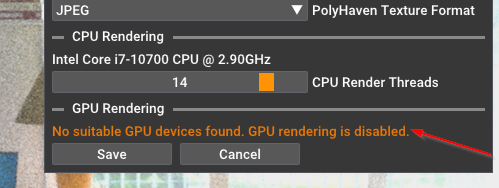
And i no graphic card
Krass
-
Hey, Rayscaper users!
Rayscaper 0.9.79 Beta is available. You can get it via:
- The SketchUcation store.
- Direct download: link.
I recommend upgrading to the latest version.
What Changed?
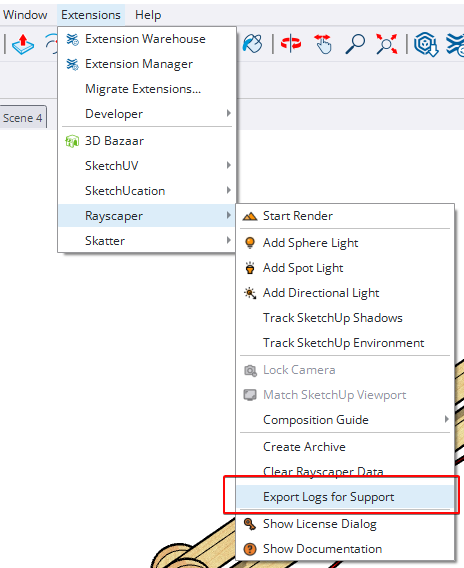
- Add log export feature. You can now export Rayscaper logs directly from the application menu, making it easier to
share diagnostic information when reporting issues. You can access it via the SketchUp menu bar:
Extensions > Rayscaper > Export Logs for Support. - Add a reset button for the post-processing tab. Quickly restore default post-processing settings with a single click.
Help Me Build the Community

If you like Rayscaper, please share your renders (final or work-in-progress, it doesn't matter)! This is motivating and helps me showcase its capabilities
to new users.Follow me on https://x.com/rayscaper3d.
Happy Rendering!
Thomas




Hello! It looks like you're interested in this conversation, but you don't have an account yet.
Getting fed up of having to scroll through the same posts each visit? When you register for an account, you'll always come back to exactly where you were before, and choose to be notified of new replies (either via email, or push notification). You'll also be able to save bookmarks and upvote posts to show your appreciation to other community members.
With your input, this post could be even better 💗
Register Login


Advertisement