[Plugin] LordOfTheToolbars - v2.9c - 20 Dec 24




-
@optimaforever said:
what if I FORCE UPDATE FredoLib?
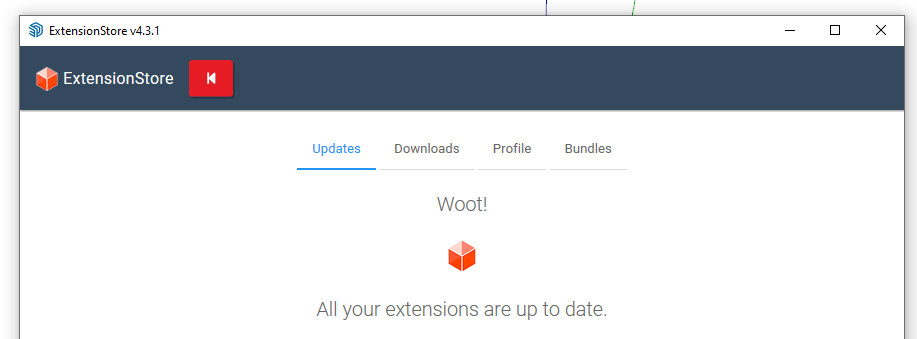
What if you open the Sketchucation Extension Store and click on the red button at the top? If there are extensions from Sketchucation that need updating, they would be shown there. I did that earlier today and it showed a couple of Fredo6's extensions needed updating. I clicked on Update All and now it loks like this:
-
@dave r said:
@optimaforever said:
what if I FORCE UPDATE FredoLib?
What if you open the Sketchucation Extension Store and click on the red button at the top? If there are extensions from Sketchucation that need updating, they would be shown there. I did that earlier today and it showed a couple of Fredo6's extensions needed updating. I clicked on Update All and now it loks like this:
[attachment=0:3nz2sv2x]<!-- ia0 -->Screenshot - 10_31_2023 , 8_16_36 AM.png<!-- ia0 -->[/attachment:3nz2sv2x]Precisely.
I did that and it updated several things, including LibFredo.
Therefore I wans't suspecting LibFredo but it was actually the problem. -
@optimaforever said:
I did that and it updated several things, including LibFredo.
I open that window two or three times a month to see if there are any extensions that need updating. I also have Fredo's Check Fredo6 Plugins for Update setup so that it offers to check every 15 days. As you know, Fredo is very active with making updates and bug fixes to his extensions so it's worth keeping your installation of them up to date. The last LibFredo6 update occurred in late August.
-
@dave r said:
@optimaforever said:
I did that and it updated several things, including LibFredo.
I open that window two or three times a month to see if there are any extensions that need updating. I also have Fredo's Check Fredo6 Plugins for Update setup so that it offers to check every 15 days. As you know, Fredo is very active with making updates and bug fixes to his extensions so it's worth keeping your installation of them up to date. The last LibFredo6 update occurred in late August.
Indeed, Fredo keeps updating his plugins but I must reckon his update check window bugs me more than I find it useful. I never push the check update button as I prefer SU or Extension store toolbar way of warning for updates. Now you make me realize, I wrote 999 days before the next update check
 Very nice idea, thanks Dave!
What I'd suggest to Fredo is to include LibFredo as a mandatory download when updating all his plugins. Anyway it takes an additional fraction of seconds these days with the download speeds. Anyway you need to reboot SU so... -
Unfortunately my menu bar is still completely gone

I think I'll finally upgrade from 21 to 23 or even 24 and port everything over, I think I'm going to be forced to eventually. I know I'm whining but it's such a pain to move over all your plugins and extensions. Such is life.
Anyhow, Thanks Fredo, you do amazing work. -
@studiospectre said:
Unfortunately my menu bar is still completely gone
Try restarting SketchUp.
@studiospectre said:
I think I'll finally upgrade from 21 to 23 or even 24
What version of SketchUp are you currently using? Your profile says 2015.
SketchUp 2024 isn't available yet.
@studiospectre said:
... but it's such a pain to move over all your plugins and extensions.
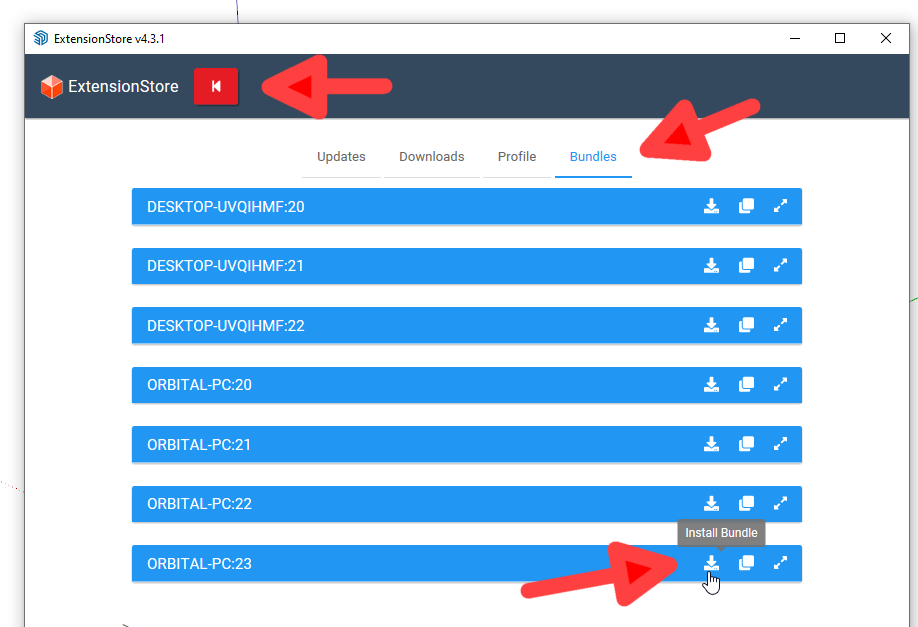
It shouldn't be. After installing the new version of SketchUp, install the current version of the Sketchucation Extension Store, sign in to Sketchucation with it, and install your extension bundle. That will install the most current versions of your extensions from Sketchucation.
-
@studiospectre said:
Unfortunately my menu bar is still completely gone
I think I'll finally upgrade from 21 to 23Naa.. It works fine in 2021 (tbh it works way better than it does on 2023 due to the 23 UI limitation).
You probably messed up the install.Make sure to download and install this:

LibFredo6 | SketchUcation
3D SketchUp Community for Design and Engineering Professionals.
(sketchucation.com)
THEN download and install this:

LordOfTheToolbars | SketchUcation
3D SketchUp Community for Design and Engineering Professionals.
(sketchucation.com)
Reboot Sketchup and you toolbars will show up again.
-
Personal Commands => menu still not working. New personal command creation is not available.
-
This tool looks awesome! However, I can't drag any icon to any palette. Can someone kindly enlighten me?
-
Thank you for the update. (probably there is a type mistake the release is until 31.10.2024 and not 31.10.2023..
Thank you again!
-
Everything is back to normal for me, thanks a lot Fredo !
-
@panixia said:
@studiospectre said:
Unfortunately my menu bar is still completely gone
I think I'll finally upgrade from 21 to 23Naa.. It works fine in 2021 (tbh it works way better than it does on 2023 due to the 23 UI limitation).
You probably messed up the install.Make sure to download and install this:
LibFredo6 | SketchUcation
3D SketchUp Community for Design and Engineering Professionals.
(sketchucation.com)
THEN download and install this:
LordOfTheToolbars | SketchUcation
3D SketchUp Community for Design and Engineering Professionals.
(sketchucation.com)
Reboot Sketchup and you toolbars will show up again.
My toolbars still aren't activated...
I tried to instell the extension in the second link you posted, but it still has an expiration date at 31.10.2023, is this the problem? -
Hello how are you.
My version of 2.5a expired.
When will there be a new update?
Or how can I solve this problem.
Thank you. -
Hi All,
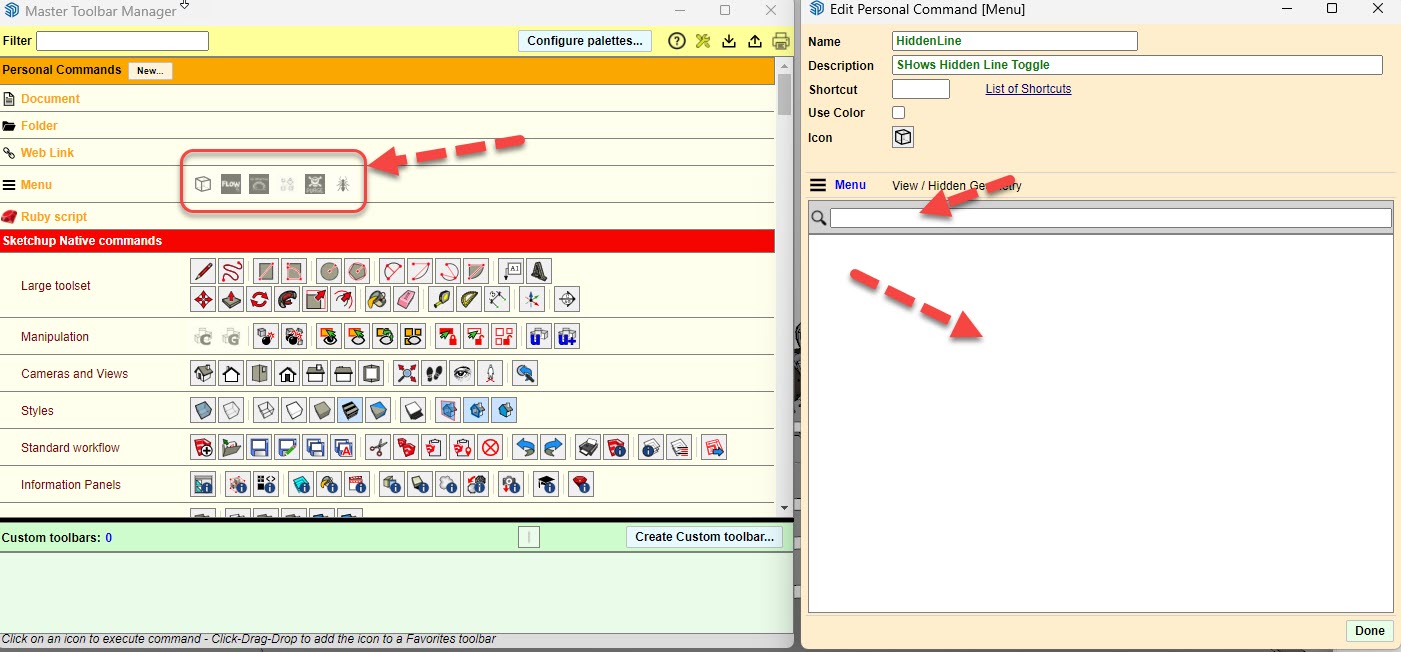
I have recently updated to SU2023 and this is my first time hearing about a UI limitation and it having a negative effect on LOTB.Since updating LOTB and SU, my personal buttons I've created, have stopped working. They are greyed out as if the extension/plugin is not associated with it.
When I 'edit' or create 'New' the next window that pops up should show all the extensions/plugins to associate with the icon/button - as you see, this is Blank. even when i search...
Is the UI limitation in SU2023 my problem ? or me doing it wrong? or something else, otherwise its working as expected.
Cheers in Advance
Chris
-
@cmeed said:
Is the UI limitation in SU2023 my problem ? or me doing it wrong? or something else, otherwise its working as expected.
SU2023 has introduced a radical change of the UI technical framework (migrating to Qt).
As a result, all features related to Menu commands and Clear Screen cannot work and are disabled in SU2023.
Sorry for that. I don't think there will be a solution for the future, as there is no longer any API to access menus and screen visual elements.
-
@cmeed said:
my personal buttons I've created, have stopped working
I posted a workaround a few pages before
https://sketchucation.com/forums/viewtopic.php?f=323&t=73776&start=270#p687744
-
@fredo6 said:
@cmeed said:
I don't think there will be a solution for the future, as there is no longer any API to access menus and screen visual elements.
This is indeed sad news! LOTB has speeded up my work. Its quick, easy and (was) very adapatble. I am still a keen fan and will be a tester if ever you need help with further developments.
Cheers for all your hard work
Chris -
@cmeed said:
@fredo6 said:
@cmeed said:
I don't think there will be a solution for the future, as there is no longer any API to access menus and screen visual elements.
This is indeed sad news! LOTB has speeded up my work. Its quick, easy and (was) very adapatble. I am still a keen fan and will be a tester if ever you need help with further developments.
Cheers for all your hard work
Chrismy 2 cents: Just make ONE large vertical (say 6X30) palette, add separators\line breaks where needed - so everything is in one place perfectly organized on the 2nd monitor. No need in extra menus or palettes (maybe except history). the rest is shortcuts and tool search
-
@panixia said:
@cmeed said:
my personal buttons I've created, have stopped working
I posted a workaround a few pages before
https://sketchucation.com/forums/viewtopic.php?f=323&t=73776&start=270#p687744
Hi. Personally, I still haven't figured out how to use your method ((( Will you have the opportunity to write instructions in more detail for noobs

-
Thanks for the 2cents. Sounds great - Not sure if it helps me with the buttons I’d created for plugins that don’t have buttons. But I do take you’re point about short cuts. I have so many though it’s hard to keep them in my head, especially the ‘used occasionally’ variety. Also I am running out of suitable key combinations ! Ha ha. I tend to keep everything on the left hand side of the keyboard for speed and one hand.






Advertisement