sketchucation logo sketchucation
    • 登入
    Oops, your profile's looking a bit empty! To help us tailor your experience, please fill in key details like your SketchUp version, skill level, operating system, and more. Update and save your info on your profile page today!
    🔌 Smart Spline | Fluid way to handle splines for furniture design and complex structures. Download

    [Plugin] Universal Importer - v1.2.6 - 30 July 2024

    已排程 已置頂 已鎖定 已移動 Plugins
    447 貼文 110 Posters 474.8k 瀏覽 110 Watching
    正在載入更多貼文
    • 從舊到新
    • 從新到舊
    • 最多點贊
    回覆
    • 在新貼文中回覆
    登入後回覆
    此主題已被刪除。只有擁有主題管理權限的使用者可以查看。
    • TIGT 離線
      TIG Moderator
      最後由 編輯

      If you use the PluginStore you login, find and download an RBZ archive for an extension.
      Typically you save it in your Downloads folder.
      In SketchUp use the Extension Manager and in its dialog use the Install... button, select the RBZ and it auto-installs for you...

      Alternatively, if you have the SketchUcation Toolset installed then you find an extension's entry in its ExtensionStore³ dialog [red toolbar button opens that] and click the button against its entry in the dialog to install it automatically... [essentially skipping the need to manually download an RBZ file...]

      TIG

      1 條回覆 最後回覆 回覆 引用 0
      • F 離線
        fabrice
        最後由 編輯

        Hello
        Thank you very much for this plugin.
        But I also have a problem with sketchup 2017, unable to import an obj, yet I have given the permissions.
        A miracle solution ?? 🤣


        import1.jpg


        import2.jpg

        1 條回覆 最後回覆 回覆 引用 0
        • TIGT 離線
          TIG Moderator
          最後由 編輯

          Find the folder C:/ProgramData/Universal Importer/
          Select its icon - select it and right-click > context-menu > Properties > Security > Edit...
          Ensure that every entry listed has FULL permissions set...
          OK to save changes.
          Thereafter you should be able to read/write/delete files in that subfolder or its tmp folder...

          TIG

          1 條回覆 最後回覆 回覆 引用 0
          • F 離線
            fabrice
            最後由 編輯

            great, it works THANKS !!!!

            1 條回覆 最後回覆 回覆 引用 0
            • E 離線
              ekoek0999
              最後由 編輯

              thanks a million!
              I was looking for a way to import pmx files into Sketchup, this one does the trick perfectly
              You are a lifesaver!!!

              1 條回覆 最後回覆 回覆 引用 0
              • M 離線
                Moltres Rider
                最後由 編輯

                Plugin DOES NOT work with Sketchup 2020 😞 STILL NO OPTION to import obj files and fbx files. In fact, it did not add a single new file format to import. Still just the usual default stuff 😞

                1 條回覆 最後回覆 回覆 引用 0
                • Rich O BrienR 離線
                  Rich O Brien Moderator
                  最後由 編輯

                  https://i.imgur.com/pTrxpA5.png

                  Download the free D'oh Book for SketchUp 📖

                  1 條回覆 最後回覆 回覆 引用 0
                  • J 離線
                    JArtz
                    最後由 編輯

                    Thank you so much. I certainly appreciate this.

                    I been wanting to use it to import my SVG vector creations - a text I made - (of which I have to export via FBX online), and it has helped a bit, only thing - I have to manually put in the lines of the text.

                    Still like the plugin.

                    Many thanks.

                    1 條回覆 最後回覆 回覆 引用 0
                    • C 離線
                      chalupsky
                      最後由 編輯

                      So grateful to find this!!

                      Two questions, importing a .x model from Vehicle Simulator. The model materials do not map to the model (I choose cancel each time), and the scale of the model. I'm asked the maximum height, (1800mm), I cancel, and the model comes in at about 1/18 the size.

                      Any assistance appreciated!

                      1 條回覆 最後回覆 回覆 引用 0
                      • E 離線
                        Ekon
                        最後由 編輯

                        @samuel_t said:

                        @paladinjnr said:

                        [...]

                        Hi Here is a link to the model as requested.

                        Filehorst wurde abgeschaltet! Filehorst has been shut down!

                        favicon

                        (filehorst.de)

                        [...]

                        Your model had absolute paths to textures. That's not supported by plugin.
                        I converted absolute paths to relative paths with a text editor. It's OK now:

                        [attachment=1:ewxujz9c]<!-- ia1 -->Fixed DirectX Model.png<!-- ia1 -->[/attachment:ewxujz9c]

                        Fixed model is attached below:

                        [attachment=0:ewxujz9c]<!-- ia0 -->fixed-directx-model.zip<!-- ia0 -->[/attachment:ewxujz9c]

                        Hello Samuel, first off, thank you so much for this superb tool!! I have the same issue about textures. I just installed the plugin and imported and FBX file but it comes in without textures. My base model comes from Revit. How can I re-path the textures so that the plugin car read / load them into Sketchup? (Text editor, ok, but how?)

                        1 條回覆 最後回覆 回覆 引用 0
                        • samuel_tS 離線
                          samuel_t
                          最後由 編輯

                          @chalupsky said:

                          So grateful to find this!!

                          😉

                          @chalupsky said:

                          The model materials do not map to the model [...]

                          You don't select materials? Can you elaborate on this?

                          @chalupsky said:

                          I'm asked the maximum height, (1800mm), I cancel, and the model comes in at about 1/18 the size.

                          It's a known issue: sizing doesn't work for all models 😕

                          1 條回覆 最後回覆 回覆 引用 0
                          • samuel_tS 離線
                            samuel_t
                            最後由 編輯

                            @ekon said:

                            Hello Samuel, first off, thank you so much for this superb tool!!

                            Hello Ekon! With pleasure 😉

                            @samuel_t said:

                            [...] Your model had absolute paths to textures. That's not supported by plugin.
                            I converted absolute paths to relative paths with a text editor. It's OK now [...]

                            @ekon said:

                            I have the same issue about textures. I just installed the plugin and imported and FBX file but it comes in without textures. My base model comes from Revit. How can I re-path the textures so that the plugin can read / load them into Sketchup? (Text editor, ok, but how?)

                            First, if you can, upgrade Revit to latest version to increase chances to have more export options.
                            Then, tell me what export options Revit offers to you. Some .x (DirectX) and .fbx files are text-encoded. All .mtl files are plain text. Open exported file with a text editor to see if textures paths are editable.

                            1 條回覆 最後回覆 回覆 引用 0
                            • P 離線
                              p11205
                              最後由 編輯

                              Hi Samuel,
                              Thanks for making this plug in available. I am having the same issue as others when importing a model. The model itself imports fine but without textures. I have read your response to others about the absolute path but am not sure what to do. I have attached the model file below if you have a chance to take a look and advise. thanks

                              the file is here:
                              https://www.dropbox.com/t/cwZOdCb32a1BrBoZ

                              1 條回覆 最後回覆 回覆 引用 0
                              • samuel_tS 離線
                                samuel_t
                                最後由 編輯

                                @p11205 said:

                                Hi Samuel,
                                Thanks for making this plug in available.

                                Hi Paul 😄

                                @p11205 said:

                                I am having the same issue as others when importing a model. The model itself imports fine but without textures. I have read your response to others about the absolute path but am not sure what to do. I have attached the model file below if you have a chance to take a look and advise. thanks

                                the file is here:
                                https://www.dropbox.com/t/cwZOdCb32a1BrBoZ

                                I successfully imported model as is on SketchUp 2017. See screenshot below. I followed these steps:

                                1. Extract whole archive.
                                2. Import "12044_w_Rae_30k.OBJ" file.
                                3. Cancel when plugin asks about "DefaultMaterial".
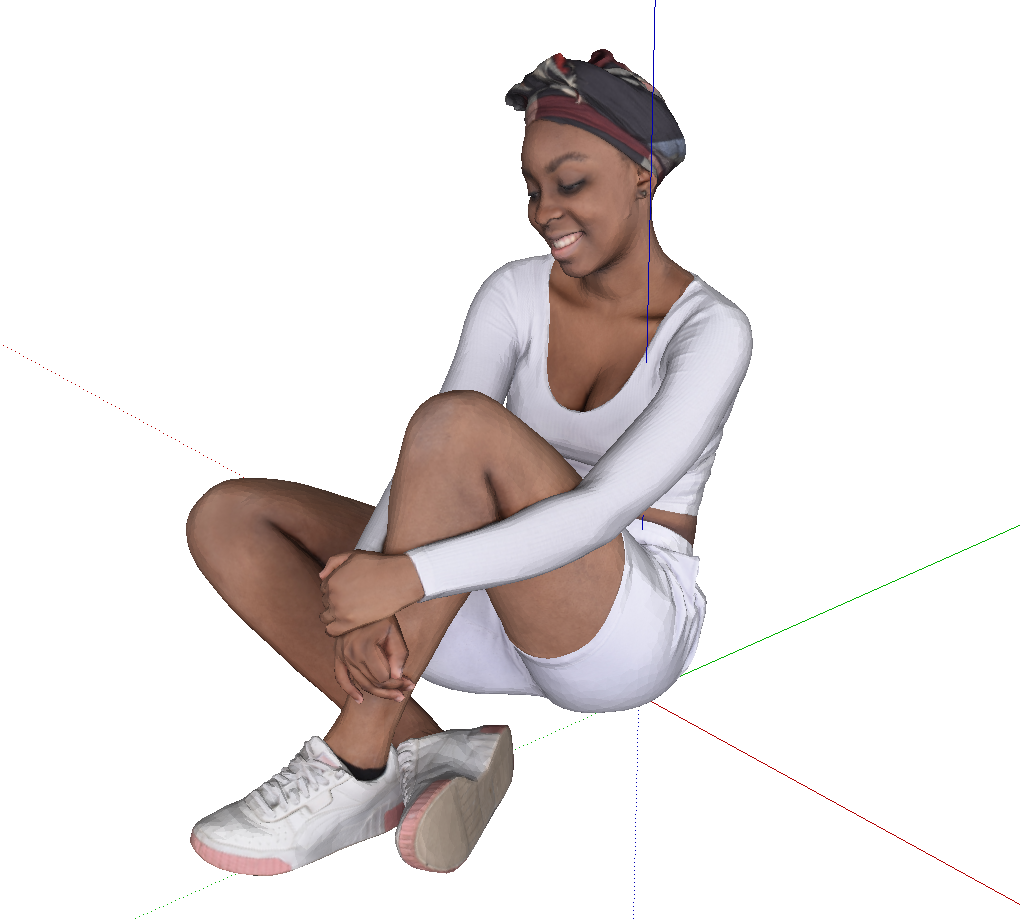
                                12044_w_Rae_30k.png

                                1 條回覆 最後回覆 回覆 引用 0
                                • P 離線
                                  p11205
                                  最後由 編輯

                                  Hi Samuel,
                                  Thanks for responding so quickly. I tried again as you outlined.after importing the 12044_w_Rae_30k.OBJ file I never got the message regarding default material from the plug in. The model again came in with no textures. Not sure how to proceed.
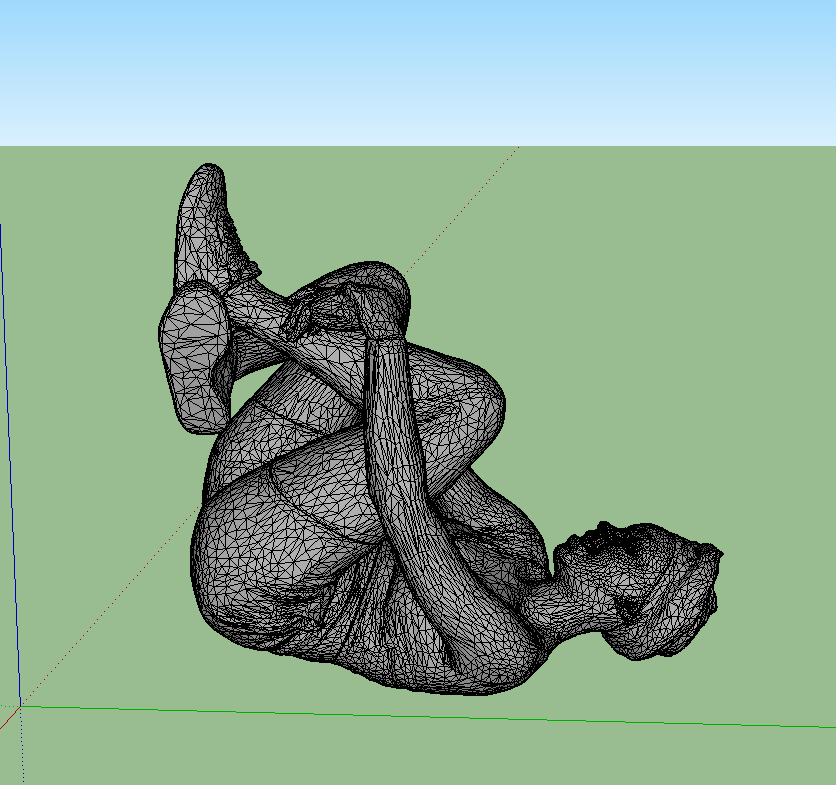

                                  these are screenshots of what I did

                                  1 條回覆 最後回覆 回覆 引用 0
                                  • MikeG73M 離線
                                    MikeG73
                                    最後由 編輯

                                    Hello Sam,

                                    Is there a recommended way to get the most out of your model as you reduce its poly count, I mean I keep getting wild responses. I have tried 20/50/70% etc... and my models look like crap up, not at all like your deer example. 😲

                                    Should I break down the model into groups and reduce each group at the same settings??? I hope I am making sense!

                                    Cheers Sam. 😄

                                    1 條回覆 最後回覆 回覆 引用 0
                                    • samuel_tS 離線
                                      samuel_t
                                      最後由 編輯

                                      @Paul To import this ".OBJ" file with its textures, extract also "12044_w_Rae_30k.mtl" file and "tex" subfolder. Keep folder hierarchy.

                                      @Mike Hello 😄 I suppose groups don't matter. I don't know if there's an optimal percent... Poly reduction algorithm is in MeshLab hands.

                                      1 條回覆 最後回覆 回覆 引用 0
                                      • M 離線
                                        Moltres Rider
                                        最後由 編輯

                                        This plugin claims that it works with FBX files not it does not! 😞

                                        Every time I try to import an FBX file I ALWAYS get the following error message:
                                        Universal importer failed to load file FBX-DOM unsupported format.

                                        Obviously this plugin CANNOT handle FBX files

                                        This shocks me that Google has no information on that specific error message since it is EVERY FBX file that results in this error

                                        this plugin obviously does NOT support FBX files 😞 Please either fix this or remove the option to import FBX files because as it currently stands, Universal Importer does NOT support FBX files

                                        1 條回覆 最後回覆 回覆 引用 0
                                        • Rich O BrienR 離線
                                          Rich O Brien Moderator
                                          最後由 編輯

                                          FBX file format can be Binary or ASCII. If your file is in a format the importer doesn't support it will throw errors.

                                          Similar to how an FBX export from SketchUp cannot be opened in Blender.

                                          Also older FBX versions can throw up some issues as well.

                                          Many things can lead to an error. It may not be Samuel's lovely extension that is at fault.

                                          Download the free D'oh Book for SketchUp 📖

                                          1 條回覆 最後回覆 回覆 引用 0
                                          • samuel_tS 離線
                                            samuel_t
                                            最後由 編輯

                                            @Moltres Rider

                                            Obviously, you have NO LUCK 😮 Universal Importer plugin works in most cases with recent versions of FBX format. Try to upgrade model with Autodesk FBX Converter then try again to import model...


                                            1 條回覆 最後回覆 回覆 引用 0
                                            • 1
                                            • 2
                                            • 19
                                            • 20
                                            • 21
                                            • 22
                                            • 23
                                            • 23 / 23
                                            • 第一個貼文
                                              最後的貼文
                                            Buy SketchPlus
                                            Buy SUbD
                                            Buy WrapR
                                            Buy eBook
                                            Buy Modelur
                                            Buy Vertex Tools
                                            Buy SketchCuisine
                                            Buy FormFonts

                                            Advertisement