sketchucation logo sketchucation
    • 登入
    Oops, your profile's looking a bit empty! To help us tailor your experience, please fill in key details like your SketchUp version, skill level, operating system, and more. Update and save your info on your profile page today!
    🔌 Easy Offset | Offset selected faces in SketchUp in positive and negative offsets. Download

    Flowify problems

    已排程 已置頂 已鎖定 已移動 Extensions & Applications Discussions
    extensions
    70 貼文 25 Posters 39.9k 瀏覽 25 Watching
    正在載入更多貼文
    • 從舊到新
    • 從新到舊
    • 最多點贊
    回覆
    • 在新貼文中回覆
    登入後回覆
    此主題已被刪除。只有擁有主題管理權限的使用者可以查看。
    • pilouP 離線
      pilou
      最後由 編輯

      Better to cover the maximum range! 😉
      It's the same time to make (1 second) 🤓

      Frenchy Pilou
      Is beautiful that please without concept!
      My Little site :)

      1 條回覆 最後回覆 回覆 引用 0
      • jujuJ 離線
        juju
        最後由 編輯

        @pilou said:

        Better to cover the maximum range! 😉
        It's the same time to make (1 second) 🤓

        Yeah, but if you ask something that seems outrageous then people will be less likely to follow the advise.

        Save the Earth, it's the only planet with chocolate.

        1 條回覆 最後回覆 回覆 引用 0
        • pilouP 離線
          pilou
          最後由 編輯

          They want advices so they will make all for that! 😄

          Frenchy Pilou
          Is beautiful that please without concept!
          My Little site :)

          1 條回覆 最後回覆 回覆 引用 0
          • A 離線
            aamirkaiser
            最後由 編輯

            @pilou said:

            But before use the Curviloft by Fredo , use other Tools by Fredo for transform your 4 curves of the ending surface! (Bezier tools (?) )

            Don't touch the 2 verticals (depend of number of segments you want but as it's vertical straight lines...)
            Transform Curve in PolyLine (Right Click / ) (upper & bottom curves)
            then Segmentor of Polyline (upper & bottom curves)
            (for example take 10 segments for upper and bottom Polylines - you can move some points if you want)

            then you will obtain that in Curviloft (third icon "Skin contour" )

            [attachment=3:26d9tppe]<!-- ia3 -->segmentor.jpg<!-- ia3 -->[/attachment:26d9tppe]

            You will obtain a better result! ☀ ( 1 minute & 30 seconds) (start surface (C) can be the exact straight rectangle projection of the start volumes (E))

            [attachment=2:26d9tppe]<!-- ia2 -->yours better.jpg<!-- ia2 -->[/attachment:26d9tppe]

            Ps You must also clean your original object! 😄

            [attachment=1:26d9tppe]<!-- ia1 -->clean_line.jpg<!-- ia1 -->[/attachment:26d9tppe]

            I have a problem utilizing the flowify plugin, and I think its the density that's the problem, can you tell me a work around for that issue... I have used flowify successfully multiple times so I know the selection or the group isn't the problem... It would be wonderful If you could help me out...


            Please help

            1 條回覆 最後回覆 回覆 引用 0
            • A 離線
              akash das
              最後由 編輯

              hi i am really struggling to use flowify, inspite of making sure of all the group of

              1. curve surface
              2. flat surface (a rectangle)
              3. connecting lines
              4. the module with raw surface

              i have checked all the perimeters it doesn't work with all kind of models i feel.

              kindly help

              1 條回覆 最後回覆 回覆 引用 0
              • cottyC 離線
                cotty
                最後由 編輯

                You can upload an example model so that we can have a deeper look...

                my SketchUp gallery

                1 條回覆 最後回覆 回覆 引用 0
                • Y 離線
                  yashmishra
                  最後由 編輯

                  a request for help : have been trying to get this right for past 2 hours everytime a different error is coming up. please could anyone help me out.


                  help me flowify

                  1 條回覆 最後回覆 回覆 引用 0
                  • cottyC 離線
                    cotty
                    最後由 編輯

                    You need a quad mesh to be able to map it to the flat surface... but there will more work to do to make it a "nice" solid...
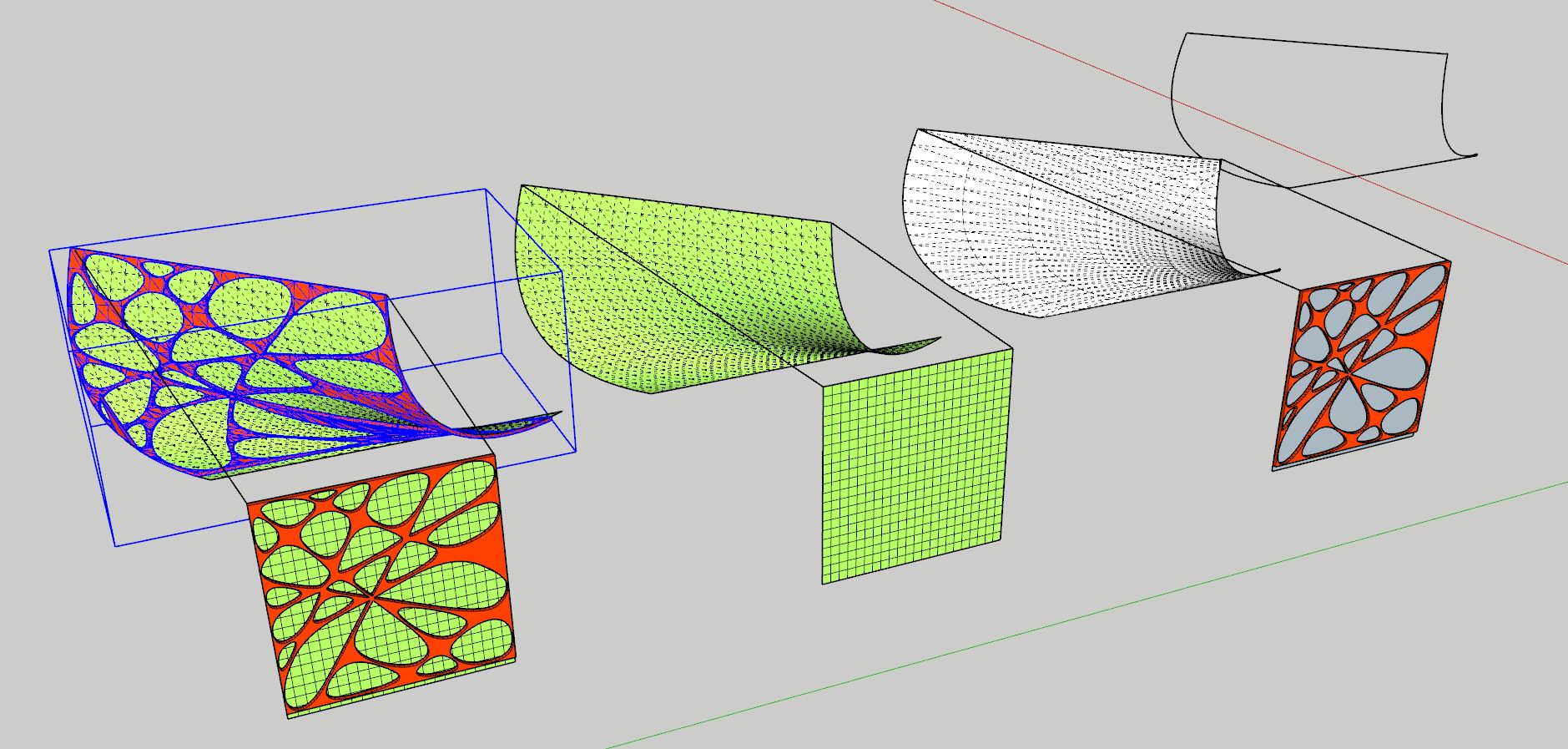
                    untitled2.JPG


                    Untitled2.skp

                    my SketchUp gallery

                    1 條回覆 最後回覆 回覆 引用 0
                    • Y 離線
                      yashmishra
                      最後由 編輯

                      @cotty said:

                      You need a quad mesh to be able to map it to the flat surface... but there will more work to do to make it a "nice" solid...

                      [attachment=1:1tgwd386]<!-- ia1 -->untitled2.JPG<!-- ia1 -->[/attachment:1tgwd386]

                      could you please explain in detail why a quad mesh is required?

                      1 條回覆 最後回覆 回覆 引用 0
                      • cottyC 離線
                        cotty
                        最後由 編輯

                        @yashmishra said:

                        could you please explain in detail why a quad mesh is required?

                        Because it's a requirement in the second sentence of the plugin description?

                        "The extension bends geometry along quad surfaces."

                        my SketchUp gallery

                        1 條回覆 最後回覆 回覆 引用 0
                        • pilouP 離線
                          pilou
                          最後由 Rich O Brien 編輯

                          @unknownuser said:

                          could you please explain in detail why a quad mesh is required?

                          You can't project something with Flowify on a complete sphere 3D!

                          But yes if you make a little triming somewhere like that!
                          You have now a "quad" surface! 😉
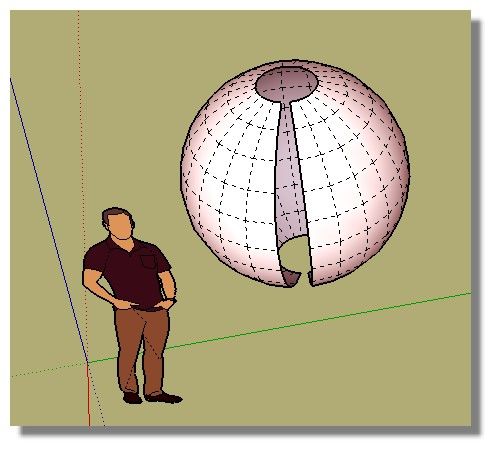
                          quasi-sphere.jpg

                          Frenchy Pilou
                          Is beautiful that please without concept!
                          My Little site :)

                          1 條回覆 最後回覆 回覆 引用 0
                          • P 離線
                            paritoshaj
                            最後由 編輯

                            Idk why its not working but its not working, i have finals tomorrow need to do roof trusses please help


                            source geometry must contain raw faces.skp

                            1 條回覆 最後回覆 回覆 引用 0
                            • cottyC 離線
                              cotty
                              最後由 編輯

                              @paritoshaj said:

                              Idk why its not working but its not working, i have finals tomorrow need to do roof trusses please help

                              After exploding the pyramids in the source geometry group, it's working...
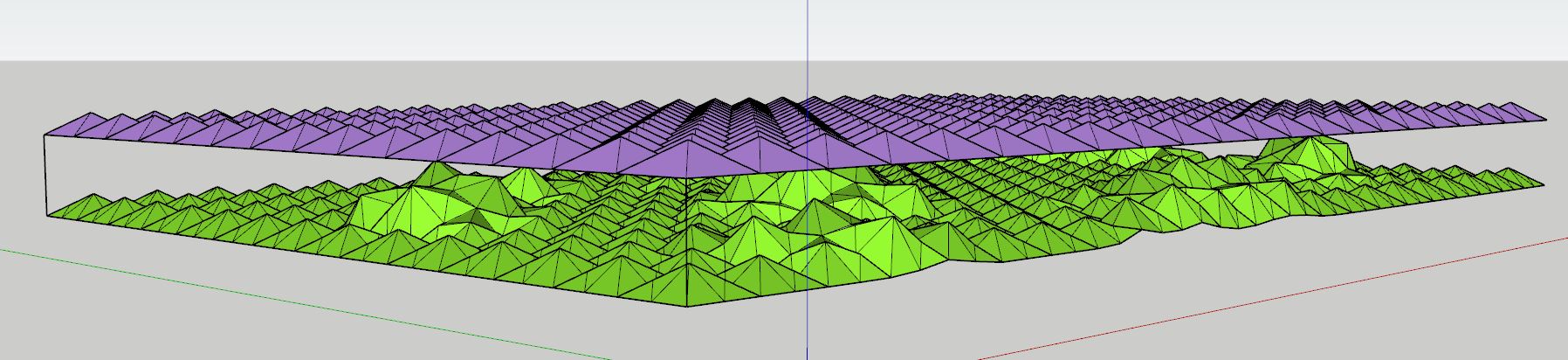
                              pyramids.JPG

                              my SketchUp gallery

                              1 條回覆 最後回覆 回覆 引用 0
                              • A 離線
                                arkiduckling
                                最後由 編輯

                                hi I have an issue also with flowify, it is not working and I dont know if it is because of my mistakes or plugin's issue because when i checked my extension manager, there's a text in the flowify says UNSIGNED. May I know what does it mean and if that was the reason why i couldnt work with flowify 😄)) thank you

                                1 條回覆 最後回覆 回覆 引用 0
                                • cottyC 離線
                                  cotty
                                  最後由 編輯

                                  It's not the reason 😉
                                  you can upload the model and we will have a look at it...

                                  my SketchUp gallery

                                  1 條回覆 最後回覆 回覆 引用 0
                                  • Dave RD 離線
                                    Dave R
                                    最後由 編輯

                                    @arkiduckling said:

                                    ...there's a text in the flowify says UNSIGNED.

                                    Signed or unsigned has no bearing on the functionality of the extension.

                                    As Cotty, suggests, share your .skp file so we can see what you are working with and what steps you need to take to sort it out.

                                    Etaoin Shrdlu

                                    %

                                    (THERE'S NO PLACE LIKE)

                                    G28 X0.0 Y0.0 Z0.0

                                    M30

                                    %

                                    1 條回覆 最後回覆 回覆 引用 0
                                    • R 離線
                                      ravindulk94
                                      最後由 編輯

                                      @optimaforever said:

                                      I have a strange behaviour too...
                                      The flowify command generates a huge model, with an array of sectional faces.

                                      [attachment=2:17yhee20]<!-- ia2 -->flowify A.JPG<!-- ia2 -->[/attachment:17yhee20]
                                      First the source material: Group 1 composed of A target surface / B source surface / C projection vectors and D the source mesh (exploded)

                                      [attachment=1:17yhee20]<!-- ia1 -->flowify B.JPG<!-- ia1 -->[/attachment:17yhee20]
                                      The resulting groups from the flowify command

                                      I succeeded all the other meshes with the same method but here I've got a bug...

                                      [attachment=0:17yhee20]<!-- ia0 -->flowify bug.skp<!-- ia0 -->[/attachment:17yhee20]

                                      did you find any solution for this error?

                                      1 條回覆 最後回覆 回覆 引用 0
                                      • Dave RD 離線
                                        Dave R
                                        最後由 編輯

                                        @ravindulk94 said:

                                        did you find any solution for this error?

                                        What version of SketchUp are you using? Your profile says 2021 Free/Make which is impossible.

                                        Etaoin Shrdlu

                                        %

                                        (THERE'S NO PLACE LIKE)

                                        G28 X0.0 Y0.0 Z0.0

                                        M30

                                        %

                                        1 條回覆 最後回覆 回覆 引用 0
                                        • M 離線
                                          MrKrabs
                                          最後由 編輯

                                          Hi,

                                          can someone help me out with flowify? I can´t get it to work properly

                                          Thanks!


                                          Flowify_problem.skp

                                          1 條回覆 最後回覆 回覆 引用 0
                                          • cottyC 離線
                                            cotty
                                            最後由 編輯

                                            @mrkrabs said:

                                            can someone help me out with flowify? I can´t get it to work properly

                                            From the instructions...
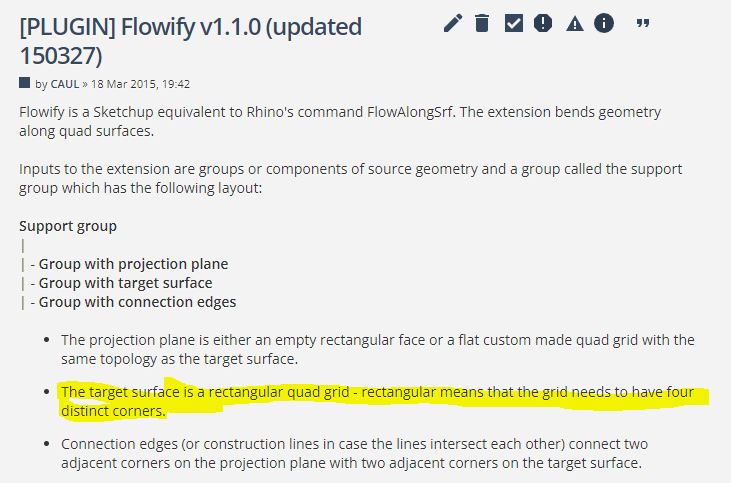
                                            flowify_target.JPG

                                            Your target surface isn't suitable.

                                            my SketchUp gallery

                                            1 條回覆 最後回覆 回覆 引用 0
                                            • 1
                                            • 2
                                            • 3
                                            • 4
                                            • 2 / 4
                                            • 第一個貼文
                                              最後的貼文
                                            Buy SketchPlus
                                            Buy SUbD
                                            Buy WrapR
                                            Buy eBook
                                            Buy Modelur
                                            Buy Vertex Tools
                                            Buy SketchCuisine
                                            Buy FormFonts

                                            Advertisement

