sketchucation logo sketchucation
    • 登入
    Oops, your profile's looking a bit empty! To help us tailor your experience, please fill in key details like your SketchUp version, skill level, operating system, and more. Update and save your info on your profile page today!
    🔌 Easy Offset | Offset selected faces in SketchUp in positive and negative offsets. Download

    Flowify problems

    已排程 已置頂 已鎖定 已移動 Extensions & Applications Discussions
    extensions
    70 貼文 25 Posters 39.9k 瀏覽 25 Watching
    正在載入更多貼文
    • 從舊到新
    • 從新到舊
    • 最多點贊
    回覆
    • 在新貼文中回覆
    登入後回覆
    此主題已被刪除。只有擁有主題管理權限的使用者可以查看。
    • panixiaP 離線
      panixia
      最後由 編輯

      @Rich The text in your example is pure genius 🤣

      1 條回覆 最後回覆 回覆 引用 0
      • pilouP 離線
        pilou
        最後由 編輯

        I believe it's not 4 + X = group
        but 4 + X = Select! 😉
        Then call Flowify! 🤓

        Frenchy Pilou
        Is beautiful that please without concept!
        My Little site :)

        1 條回覆 最後回覆 回覆 引用 0
        • R 離線
          RemsRivera123 Newcomers
          最後由 編輯

          Hey everyone!

          I’m having some trouble with Flowify and hoping someone can help me out. I’ve set up my groups as follows:

          A – The curve

          B – The length of the curve

          C – The pathway

          D – The group I want to flow

          But when I select everything and try to apply Flowify, it doesn’t actually "flow"—instead, it just resizes to a much bigger scale. Any idea what might be going wrong?

          Thanks in advance! Appreciate any help!

          PS. I attached a video showing my problem

          SKP Flowify Problem.mp4

          1 條回覆 最後回覆 回覆 引用 1
          • Rich O BrienR 離線
            Rich O Brien Moderator
            最後由 編輯

            Can you share a file? @RemsRivera123

            It’s quicker solve if there’s something to see

            Download the free D'oh Book for SketchUp 📖

            R 1 條回覆 最後回覆 回覆 引用 0
            • R 離線
              RemsRivera123 Newcomers @Rich O Brien
              最後由 編輯

              @Rich-O-Brien Hello there, here's the skp file
              Staircase 01.skp

              1 條回覆 最後回覆 回覆 引用 1
              • R 離線
                RemsRivera123 Newcomers
                最後由 編輯

                IDK if my reply is pushing through @Rich-O-Brien but I did send a reply with the skp file attached

                1 條回覆 最後回覆 回覆 引用 1
                • Rich O BrienR 離線
                  Rich O Brien Moderator
                  最後由 編輯

                  Posts are approved to prevent spam. You should be good to bypass approval now.

                  I'll take a look at the file and see if something stands out

                  Download the free D'oh Book for SketchUp 📖

                  1 條回覆 最後回覆 回覆 引用 0
                  • R 離線
                    RemsRivera123 Newcomers
                    最後由 編輯

                    Got it, thanks! I appreciate you checking the file. Let me know if you spot anything that needs adjustment.

                    1 條回覆 最後回覆 回覆 引用 0
                    • Rich O BrienR 離線
                      Rich O Brien Moderator
                      最後由 編輯

                      I think your are expecting too much of both Flowify and SketchUp trying to conform the railing.

                      Also bad geometry IN equals bad geometry OUT.

                      Your grid is 1500+ entities and the railing is 210k+ entities.

                      If you look at any YouTube video related to Flowify you will see at least some continuity in term of topology and entity count.

                      This, for me, is possible but in terms of having workable file at the end a texture would be 100x the better approach.

                      You are asking a plugin to take 210k+ entities and conform them to a curved surface containing ~400 facets.

                      The end result is even more entities.

                      Maybe breaking down your rail into manageable pieces would be better. But asking it to do the whole thing is a bit much.

                      Download the free D'oh Book for SketchUp 📖

                      1 條回覆 最後回覆 回覆 引用 0
                      • R 離線
                        RemsRivera123 Newcomers
                        最後由 編輯

                        Thanks for the detailed explanation! That makes a lot of sense. I didn’t realize the entity count was that high, and I see now how that would be a problem. I’ll try breaking the railing into smaller sections to see if that helps. If that still doesn’t work efficiently, I might explore using a texture instead. Appreciate the insight!

                        1 條回覆 最後回覆 回覆 引用 1
                        • Rich O BrienR 離線
                          Rich O Brien Moderator
                          最後由 編輯

                          image.png

                          You can see if I just run it on these pieces I get a result.

                          Download the free D'oh Book for SketchUp 📖

                          1 條回覆 最後回覆 回覆 引用 0
                          • R 離線
                            RemsRivera123 Newcomers
                            最後由 編輯

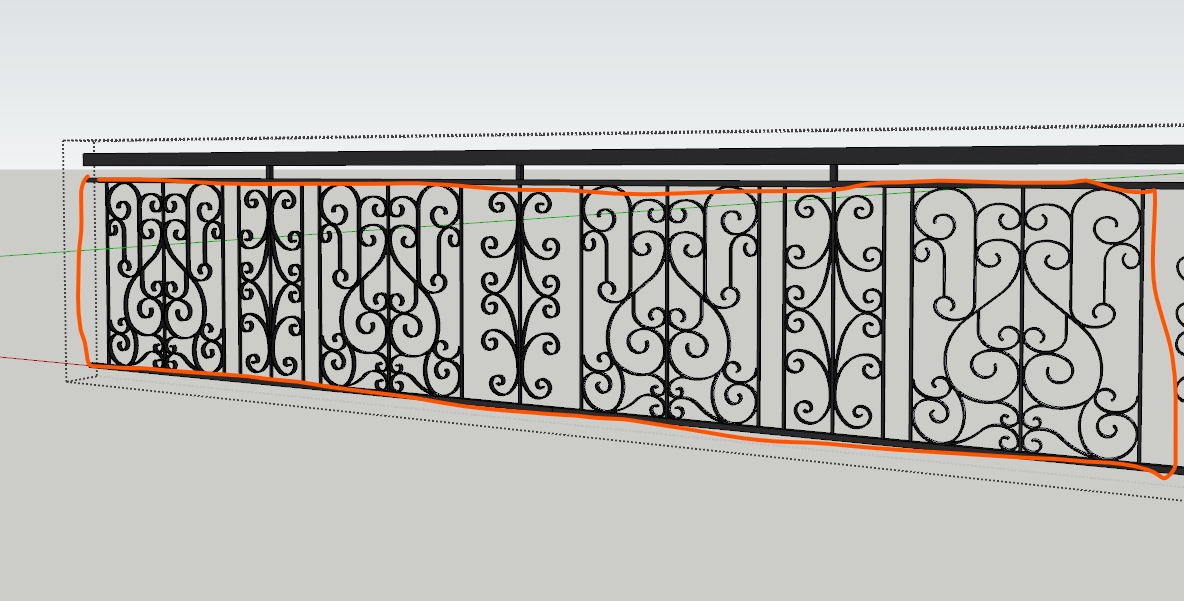
                            I tried something similar and got the same result. However, my main challenge is the ornament on the handrail. Should I also break it down into sections? If so, do you have any tips on how to do it?
                            Screenshot 2025-01-31 215540.png

                            1 條回覆 最後回覆 回覆 引用 0
                            • Rich O BrienR 離線
                              Rich O Brien Moderator
                              最後由 編輯

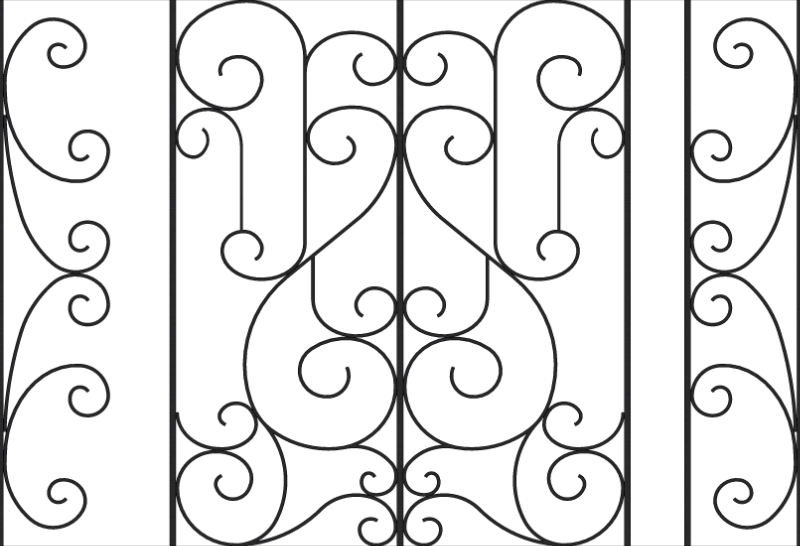
                              Use a texture....save yourself a headache
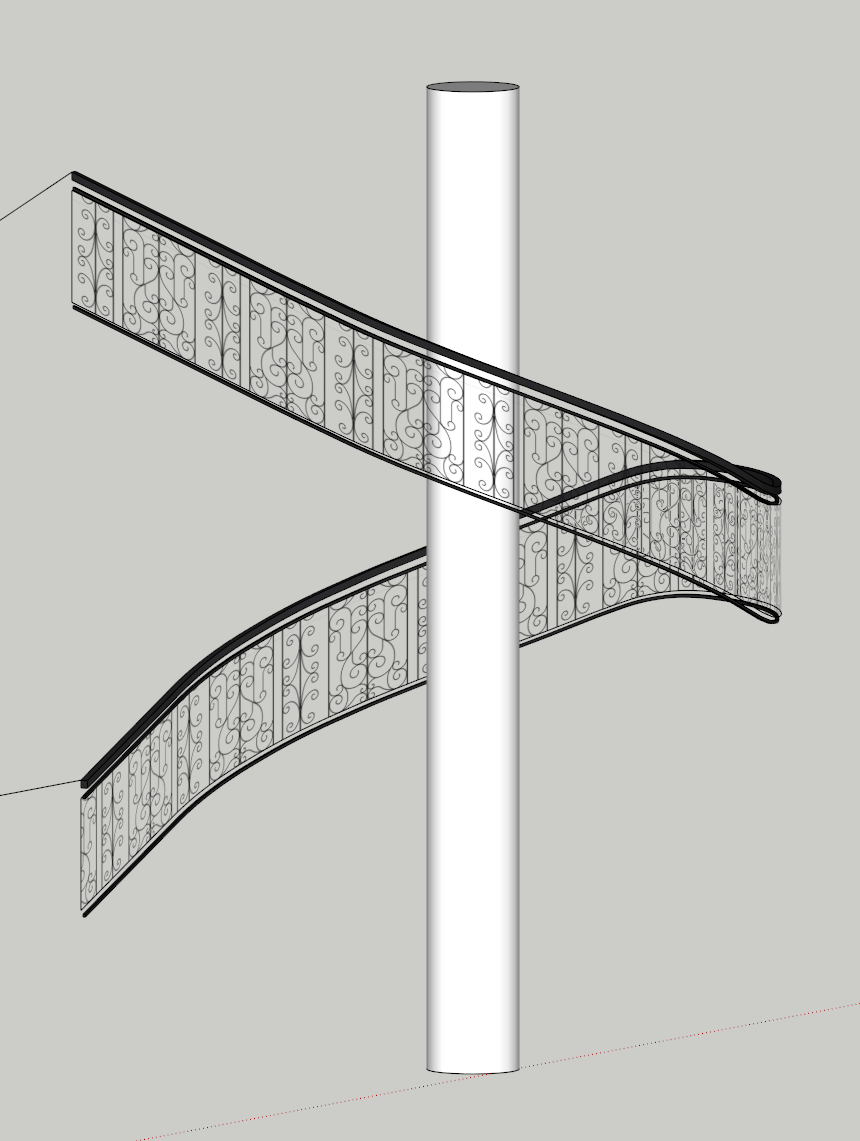
                              image.png

                              Here's a texture for you....

                              staircase-01.png

                              Download the free D'oh Book for SketchUp 📖

                              1 條回覆 最後回覆 回覆 引用 0
                              • R 離線
                                RemsRivera123 Newcomers
                                最後由 編輯

                                Aww, I was hoping to use a texture to save time, but I’m required to model the ornament at work—haha! Still, I really appreciate your help!

                                1 條回覆 最後回覆 回覆 引用 0
                                • Rich O BrienR 離線
                                  Rich O Brien Moderator
                                  最後由 編輯

                                  Its the irregularity of the surface along with the high density of the ornamental portion where you are bottlenecking things.

                                  There's no magic bullet here except a more diligent approach.

                                  Stock up on the paracetamol!

                                  Download the free D'oh Book for SketchUp 📖

                                  1 條回覆 最後回覆 回覆 引用 0
                                  • R 離線
                                    RemsRivera123 Newcomers
                                    最後由 編輯

                                    Yeah, I figured as much! The dense details are really slowing things down. Guess I’ll just have to power through it—no shortcuts this time! Haha. Thanks for the advice… and I’ll definitely keep that paracetamol handy!😆

                                    1 條回覆 最後回覆 回覆 引用 1
                                    • 1
                                    • 2
                                    • 3
                                    • 4
                                    • 3 / 4
                                    • 第一個貼文
                                      最後的貼文
                                    Buy SketchPlus
                                    Buy SUbD
                                    Buy WrapR
                                    Buy eBook
                                    Buy Modelur
                                    Buy Vertex Tools
                                    Buy SketchCuisine
                                    Buy FormFonts

                                    Advertisement