sketchucation logo sketchucation
    • 登入
    Oops, your profile's looking a bit empty! To help us tailor your experience, please fill in key details like your SketchUp version, skill level, operating system, and more. Update and save your info on your profile page today!
    🔌 Smart Spline | Fluid way to handle splines for furniture design and complex structures. Download

    [Plugin] ClothWorks v1.8.0 - 28 Apr 2024

    已排程 已置頂 已鎖定 已移動 Plugins
    699 貼文 161 Posters 669.6k 瀏覽 161 Watching
    正在載入更多貼文
    • 從舊到新
    • 從新到舊
    • 最多點贊
    回覆
    • 在新貼文中回覆
    登入後回覆
    此主題已被刪除。只有擁有主題管理權限的使用者可以查看。
    • A 離線
      Anton_S
      最後由 編輯

      @vimsy said:

      Kindly update its version!! I use sketchup 2016 and i installed this plugin but it is not working, there is no simulation happening.

      Hello,

      Which operating version are you using with SU2016, e.g. Windows XP/7 or OS X? This will help me verify if this is working.

      Thanks,
      Anton

      1 條回覆 最後回覆 回覆 引用 0
      • Gus RG 離線
        Gus R
        最後由 編輯

        Works great on SketchUp Pro 2021 and updated on SketchUp 2017. Not getting those weird temp files anymore in 2017. Trying to practice with the gift wrap tutorial from above which is probably a skip and a jump on the learning curve.

        www.instagram.com/gusrobatto/

        www.facebook.com/gusrobatto

        www.flickr.com/photos/gusrobatto

        1 條回覆 最後回覆 回覆 引用 0
        • M 離線
          mbieniu1
          最後由 編輯

          Hello,

          I bought full version of your plugin, but I have 2 issue:

          • it doesnt save presets after I close SU and open again (I use "save us" button)
          • it is very slow when I tries to copy your setup from youtube (on empty file and no plugins workin, it has 5 FPS for 100 frames, than 1-2 FPS)

          My Sketchup v. 2021 Clothwork v.1.7.4c, comp spec Windows 10 pro, AMD Ryzen 9 3950X, 64 GB Ram, NVIDIA GeForce RTX 2080 Ti

          Do you have any tips to fix it? Or should I change Sketchup preferences?

          @anton_s said:

          Hello everyone,

          ClothWorks is updated: https://sketchucation.com/plugin/2053-clothworks

          Happy holidays!

          Best regards,
          Anton

          1 條回覆 最後回覆 回覆 引用 0
          • TIGT 離線
            TIG Moderator
            最後由 編輯

            Anton will reply...

            BUT when you installed SketchUp was it done correctly ?
            You can always try the following method - it will do no harm to your current setup [except for perhaps fixing preferences !]

            Whilst you are logged into Windows using your normal user-account.
            Ensure SketchUp is closed.
            Find the SketchUp installer's exe file - usually in your Downloads folder...
            Select its icon and right-click > context-menu > "Run as administrator"
            When prompted choose "Repair" [for a brand-new installation it's "Install"]
            When it completes restart SketchUp and see if your tools' preferences/setting are now saved across sessions...

            TIG

            1 條回覆 最後回覆 回覆 引用 0
            • M 離線
              mbieniu1
              最後由 編輯

              thank you for replay

              before you post your comment I try not to use Polish font in name and that solve the problem

              I did as you mentioned and make Repair Sketchup as Admin but FPS it still poor
              Maybe it is like Cyberpunk2077, with Intel it works better than AMD 😉

              1 條回覆 最後回覆 回覆 引用 0
              • A 離線
                Anton_S
                最後由 編輯

                @mbieniu1 said:

                thank you for replay

                before you post your comment I try not to use Polish font in name and that solve the problem

                I did as you mentioned and make Repair Sketchup as Admin but FPS it still poor
                Maybe it is like Cyberpunk2077, with Intel it works better than AMD 😉

                ClothWorks simulation is purely based on CPU power for now.

                Unless already, can you ensure that Multi-threaded and Draw with OpenGL API is enabled? This should help with simulation performance.

                1 條回覆 最後回覆 回覆 引用 0
                • M 離線
                  mbieniu1
                  最後由 編輯

                  Hello,

                  I ensure that Multi-threaded and Draw with OpenGL API is enabled. Would it help if I record performance?

                  Does cloth presets are store in skp files? Should one preset should be enable in all files?

                  Happy 2021 year 😄

                  1 條回覆 最後回覆 回覆 引用 0
                  • A 離線
                    Anton_S
                    最後由 編輯

                    @mbieniu1 said:

                    Hello,

                    I ensure that Multi-threaded and Draw with OpenGL API is enabled. Would it help if I record performance?

                    Does cloth presets are store in skp files? Should one preset should be enable in all files?

                    Happy 2021 year 😄

                    I that case, it looks like that's the best performance you can get from ClothWorks. Although it might help if you send a screenshot (a private message also works).

                    A few presets are persisted globally (like multithreaded and drawing with opengl), while other options, like simulation wind and cloth material properties, are local to the file.

                    1 條回覆 最後回覆 回覆 引用 0
                    • K 離線
                      knryder
                      最後由 編輯

                      sketchup 2021, clothworks v1.7.4

                      i tried to do the cussion example from your manual. after pushing play sketchup closes.

                      tips ?

                      1 條回覆 最後回覆 回覆 引用 0
                      • A 離線
                        Anton_S
                        最後由 編輯

                        @knryder said:

                        sketchup 2021, clothworks v1.7.4

                        i tried to do the cussion example from your manual. after pushing play sketchup closes.

                        tips ?

                        Does sketchup close for any model you press play with or with this particular one? Try opening a blank Sketchup template model and try pressing play.

                        1 條回覆 最後回覆 回覆 引用 0
                        • kaluK 離線
                          kalu
                          最後由 編輯

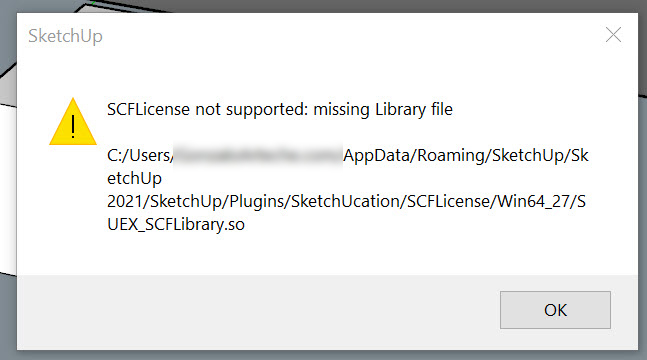
                          Hi Do this program works on Sketchup 2021? I purchase the license in 2020 and I try to use it in 2021 and the plugin is not work They ask me for the license. Any Ideas?

                          Thanks for any Feedback. I got this message:

                          2021-01-09_11-45-01.jpg

                          THE ONLY DIFFERENCE BETWEEN FICTION AND REALITY IS WHEN FICTION HAS TO BE CREDIBLE

                          1 條回覆 最後回覆 回覆 引用 0
                          • fredo6F 離線
                            fredo6
                            最後由 編輯

                            @kalu

                            Please install the latest version of the Sketchucation toolset, v4.0b.

                            It is required for compatibility with SU2021.

                            Thanks to advise if this works.

                            Fredo

                            1 條回覆 最後回覆 回覆 引用 0
                            • J 離線
                              JohnWoodGarden
                              最後由 編輯

                              ClothWorks. Can anyone help please.
                              All has been working perfectly. Now it suddenly won't let me 'apply a quadrilateral grid' to the cloth. I click and get the message: Purge the selected grid of coplaner geometry. But there is no complex geometry! It's just a simple rectangle just like I've always done before! I've unistalled and re-installed. I've switched off and switched on again. Still nothing. Still the same block.
                              I'm writing as someone who's used Clothworks a lot and never had the slightest problem with it.
                              Any help v greatly received. Thank you

                              John

                              1 條回覆 最後回覆 回覆 引用 0
                              • A 離線
                                Anton_S
                                最後由 編輯

                                @johnwoodgarden said:

                                ClothWorks. Can anyone help please.
                                All has been working perfectly. Now it suddenly won't let me 'apply a quadrilateral grid' to the cloth. I click and get the message: Purge the selected grid of coplaner geometry. But there is no complex geometry! It's just a simple rectangle just like I've always done before! I've unistalled and re-installed. I've switched off and switched on again. Still nothing. Still the same block.
                                I'm writing as someone who's used Clothworks a lot and never had the slightest problem with it.
                                Any help v greatly received. Thank you

                                John

                                The message you're getting is "Purge the selected cloth of coplanar geometry, prior to generating a grid?" -- a question. You should click YES and it will proceed with generating the grid, and will do so successfully if your geometry turns out to be a quadrilateral or two triangles linked by an edge.

                                1 條回覆 最後回覆 回覆 引用 0
                                • J 離線
                                  JohnWoodGarden
                                  最後由 編輯

                                  Hi Anton, please help
                                  Your brilliant plugin has always worked perfectly for me. Suddenly the usual menu has disappeared! Instead of 'make cloth' and 'make collider' I get a long menu I've not seen before which reads:
                                  Toggle UI
                                  Toggle Play
                                  Stop
                                  Reset
                                  Toggle Drape
                                  Add pin

                                  etc etc and so it goes on, but nowhere can I make a cloth or make a collider, so suddenly I can't use your plugin at all!

                                  How do I get it working properly again?! I've tried uninstalling and reinstalling, but still exactly the same problem persists!

                                  Do hope you can help me to sort this out

                                  Thank you
                                  Best regards
                                  John

                                  1 條回覆 最後回覆 回覆 引用 0
                                  • Dave RD 離線
                                    Dave R
                                    最後由 編輯

                                    @johnwoodgarden said:

                                    Suddenly the usual menu has disappeared! Instead of 'make cloth' and 'make collider'...

                                    Is this what you see when you context (right) click on a group or component?
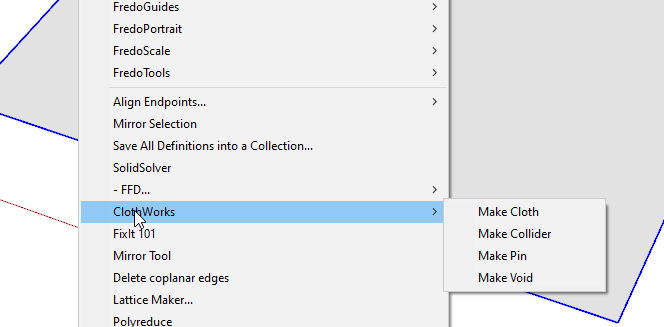
                                    Screenshot - 3_11_2021 , 1_11_30 PM.png

                                    I only see the menu items you list under Extensions>Clothworks

                                    Are you still using SketchUp 2013? If not, please update your profile.

                                    Etaoin Shrdlu

                                    %

                                    (THERE'S NO PLACE LIKE)

                                    G28 X0.0 Y0.0 Z0.0

                                    M30

                                    %

                                    1 條回覆 最後回覆 回覆 引用 0
                                    • A 離線
                                      Anton_S
                                      最後由 編輯

                                      @johnwoodgarden said:

                                      Hi Anton, please help
                                      Your brilliant plugin has always worked perfectly for me. Suddenly the usual menu has disappeared! Instead of 'make cloth' and 'make collider' I get a long menu I've not seen before which reads:
                                      Toggle UI
                                      Toggle Play
                                      Stop
                                      Reset
                                      Toggle Drape
                                      Add pin

                                      etc etc and so it goes on, but nowhere can I make a cloth or make a collider, so suddenly I can't use your plugin at all!

                                      How do I get it working properly again?! I've tried uninstalling and reinstalling, but still exactly the same problem persists!

                                      Do hope you can help me to sort this out

                                      Thank you
                                      Best regards
                                      John

                                      Hey, the Make Cloth and rgw Make Collider options are only available in the Context Menu. You can access the context menu by right-clicking on a top-level group or a component.

                                      1 條回覆 最後回覆 回覆 引用 0
                                      • S 離線
                                        svanholm
                                        最後由 編輯

                                        Will Sketchup 2021-compability come soon?

                                        1 條回覆 最後回覆 回覆 引用 0
                                        • Dave RD 離線
                                          Dave R
                                          最後由 編輯

                                          @svanholm said:

                                          Will Sketchup 2021-compability come soon?

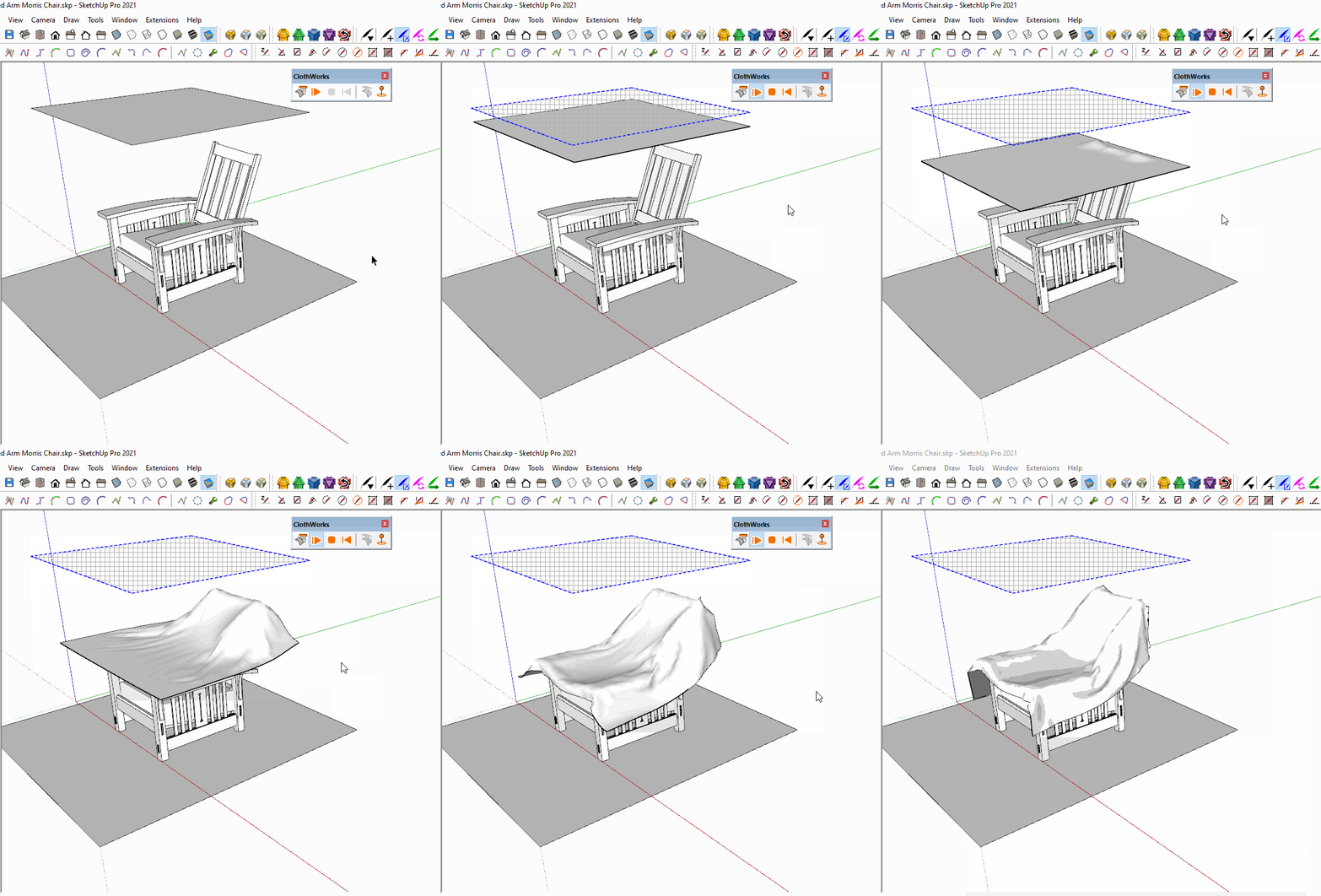
                                          It's already compatible with SketchUp 2021.

                                          Click on the picture.
                                          cm.gif

                                          Etaoin Shrdlu

                                          %

                                          (THERE'S NO PLACE LIKE)

                                          G28 X0.0 Y0.0 Z0.0

                                          M30

                                          %

                                          1 條回覆 最後回覆 回覆 引用 0
                                          • G 離線
                                            gaelhietin
                                            最後由 編輯

                                            Dear Anton,

                                            Thanks a lot for your Cloth Work Plugin.
                                            It's great and I'm having lot of fun with it.
                                            One question :
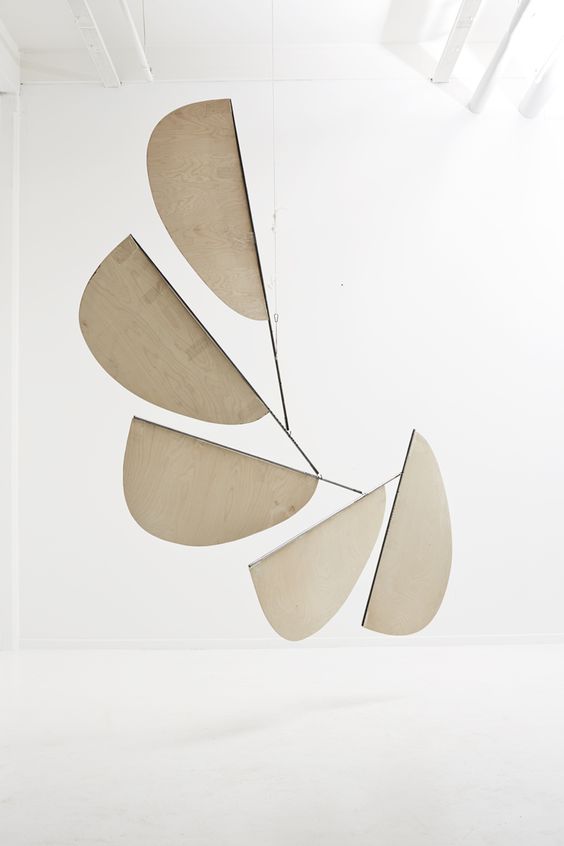
                                            Do you think Cloth Work will be the good plugin to simulate this pendant mobile ?
                                            Please see attached picture.
                                            If yes, could you give me the main keys to do it ?
                                            Best
                                            Gaël

                                            1d7e37f51be1f4bafe7ab3e917cbcf96.jpg

                                            1 條回覆 最後回覆 回覆 引用 0
                                            • 1
                                            • 2
                                            • 3
                                            • 4
                                            • 5
                                            • 6
                                            • 7
                                            • 8
                                            • 34
                                            • 35
                                            • 6 / 35
                                            • 第一個貼文
                                              最後的貼文
                                            Buy SketchPlus
                                            Buy SUbD
                                            Buy WrapR
                                            Buy eBook
                                            Buy Modelur
                                            Buy Vertex Tools
                                            Buy SketchCuisine
                                            Buy FormFonts

                                            Advertisement