sketchucation logo sketchucation
    • 登入
    Oops, your profile's looking a bit empty! To help us tailor your experience, please fill in key details like your SketchUp version, skill level, operating system, and more. Update and save your info on your profile page today!
    🔌 Smart Spline | Fluid way to handle splines for furniture design and complex structures. Download

    Vertex tools

    已排程 已置頂 已鎖定 已移動 Plugins
    53 貼文 16 Posters 9.6k 瀏覽 16 Watching
    正在載入更多貼文
    • 從舊到新
    • 從新到舊
    • 最多點贊
    回覆
    • 在新貼文中回覆
    登入後回覆
    此主題已被刪除。只有擁有主題管理權限的使用者可以查看。
    • BoxB 離線
      Box
      最後由 編輯

      Not that I care, but in the interests of accuracy, you need two tools to beat Rich's one.

      1 條回覆 最後回覆 回覆 引用 0
      • Rich O BrienR 線上
        Rich O Brien Moderator
        最後由 編輯

        Fo shizzle...

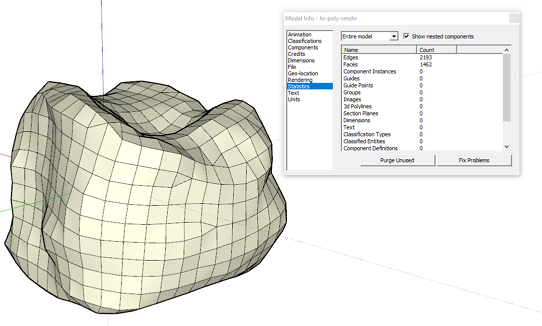
        There's also something brewing called ReMeshR....
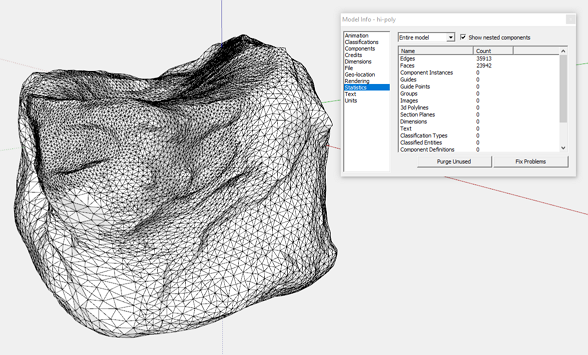
        Image 1.png

        Image 2.png

        😛

        Download the free D'oh Book for SketchUp 📖

        1 條回覆 最後回覆 回覆 引用 0
        • JQLJ 離線
          JQL
          最後由 編輯

          @box said:

          Not that I care, but in the interests of accuracy, you need two tools to beat Rich's one.

          Let's say I can't decide which one of them is the best, I'd put them both above everything else basically. 😄

          www.casca.pt
          Visit us on facebook!

          1 條回覆 最後回覆 回覆 引用 0
          • JQLJ 離線
            JQL
            最後由 編輯

            @rich o brien said:

            Fo shizzle...

            There's also something brewing called ReMeshR....
            [attachment=1:jarulvus]<!-- ia1 -->Image 1.png<!-- ia1 -->[/attachment:jarulvus]

            [attachment=0:jarulvus]<!-- ia0 -->Image 2.png<!-- ia0 -->[/attachment:jarulvus]

            😛

            So there is sound on that silence!

            www.casca.pt
            Visit us on facebook!

            1 條回覆 最後回覆 回覆 引用 0
            • Rich O BrienR 線上
              Rich O Brien Moderator
              最後由 編輯

              Quietly moving forward.

              WrapR goes to open beta soon.

              Download the free D'oh Book for SketchUp 📖

              1 條回覆 最後回覆 回覆 引用 0
              • JQLJ 離線
                JQL
                最後由 編輯

                The sooner it's on sale the sooner I'll get to brag again about multigroups, atlases and UDIM... 😄

                www.casca.pt
                Visit us on facebook!

                1 條回覆 最後回覆 回覆 引用 0
                • O 離線
                  optimaforever
                  最後由 編輯

                  Can't wait for VT2 and SubD2 (opensubdivs?)

                  1 條回覆 最後回覆 回覆 引用 0
                  • thomthomT 離線
                    thomthom
                    最後由 編輯

                    @optimaforever said:

                    SubD2 (opensubdivs?)

                    Indeed 😄

                    Thomas Thomassen — SketchUp Monkey & Coding addict
                    List of my plugins and link to the CookieWare fund

                    1 條回覆 最後回覆 回覆 引用 0
                    • Collage ArchitectureC 離線
                      Collage Architecture
                      最後由 編輯

                      @rich o brien said:

                      Quietly moving forward.

                      WrapR goes to open beta soon.

                      Can we play with Wrap-R before Christmas?

                      I love Sketchup

                      1 條回覆 最後回覆 回覆 引用 0
                      • pbacotP 離線
                        pbacot
                        最後由 編輯

                        @jql said:

                        @rich o brien said:

                        That said VT is still the best extension ever made 👍 IMHO

                        That is clearly wrong, the best one is Edgetools2 splitface tool along with SectionCutFace

                        Why two together?

                        Split face tool should be in SU. Actually maybe both these should have been. However SFT does fail to take sometimes with inferences. Need multiples and repeat action to be overwhelmingly great... Should be standalone tool.

                        MacOSX MojaveSketchUp Pro v19 Twilight v2 Thea v3 PowerCADD

                        1 條回覆 最後回覆 回覆 引用 0
                        • S 離線
                          sofie9536
                          最後由 編輯

                          I change my computer, do I need a new license?
                          Thanks

                          1 條回覆 最後回覆 回覆 引用 0
                          • thomthomT 離線
                            thomthom
                            最後由 編輯

                            @sofie9536 said:

                            I change my computer, do I need a new license?
                            Thanks

                            No, the license is per-user. 😄

                            Thomas Thomassen — SketchUp Monkey & Coding addict
                            List of my plugins and link to the CookieWare fund

                            1 條回覆 最後回覆 回覆 引用 0
                            • pilouP 離線
                              pilou
                              最後由 編輯

                              Does exist Function "Recall (Last) Selection" ?

                              Because after apply some deformations and click on the empty space
                              seems selection is losted being always inside Vertex tools! 😮

                              If not, very painful in case of numerous or/and complex selection!
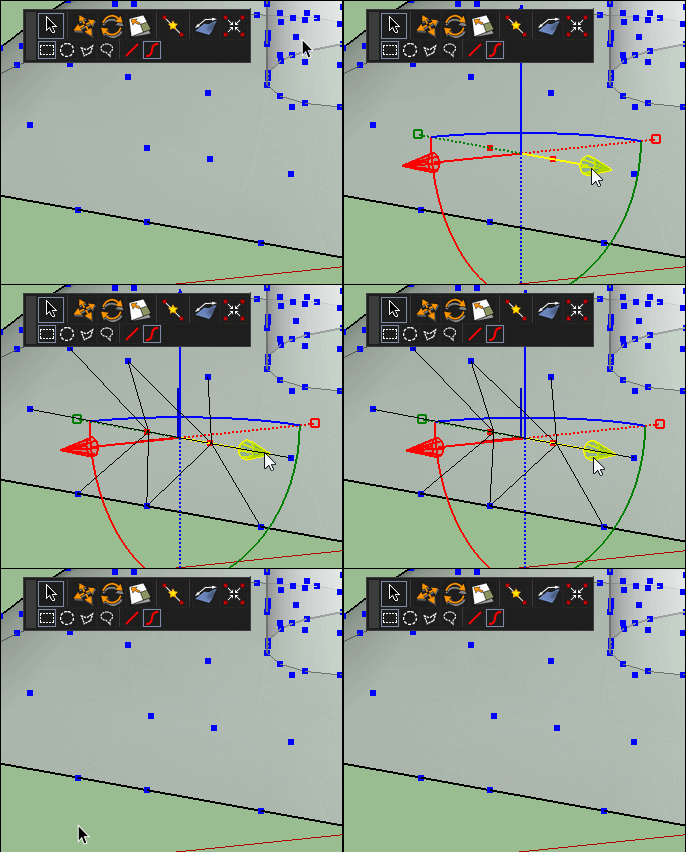

                              GIF_lost_select.gif

                              Frenchy Pilou
                              Is beautiful that please without concept!
                              My Little site :)

                              1 條回覆 最後回覆 回覆 引用 0
                              • R 離線
                                rv1974
                                最後由 編輯

                                Some humble features requests:

                                1. Is it possible to enable snapping on gizmo manipulating;
                                2. Ability to lock (vertices) selection.
                                1 條回覆 最後回覆 回覆 引用 0
                                • R 離線
                                  rv1974
                                  最後由 編輯

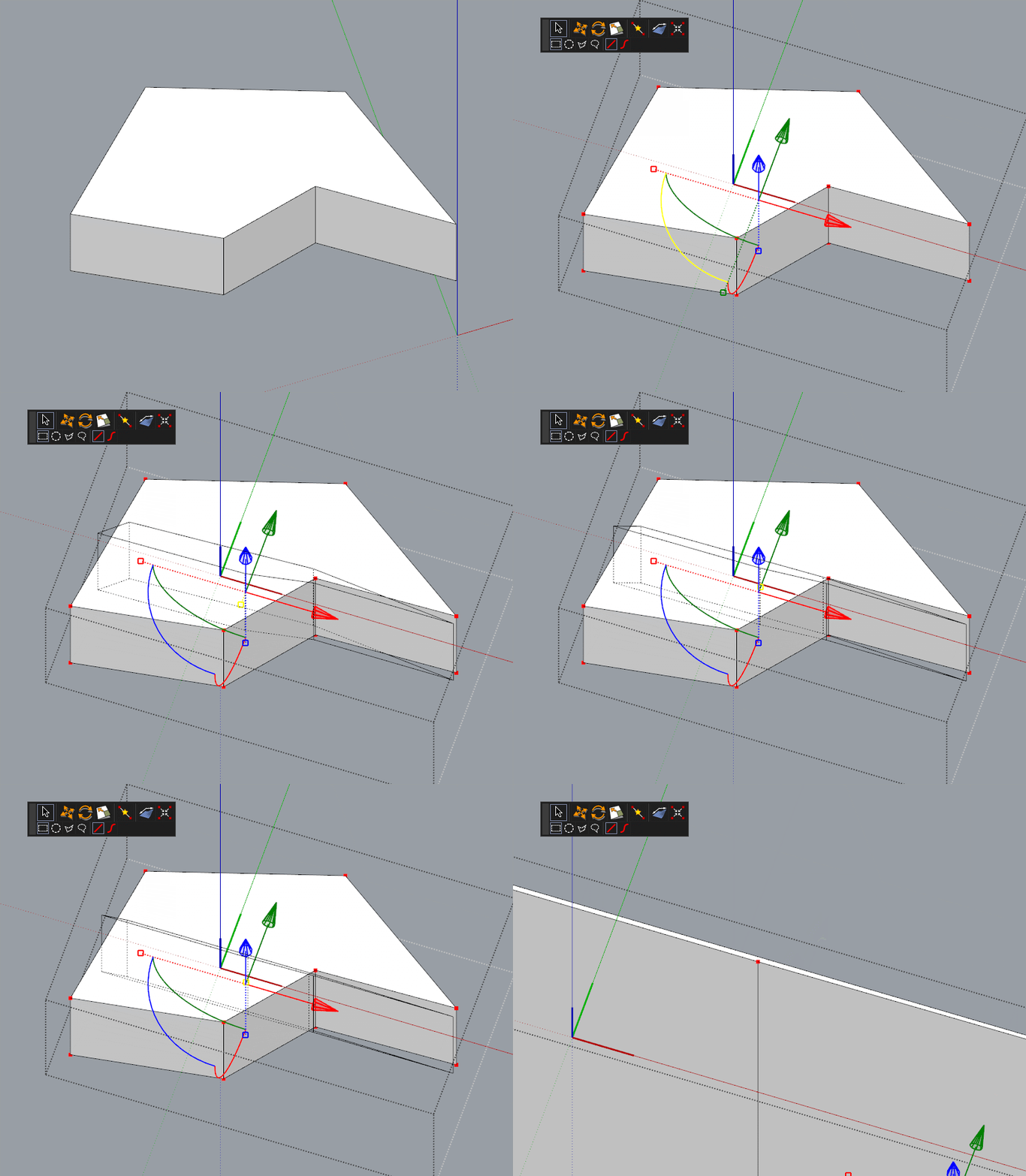
                                  I have some issues with scaling along local axes. It simply not 100% precise.
                                  Please see attached. I tried to flatten to 0.00 but had no luck.
                                  Another problem- I can't wind a way to input values (while scaling) with keyboard,
                                  mouse(=pain) only. Do I miss something?
                                  Edit: After a brief research I found that Fredo6 Scale and S4u scale can flatten to zero in any direction.

                                  GIF.gif

                                  1 條回覆 最後回覆 回覆 引用 0
                                  • thomthomT 離線
                                    thomthom
                                    最後由 編輯

                                    @pilou said:

                                    Because after apply some deformations and click on the empty space
                                    seems selection is losted being always inside Vertex tools! 😮
                                    !

                                    Clicking in empty model space clears the selection as intended - mimicking native SketchUp selection.

                                    @rv1974 said:

                                    I have some issues with scaling along local axes. It simply not 100% precise.
                                    Please see attached. I tried to flatten to 0.00 but had no luck.
                                    Another problem- I can't wind a way to input values (while scaling) with keyboard,
                                    mouse(=pain) only. Do I miss something?

                                    Next release will have snapping at origin. And other gizmo improvements.

                                    @rv1974 said:

                                    Some humble features requests:

                                    1. Is it possible to enable snapping on gizmo manipulating;

                                    Not in the currently released version. But it's on my list for the new release.

                                    Thomas Thomassen — SketchUp Monkey & Coding addict
                                    List of my plugins and link to the CookieWare fund

                                    1 條回覆 最後回覆 回覆 引用 0
                                    • JQLJ 離線
                                      JQL
                                      最後由 編輯

                                      @thomthom said:

                                      @rv1974 said:

                                      Some humble features requests:

                                      1. Is it possible to enable snapping on gizmo manipulating;

                                      Not in the currently released version. But it's on my list for the new release.

                                      And inferences? Like we discussed before?

                                      That would be stellar!

                                      www.casca.pt
                                      Visit us on facebook!

                                      1 條回覆 最後回覆 回覆 引用 0
                                      • C 離線
                                        cuttingedge
                                        最後由 編輯

                                        Vertex tools remain one of my most used plugin. It changed the way I looked at SU.
                                        I’d just like to bring up my request if I may the following features for vertex tools next release.

                                        1. The ability to soft select “connected vertices” only and not all vertices within
                                          the radius.
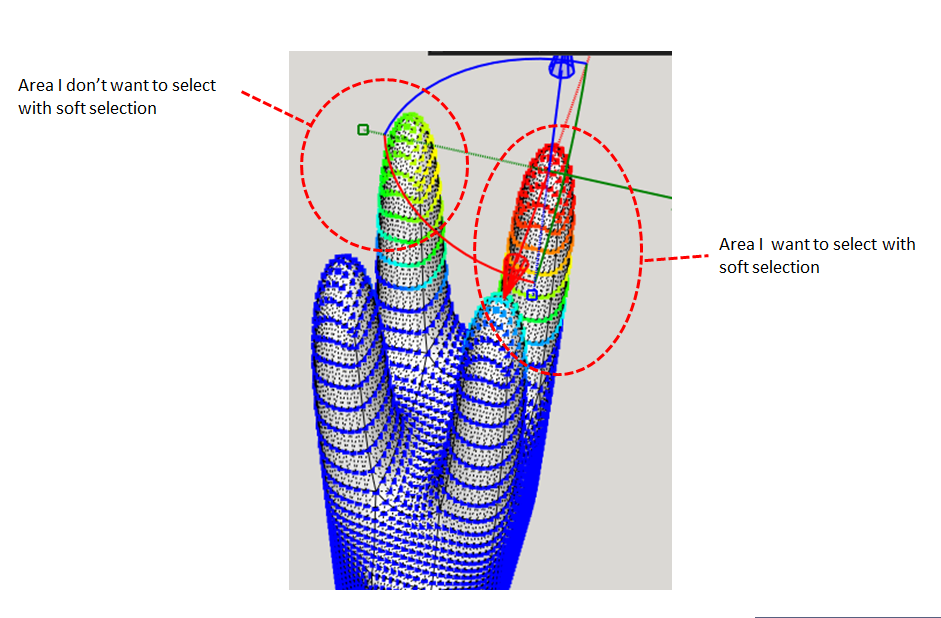
                                        vertex tools q.png

                                        1. To be able to offset or inset quad faces. Same as native offset but split to quads. I dot know if it should come thru QFT or other plugins. But this will be great addition
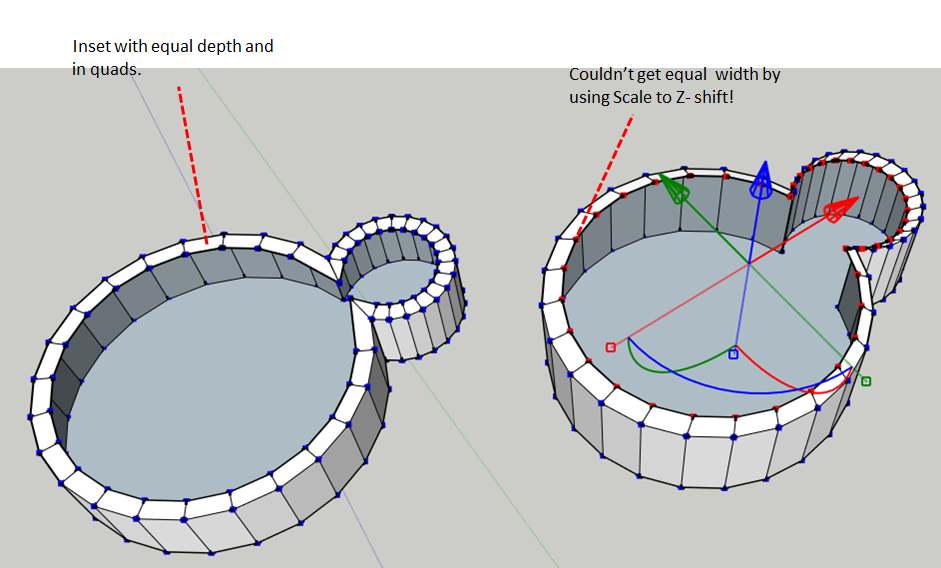
                                          offset/ inset

                                        3.To be able to merge vertices with snapping. Should be able to select which
                                        vertices move and which one stay. (Maybe locking a vertex will make it stay)

                                        1. To be able to lock selected vertices. In this way well have better control of
                                          Vertices that you want to edit . This could be an option if issue no1 is hard to do.

                                        Well, as it is now is very useful. Just want to present this for the author's consideration..

                                        1 條回覆 最後回覆 回覆 引用 0
                                        • R 離線
                                          rv1974
                                          最後由 編輯

                                          ^^! to deselect softly pre-selected ones would be great indeed!

                                          1 條回覆 最後回覆 回覆 引用 0
                                          • thomthomT 離線
                                            thomthom
                                            最後由 編輯

                                            @jql said:

                                            @thomthom said:

                                            @rv1974 said:

                                            Some humble features requests:

                                            1. Is it possible to enable snapping on gizmo manipulating;

                                            Not in the currently released version. But it's on my list for the new release.

                                            And inferences? Like we discussed before?

                                            I need to look through my notes on inferences with the gizmo. I recall having conversation about this.


                                            Thomas Thomassen — SketchUp Monkey & Coding addict
                                            List of my plugins and link to the CookieWare fund

                                            1 條回覆 最後回覆 回覆 引用 0
                                            • 1
                                            • 2
                                            • 3
                                            • 2 / 3
                                            • 第一個貼文
                                              最後的貼文
                                            Buy SketchPlus
                                            Buy SUbD
                                            Buy WrapR
                                            Buy eBook
                                            Buy Modelur
                                            Buy Vertex Tools
                                            Buy SketchCuisine
                                            Buy FormFonts

                                            Advertisement