[Tips] Animator Tips and Tricks
-
Yeah, it seems like the natural next step, hopefully it's something the grandmaster is working on.

-
It was animated crowds I was thinking of...
-
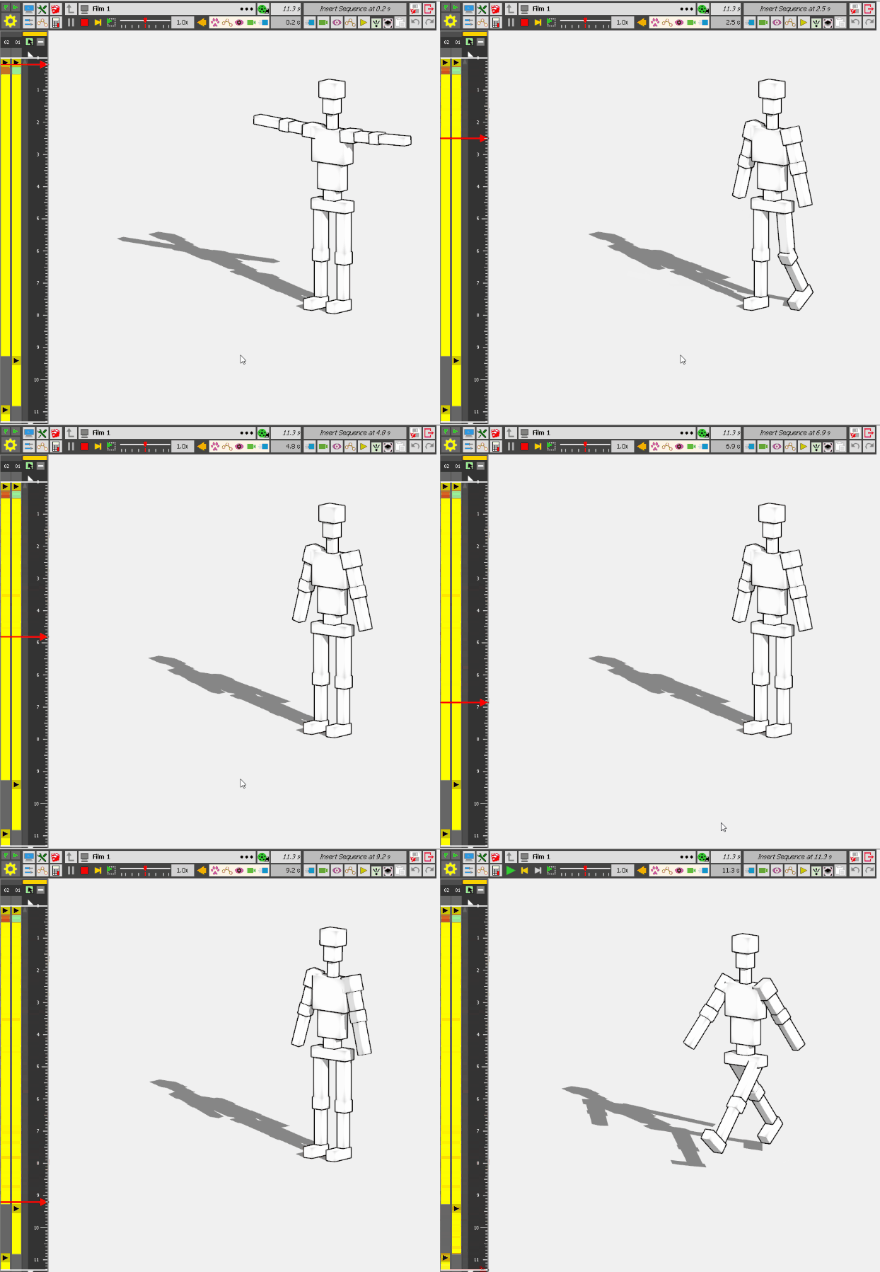
Well, you can do that within the same file no problem, but the hidden door file I posted I created and then thought of the Robot only after doing it all. I had animated the robot in another file but couldn't get it into the hidden door file with animation intact. And by then it was late and I didn't have the energy to reanimate the robot. He really should walk into the space and then exit through the roof.
-
Anyone have tips for animating speech using Fredo6 Animator and a model in SketchUp? I'm working with SU 2017 (Make).
thanks in advance for suggestions!
-
@shelburneplanner said:
Anyone have tips for animating speech using Fredo6 Animator and a model in SketchUp?
What do you mean by 'animating speech'?
-
@rich o brien said:
It was animated crowds I was thinking of...
[attachment=0:3irjohc4]<!-- ia0 -->dummy-test.gif<!-- ia0 -->[/attachment:3irjohc4]
Fredo, is there a way to save this animation, or any animation created with Animator, in a format that could then be used in PowerPoint?
As a reference, here are two videos that show animated 3D models being used in PPT:
https://www.youtube.com/watch?v=2-9g6fVL7uQ
https://www.youtube.com/watch?v=3Qo_Hx21KUcBTW, PPT will allow you to import an skip file so maybe the native skip file with your animations will work. My laptop died so I do not have the capability to try it myself.

-
I don't think you can insert a skp model with Animator data, because Animator data are totally custom.
However, I see that PPT accepts several 3D formats, but apparently none with Animation (like gLTF).
Worth exploring however....
-
Here is some information I found about the type of 3D model files that PPT will accept:
As of now, PowerPoint can insert 3D models in these formats:
Filmbox Format – *.fbx files
Object Format – *.obj files
3D Manufacturing Format – *.3mf files
Polygon Format – *.ply files
StereoLithography Format – *.stl files
Binary GL Transmission Format – *.glb filesI am not sure how old this info is. I have seen a video that does show it accepting a .skp file as well. Also I have seen some places where this (allowing you to insert a 3D model) might be limited to PPT 365. So I am not sure about any of this. It would also be neat if this type of facility was available in the presentation feature of LayOut.
-
Another vey interesting video that confirms the ability to use .skp files in PPT
-
Importing a static 3D model is ok. This is more about the problem of importing the animation. I guess that it is only the gLTF format that will do that.
-
Can that be done with Animator? If it can, it would be neat to see an example.
Maybe it is time for me to quit bringing up topics like this.
-
@ntxdave said:
Maybe it is time for me to quit bringing up topics like this.
I think the missing info in your thinking is what a 3D file format natively is capable of.
SKP cannot store animation readable to other apps. So you would need a means to bake the animator data into the model and then export that into a format that supports animation. FBX, USDS, GTLF, Alembic all store animation data that other apps can read.
Animator does store animation data in a .skp file but in a way that only Animator is able to read.
Its the same as calling over to your mates house with an Atari Pong cartridge and trying to play it on a Nintendo.
Microsoft wouldn't know anything about the animation stored in a skp in the same way.
-
Yes Rick, I understand. I was trying to see if Fredo might be able to come up with a way to generate a GLTF file with Animator.
Maybe I am just being a PITA and it is time for me to just back off.

-
Hi there!
When dealing with kinematics, it's very useful to be able to graphically manage speeds instead of positions (slope of positions law)
I see that a lot of non-linear laws are availables during a movement, but as far I understand, it's only useful between 2 keyframes.
When dealing with more keyframes within a same general movement, I didn't manage to have some smooth transitions...Here is a simple case:
Let's say we want to animate a car, constant speed (100km/h) between KF#1 and KF#2.
Then it decelerates between KF#2 and KF#3 so that it reaches another constant speed (50km/h) from KF#3 up to KF#4.
I didn't manage smooth transitions without generating some weird stuff...
Is there some kind of tricks using available non-linear laws?Thanks!
-
 R Rich O Brien pinned this topic





Advertisement