sketchucation logo sketchucation
    • 登入
    Oops, your profile's looking a bit empty! To help us tailor your experience, please fill in key details like your SketchUp version, skill level, operating system, and more. Update and save your info on your profile page today!
    🔌 Smart Spline | Fluid way to handle splines for furniture design and complex structures. Download

    [Tips] Animator Tips and Tricks

    已排程 已置頂 已鎖定 已移動 Animator Beta
    renderpluginsextensions
    74 貼文 18 Posters 257.4k 瀏覽 18 Watching
    正在載入更多貼文
    • 從舊到新
    • 從新到舊
    • 最多點贊
    回覆
    • 在新貼文中回覆
    登入後回覆
    此主題已被刪除。只有擁有主題管理權限的使用者可以查看。
    • soloS 離線
      solo
      最後由 編輯

      smarty pants. I'm too old to learn these tricks.

      http://www.solos-art.com

      If you see a toilet in your dreams do not use it.

      1 條回覆 最後回覆 回覆 引用 0
      • wanniyaW 離線
        wanniya
        最後由 編輯

        Is there any way to work with section plane animation?

        1 條回覆 最後回覆 回覆 引用 0
        • fredo6F 離線
          fredo6
          最後由 編輯

          @wanniya said:

          Is there any way to work with section plane animation?

          This is coming in a new release tomorrow.

          Fredo
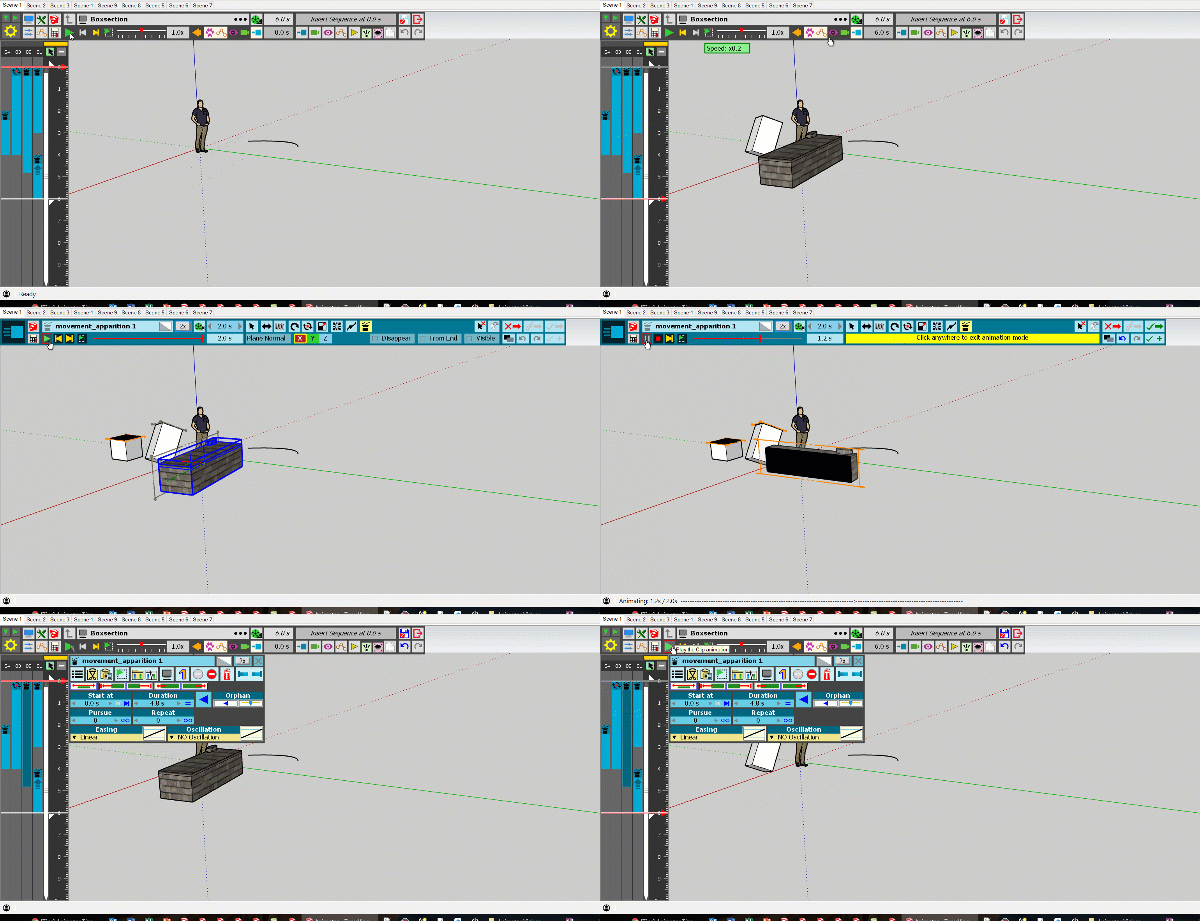
          Animator - Apparition.gif

          Animator - Apparition 2.gif

          1 條回覆 最後回覆 回覆 引用 0
          • pilouP 離線
            pilou
            最後由 編輯

            Useful for magician! 😎

            Frenchy Pilou
            Is beautiful that please without concept!
            My Little site :)

            1 條回覆 最後回覆 回覆 引用 0
            • fredo6F 離線
              fredo6
              最後由 編輯

              The picto is explicit

              1 條回覆 最後回覆 回覆 引用 0
              • pilouP 離線
                pilou
                最後由 編輯

                Can we add a Clip (or a movement) made in a previous session to the current session where an another is yet created ?

                Say an object A (a Car) is on the screen and animated
                A ball is an object B (a Ball animated) previously made in another session, can we add it to the car ?

                Frenchy Pilou
                Is beautiful that please without concept!
                My Little site :)

                1 條回覆 最後回覆 回覆 引用 0
                • fredo6F 離線
                  fredo6
                  最後由 編輯

                  @pilou said:

                  Can we add a Clip (or a movement) made in a previous session to the current session where an another is yet created ?

                  Say an object A (a Car) is on the screen and animated
                  A ball is an object B (a Ball animated) previously made in another session, can we add it to the car ?

                  Any animation piece (i.e. sequence) created within a model can be integrated into a film, knowing that you can have many films within the same model. Think of a Sequence as a Component Definition in Sketchup. You can create instances of a sequence and insert them in the time line, change some parameters like duration, easing, ... (like you can scale a component instance in Sketchup). All sequences created in the model are accessible from the Insert buttons (for Movement, Cameras, Visual Effects, ....):
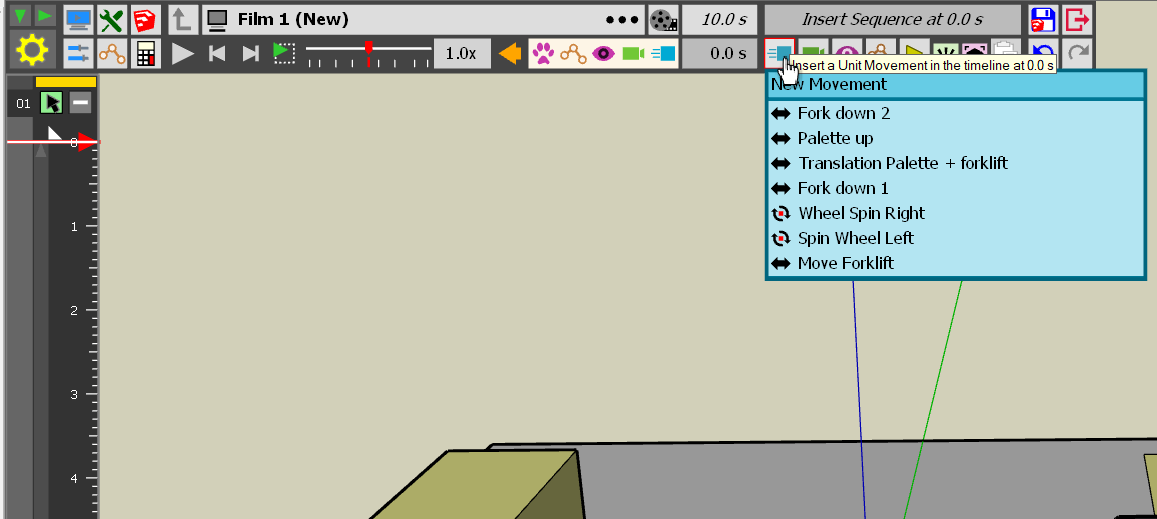
                  Animator - Insert sequence.png

                  Note that you can also insert a full film
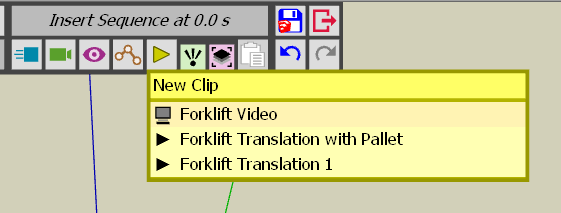
                  Animator - Insert film.png

                  Fredo

                  1 條回覆 最後回覆 回覆 引用 0
                  • soloS 離線
                    solo
                    最後由 編輯

                    I'm still using Thea 1.5, but I cannot get animator to work with Thea, it works perfect with straight SU output but nothing happens with Thea, at first it just rendered the 1st scene, now when I click 'render animation' it does nothing, what am I doing wrong?

                    http://www.solos-art.com

                    If you see a toilet in your dreams do not use it.

                    1 條回覆 最後回覆 回覆 引用 0
                    • fredo6F 離線
                      fredo6
                      最後由 編輯

                      @solo said:

                      I'm still using Thea 1.5, but I cannot get animator to work with Thea, it works perfect with straight SU output but nothing happens with Thea, at first it just rendered the 1st scene, now when I click 'render animation' it does nothing, what am I doing wrong?

                      Do you mean when you launch the rendering from Thea (not from Animator)?

                      Fredo

                      1 條回覆 最後回覆 回覆 引用 0
                      • MANaboutTOOLSM 離線
                        MANaboutTOOLS
                        最後由 編輯

                        Hi,

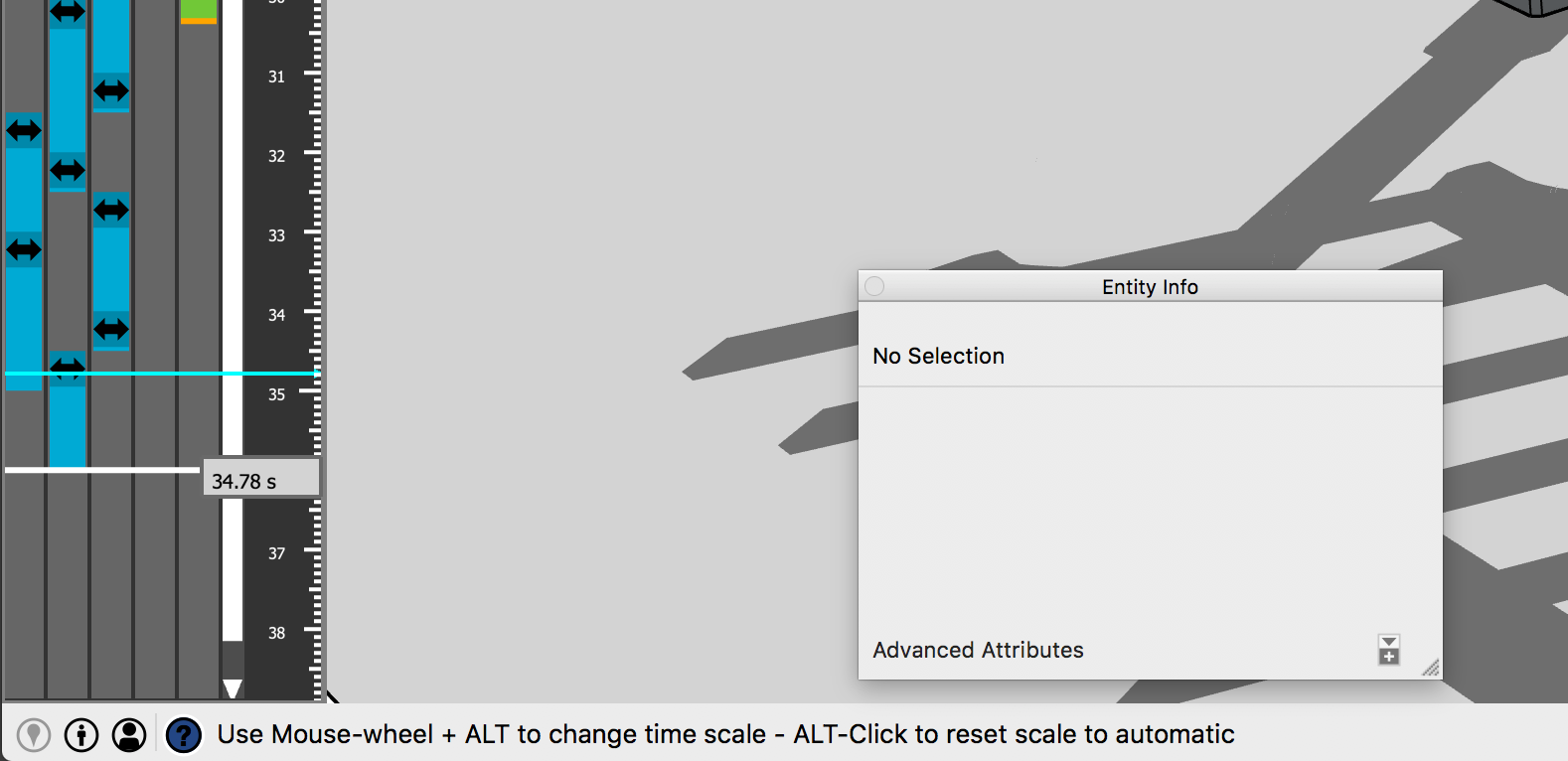
                        I am using a Mac and cannot change the scale of the timeline to zoom in. When I mouse over the scroll bar it says "Use Mouse-wheel +ALT to change scale"

                        The equivalent on the Mac is the "option" key. When I push the option key and touch scroll the Mac magic mouse it zooms the model and not the timeline.

                        Thanks
                        Kent
                        https://manabouttools.com

                        Screen Shot 2018-10-31 at 1.09.47 PM.png

                        1 條回覆 最後回覆 回覆 引用 0
                        • fredo6F 離線
                          fredo6
                          最後由 編輯

                          @manabouttools said:

                          Hi,

                          I am using a Mac and cannot change the scale of the timeline to zoom in. When I mouse over the scroll bar it says "Use Mouse-wheel +ALT to change scale"

                          The equivalent on the Mac is the "option" key. When I push the option key and touch scroll the Mac magic mouse it zooms the model and not the timeline.

                          Thanks
                          Kent
                          https://manabouttools.com

                          I don't have a Mac to test.

                          Could you try with Command or Ctrl to see what happens.

                          Fredo

                          1 條回覆 最後回覆 回覆 引用 0
                          • MANaboutTOOLSM 離線
                            MANaboutTOOLS
                            最後由 編輯

                            I tried as many combinations as possible. All just zoom the model.

                            Kent

                            1 條回覆 最後回覆 回覆 引用 0
                            • fredo6F 離線
                              fredo6
                              最後由 編輯

                              @manabouttools said:

                              I tried as many combinations as possible. All just zoom the model.

                              Kent

                              Can you at least scroll the timeline (mousewheel, no modifier) and scroll the tracks (Ctrl + mousewheel), [assuming you have enough tracks) ?

                              1 條回覆 最後回覆 回覆 引用 0
                              • MANaboutTOOLSM 離線
                                MANaboutTOOLS
                                最後由 編輯

                                I don't have enough tracks to test that. Will try tmrw.

                                1 條回覆 最後回覆 回覆 引用 0
                                • MANaboutTOOLSM 離線
                                  MANaboutTOOLS
                                  最後由 編輯

                                  I changed a clip to make it longer so it brought up the scroll bars. I am unable to scroll the timeline with the mouse wheel. It always zooms the model window.

                                  Kent

                                  1 條回覆 最後回覆 回覆 引用 0
                                  • MANaboutTOOLSM 離線
                                    MANaboutTOOLS
                                    最後由 編輯

                                    Any keyboard shortcuts to zoom the timeline? Or any settings to key in a zoom value to get around this?

                                    Thanks
                                    Kent

                                    1 條回覆 最後回覆 回覆 引用 0
                                    • fredo6F 離線
                                      fredo6
                                      最後由 編輯

                                      @manabouttools said:

                                      Any keyboard shortcuts to zoom the timeline? Or any settings to key in a zoom value to get around this?

                                      Thanks
                                      Kent

                                      Let's take things in order

                                      1. without any modifier, putting the mouse cursor over the time, can you scroll the timeline?

                                      2. with Option key pressed, and assuming you have enough tracks, can you scroll the tracks?

                                      3. with Command key pressed, putting the mouse cursor over the time, what do you get?

                                      1 條回覆 最後回覆 回覆 引用 0
                                      • MANaboutTOOLSM 離線
                                        MANaboutTOOLS
                                        最後由 編輯

                                        I can click-drag with the left button to scroll the time. I added enough tracks to test this.

                                        1. No. Hovering the curser over the bar and gesturing with the magic mouse (scroll-wheel) zooms the model.

                                        2. No. Zooms the model

                                        3. With the mouse hovering over the scroll bar the time reads (for example) 25.5 s. If I press the command key the time then reads 25.50 s. And as above, mouse wheel gesture zooms model.

                                        I hope this helps. Do you want a screen record?
                                        Kent

                                        1 條回覆 最後回覆 回覆 引用 0
                                        • MANaboutTOOLSM 離線
                                          MANaboutTOOLS
                                          最後由 編輯

                                          Here's a screenflow capture...

                                          zoom-test2.gif

                                          1 條回覆 最後回覆 回覆 引用 0
                                          • fredo6F 離線
                                            fredo6
                                            最後由 編輯

                                            Do you have a special mouse ?

                                            1 條回覆 最後回覆 回覆 引用 0
                                            • 1
                                            • 2
                                            • 3
                                            • 4
                                            • 4 / 4
                                            • 第一個貼文
                                              最後的貼文
                                            Buy SketchPlus
                                            Buy SUbD
                                            Buy WrapR
                                            Buy eBook
                                            Buy Modelur
                                            Buy Vertex Tools
                                            Buy SketchCuisine
                                            Buy FormFonts

                                            Advertisement