sketchucation logo sketchucation
    • 登入
    Oops, your profile's looking a bit empty! To help us tailor your experience, please fill in key details like your SketchUp version, skill level, operating system, and more. Update and save your info on your profile page today!
    🔌 Smart Spline | Fluid way to handle splines for furniture design and complex structures. Download

    SUbD and quad workflow advices?

    已排程 已置頂 已鎖定 已移動 SUbD
    renderpluginsextensions
    30 貼文 11 Posters 14.2k 瀏覽 11 Watching
    正在載入更多貼文
    • 從舊到新
    • 從新到舊
    • 最多點贊
    回覆
    • 在新貼文中回覆
    登入後回覆
    此主題已被刪除。只有擁有主題管理權限的使用者可以查看。
    • thomthomT 離線
      thomthom
      最後由 編輯

      Do you have a sample model so we can see what is going on?

      Thomas Thomassen — SketchUp Monkey & Coding addict
      List of my plugins and link to the CookieWare fund

      1 條回覆 最後回覆 回覆 引用 0
      • xiombargX 離線
        xiombarg
        最後由 編輯

        I fixed the problems on the original model, but I was able to recreate the issue.
        It's not necessarily anything of a serious problem, but it does create unnecessary geometry when subdivided, yet still smoothed.

        The odd geometry only appears on portions of the model.


        example.skp

        1 條回覆 最後回覆 回覆 引用 0
        • thomthomT 離線
          thomthom
          最後由 編輯

          Some of the diagonals have cast-shadows enabled:
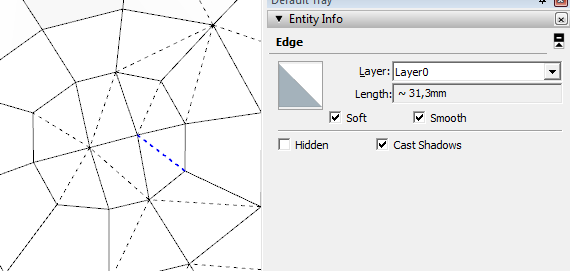
          2016-02-22_12h22_38.png

          If you have only soft+smooth diagonals (like from Sandbox Tools) then use the Sandbox Tools Quads to QuadFace Tools Quads function in QFT. That will ensure they are treated as quads and not separate triangles.

          I got plans for further tools to make it easier to detect this.

          Thomas Thomassen — SketchUp Monkey & Coding addict
          List of my plugins and link to the CookieWare fund

          1 條回覆 最後回覆 回覆 引用 0
          • xiombargX 離線
            xiombarg
            最後由 編輯

            Hmmm, it seems to do it somewhat randomly. I have tried doing push pulls with different options selected, and sometimes it will have cast shadows checked on the edges and sometimes it doesn't. The only consistency I could see is that cast shadows become selected the more the model has been monkeyed around with which I'm sure means something specifically is causing it, but I can't pinpoint what it is. I thought it would always have something to do with the options selected on a push pull, but that only generates cast shadows on edges sometimes. Odd?

            1 條回覆 最後回覆 回覆 引用 0
            • pbacotP 離線
              pbacot
              最後由 編輯

              Wouldn't JPP produce more softened edges? And why would these be expected to follow quad rules? I may not be following the method correctly as others clearly know more about this... just thought I'd offer this.

              MacOSX MojaveSketchUp Pro v19 Twilight v2 Thea v3 PowerCADD

              1 條回覆 最後回覆 回覆 引用 0
              • M 離線
                miikka1978
                最後由 編輯

                Do you have any tips what would be your workflow when modeling this kind of Jacuzzi with the help of SUbD and other useful plugins?

                http://i.imgur.com/kx8fWsK.jpg

                1 條回覆 最後回覆 回覆 引用 0
                • Rich O BrienR 離線
                  Rich O Brien Moderator
                  最後由 編輯

                  not accurately dimensioned just something to for you to tweak...

                  [edg3d:1r4utfmh]hROHySkeFXAjkq4[/edg3d:1r4utfmh]

                  subd-jacuzzi.skp

                  Download the free D'oh Book for SketchUp 📖

                  1 條回覆 最後回覆 回覆 引用 0
                  • O 離線
                    optimaforever
                    最後由 編輯

                    any advice to keep quads on borders after a JPP?

                    The default behaviour of JPP is to soften the borders. Yet for QFT and SubD we need to keep those extruded edges when shelling.
                    I can't use Splitdonut as the resulting border surface isn't flat.
                    SubD's quadpushpull doesn't work like JPP for big complex surfaces.

                    EDIT: Found. A. Synytsia's "Smooth to Quadrants" does exactly that.

                    BTW does thomthom's Shell work on quads?
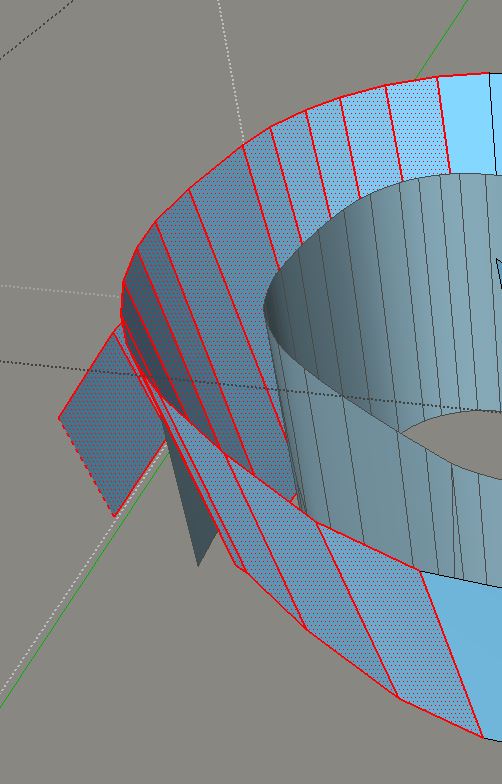

                    before joint pushpull


                    after joint pushpull

                    1 條回覆 最後回覆 回覆 引用 0
                    • M 離線
                      miikka1978
                      最後由 編輯

                      @rich o brien said:

                      not accurately dimensioned just something to for you to tweak...

                      [edg3d:1qmnhj2j]hROHySkeFXAjkq4[/edg3d:1qmnhj2j]

                      [attachment=0:1qmnhj2j]<!-- ia0 -->subd-jacuzzi.skp<!-- ia0 -->[/attachment:1qmnhj2j]

                      Thanks for the model/tips! All these basic shapes (included skp model) look so simple but I am still having hard hard time to find out what is the efficient way (workflow) to create this kind of models and what are the plugins that would be useful. I will try to recreate this model and hopefully I will learn something.

                      1 條回覆 最後回覆 回覆 引用 0
                      • pbacotP 離線
                        pbacot
                        最後由 編輯

                        Thanks Rich. Will the browser eventually have subd mode (showing the subd basic divisions)? I thought you posted that before. BTW I notice the viewer does not give access to controls once it is full screen or is that just my setup?

                        MacOSX MojaveSketchUp Pro v19 Twilight v2 Thea v3 PowerCADD

                        1 條回覆 最後回覆 回覆 引用 0
                        • 1
                        • 2
                        • 2 / 2
                        • 第一個貼文
                          最後的貼文
                        Buy SketchPlus
                        Buy SUbD
                        Buy WrapR
                        Buy eBook
                        Buy Modelur
                        Buy Vertex Tools
                        Buy SketchCuisine
                        Buy FormFonts

                        Advertisement