Quick Comparison -Subd and Artisan
-
Following the release of the much awaited SubD. I did a quick test to compare subD and artisan. So far these are my observations:
-
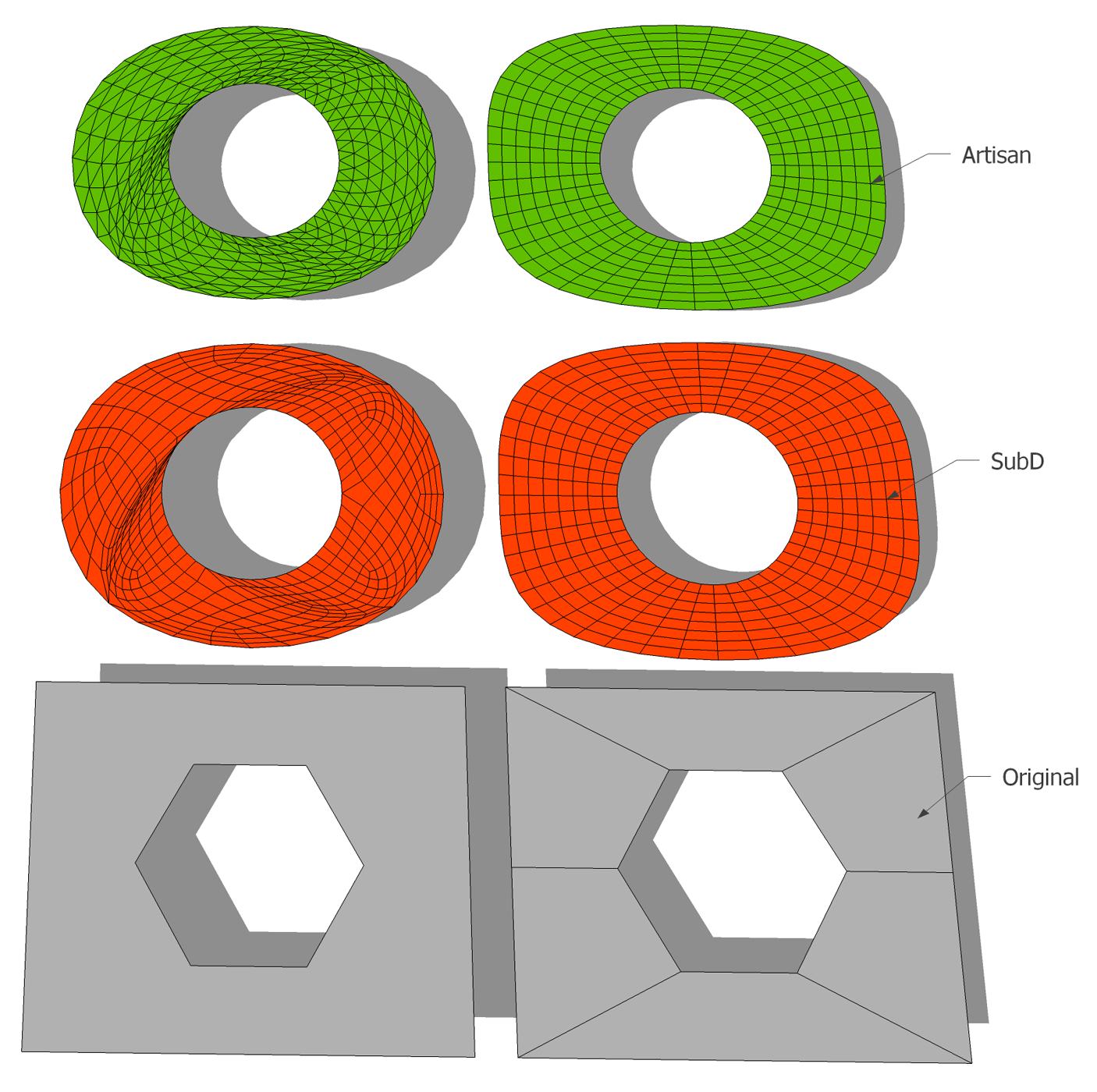
The first thing I noticed is that in simple flat surfaces, Subd triangulates while Artisan
kept the quads. -
In the next other model (the goblet) , I see more triangulation in Subd than in Artisan.
-
In more complex model (the sculpture), I do have a little issue smoothing the SubD model
even I put more iteration, the artisan gives a smoother surface.
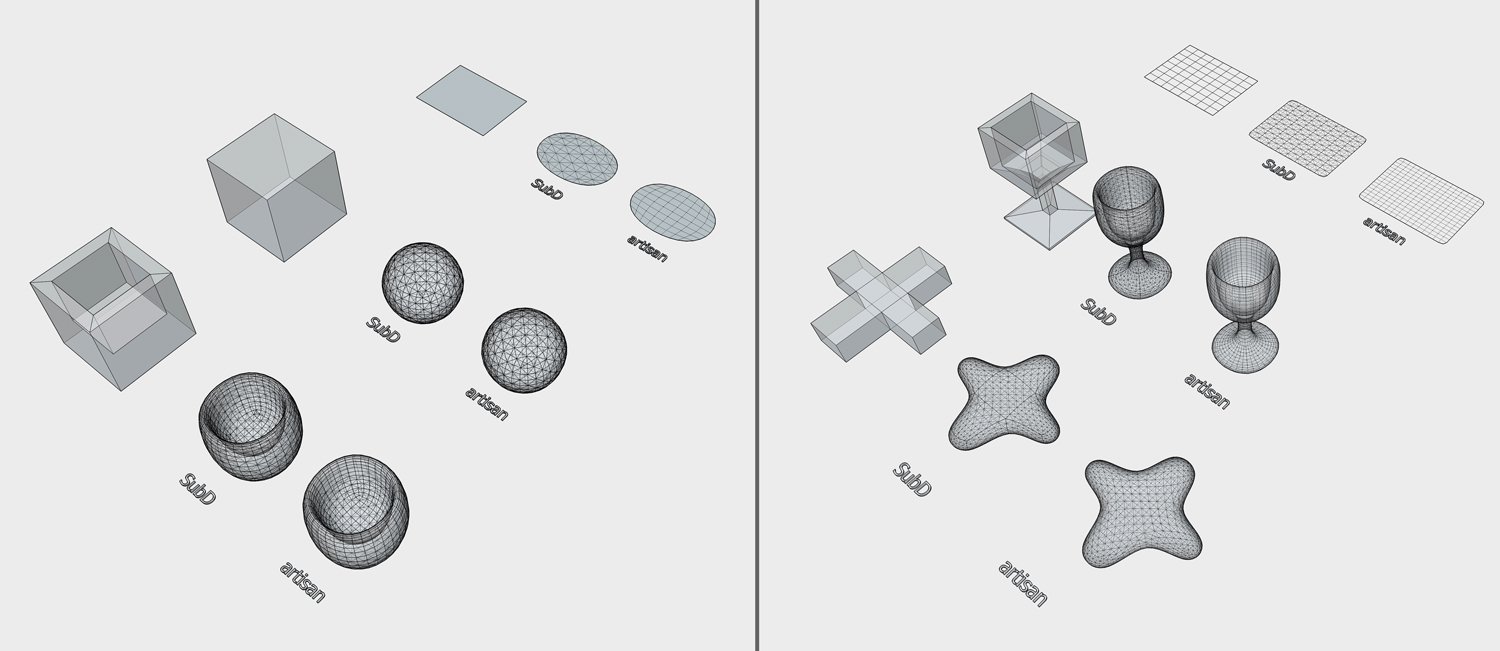
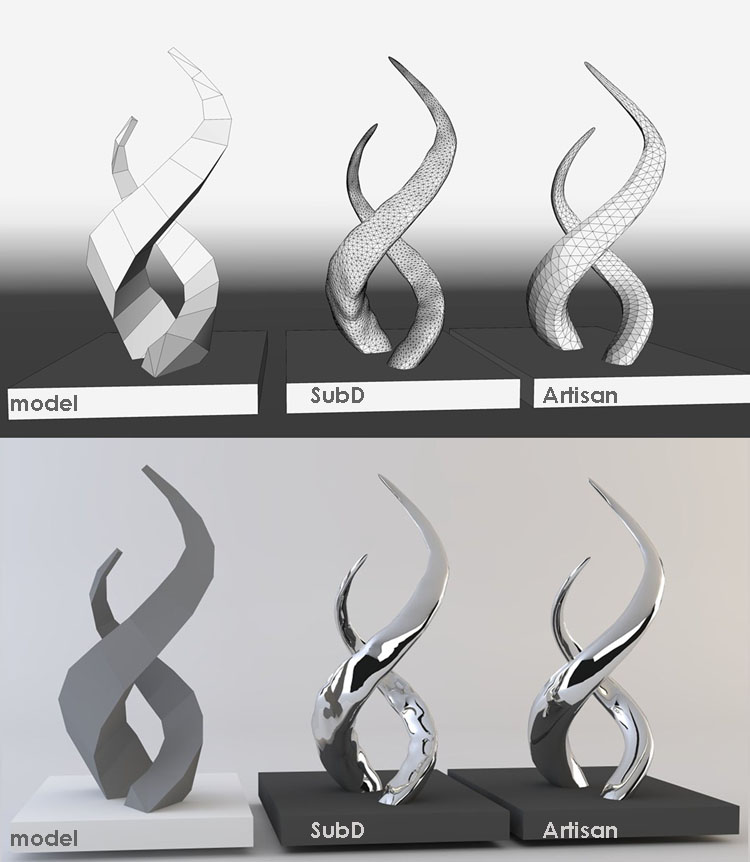
The SubD and artisan has almost similar subdivision function.. The advantage of Subd, is you can always go back to the low poly mode and do modification rather than saving proxies after proxies in each stage of modeling... plus it retains the material and UV info (haven’t fully tried this though). You will lose all materials in artisan once subdivided.
Im still learning Subd and its uses in my modeling career.

-
-
Artisan : can subdivide any number of separated volume(s) in the same time!
even it's not group(s) or component(s)SUbD : can only subdivide one volume - and this volume must be a group or a component!
-
You need to understand that SubD works with quads. If you have triangulation or broken lines it will give you bumps.
Would you share the sculpture example, I will try to work a bit the geometry so it will smooth correctly with SubD. -
@cuttingedge said:
- In the next other model (the goblet) , I see more triangulation in Subd than in Artisan.
Can you share the model for this one? Looking at the result of SUbD there it almost looks like the control-mesh isn't built up on QuadFace quads. It looks like the squares are triangulates as the SUbD output should be more regular than that if it's coming from a quad-mesh.
SUbD will always produce triangulated results - even for planar faces. Originally it didn't, but there where performance issues when using the crease tool on the subdivided mesh. When a crease caused a planar face to auto-fold it'd cause sluggishness. So at the expense of always triangulating the creasing will perform better.
If you should right-click on a subdivided mesh (after using SUbD) and choose SUbD > Convert to Plain Mesh - the resulting mesh will be compatible with QuadFace Tools. That means you can carry on working with QFT after creating the shape you want to add more details or whatnot.
-
@pilou said:
SUbD : can only subdivide one volume - and this volume must be a group or a component!
Correct - SUbD require a group or component. It needs an "object" in order to be able to toggle back and forth. That wouldn't be possible if it was mixed with other geometry.
However, the limitation of turning subdivision on/off for only one object at a time is high up on the list of improvements. Stay tuned.
-
Click to watch....
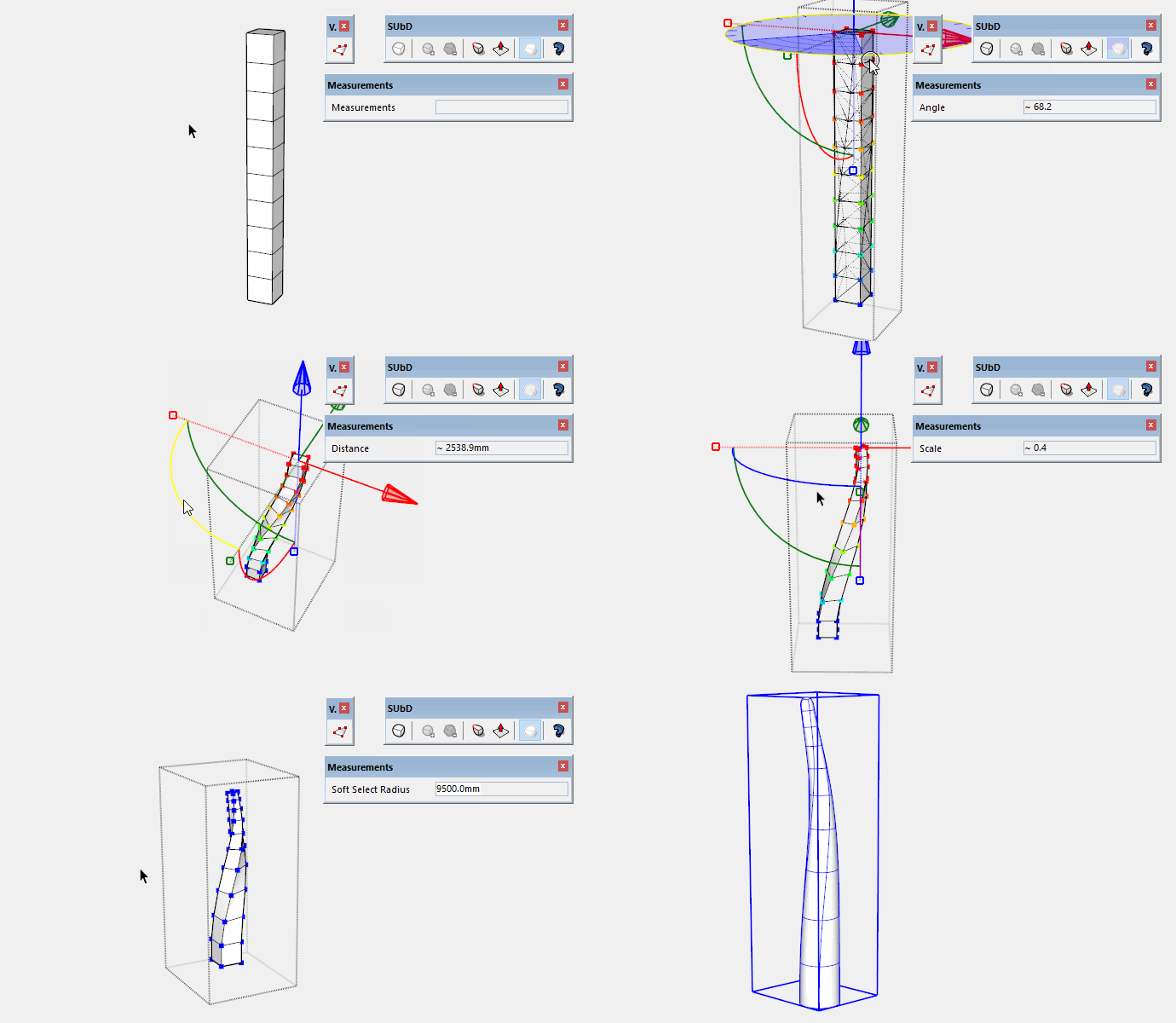
When modeling in SU you need to follow the convention of QuadFace Tools to get a result that you can compare to Artisan.
Here I used Vertex Tools for the manipulation because it creates quads out of the box.
-
@rich o brien said:
When modeling in SU you need to follow the convention of QuadFace Tools to get a result that you can compare to
Artisan.i would say "a result that you can compare to 3dsmax, maya, blender, modo, cinema4d, zbrush, mudbox, wing3d, etcetera, etcetera, etcetera.."

and personally i would say that is this the very main difference between sub-d vs artisan/sudivide and smoot/loop subdivision/whatever your favourite sketchup triangulated subdiv plugin you loved before..
-
Some images, I will post the models in the example post if I have more time...
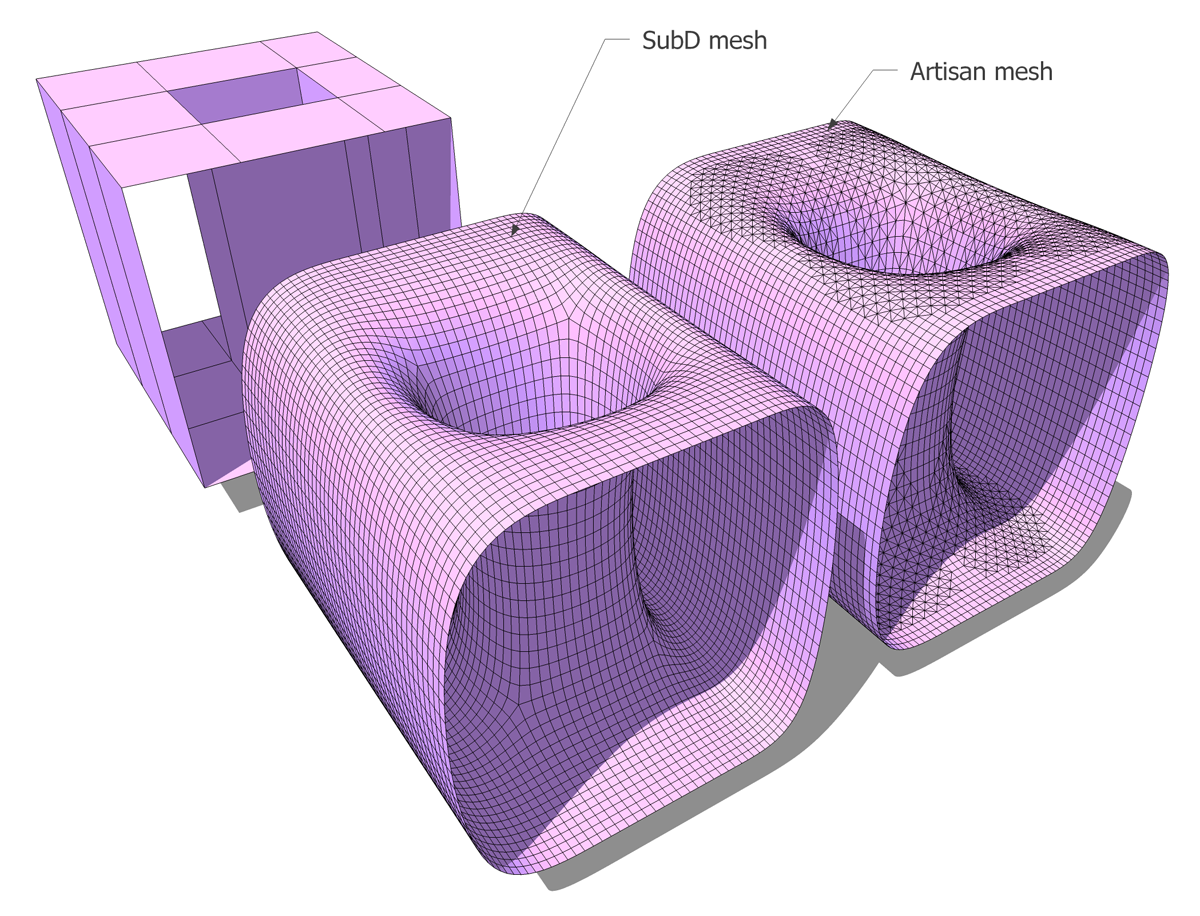
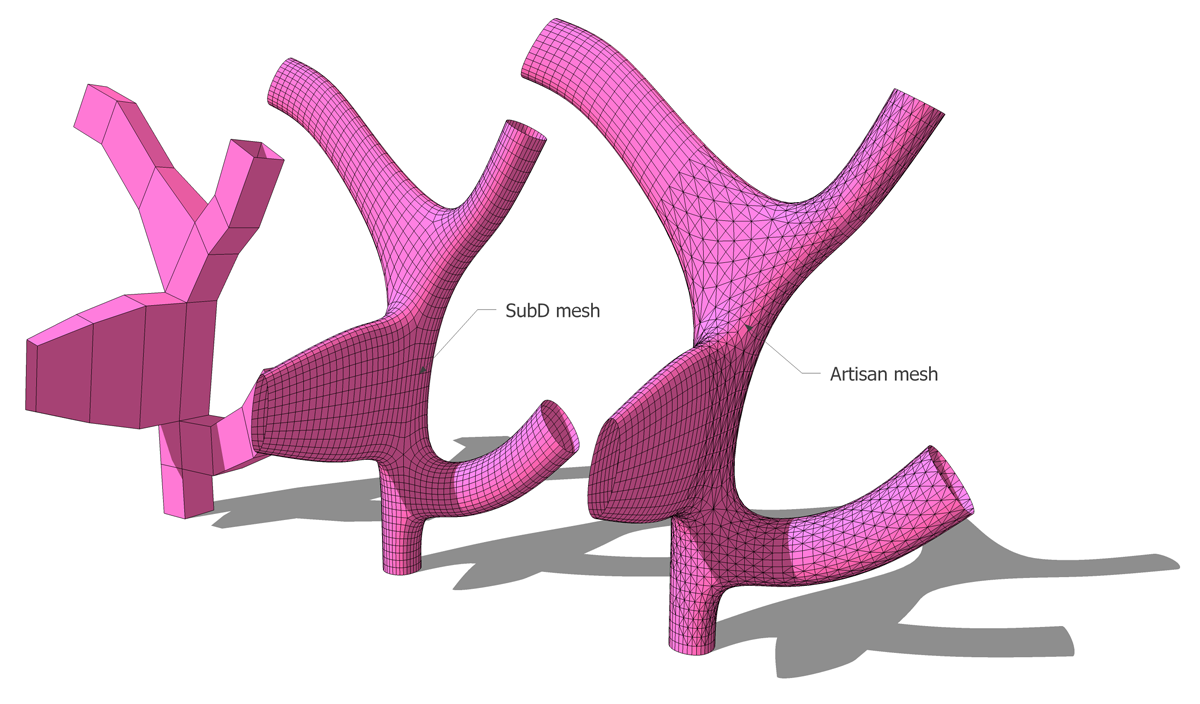
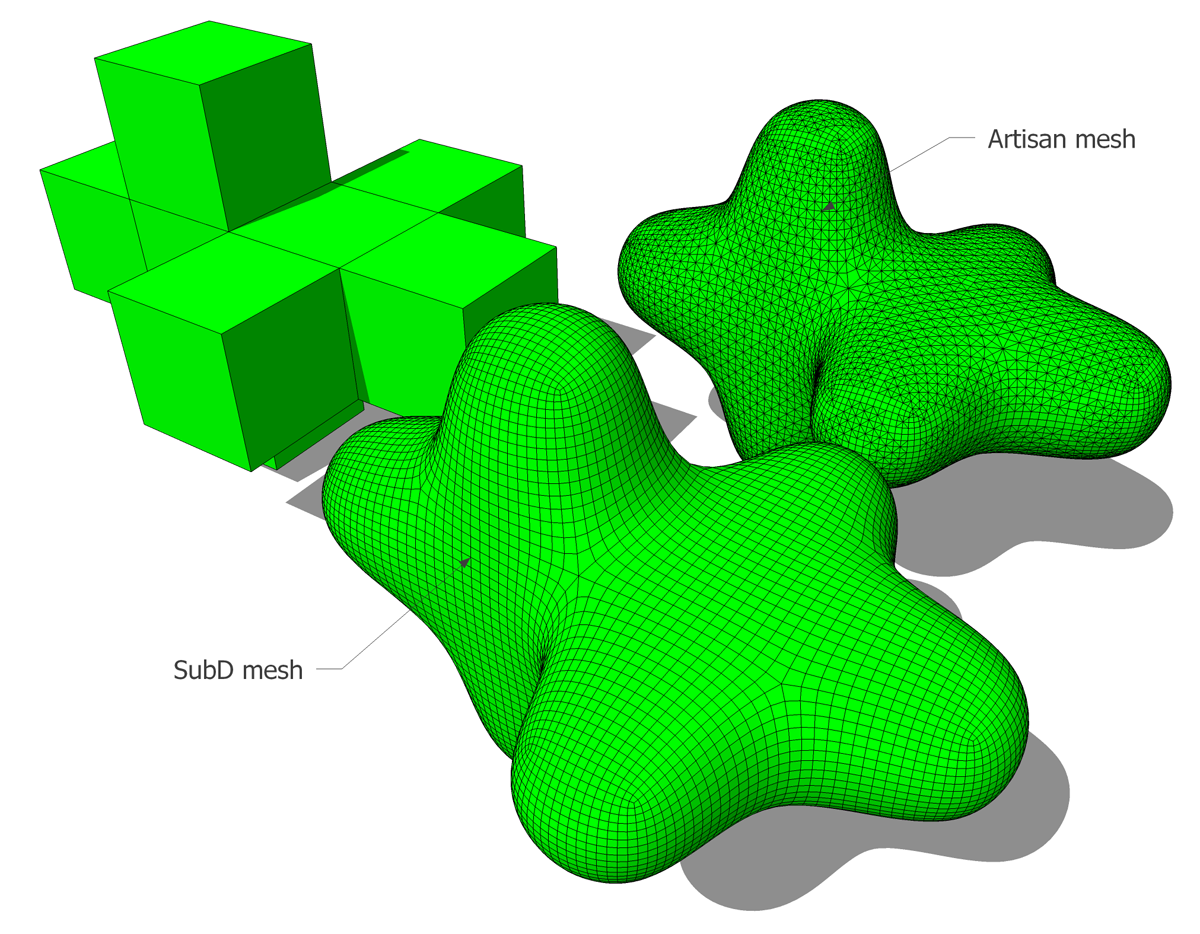
-
Help me understand the point you guys are making. I have not used any of these types of tools and I am a little embarrassed to say that I cannot fully appreciate the differences you are pointing out. If, after I convert the "block" drawing to a mesh, is one of them easier/better for "fine tuning"?
I am trying to learn from all of this

-
@ntxdave said:
Help me understand the point you guys are making. I have not used any of these types of tools and I am a little embarrassed to say that I cannot fully appreciate the differences you are pointing out. If, after I convert the "block" drawing to a mesh, is one of them easier/better for "fine tuning"?
It would depend entirely on your workflow - and I'd argue that the two in extensions in question isn't mutually exclusive. If you are not that big on quad based workflows then Artisan might be a better choice for you - in terms of subdividing. It uses an algorithm that works better with triangles than what SUbD so. Artisan also have a really nice sculpting set - which can be applied regardless of which subdivision method you use.
The background for SUbD is that I've been somewhat obsessed with being able to model with quads. (If you want more into about why I obsess about quads you can start with some of the links I posted in this thread: http://sketchucation.com/forums/viewtopic.php?f=397%26amp;t=63820%26amp;start=30#p584988 For further reading I'd recommend anything that dwell into the topic of 3d topology.) Quad-based workflow is common in the industry - almost a standard. But it's been a challenge in SketchUp because it nativly doesn't allow for non-planar quads which creates big challenges in the workflow. So from there I started many years ago to explore, tinker, with QuadFace Tools, a set of SketchUp tools that allowed me to manipulate and create quad-based topology in SketchUp (with non-planar quads).
Once you have a mesh built with quads it's much more predictable and you can create a large suite of tools that efficiently manipulate it. SUbD is a piece in this puzzle - a subdivision extension that consume and produce quads. It may not be for everyone - but if it is, then I hope it can be of value.
Quads in SketchUp is a rather alien concept - because of this I plan to create a series of little guides and tutorials. Small articles and small GIFs to illustrate various concepts and challenges.
-
@thomthom said:
Can you share the model for this one? Looking at the result of SUbD there it almost looks like the control-mesh isn't built up on QuadFace quads. It looks like the squares are triangulates as the SUbD output should be more regular than that if it's coming from a quad-mesh.
Thanks Thomas for your quick reply.. I know I must be doing something not right. My quads may not be exactly quads. I hope I know what you mean by "Quadface Quads"
I like the fact that Subd detects internal faces and notifies. Artisan doesnt.
Let me share you two simple models to test . The sculpture and goblet.
Here are simple skp objectsHere's also a screenshot. For the sake of investigating the mesh, the smoothing slide is on 0.
Here, Subd shows triangulation, while artisan shows quads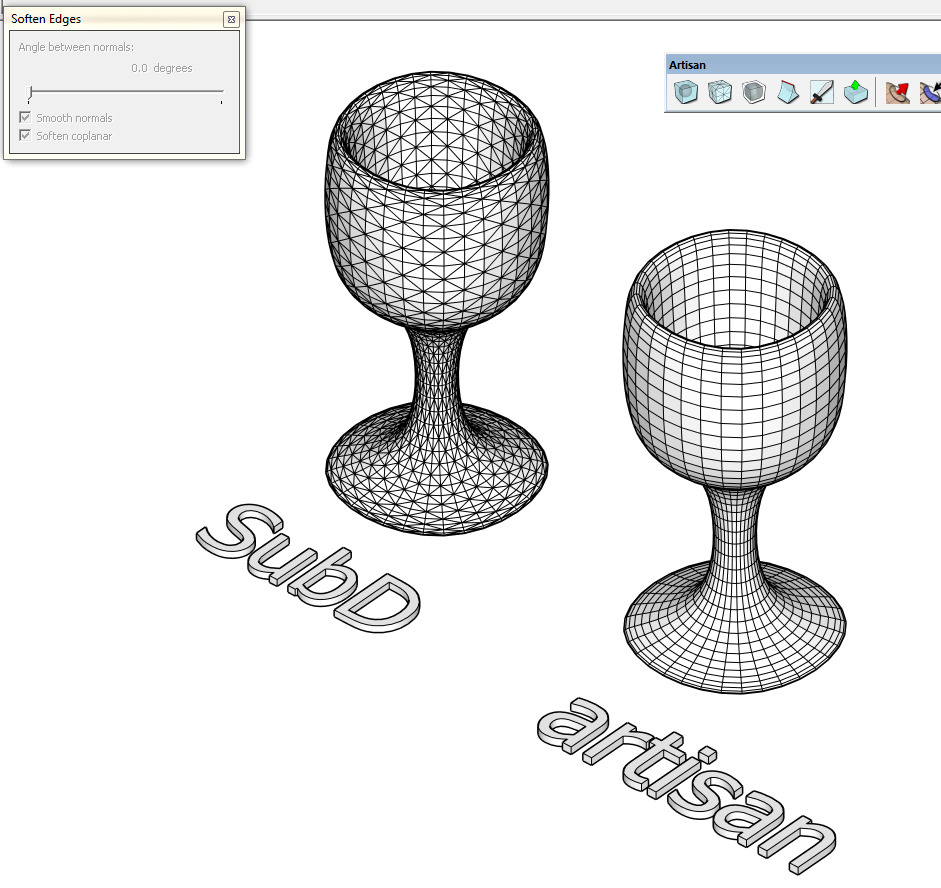
I hope I can learn better workflows modeling in quads.
-
I have fixed the geometry by removing the triangulation and by using the Quad face tools. I have also oriented each diagonal on the same direction, this helps a lot with Artisan too.
Honestly I don't exactly know which of the functions works to fix it because I have tried for a couple of times all the convert from tris to quads including the sandbox option.
-
@cuttingedge: I can't reproduce your glass image, I've got the same topology with both plugins in this case...
-
@cuttingedge said:
Here's also a screenshot. For the sake of investigating the mesh, the smoothing slide is on 0.
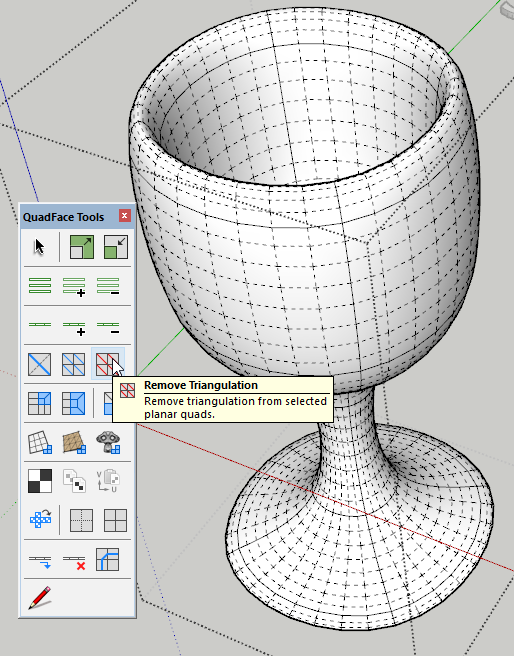
Here, Subd shows triangulation, while artisan shows quadsYes, SUbD always create triangulated mesh for the sake of editing performance. Though they are created as QuadFace Tools quads - so pairs of triangles will be treated as a logical quad.
Technically, even a native planar SketchUp quad will have two triangles - at least in terms of the GPU. It's just a matter of whether you expose the sub-triangles to the end user or not.Once you are done subdividing, you can convert the instance to a plain mesh (Context Menu > SUbD > Convert to Plain Mesh) and then use QuadFace Tools to remove the triangles from planar quads:
-
@ely862me said:
I have fixed the geometry by removing the triangulation and by using the Quad face tools. I have also oriented each diagonal on the same direction, this helps a lot with Artisan too.
Honestly I don't exactly know which of the functions works to fix it because I have tried for a couple of times all the convert from tris to quads including the sandbox option.Making sure things are treated as QuadFace Tools quads is the key here - that two triangles share an edge that is soft+smooth and doesn't cast shadows. Then QFT and SUbD will thread them as one logical unit.
(I took screenshots of your model to visualize the results after quadifying the mesh)
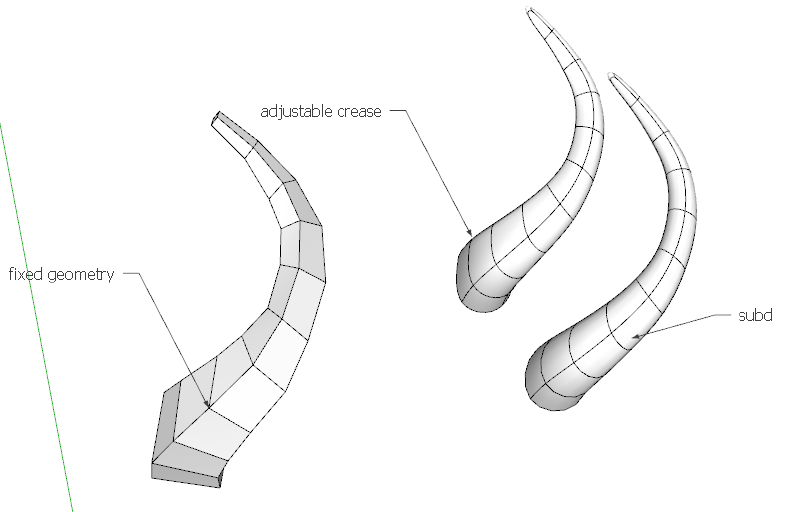
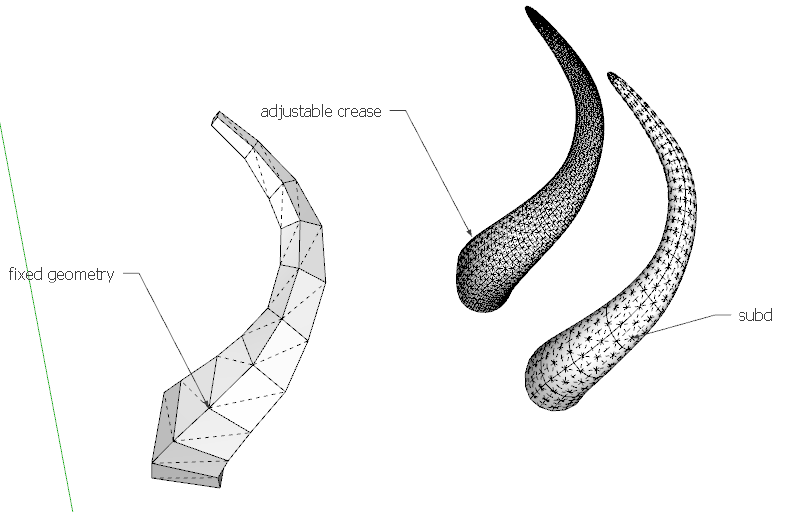
-
@ely862me said:
I have fixed the geometry by removing the triangulation and by using the Quad face tools. I have also oriented each diagonal on the same direction, this helps a lot with Artisan too.
Honestly I don't exactly know which of the functions works to fix it because I have tried for a couple of times all the convert from tris to quads including the sandbox option.Thanks for this, I didnt know that both soft-ness and smooth-ness of the geometry has influence over the quality of the subdivisions.
Artisan would give similar results to soft&smooth" and non-soft&smooth geometry.
Now Im learning...
-
@cuttingedge said:
Thanks for this, I didnt know that both soft-ness and smooth-ness of the geometry has influence over the quality of the subdivisions.
SubD (catmull clark subdivision) works best for quads, and quads in SU are quasi-defined by Thomthom this way "two triangles share an edge that is soft+smooth and doesn't cast shadows".
Artisan uses another subdivision algorithm and don't need quads.
-
-
@cuttingedge said:
plus it retains the material and UV info (haven’t fully tried this though). You will lose all materials in artisan once subdivided.
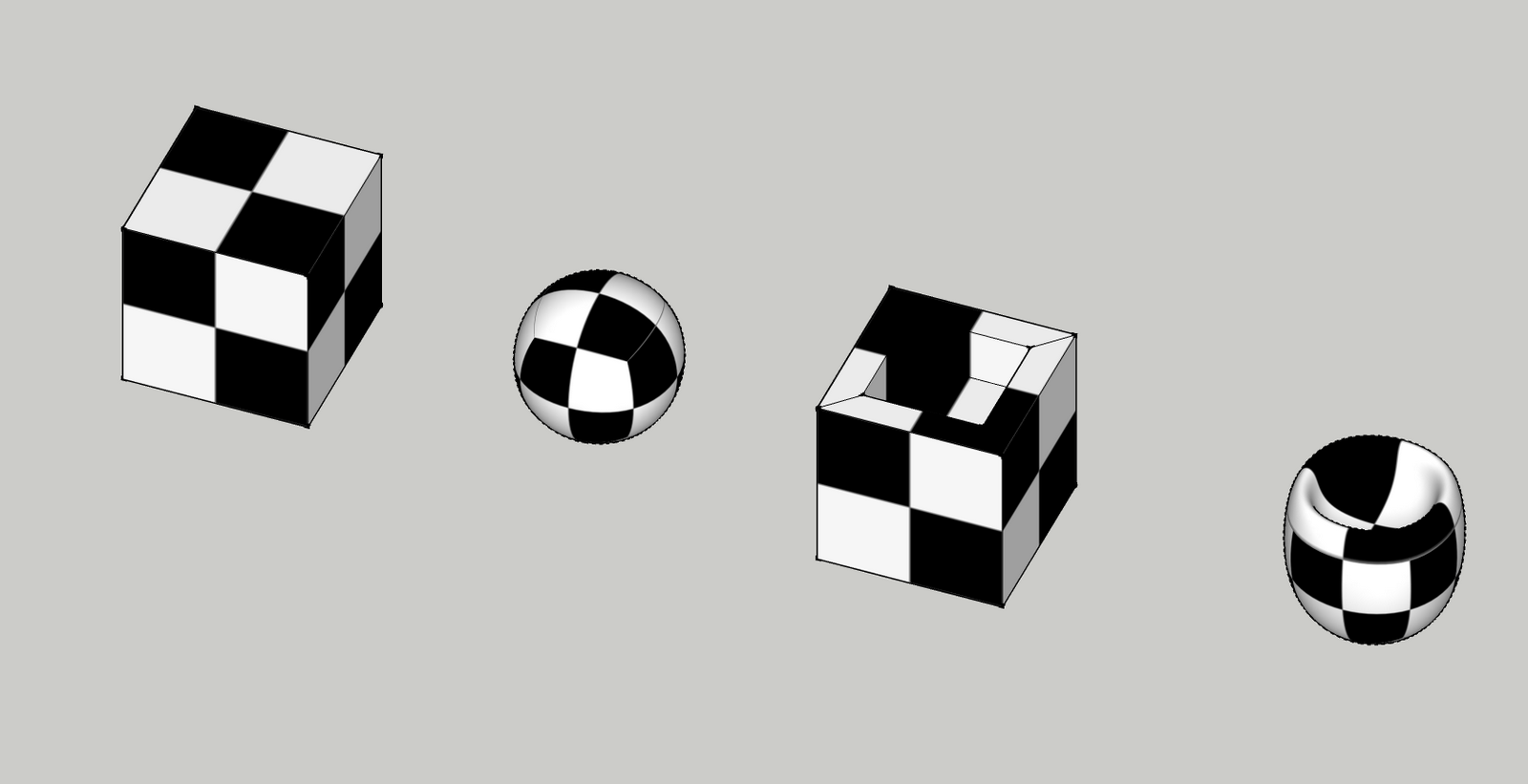
Just want to clarify a common misconception about Artisan. You CAN retain materials and UVs in Artisan, you just need to enable that feature in 'Settings'. It is not enabled by default because it results in a performance hit.
-
Hi, everybody. Here's my example with Artisan, texture and UV is retained.










Advertisement