sketchucation logo sketchucation
    • 登入
    Oops, your profile's looking a bit empty! To help us tailor your experience, please fill in key details like your SketchUp version, skill level, operating system, and more. Update and save your info on your profile page today!
    🔌 Smart Spline | Fluid way to handle splines for furniture design and complex structures. Download

    SubD examples and models

    已排程 已置頂 已鎖定 已移動 SUbD
    renderpluginsextensions
    1.7k 貼文 81 Posters 1.1m 瀏覽 79 Watching
    正在載入更多貼文
    • 從舊到新
    • 從新到舊
    • 最多點贊
    回覆
    • 在新貼文中回覆
    登入後回覆
    此主題已被刪除。只有擁有主題管理權限的使用者可以查看。
    • JQLJ 離線
      JQL
      最後由 編輯

      The Uv's are kept, but the faces are subdivided and "deformed" so the texture warps...

      www.casca.pt
      Visit us on facebook!

      1 條回覆 最後回覆 回覆 引用 0
      • Rich O BrienR 離線
        Rich O Brien Moderator
        最後由 編輯

        The texture distortions aren't an issue for v2 of SUbD. It uses OpenSubDiv and it's even more awesome.

        Download the free D'oh Book for SketchUp 📖

        1 條回覆 最後回覆 回覆 引用 0
        • O 離線
          optimaforever
          最後由 編輯

          @rich o brien said:

          The texture distortions aren't an issue for v2 of SUbD. It uses OpenSubDiv and it's even more awesome.

          Oho
          Is it even better than Catmull-Clark?

          1 條回覆 最後回覆 回覆 引用 0
          • JQLJ 離線
            JQL
            最後由 編輯

            Damn Rich, you're playing with all the good tools!

            I've been playing with OpenSubDiv on Blender and I can't seem to find how to crease... I'm going to seach some tuts...

            www.casca.pt
            Visit us on facebook!

            1 條回覆 最後回覆 回覆 引用 0
            • Rich O BrienR 離線
              Rich O Brien Moderator
              最後由 編輯

              Shift + E on selected edges to crease.

              Or hit N to bring up property panel. At the top you can see crease slider.

              Download the free D'oh Book for SketchUp 📖

              1 條回覆 最後回覆 回覆 引用 0
              • C 離線
                cuttingedge
                最後由 編輯

                @thomthom said:

                Indeed - one start seeing everything in quads. 😄

                to an extent it becomes an uncontrollable syndrome- seeing the world in wires... now in quads.. here's my finished earpod..
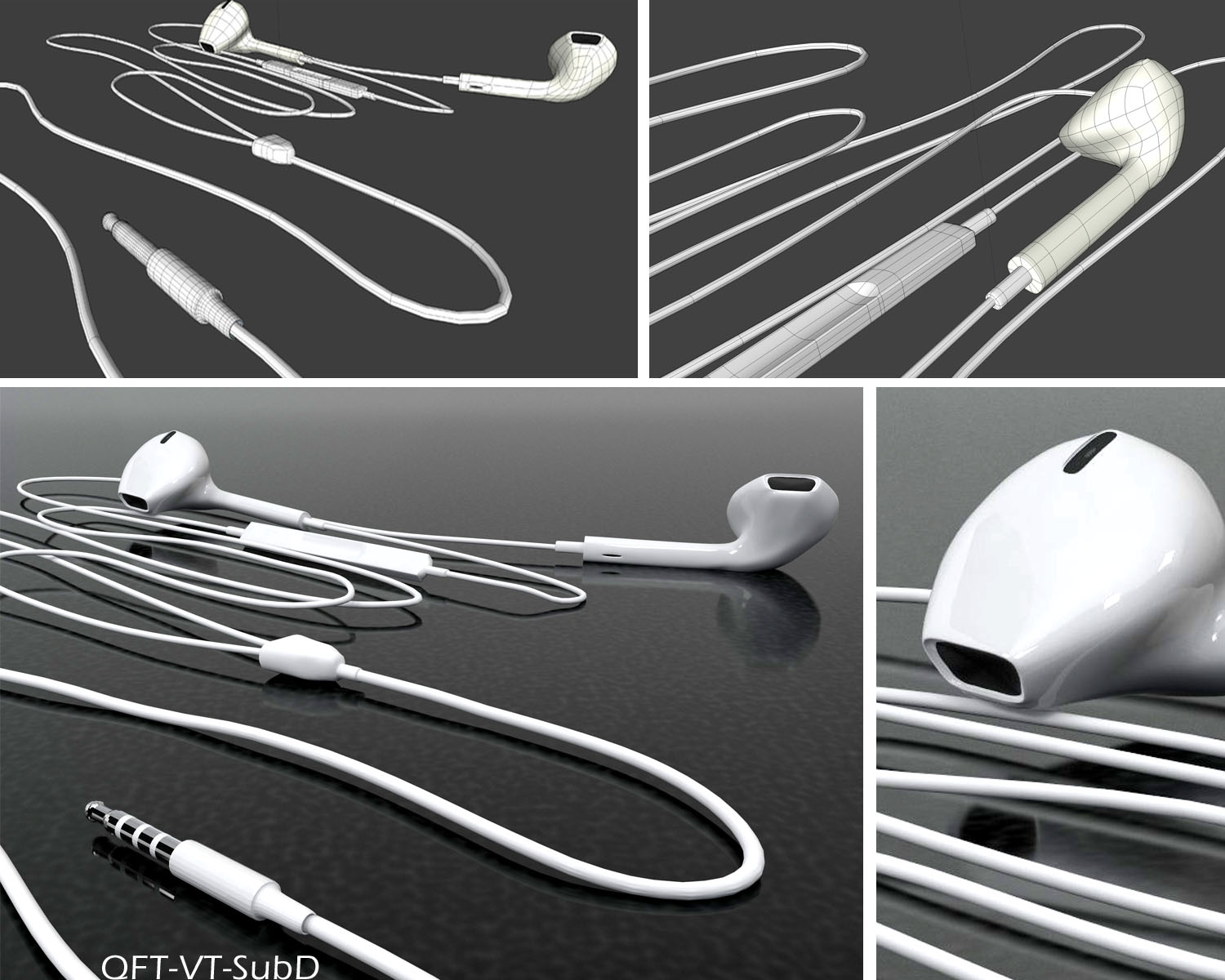
                my earpod

                1 條回覆 最後回覆 回覆 引用 0
                • garydornG 離線
                  garydorn
                  最後由 編輯

                  Howdy
                  Please excuse my questions if its not suitable here.

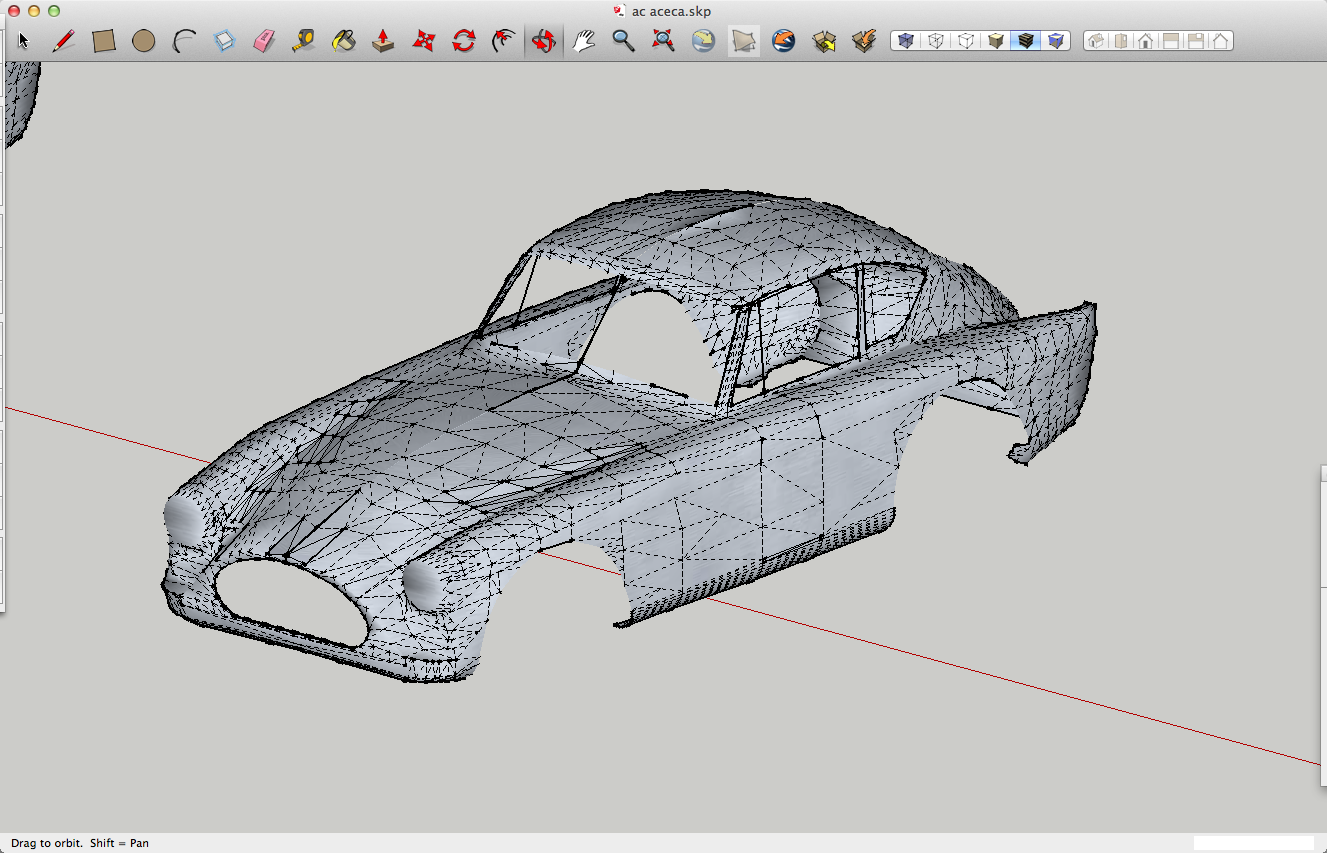
                  I've modelled up an AC aceca body - using SU 6 - native tools only , following CaljuCotcas how to model in a car in 3D using blueprints https://www.youtube.com/watch?v=Hgrix3m1l9k

                  blueprint is from a 3Warehouse model called Aceca ( no model just blueprints.)

                  Is SubD something that could be used to smooth out and simplify the surface better than what I've modelled so far. - some of my surfaces are still too dimply.

                  Thanks - any advice appreciated.


                  Ac aceca model SU 6 with stages in different layers


                  photo off web


                  l_ac-aceca-1955-.jpg


                  screen shot of file

                  1 條回覆 最後回覆 回覆 引用 0
                  • utilerU 離線
                    utiler
                    最後由 編輯

                    Holy crap!!!!! Very impressed.....

                    Just Curious...

                    1 條回覆 最後回覆 回覆 引用 0
                    • ely862meE 離線
                      ely862me
                      最後由 編輯

                      @garydorn said:

                      Howdy

                      Is SubD something that could be used to smooth out and simplify the surface better than what I've modelled so far. - some of my surfaces are still too dimply.

                      Thanks - any advice appreciated.

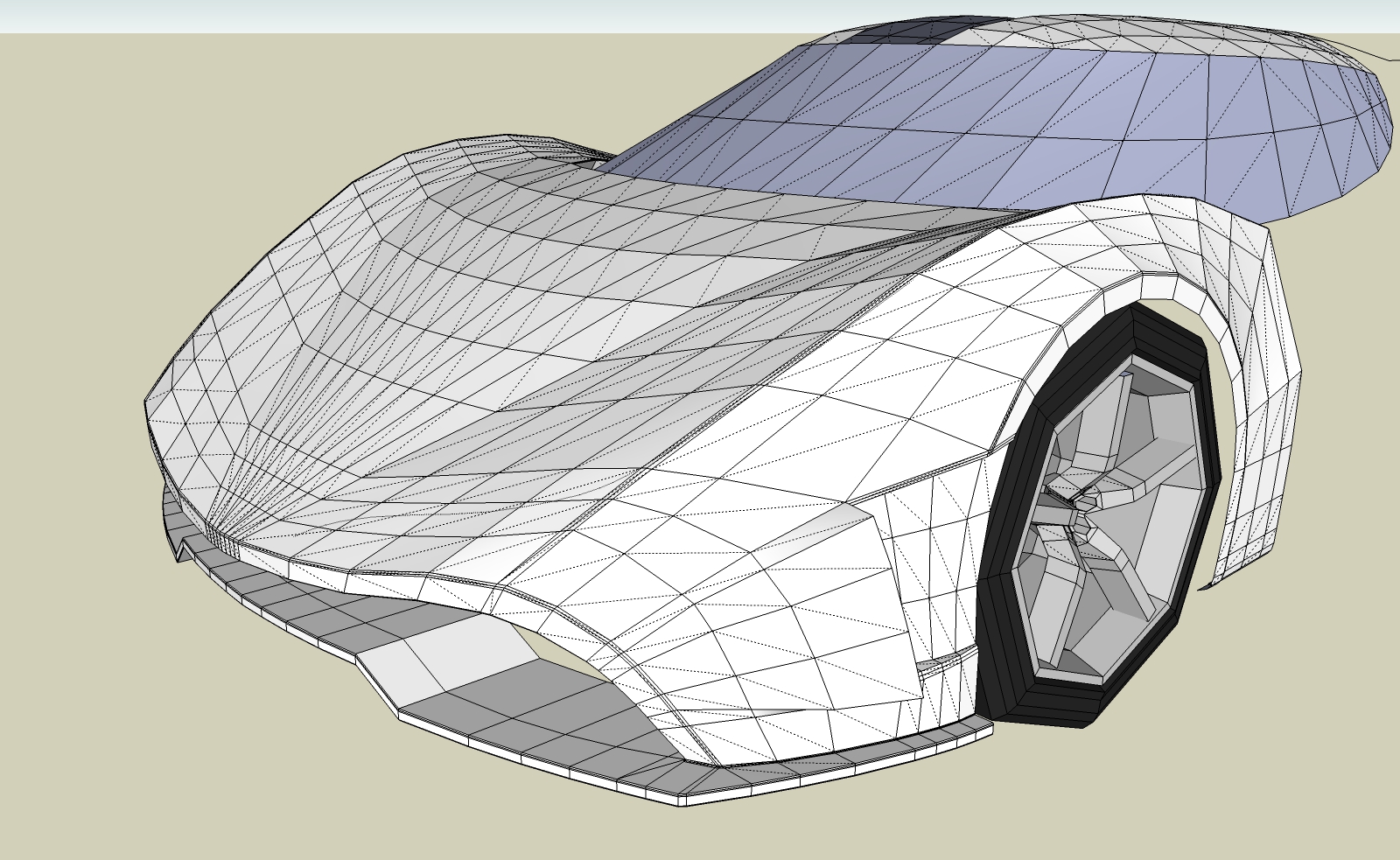
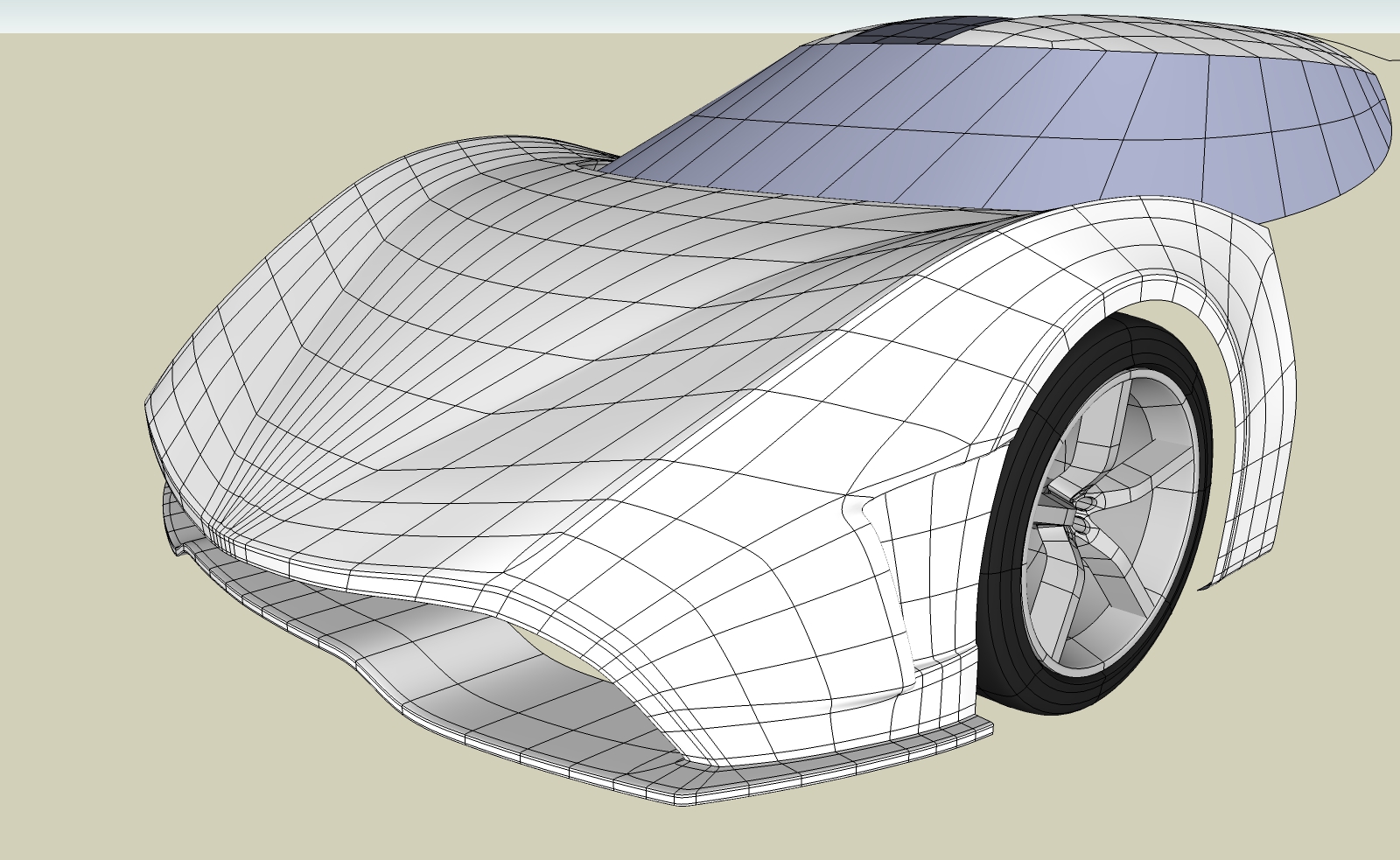
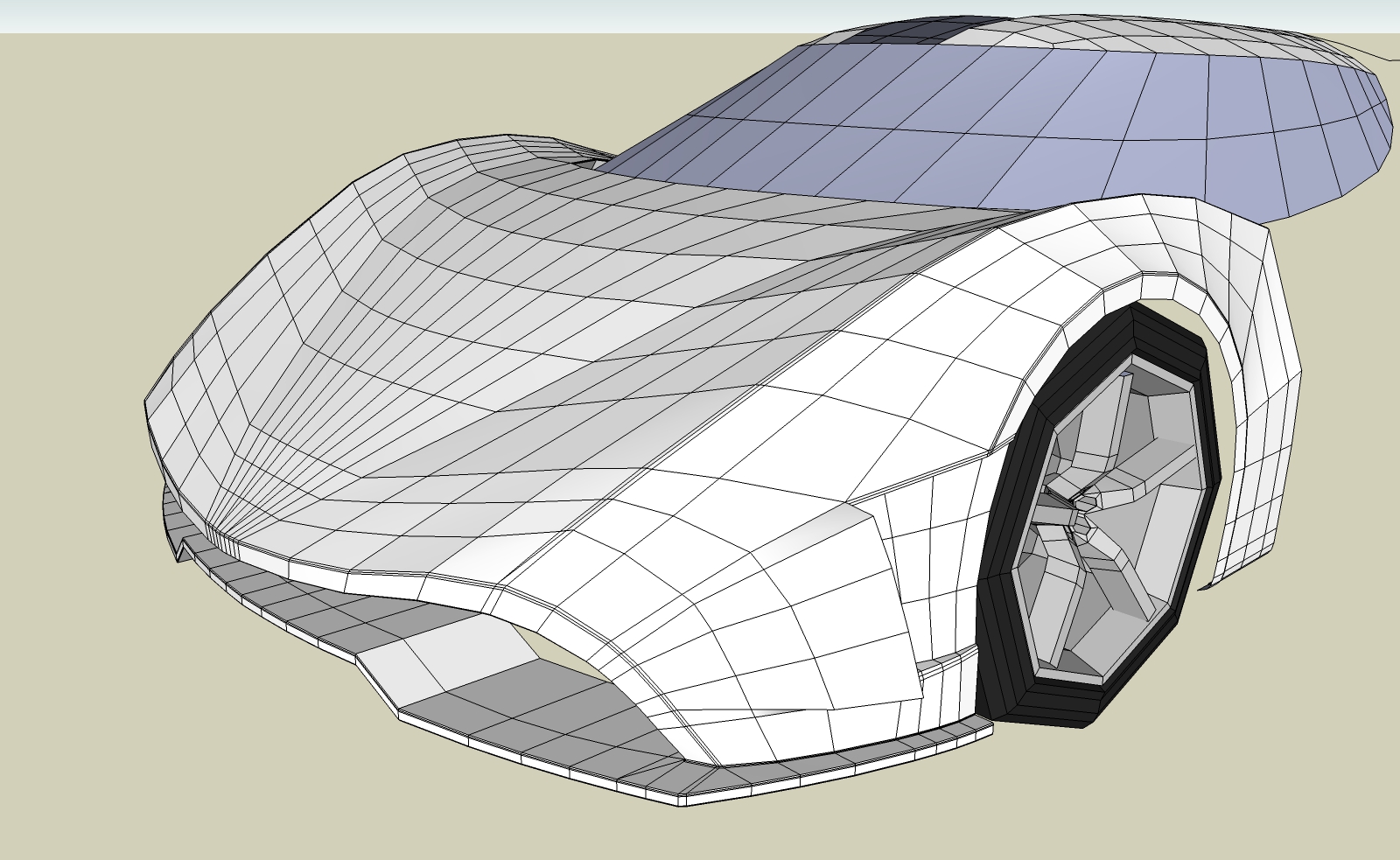
                      In order for your mesh to smooth properly with SubD and even with Artisan, you need to make it a lot cleaner.
                      For SubD you need to make it like this .

                      Component_3 3.jpg


                      Component_3 2.jpg


                      Component_3 1.jpg

                      Elisei (sketchupper)


                      Before no life was done on Earth it was THE LIFE ITSELF...GOD
                      Come and See EliseiDesign

                      1 條回覆 最後回覆 回覆 引用 0
                      • O 離線
                        optimaforever
                        最後由 編輯

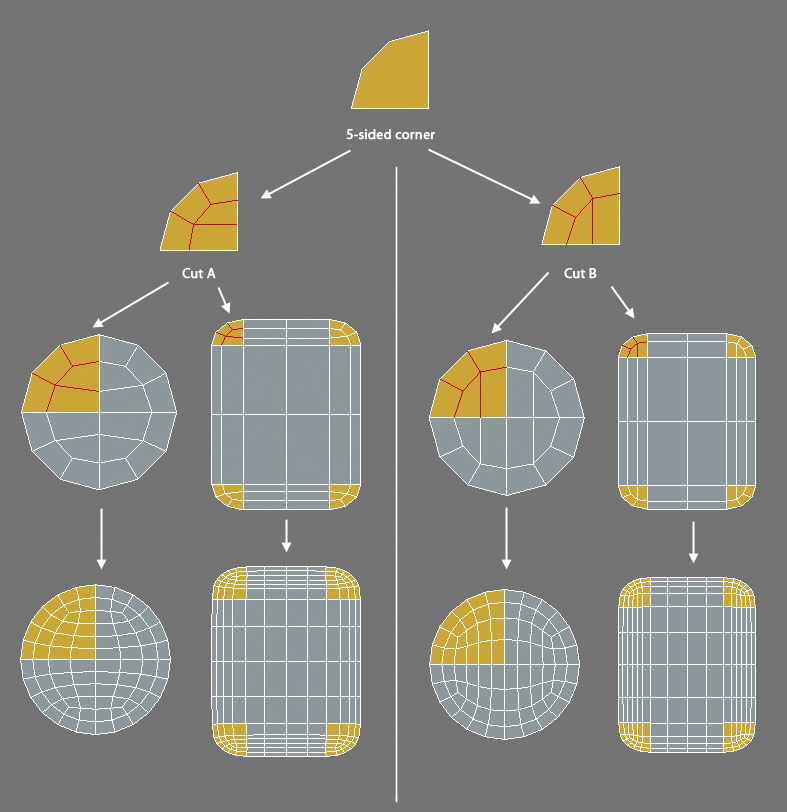
                        Ok... again a dumb question:
                        to get these topologies (Cut Face A and B), is there a specific tool or can I draw them the usual way with QFT line tool?

                        how to quadify a 5 sided corner

                        1 條回覆 最後回覆 回覆 引用 0
                        • thomthomT 離線
                          thomthom
                          最後由 編輯

                          @optimaforever said:

                          @rich o brien said:

                          The texture distortions aren't an issue for v2 of SUbD. It uses OpenSubDiv and it's even more awesome.

                          Oho
                          Is it even better than Catmull-Clark?

                          OpenSubdiv uses Catmull-Clack. But with more improvements than the variants I implemented myself. In the current version of SUbD the UVs are linearly interpolated. OpenSubdiv offer some more options - though I'm still exploring exactly what that means.

                          Thomas Thomassen — SketchUp Monkey & Coding addict
                          List of my plugins and link to the CookieWare fund

                          1 條回覆 最後回覆 回覆 引用 0
                          • thomthomT 離線
                            thomthom
                            最後由 編輯

                            @garydorn said:

                            Is SubD something that could be used to smooth out and simplify the surface better than what I've modelled so far. - some of my surfaces are still too dimply.

                            Car modelling has been my main interest for QFT and SUbD. You can see a test model in the beginning of this thread: http://sketchucation.com/forums/viewtopic.php?f=397%26amp;t=63826#p584865

                            That car you got there would be really fun to model. I've been thinking that I want to model a rounder car like that. (Was thinking Cobra is similar.)

                            Thomas Thomassen — SketchUp Monkey & Coding addict
                            List of my plugins and link to the CookieWare fund

                            1 條回覆 最後回覆 回覆 引用 0
                            • R 離線
                              rv1974
                              最後由 編輯

                              @unknownuser said:

                              OpenSubdiv uses Catmull-Clack. But with more improvements than the variants I implemented myself. In the current version of SUbD the UVs are linearly interpolated. OpenSubdiv offer some more options - though I'm still exploring exactly what that means.

                              Something in this fashion (at 10:17)
                              Are you going to grant us all those options mentoned below, or concentrate on one working the best?

                              1 條回覆 最後回覆 回覆 引用 0
                              • JQLJ 離線
                                JQL
                                最後由 編輯

                                @rich o brien said:

                                Shift + E on selected edges to crease.

                                Or hit N to bring up property panel. At the top you can see crease slider.

                                @Rich @Thomhom sorry to get a bit off topic, but neither OpenSubDiv nor the regular SubDiv in Blender seem to assume the crease.

                                Open subdiv doesn't allow to subdiv in edit mode so I can't interactivelly see how I'm creasing.

                                Of course I must be doing something wrong... That goes to show how Sketchup is intuitive for sketchup users, making all other software cumbersome to use, so again, congratulations on your work Thomthom.

                                There is still a big difference in SubD in Sketchup or SubD in Blender though, the control mesh UV stays within UV unwrap when you deform it, while in Sketchup I suspect it doesn't as deforming an edge or a face will make Sketchup assume it should extend the tiling:

                                I've shared this concern with other developers dealing with UV unwrap 😉 but it makes sense sharing it here too:

                                Would it be possible to have this behaviour by default on a set of faces that are being used in your control mesh?

                                http://i.imgur.com/MuLG03A.gif

                                www.casca.pt
                                Visit us on facebook!

                                1 條回覆 最後回覆 回覆 引用 0
                                • thomthomT 離線
                                  thomthom
                                  最後由 編輯

                                  @rv1974 said:

                                  Something in this fashion (at 10:17)
                                  Are you going to grant us all those options mentoned below, or concentrate on one working the best?

                                  I'm working on exposing these options to the SUbD UI. I was thinking of trying to pick default values that makes sense most of the time - but make it easy to switch.

                                  But need to work on the names. Like in that video the naming is weird. "Smooth (Always Sharp)" ... I mean, whut? Oxymoron descriptions that make no sense. And "Bilinear" - maybe it's just me, but I struggle to visualize what that really means - at least compared to "Smooth". So I need to figure out some better names. And I was thinking the UI would have some thumbnails to illustrate what goes on.

                                  In the OSD docs there are some visualizations, but I'm still not quite happy with that style: http://graphics.pixar.com/opensubdiv/docs/subdivision_surfaces.html#face-varying-interpolation-rules

                                  Thomas Thomassen — SketchUp Monkey & Coding addict
                                  List of my plugins and link to the CookieWare fund

                                  1 條回覆 最後回覆 回覆 引用 0
                                  • thomthomT 離線
                                    thomthom
                                    最後由 編輯

                                    @jql said:

                                    Would it be possible to have this behaviour by default on a set of faces that are being used in your control mesh?

                                    Nothing exist that allow UVs to be pinned like that. Though extensions can make sure to preserve UVs like that - Vertex Tools will for instance. And QFT have a save and reload feature - such that if you only distort the mesh with any tool that mess up UVs you can restore them to the vertices.

                                    Thomas Thomassen — SketchUp Monkey & Coding addict
                                    List of my plugins and link to the CookieWare fund

                                    1 條回覆 最後回覆 回覆 引用 0
                                    • Rich O BrienR 離線
                                      Rich O Brien Moderator
                                      最後由 編輯

                                      @jql said:

                                      @Rich @Thomhom sorry to get a bit off topic, but neither OpenSubDiv nor the regular SubDiv in Blender seem to assume the crease.

                                      Hmmm....sounds like PEBKAC

                                      Download the free D'oh Book for SketchUp 📖

                                      1 條回覆 最後回覆 回覆 引用 0
                                      • R 離線
                                        rv1974
                                        最後由 編輯

                                        General question:
                                        Would this plugin or any other have any benefits (speed, reliability etc.) being part SU core code (and not as add-on)?

                                        1 條回覆 最後回覆 回覆 引用 0
                                        • thomthomT 離線
                                          thomthom
                                          最後由 編輯

                                          @rv1974 said:

                                          General question:
                                          Would this plugin or any other have any benefits (speed, reliability etc.) being part SU core code (and not as add-on)?

                                          This plugins would have a benefit to API access to the viewport pipeline - as then the subdivided mesh could be sent directly to the OpenGL pipeline instead of having to regenerate SketchUp faces. Then SU would know only about the control mesh and any tool could be used to manipulate the mesh while seeing the subdivided result.
                                          Though I have some ideas for that which might make it less of an issue.

                                          (I feel we should be having a separate thread for all of this and keep this thread about example models. Can a mod split out the recent posts?)

                                          Thomas Thomassen — SketchUp Monkey & Coding addict
                                          List of my plugins and link to the CookieWare fund

                                          1 條回覆 最後回覆 回覆 引用 0
                                          • JQLJ 離線
                                            JQL
                                            最後由 編輯

                                            @rv1974 said:

                                            General question:
                                            Would this plugin or any other have any benefits (speed, reliability etc.) being part SU core code (and not as add-on)?

                                            As with all my questions with blender... I will get there eventually...

                                            www.casca.pt
                                            Visit us on facebook!

                                            1 條回覆 最後回覆 回覆 引用 0
                                            • 1
                                            • 2
                                            • 20
                                            • 21
                                            • 22
                                            • 23
                                            • 24
                                            • 82
                                            • 83
                                            • 22 / 83
                                            • 第一個貼文
                                              最後的貼文
                                            Buy SketchPlus
                                            Buy SUbD
                                            Buy WrapR
                                            Buy eBook
                                            Buy Modelur
                                            Buy Vertex Tools
                                            Buy SketchCuisine
                                            Buy FormFonts

                                            Advertisement