sketchucation logo sketchucation
    • 登入
    Oops, your profile's looking a bit empty! To help us tailor your experience, please fill in key details like your SketchUp version, skill level, operating system, and more. Update and save your info on your profile page today!
    ⚠️ Important | Libfredo 15.6b introduces important bugfixes for Fredo's Extensions Update

    AmbientOcclusion for SketchUp released

    已排程 已置頂 已鎖定 已移動 Extensions & Applications Discussions
    extensions
    42 貼文 15 Posters 13.3k 瀏覽 15 Watching
    正在載入更多貼文
    • 從舊到新
    • 從新到舊
    • 最多點贊
    回覆
    • 在新貼文中回覆
    登入後回覆
    此主題已被刪除。只有擁有主題管理權限的使用者可以查看。
    • jiminy-billy-bobJ 離線
      jiminy-billy-bob
      最後由 編輯

      @juju said:

      I'm trying to figure out how this differs from Visualizer...

      Visualizer is a true renderer (although very limited features). This is "just" Ambient Occlusion.

      It could actually be very interesting if it was happening in the viewport. For client presentation/interaction, etc
      Sometimes you just want to add some depth to the model without a realistic render.

      25% off Skatter for SketchUcation Premium Members

      1 條回覆 最後回覆 回覆 引用 0
      • pbacotP 離線
        pbacot
        最後由 編輯

        Is the blur in the last image a part of the plugin's function or post pro?

        MacOSX MojaveSketchUp Pro v19 Twilight v2 Thea v3 PowerCADD

        1 條回覆 最後回覆 回覆 引用 0
        • F 離線
          fluid
          最後由 編輯

          The blur is a ray-traced depth of field done directly by the plugin (in the pro version)

          1 條回覆 最後回覆 回覆 引用 0
          • FrederikF 離線
            Frederik
            最後由 編輯

            @pixero said:

            @fluid said:

            Yes, unfortunately the SketchUp api doesn't allow to render directly into the standard viewport

            Isn't that what LightUp does?

            Thea4SU is also able to do this, hence you're wrong, Nicola...

            Cheers
            Kim Frederik

            1 條回覆 最後回覆 回覆 引用 0
            • F 離線
              fluid
              最後由 編輯

              Thanks for pointing that out, we'll look into it for the upcoming release

              1 條回覆 最後回覆 回覆 引用 0
              • F 離線
                fluid
                最後由 編輯

                We just did a new release, fixing the Bugsplat that some users were experiencing. You can get it here

                1 條回覆 最後回覆 回覆 引用 0
                • S 離線
                  sepo
                  最後由 編輯

                  Hmmm...The output looks like Podium version 1.x with no lighting and AO preset. I remember it well as wrote a preset and it was damn fast. If is not real time in the SU viewport it is step backward IMHO.

                  1 條回覆 最後回覆 回覆 引用 0
                  • pbacotP 離線
                    pbacot
                    最後由 編輯

                    What would realtime in the SU Viewport mean? You could view your models like this while navigating and working on them?

                    MacOSX MojaveSketchUp Pro v19 Twilight v2 Thea v3 PowerCADD

                    1 條回覆 最後回覆 回覆 引用 0
                    • olisheaO 離線
                      olishea
                      最後由 編輯

                      would be cool if it baked the textures

                      oli

                      1 條回覆 最後回覆 回覆 引用 0
                      • Rich O BrienR 離線
                        Rich O Brien Moderator
                        最後由 編輯

                        @sepo said:

                        If is not real time in the SU viewport it is step backward IMHO.

                        👍

                        Download the free D'oh Book for SketchUp 📖

                        1 條回覆 最後回覆 回覆 引用 0
                        • jujuJ 離線
                          juju
                          最後由 編輯

                          @fluid said:

                          We just released a new version of AmbientOcclusion, you can get it here: http://www.ambientocclusion-sketchup.com

                          This new version adds rendering directly inside the SketchUp viewport.

                          [flash:7ci503sq]https://www.youtube.com/v/Rst3-SoYAvA[/flash:7ci503sq]

                          nice...

                          Save the Earth, it's the only planet with chocolate.

                          1 條回覆 最後回覆 回覆 引用 0
                          • F 離線
                            fluid
                            最後由 編輯

                            We just released a new version of AmbientOcclusion, adding support for SketchUp 2015 for Mac and fixing some bugs. You can get it here.

                            1 條回覆 最後回覆 回覆 引用 0
                            • olisheaO 離線
                              olishea
                              最後由 編輯

                              I like it; simple and effective.

                              Would be awesome if you had an option to overlay the sketchup lines onto the render in one shot 😉 Anti-aliased of course. Should be able to maintain the current sketchup line style too such as line extension.

                              Many people like to make simple "clay" renders with a line overlay to help reveal details.

                              A vignette option may also be cool. Goes really well with AO renders.

                              oli

                              1 條回覆 最後回覆 回覆 引用 0
                              • F 離線
                                fluid
                                最後由 編輯

                                We just released AmbientOcclusion 1.5.0, you can get it here.
                                In this version:

                                • Added hard shadows
                                • Added opacity control for xray effect
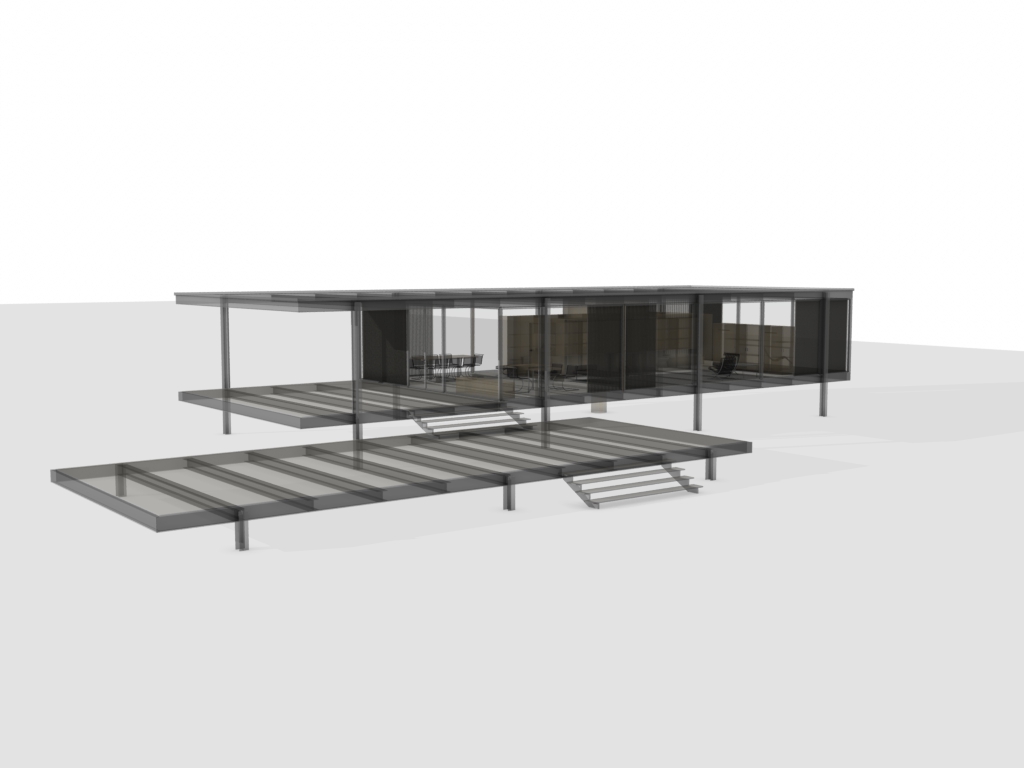
                                Hard Shadows
                                X-Ray

                                1 條回覆 最後回覆 回覆 引用 0
                                • T 離線
                                  tim
                                  最後由 編輯

                                  I'm giving this a quick tryout and so far I quite like what I see. On my 3y.o. iMac it renders modest models very rapidly - my whole-house model is taking quite a while though, unsurprisingly.

                                  Two annoyances I noticed pretty quickly
                                  a) once you've turned on 'render viewport' I can't see a way to turn it off. closing the model window seems to be the only option, followed by reopening. Not as friendly as it could be.
                                  b) it seems to take an interesting view of what is visible and what is not. When rendering my house from a view supposedly only showing the layer for the timber frame the rendering was displaying many other layers but not all. Odd. If you would like to use it for testing I'll happily send you a copy of the model file.

                                  Oh, and I just noticed that it leaves the sliders (used by opacity setting etc) lying around on the screen.

                                  1 條回覆 最後回覆 回覆 引用 0
                                  • J 離線
                                    Jim
                                    最後由 編輯

                                    I like it also because it's easy and fast even on my old laptop. But after I do a few renders, SketchUp gets really slow to do anything. Even just creating a box starts lagging. I'm going to guess you are using SketchUp observers inefficiently.

                                    Hi

                                    1 條回覆 最後回覆 回覆 引用 0
                                    • pbacotP 離線
                                      pbacot
                                      最後由 編輯

                                      I guess I don't get it. The rendering looks nice but the shadows look unrealistic to me. A lot people like this sort of thing though.

                                      EDIT: I don't use SketchUp (live) a lot for project demonstrations, but I did the other day. I admit this feature might have enhanced the appearance of the model in that process.

                                      MacOSX MojaveSketchUp Pro v19 Twilight v2 Thea v3 PowerCADD

                                      1 條回覆 最後回覆 回覆 引用 0
                                      • K 離線
                                        karimtabbara
                                        最後由 編輯

                                        Hello

                                        I've just tryed Ambient Occlusion.

                                        I read "if you add overlaying on textures (adding support for .jpg/.png textures is enough) then it can be a free alternative to LightUp"

                                        Sorry but I don't thik so.
                                        LightUp is maybe 189$ but it's worth it.
                                        Adam has made a very good plug in.
                                        Even Incremental Render mode is better and faster then Ambient Occlusion...
                                        No need to say that wonce fully rendered with Lightup, all scenes need no time to render.
                                        ... And Ligtup has video Render, Internet plug in, many many settings ...

                                        Best regards

                                        1 條回覆 最後回覆 回覆 引用 0
                                        • S 離線
                                          spadestick
                                          最後由 編輯

                                          too slow on my machine for any real use... it should be instant. perhaps graphics card?

                                          1 條回覆 最後回覆 回覆 引用 0
                                          • F 離線
                                            fluid
                                            最後由 編輯

                                            We just released AmbientOcclusion 1.5.4, you can get it here.

                                            This version solves a lot of issues, in particular:

                                            • Layer visibility
                                            • Slowdowns
                                            • Imprecise camera placement when rendering big models
                                            • Group closing when changing view

                                            1 條回覆 最後回覆 回覆 引用 0
                                            • 1
                                            • 2
                                            • 3
                                            • 1 / 3
                                            • 第一個貼文
                                              最後的貼文
                                            Buy SketchPlus
                                            Buy SUbD
                                            Buy WrapR
                                            Buy eBook
                                            Buy Modelur
                                            Buy Vertex Tools
                                            Buy SketchCuisine
                                            Buy FormFonts

                                            Advertisement