sketchucation logo sketchucation
    • Login
    Oops, your profile's looking a bit empty! To help us tailor your experience, please fill in key details like your SketchUp version, skill level, operating system, and more. Update and save your info on your profile page today!
    ⚠️ Update | Sketchucation Tools 5.0.8 released with licensing improvements and bugfixes Download

    Projecting through a solid

    Scheduled Pinned Locked Moved SketchUp Discussions
    sketchup
    26 Posts 8 Posters 2.1k Views 8 Watching
    Loading More Posts
    • Oldest to Newest
    • Newest to Oldest
    • Most Votes
    Reply
    • Reply as topic
    Log in to reply
    This topic has been deleted. Only users with topic management privileges can see it.
    • BoxB
      Box
      last edited by

      Dave seems to be on the money here, but an image of what you want to do would help.

      1 Reply Last reply
      Reply Quote 0
      • Dave RD
        Dave R
        last edited by

        @box said:

        Dave seems to be on the money here, but an image of what you want to do would help.

        too bad I'm not in the money. 😆 😆

        Etaoin Shrdlu

        %

        (THERE'S NO PLACE LIKE)

        G28 X0.0 Y0.0 Z0.0

        M30

        %

        1 Reply Last reply
        Reply Quote 0
        • ntxdaveN
          ntxdave
          last edited by

          You can even take advantage of a transparent image to make something like a sign that has irregular edges using DaveR's technique. The attached model is an example.


          WashEntranceSign.skp

          Press F1...thank me later

          1 Reply Last reply
          Reply Quote 0
          • Wo3DanW
            Wo3Dan
            last edited by

            @ansenseale said:

            Is there a way to project an image through a solid shape so that it shows up on both sides?

            Before applying the texture to a face (still default on both sides!) just reduce the opacity from 100% to say 99%. Then sample it and paint default faces.
            Once done, raise opacity of the texture to 100% again if needed.
            Front shows normal oriented texture, back shows mirrored texture.

            1 Reply Last reply
            Reply Quote 0
            • Dave RD
              Dave R
              last edited by

              @wo3dan said:

              @ansenseale said:

              Is there a way to project an image through a solid shape so that it shows up on both sides?

              Before applying the texture to a face (still default on both sides!) just reduce the opacity from 100% to say 99%. Then sample it and paint default faces.
              Once done, raise opacity of the texture to 100% again if needed.
              Front shows normal oriented texture, back shows mirrored texture.

              That works if you are applying the material to both sides of the same face but not if applying the material to the opposite end of a 3D shape, right Gerrit?

              Etaoin Shrdlu

              %

              (THERE'S NO PLACE LIKE)

              G28 X0.0 Y0.0 Z0.0

              M30

              %

              1 Reply Last reply
              Reply Quote 0
              • KrisidiousK
                Krisidious
                last edited by

                Depends on if you can have back faces on a solid. then it should be revered on back right? I'd have to test.

                By: Kristoff Rand
                Home DesignerUnique House Plans

                1 Reply Last reply
                Reply Quote 0
                • Dave RD
                  Dave R
                  last edited by

                  @krisidious said:

                  Depends on if you can have back faces on a solid. then it should be revered on back right? I'd have to test.

                  C'mon. Catch up. 😆 We've already done that. If you look at the SKP file I shared back a few posts, you'll see it works. You don't need to test it.

                  Etaoin Shrdlu

                  %

                  (THERE'S NO PLACE LIKE)

                  G28 X0.0 Y0.0 Z0.0

                  M30

                  %

                  1 Reply Last reply
                  Reply Quote 0
                  • KrisidiousK
                    Krisidious
                    last edited by

                    Don't ask me how I did it... Cuz I can't recreate it now.


                    backside.skp

                    By: Kristoff Rand
                    Home DesignerUnique House Plans

                    1 Reply Last reply
                    Reply Quote 0
                    • KrisidiousK
                      Krisidious
                      last edited by

                      Cuz I didn't do it...

                      By: Kristoff Rand
                      Home DesignerUnique House Plans

                      1 Reply Last reply
                      Reply Quote 0
                      • Wo3DanW
                        Wo3Dan
                        last edited by

                        @dave r said:

                        ........That works if you are applying the material to both sides of the same face but not if applying the material to the opposite end of a 3D shape, right Gerrit?

                        How can I get out of this, 😲 and deny that you are right.

                        Well, let's just face it, you are right Dave. I should have paid more attention when reading. 😳

                        1 Reply Last reply
                        Reply Quote 0
                        • AnsenSealeA
                          AnsenSeale
                          last edited by

                          Thanks, guys.
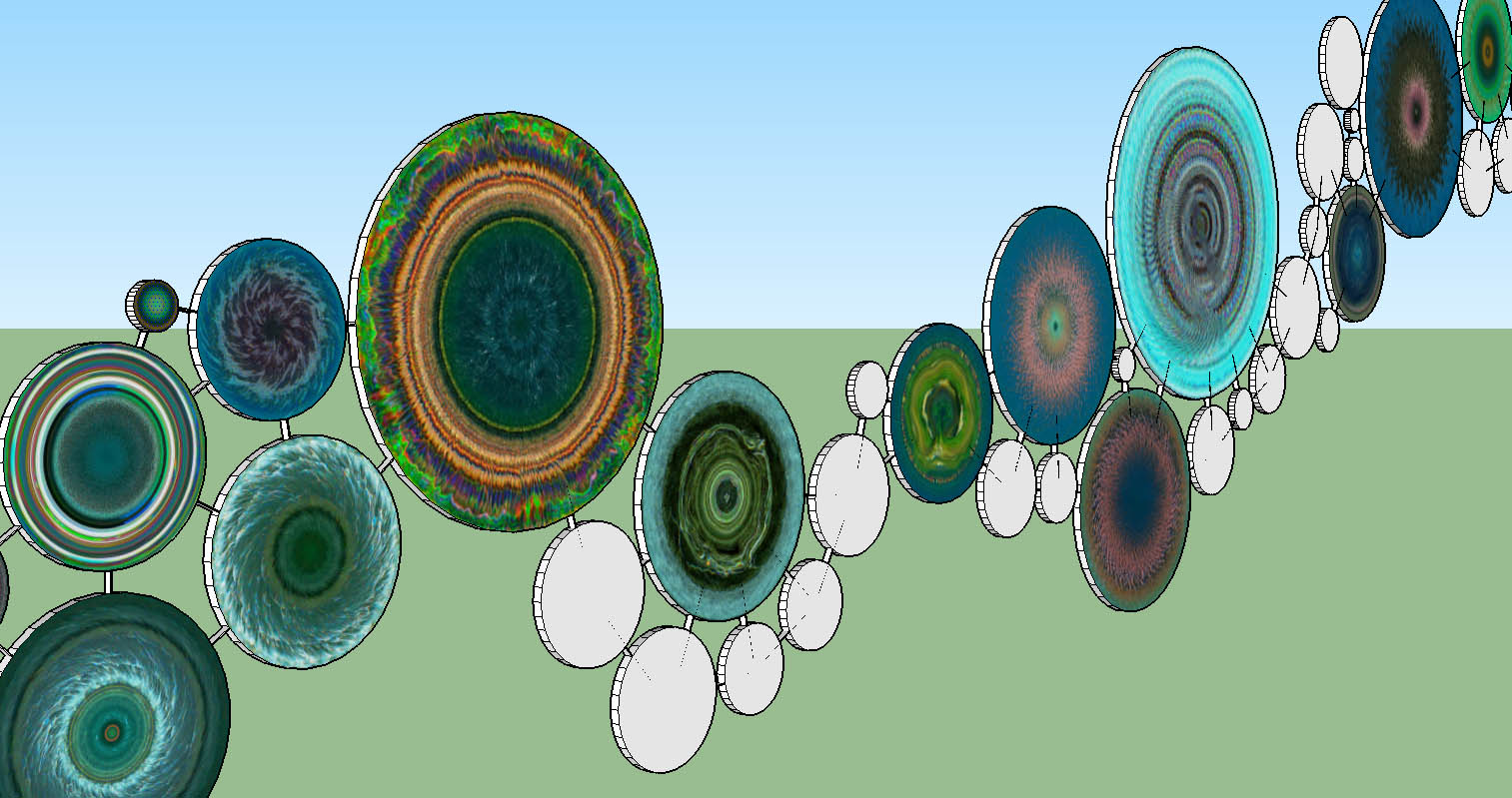
                          I'm just sending a screenshot because my model is already 15MB with all the photos. I definitely want to project through the solid, if possible, not just affect both sides of a face. My images are abstract enough that flipping is not really the issue. It's just pure laziness on my part. That's the issue.

                          circles.jpg

                          --Ansen Seale

                          ansenseale.com

                          1 Reply Last reply
                          Reply Quote 0
                          • KrisidiousK
                            Krisidious
                            last edited by

                            with those types of images, those that are hard to discern left from right, you could easily just paint the surface with the one material... I doubt many would know it was not the same on the other side.

                            By: Kristoff Rand
                            Home DesignerUnique House Plans

                            1 Reply Last reply
                            Reply Quote 0
                            • AnsenSealeA
                              AnsenSeale
                              last edited by

                              My point exactly. I just don't want to import all the image over again, doubling my file size and rendering time.

                              --Ansen Seale

                              ansenseale.com

                              1 Reply Last reply
                              Reply Quote 0
                              • Dave RD
                                Dave R
                                last edited by

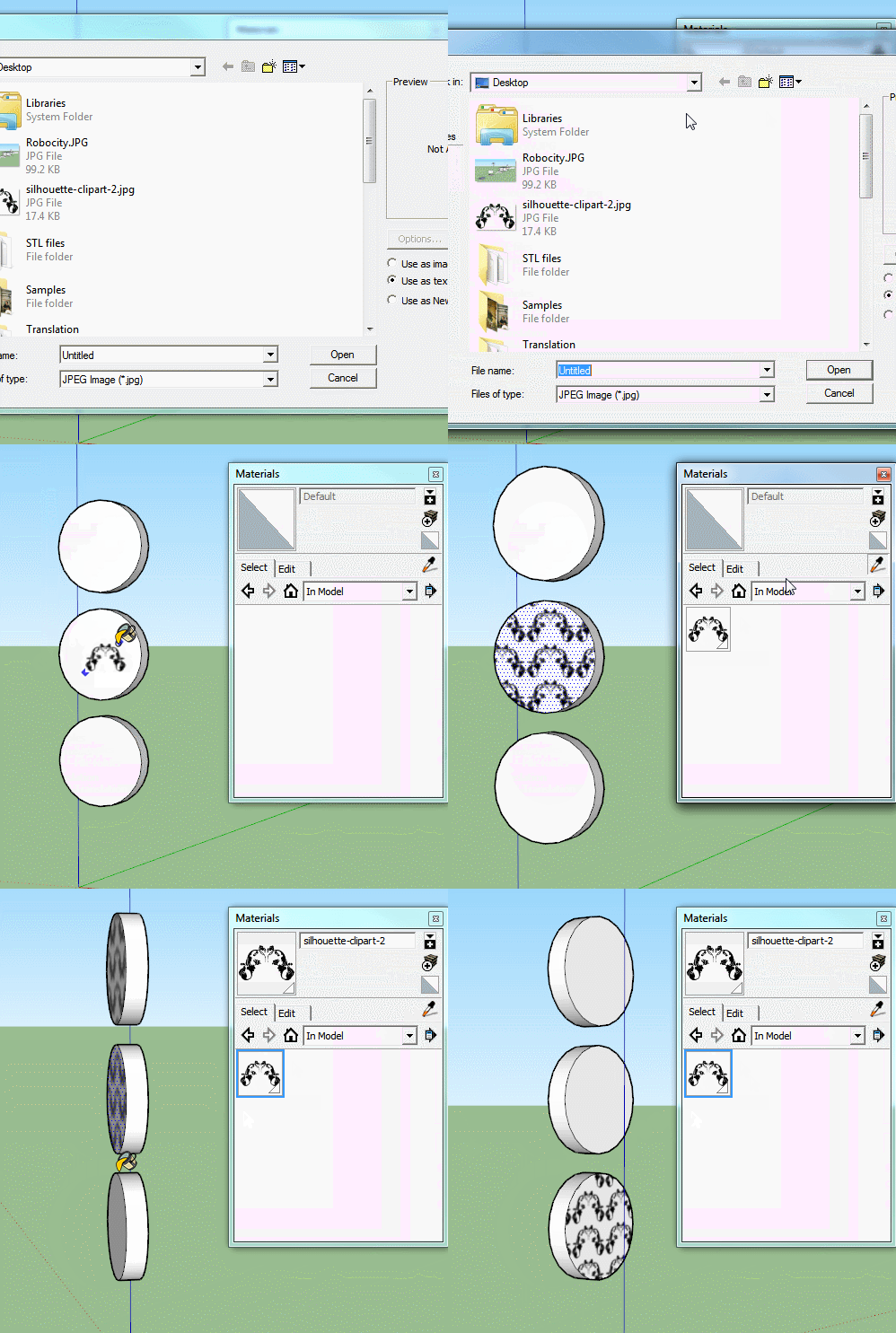
                                Once the image is imported as a texture, there's no need to import it again. There's no reason to wind up with two of each image.

                                Etaoin Shrdlu

                                %

                                (THERE'S NO PLACE LIKE)

                                G28 X0.0 Y0.0 Z0.0

                                M30

                                %

                                1 Reply Last reply
                                Reply Quote 0
                                • KrisidiousK
                                  Krisidious
                                  last edited by

                                  Yeah... As Dave said, there will only be one of each image, even if you mirrored it, it would be the same image mirrored. and there is a plugin to import all images from a directory.

                                  By: Kristoff Rand
                                  Home DesignerUnique House Plans

                                  1 Reply Last reply
                                  Reply Quote 0
                                  • AnsenSealeA
                                    AnsenSeale
                                    last edited by

                                    How would you duplicate a texture without importing it again?
                                    Thanks.

                                    --Ansen Seale

                                    ansenseale.com

                                    1 Reply Last reply
                                    Reply Quote 0
                                    • BoxB
                                      Box
                                      last edited by

                                      @ansenseale said:

                                      How would you duplicate a texture without importing it again?
                                      Thanks.

                                      Use the eye dropper tool to select the one you want and paint it on the other face.

                                      Eyedrop.gif

                                      1 Reply Last reply
                                      Reply Quote 0
                                      • AnsenSealeA
                                        AnsenSeale
                                        last edited by

                                        Thank you, Box!

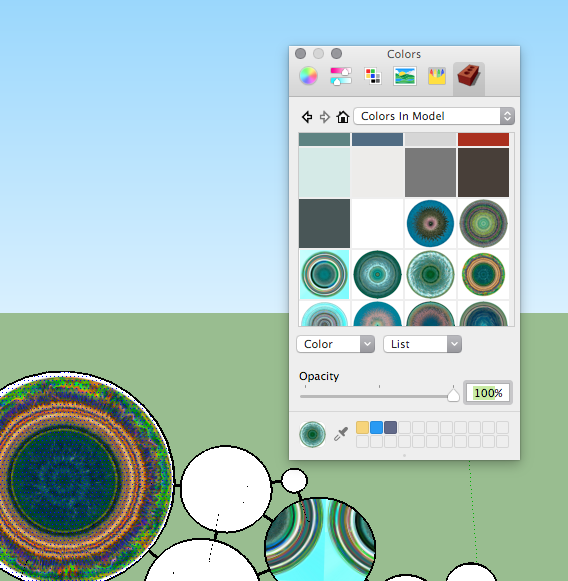
                                        My interface looks like this on the Mac. The "Materials" label brings up the Colors window with my photos showing up under "Colors in Model". I like the PC version better.

                                        Screen Shot 2015-08-03 at 07.47.18.png

                                        --Ansen Seale

                                        ansenseale.com

                                        1 Reply Last reply
                                        Reply Quote 0
                                        • S
                                          slbaumgartner
                                          last edited by

                                          Yeah, it's a longstanding gripe among Mac users (I am one also). On Mac, the Materials Window interface is a kludge built clumsily atop the Mac Color Chooser. On my Mac the eyedropper down by the samples palette at the bottom brings up a magnifying glass cursor to sample the color at a single pixel, not to capture a material. Plus it causes the cursor to vanish when finished so that I have to activate another window (command-tab) and then come back to SketchUp to get a visible cursor again. The Windows version is far superior.

                                          1 Reply Last reply
                                          Reply Quote 0
                                          • BoxB
                                            Box
                                            last edited by

                                            Sorry about that, I knew there was a difference but didn't realize it was that bad.

                                            1 Reply Last reply
                                            Reply Quote 0

                                            Hello! It looks like you're interested in this conversation, but you don't have an account yet.

                                            Getting fed up of having to scroll through the same posts each visit? When you register for an account, you'll always come back to exactly where you were before, and choose to be notified of new replies (either via email, or push notification). You'll also be able to save bookmarks and upvote posts to show your appreciation to other community members.

                                            With your input, this post could be even better 💗

                                            Register Login
                                            • 1
                                            • 2
                                            • 2 / 2
                                            • First post
                                              Last post
                                            Buy SketchPlus
                                            Buy SUbD
                                            Buy WrapR
                                            Buy eBook
                                            Buy Modelur
                                            Buy Vertex Tools
                                            Buy SketchCuisine
                                            Buy FormFonts

                                            Advertisement