Power Toolbar (2.5) - fix for 2019
-
- Update Feb 09 2019 (version 2.5)
please report any issues
2.5 = 2019 loading compatibility fix
2.3 = fixed small bugs in the menu.
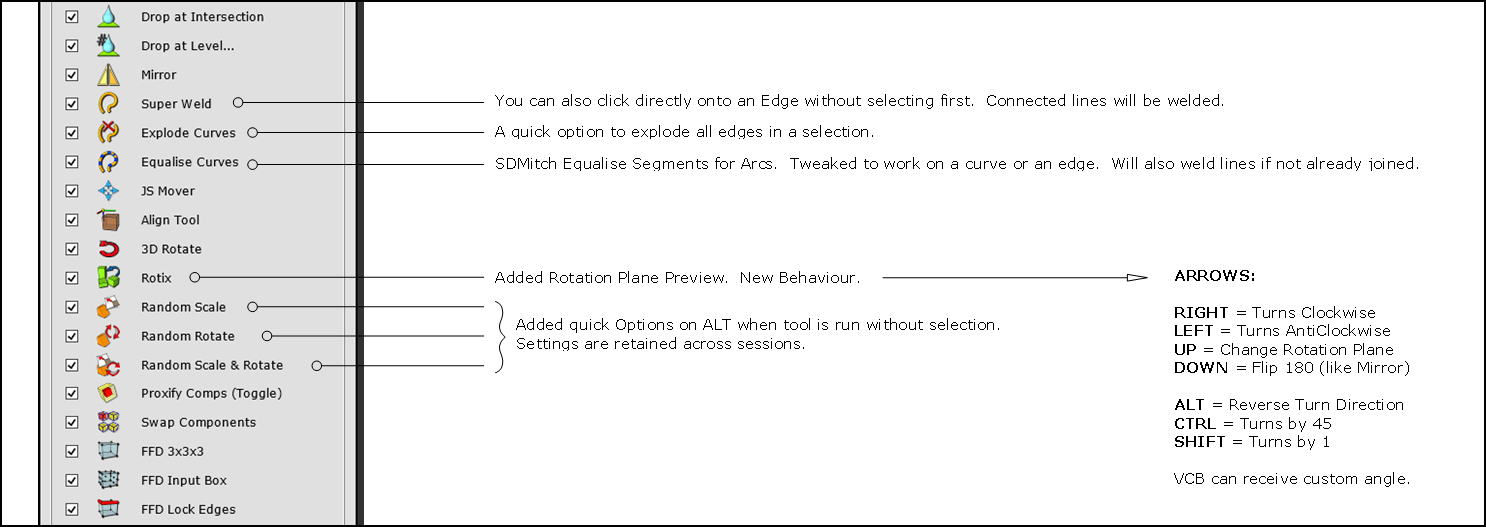
Quick changes for 2.3:
[attachment=2:2q4zlveq]<!-- ia2 -->2.3 updates.jpg<!-- ia2 -->[/attachment:2q4zlveq]
[attachment=4:2q4zlveq]<!-- ia4 -->POWERBAR.jpg<!-- ia4 -->[/attachment:2q4zlveq]
It's been a long time coming... but the new Powerbar version is ready (should work with v8 to 2015). Another post will follow 'soon' with more info, credits and tutorials (when i recover!)

Some tools ended up quite different compared to when first posted - please check the status bar for some hints until i get the docs sorted.
few key points:
-
I have no Mac. I believe it should work fine, but am not sure. Please report any findings.
-
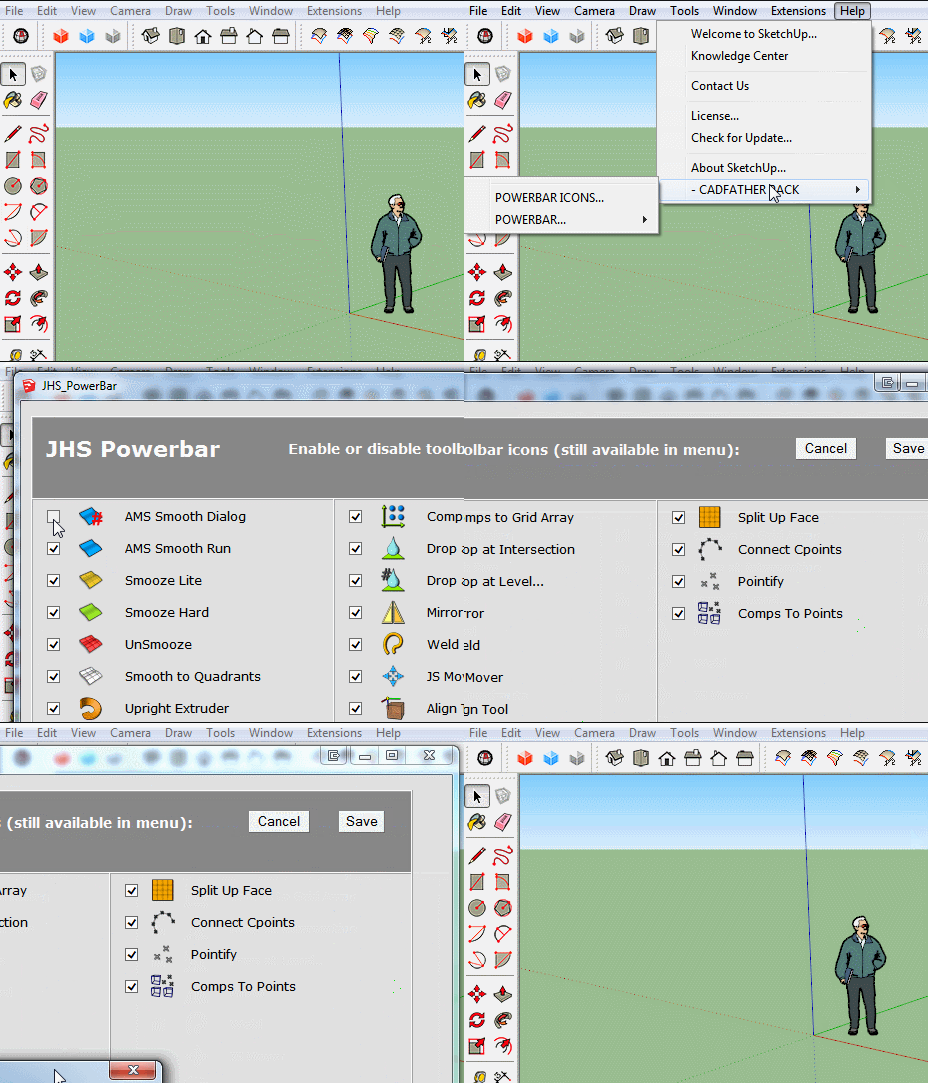
The menu itself is under the Help section, this is due to traffic and it ties up with things to come.
-
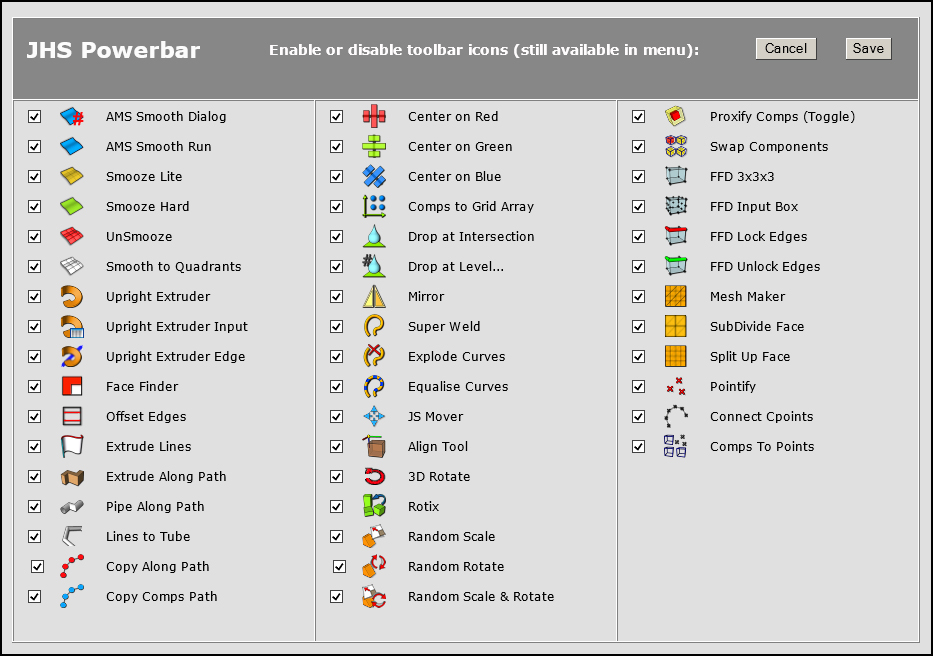
The toolbar can be customised. From the menu you can choose your favourite icons and tools. By default they are all ON.
[attachment=3:2q4zlveq]<!-- ia3 -->ICONS V2.2.jpg<!-- ia3 -->[/attachment:2q4zlveq]
Of course this is possible only because of the masters and Super Thanks go the jedis round here who have created many of these jewels and shared them in the first place.
Thinking to take advantage of the Christmas holidays. I sent a message to a few of them asking for their permission to use, include, tweak (indeed destroy!) some of their ruby gems and update this old but still much used tool. The response was a fab 'Yes'. (TIG, SDMitch, Rick Wilson, Thom Thom, Anton Synytsia, Julia Christina Eneroth, Dan Rathburn, Jim Foltz, Matt Noblet, Ithil, Didier Bur, Ian Sandstrom, Chris Phillips, TBD, and CadFather (aka Max Coppoletta).
The many authors who generously contributed to this project are listed both on the plugin menus and in the Credits section of the plugin. Also waiting to hear from a couple more, regarding some additions i'd really like to include. (Didier, used a couple of yours from the old days, couldn't get in touch with you).
One more thank i'd like to give: to my Mother, who while i spent the whole of the holidays working on this, fed me with the most incredible food... and to my Daughter, whose Christmas patience was simply inexhaustible.
Here it is, Enjoy.
fix for 2019 [attachment=0:2q4zlveq]<!-- ia0 -->Powerbar Fix for 2019.rbz<!-- ia0 -->[/attachment:2q4zlveq]
2.3 [attachment=1:2q4zlveq]<!-- ia1 -->JHS POWERBAR 2015 (2.3).rbz<!-- ia1 -->[/attachment:2q4zlveq]
2.1 [attachment=5:2q4zlveq]<!-- ia5 -->JHS POWERBAR 2015.rbz<!-- ia5 -->[/attachment:2q4zlveq]

-
A task work of designing icons!

-
Really Pilou, the icons were easy... dreaming code at night was something though!
-
Toolbar came up just fine, but it's not the one pictured above. The one that comes up is one long bar with no check boxes.
UPDATE
uninstalled it, then re-installed JHS_PowerBar_2015_v2.0.rbz.
Now I get two sets of icons in one long string. I've taken a picture of the center section of the bar. Now its too long to fit in SU!! There are 44 icons that are bad and 44 that are good. Seems like it's trying to load two sets of icons. The _ICONS folder has 44 of each size (16 and 24).
-
Bob make sure you haven't installed it in two different places. The sketchucloud for example and the default.
But the customising menu can be found under the help menu as mentioned above.
-
good choice and easy to use cadfather

-
Hey man! That's a nice powerbar. By looking at the main file size, some 216KB, I can tell that so much work has been put into combining all these tools together. All the icons look amazing as well. Generally, I'm very impressed with your work and actually find your powerbar quite handy. Thank you
-
Thanks for the great work! Very cool. I'll try it on Mac.
-
1001 x thanks!
Since I updated to 2015, I was VERY frustrated the PTB wasn't working anymore...
Simple tools like extrudealongpath, pipealongpath, extrudelines, mirror, dropintersection, protrude were really essential in my workflow and crawling through the menus to find them was really a pain...
My brain is already overcrowded with shortcut keys of photoshop, 3dsmax, aftereffects, sketchup, etc. that I feel very relieved when sometimes there are simply but brilliantly designed icons to click on
-
Very nice, thank you!
Just a minor issue: On my Laptop I have the screen resolution 1366x768 (a little low for Sketchup, I know, but right now I don't have access to my desktop pc with the FullHD screen) and in the customization menu the two lowest lines are not visible. Any chance of a scrollbar or a more horizontal alignment of the icons (I think 15/15/14 would make sense)?
-
Bob, fairly sure you haven't really uninstalled it somehow. try it manually, there are only 2 files: _jhs01_powerbar.rb and the jhs folder. delete them and reinstall
Anton, it was titanic (in the greek sense of the word). for the main part i didn't go out of the house for 8 solid days, or talk to anyone for that matter
. in fact there's a big chunk of my own coding on this one, (by grace of all the pastas i was being nurtured with). Pherim, check the fix on first post, should be good with 1366x768.
Thanks all, good to hear you like it.
-
@cadfather said:
Bob, fairly sure you haven't really uninstalled it somehow. try it manually, there are only 2 files: _jhs01_powerbar.rb and the jhs folder. delete them and reinstall
Did that. Three times. Loaded it three ways: Importing rbz, opening the rbz with WinZip and extracting the files, and Plugin Store. Also, only used the standard plugin folder so no duplication in two locations.
Must just be having a bad hair day -
It looks different for me... the first icon in the middle column is Comps to Grid Array and even when maximized, the lowest row of icons is only visible when I enable automatic taskbar hiding. Not a big issue, certainly, but a little annoying.
-
Bob, are you sure you have no file or folder named jhs anywhere? never happened before.
Pherim, strange sounding - the new fix sets the window at 650 vertical, so that should not occur.
it should look like above image: first icon on second column being 'center to red'.
-
it's nice max!
now get back to the guitar...
-
...don't tempt me, mate!

-
Oh, alright, I didn't realize I had to re-install it... It was not marked as updated. After re-installing, it works, thank you!
-
Thank you for this fantastic job! I will try it right now!
-
told of a bug in the menus - fix coming soon.
-
Does installing the toolbar also install all of the related plugins?









Hello! It looks like you're interested in this conversation, but you don't have an account yet.
Getting fed up of having to scroll through the same posts each visit? When you register for an account, you'll always come back to exactly where you were before, and choose to be notified of new replies (either via email, or push notification). You'll also be able to save bookmarks and upvote posts to show your appreciation to other community members.
With your input, this post could be even better 💗
Register Login


Advertisement