sketchucation logo sketchucation
    • 登入
    Oops, your profile's looking a bit empty! To help us tailor your experience, please fill in key details like your SketchUp version, skill level, operating system, and more. Update and save your info on your profile page today!
    ⚠️ Important | Libfredo 15.6b introduces important bugfixes for Fredo's Extensions Update

    [Plugin] Shortcutter Beta

    已排程 已置頂 已鎖定 已移動 Plugins
    98 貼文 14 Posters 44.7k 瀏覽 14 Watching
    正在載入更多貼文
    • 從舊到新
    • 從新到舊
    • 最多點贊
    回覆
    • 在新貼文中回覆
    登入後回覆
    此主題已被刪除。只有擁有主題管理權限的使用者可以查看。
    • JQLJ 離線
      JQL
      最後由 編輯

      Hi guys!

      Any news on the ability to transfer shortcuts from windows to mac?

      It would be very handy...

      Thanks and best regards,

      JQL

      www.casca.pt
      Visit us on facebook!

      1 條回覆 最後回覆 回覆 引用 0
      • Rich O BrienR 離線
        Rich O Brien Moderator
        最後由 編輯

        Working hard at v3 and under the hood stuff.

        Download the free D'oh Book for SketchUp 📖

        1 條回覆 最後回覆 回覆 引用 0
        • JQLJ 離線
          JQL
          最後由 編輯

          Thanks for the update Rich!

          www.casca.pt
          Visit us on facebook!

          1 條回覆 最後回覆 回覆 引用 0
          • P 離線
            Pherim
            最後由 編輯

            The Plugins Menu was renamed to Extensions in SU2015, and Shortcutter does not recognize it any more and does not display the Shortcuts assigned to functions in it.

            1 條回覆 最後回覆 回覆 引用 0
            • Rich O BrienR 離線
              Rich O Brien Moderator
              最後由 編輯

              Thanks for flagging it.

              Download the free D'oh Book for SketchUp 📖

              1 條回覆 最後回覆 回覆 引用 0
              • TIGT 線上
                TIG Moderator
                最後由 編輯

                We are working on it !

                TIG

                1 條回覆 最後回覆 回覆 引用 0
                • D 離線
                  driven
                  最後由 編輯

                  @ tig
                  the mac code I used was

                  
                  require "pathname"
                  target = Pathname(Sketchup.find_support_files("").grep(/User/)[0]).parent
                  shortcuts = Pathname(target + "Shortcuts.plist")           
                  File.write(shortcuts,File.open(shortcuts,&;read).gsub("Plugins","Extensions")) if File.exists?(shortcuts)
                  

                  that's taken out of a general migration assistant but it should work stand-alone...

                  learn from the mistakes of others, you may not live long enough to make them all yourself...

                  1 條回覆 最後回覆 回覆 引用 0
                  • TIGT 線上
                    TIG Moderator
                    最後由 編輯

                    It needs a minor adjustment server-side to parse for "^Extensions/|^Plugins/" - Gábor is on to it...
                    It ought to work on PC or MAC as the string passed from the Ruby-side is the same...

                    TIG

                    1 條回覆 最後回覆 回覆 引用 0
                    • Rich O BrienR 離線
                      Rich O Brien Moderator
                      最後由 編輯

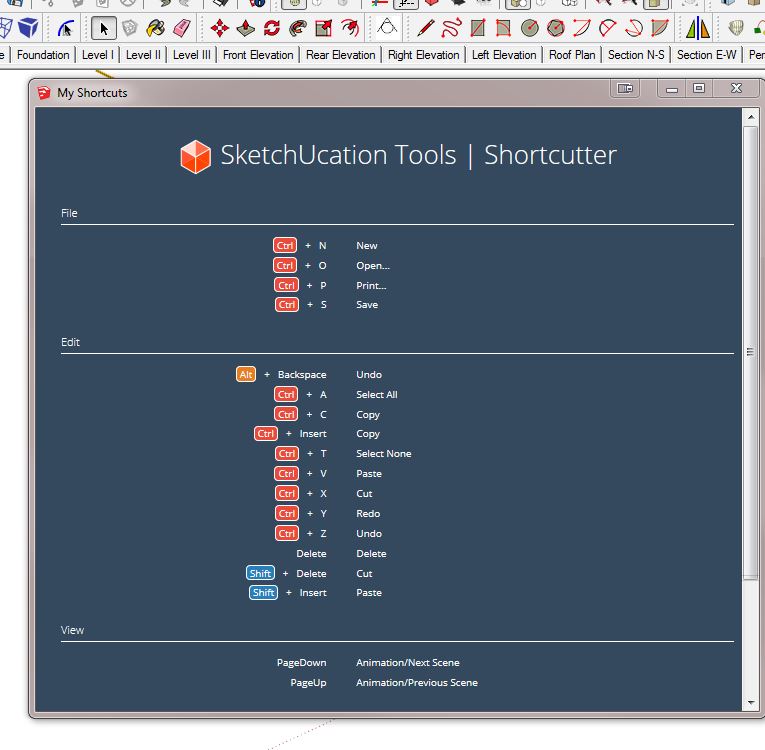
                      Can I ask someone to report what you now see in the Shortcutter dialog in SketchUp 2015?

                      Download the free D'oh Book for SketchUp 📖

                      1 條回覆 最後回覆 回覆 引用 0
                      • KrisidiousK 離線
                        Krisidious
                        最後由 編輯

                        Looks like this on Win 7 in SU 2015 64bit
                        shortcutter.JPG

                        By: Kristoff Rand
                        Home DesignerUnique House Plans

                        1 條回覆 最後回覆 回覆 引用 0
                        • BoxB 線上
                          Box
                          最後由 編輯

                          .


                          Shorties.JPG


                          Shorties2.JPG

                          1 條回覆 最後回覆 回覆 引用 0
                          • TIGT 線上
                            TIG Moderator
                            最後由 編輯

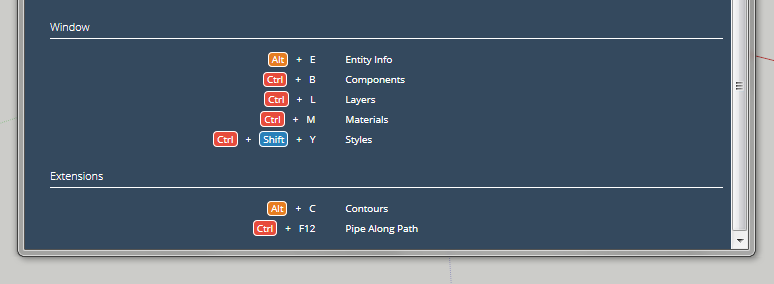
                            I guess you want to see the end of the list showing either 'Plugins' OR the new-fangled 'Extensions' in v2015.
                            I confirm it's now working correctly in v2015. 😄

                            And in v2014 it shows as 'Plugins' as expected...

                            Capture.PNG

                            TIG

                            1 條回覆 最後回覆 回覆 引用 0
                            • Rich O BrienR 離線
                              Rich O Brien Moderator
                              最後由 編輯

                              not for me 😞

                              time to sue someone

                              Download the free D'oh Book for SketchUp 📖

                              1 條回覆 最後回覆 回覆 引用 0
                              • BoxB 線上
                                Box
                                最後由 編輯

                                💚 Have you tried clearing your cache

                                1 條回覆 最後回覆 回覆 引用 0
                                • TIGT 線上
                                  TIG Moderator
                                  最後由 編輯

                                  Clear your IE cache ?
                                  Retry...

                                  TIG

                                  1 條回覆 最後回覆 回覆 引用 0
                                  • P 離線
                                    Pherim
                                    最後由 編輯

                                    Still not seeing the Extensions entry...

                                    1 條回覆 最後回覆 回覆 引用 0
                                    • TIGT 線上
                                      TIG Moderator
                                      最後由 編輯

                                      @pherim said:

                                      Still not seeing the Extensions entry...
                                      It is not made IF you have no shortcuts set up to access items in the Plugins AKA Extensions menu.
                                      You also need to clear your Internet Explorer cache so that any older html/js etc is deleted...

                                      TIG

                                      1 條回覆 最後回覆 回覆 引用 0
                                      • Dave RD 離線
                                        Dave R
                                        最後由 編輯

                                        I'm still seeing Plugins, not Extensions on my Mac. I've cleared the Safari caches, set a shortcut for an entry in Extensions, quit SketchUp and restarted. Still no Extensions section in the list.

                                        Etaoin Shrdlu

                                        %

                                        (THERE'S NO PLACE LIKE)

                                        G28 X0.0 Y0.0 Z0.0

                                        M30

                                        %

                                        1 條回覆 最後回覆 回覆 引用 0
                                        • P 離線
                                          Pherim
                                          最後由 編輯

                                          @tig said:

                                          @pherim said:

                                          Still not seeing the Extensions entry...
                                          It is not made IF you have no shortcuts set up to access items in the Plugins AKA Extensions menu.
                                          You also need to clear your Internet Explorer cache so that any older html/js etc is deleted...

                                          Yes, I have changed all shortcuts that were previously assigned to the plugins menu to the extensions menu, as they were still connected with the plugins folder after importing my settings from 2013. I just tried setting a new shortcut but "Extensions" still doesn't show up.
                                          And yes I tried deleting the browser cache, I even restarted my PC.

                                          1 條回覆 最後回覆 回覆 引用 0
                                          • TIGT 線上
                                            TIG Moderator
                                            最後由 編輯

                                            What version of SketchUcation PluginStore ?
                                            v2.6.1 ?

                                            TIG

                                            1 條回覆 最後回覆 回覆 引用 0
                                            • 1
                                            • 2
                                            • 3
                                            • 4
                                            • 5
                                            • 3 / 5
                                            • 第一個貼文
                                              最後的貼文
                                            Buy SketchPlus
                                            Buy SUbD
                                            Buy WrapR
                                            Buy eBook
                                            Buy Modelur
                                            Buy Vertex Tools
                                            Buy SketchCuisine
                                            Buy FormFonts

                                            Advertisement