sketchucation logo sketchucation
    • 登入
    Oops, your profile's looking a bit empty! To help us tailor your experience, please fill in key details like your SketchUp version, skill level, operating system, and more. Update and save your info on your profile page today!
    🔌 Smart Spline | Fluid way to handle splines for furniture design and complex structures. Download

    [Plugin][$] JointPushPull Interactive - v4.9a - 02 Apr 25


    已排程 已置頂 已鎖定 已移動 Plugins
    619 貼文 156 Posters 631.4k 瀏覽 155 Watching
    正在載入更多貼文
    • 從舊到新
    • 從新到舊
    • 最多點贊
    回覆
    • 在新貼文中回覆
    登入後回覆
    此主題已被刪除。只有擁有主題管理權限的使用者可以查看。
    • W 離線
      wharfedale1976 @TIG
      最後由 編輯

      @TIG
      @fredo6

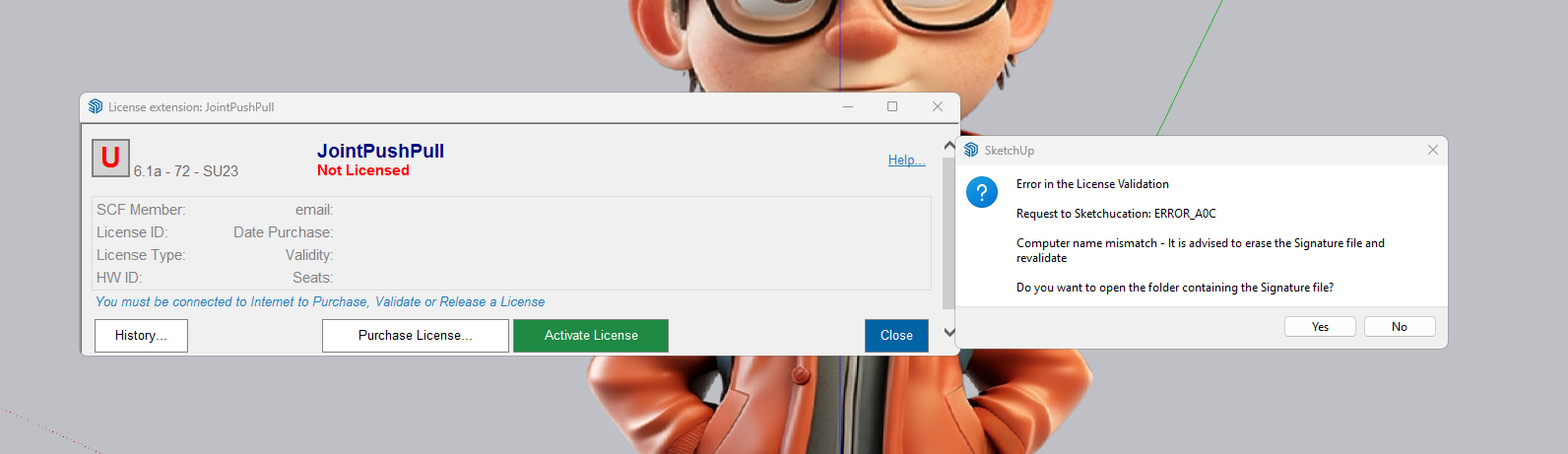
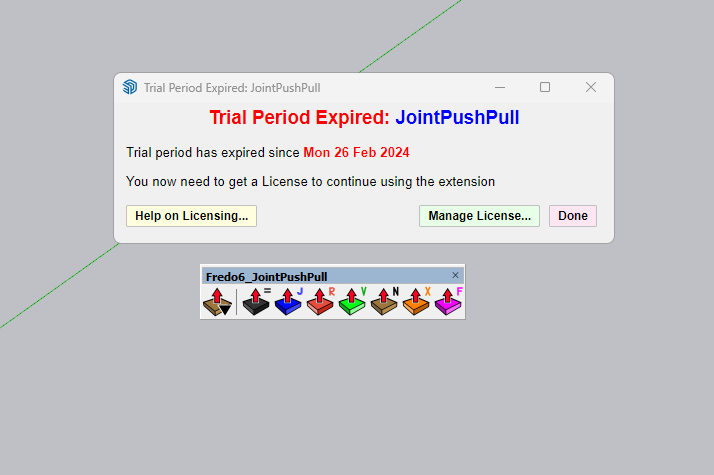
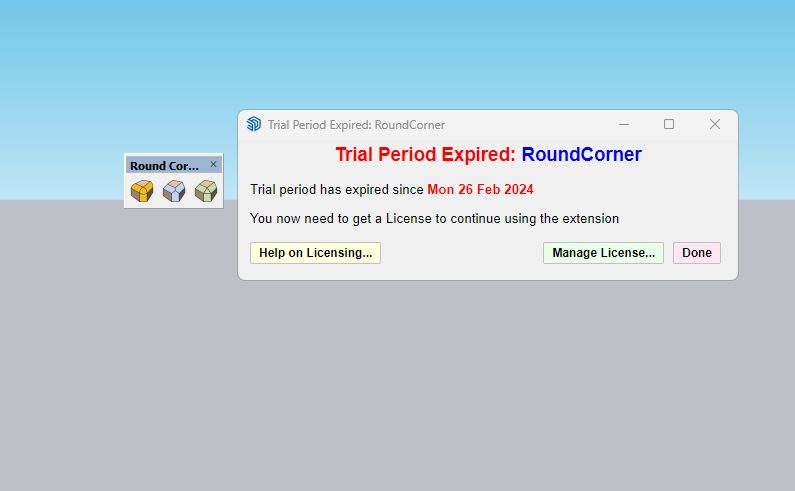
      The same problem just happened to me.
      While other licensed Fredo plugins ran, two plugins (joint push-pull and round-corner plugins) gave errors.
      I didn't change the computer name or move the license files.
      The interesting thing is that other Fredo plugins work.

      How should I go about fixing this problem?

      Thanks and Regards
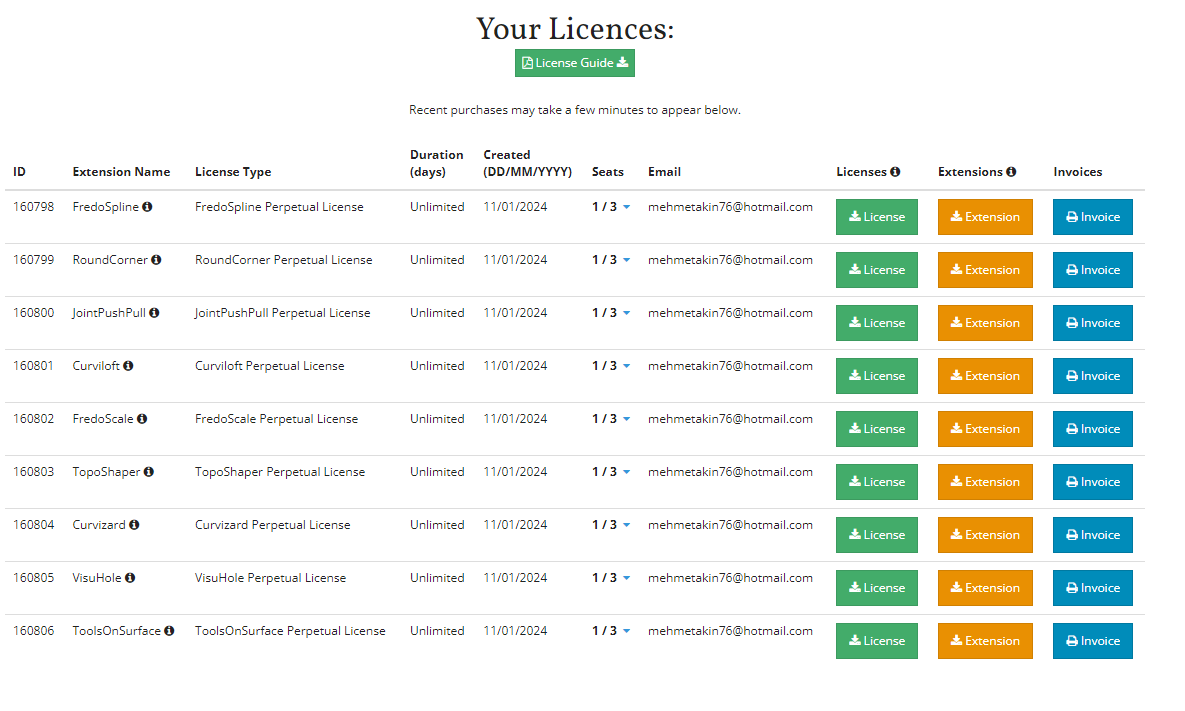
      fredo plugins licence.png lisans hatası.png joint push pull.png round corner.png

      Rich O BrienR 1 條回覆 最後回覆 回覆 引用 0
      • Rich O BrienR 離線
        Rich O Brien Moderator @wharfedale1976
        最後由 編輯

        @wharfedale1976
        Please run the Window > Libfredo Settings > Fredo6 Plugins Information for Sketchucation Support menu command in SketchUp and copy/paste the output into your reply.

        Download the free D'oh Book for SketchUp 📖

        W 2 條回覆 最後回覆 回覆 引用 0
        • W 離線
          wharfedale1976 @Rich O Brien
          最後由 編輯

          @Rich-O-Brien

          Fredo6 Plugins Information on 2024-03-23 23:29:13 +0300

          • Platform: x64-mswin64_140 - Ruby: 2.7.7
          • Sketchup: 23.1.340
          • LibFredo6: v14.2a
          • LibFredo6 Binary loaded
          • Sketchucation ExtensionStore: 4.3.1
          • SCFLicense: v6.1a - 72
          • Fredo6 Plugins

            Curviloft v1.9b
            Curvizard v2.4b
            FredoPortrait v2.8a
            FredoScale v3.5a
            FredoSketch v1.3a
            FredoSpline v2.5a
            FredoTools v4.4a
            JointPushPull v4.7a
            MoveAlignMe v1.2a
            RoundCorner v3.3a
            ToolsOnSurface v2.5a
            TopoShaper v2.6a
            VisuHole v1.4b

          • SCFLicense directory present

            Signature File: 2024-01-27 16:19:01 +0300
            Curviloft: 2024-01-27 16:19:12 +0300
            Curvizard: 2024-01-27 16:20:12 +0300
            FredoScale: 2024-01-27 16:20:42 +0300
            FredoSpline: 2024-01-27 16:21:06 +0300
            ToolsOnSurface: 2024-01-27 16:21:51 +0300
            TopoShaper: 2024-01-27 16:22:07 +0300
            VisuHole: 2024-01-27 16:22:18 +0300
            "Add help menu!"
            "create new"
            (eval):23: warning: calling URI.open via Kernel#open is deprecated, call URI.open directly or use URI#open

          "created"
          #Sketchup::Menu:0x000002b1bf9540e8PİCTURE.png
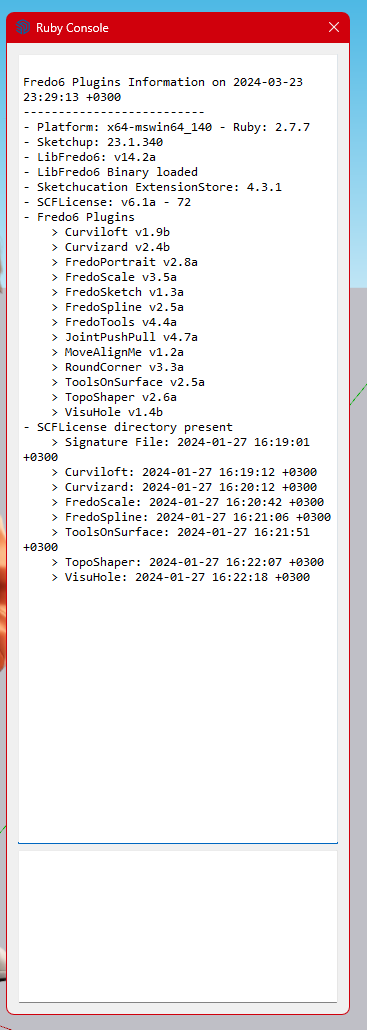
          1 條回覆 最後回覆 回覆 引用 0
          • W 離線
            wharfedale1976 @Rich O Brien
            最後由 編輯

            @Rich-O-Brien

            I deleted the SCFLicenseSignature - DO NOT MODIFY OR DELETE.txt file located in the \SCF Licenses folder. And when I reinstalled the licenses of the two plugins that gave the license error, the problem was solved.

            Thank you

            Rich O BrienR 1 條回覆 最後回覆 回覆 引用 0
            • TIGT 線上
              TIG Moderator @wharfedale1976
              最後由 編輯

              @wharfedale1976
              Do you have the latest versions downloaded and installed for those Extensions, LibFredo6 and the latest SketchUcation Tools [for the licensing] ?
              Please post the errors that you got.
              If it says to delete the Signature file have you done that ??
              Have you then tried re-validating the licenses etc ?

              TIG

              1 條回覆 最後回覆 回覆 引用 0
              • Rich O BrienR 離線
                Rich O Brien Moderator @wharfedale1976
                最後由 編輯

                wharfedale1976 said in [Plugin][$] JointPushPull Interactive - v4.4e - 02 Jun 19:

                And when I reinstalled the licenses of the two plugins that gave the license error, the problem was solved.

                @TIG I believe he rectified the issue by deleting the signature as prompted.

                Download the free D'oh Book for SketchUp 📖

                1 條回覆 最後回覆 回覆 引用 0
                • fredo6F 離線
                  fredo6
                  最後由 fredo6 編輯

                  NEW RELEASE: JointPushPull Interactive v4.8a - 30 Mar 24

                  JointPushPull Interactive 4.8a is a major release including:

                  • adjustments for future compatibility

                  IMPORTANT: JointPushPull 4.8a requires LibFredo6 14.3 or above


                  See plugin home page of JointPushPull for Download of JointPushPull.

                  Main Post of the JointPushPull thread on this forum

                  1 條回覆 最後回覆 回覆 引用 1
                  • D 離線
                    Dandelliones
                    最後由 編輯

                    hellow!!! i have the same problem, i reinstalled the sketchup in my pc and i cant RELEASE SEATS of the jointpushpull too
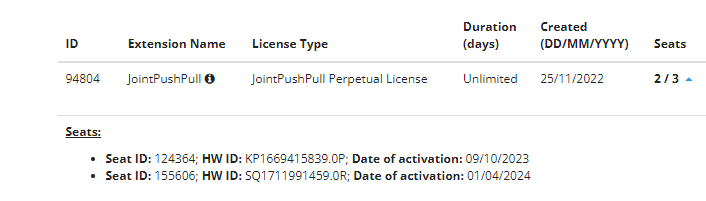
                    imagen_2024-04-10_110418647.png

                    TIGT D Rich O BrienR 3 條回覆 最後回覆 回覆 引用 0
                    • TIGT 線上
                      TIG Moderator @Dandelliones
                      最後由 TIG 編輯

                      @Dandelliones
                      Have you installed the latest versions of the SketchUcation toolset [v4.4.0], LibFredo and the Fredo extension itself ?
                      These have been updated for the latest SketchUp version etc...
                      Have you restarted SketchUp afterwards ?
                      Have you then tried managing your licenses yourself with the menu item

                      Extensions/SketchUcation/SCFLicense: My Licenses at SketchUcation...
                      

                      TIG

                      1 條回覆 最後回覆 回覆 引用 0
                      • G 離線
                        g.petinati @fredo6
                        最後由 編輯

                        @fredo6 Hi Fredo.
                        I purchased a license of Joint Push Pull Interactive and installed it, but I can't make it work.
                        I even tried to replicate the videos, but to no avail.

                        I select the faces via JPP, but when I move the mouse away from the model, to access the toolbar, all faces are unselected. Also, the icon to apply the changes never turns green...

                        Any idea of what I may be doing wrong?

                        By the way, all your plugins are awesome.

                        1 條回覆 最後回覆 回覆 引用 0
                        • D 離線
                          Dandelliones @Dandelliones
                          最後由 編輯

                          @Dandelliones Yes, i do... but in my licenses managing it does not let me release the seats

                          TIGT 1 條回覆 最後回覆 回覆 引用 0
                          • TIGT 線上
                            TIG Moderator @Dandelliones
                            最後由 編輯

                            @Dandelliones
                            OK I'll try to get someone else to resolve this...
                            @Rich-O-Brien

                            TIG

                            1 條回覆 最後回覆 回覆 引用 0
                            • Rich O BrienR 離線
                              Rich O Brien Moderator @Dandelliones
                              最後由 編輯

                              @Dandelliones Device ID SQ.... which you activated on 01/04/24 must be using an old version of Sketchucation Tools. Please upgrade to newest version
                              Link Preview Image
                              Sketchucation Tools | SketchUcation

                              3D SketchUp Community for Design and Engineering Professionals.

                              favicon

                              (sketchucation.com)

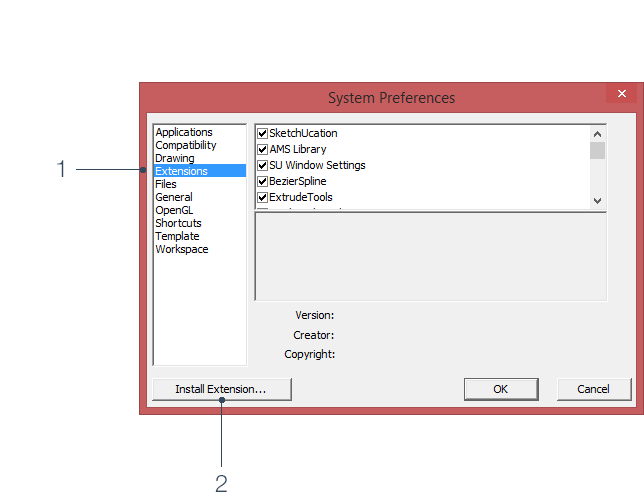
                              Once you update and restart SketchUp go to Tools > Fredo Collection > JPP > License and click the Seats button.

                              Then visit https://sketchucation.com/webshop/my-licences.php and the release checkbox will be available

                              Download the free D'oh Book for SketchUp 📖

                              H 1 條回覆 最後回覆 回覆 引用 0
                              • M 離線
                                Medness
                                最後由 編輯

                                此回覆已被刪除!
                                1 條回覆 最後回覆 回覆 引用 0
                                • M 離線
                                  Medness
                                  最後由 編輯

                                  此回覆已被刪除!
                                  1 條回覆 最後回覆 回覆 引用 0
                                  • M 離線
                                    Medness
                                    最後由 編輯

                                    Hi, I have purchased licenses of JointPushPull, Curviloft and TopoShaper. When I install these plugins, the activation of Curviloft and TopoShaper goes fine, but JointPushPull gets an error:
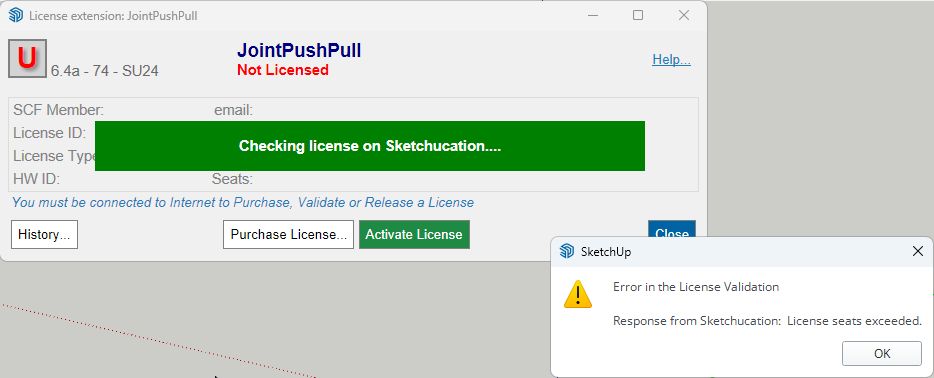
                                    Захват1.jpg
                                    When I check my SketchUcation v4.4.0 licenses:
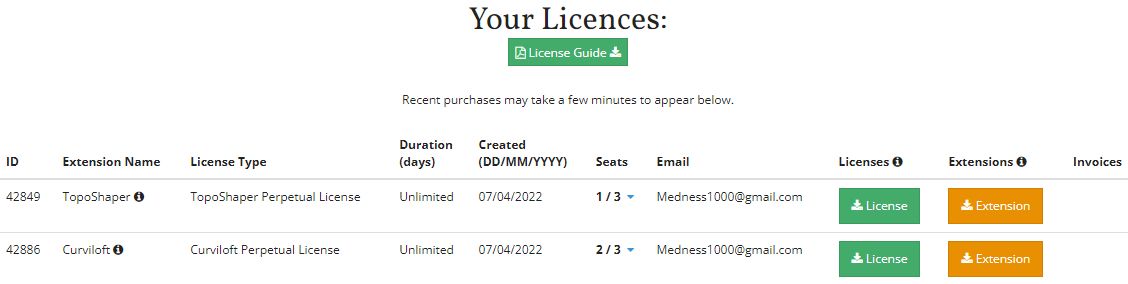
                                    Захват2.jpg
                                    I don't even have it listed

                                    Rich O BrienR 1 條回覆 最後回覆 回覆 引用 0
                                    • Rich O BrienR 離線
                                      Rich O Brien Moderator @Medness
                                      最後由 編輯

                                      @Medness You have multiple account and purchased JPP on another account.

                                      Login to that account and release seats

                                      Download the free D'oh Book for SketchUp 📖

                                      M 1 條回覆 最後回覆 回覆 引用 0
                                      • M 離線
                                        Medness @Rich O Brien
                                        最後由 編輯

                                        @Rich-O-Brien said in [Plugin][$] JointPushPull Interactive - v4.8a - 30 Mar 24:

                                        You have multiple account and purchased JPP on another account.
                                        Login to that account and release seats

                                        I registered all plugins to the same email address. Where can I see for which account I got the JPP plugin? Can the accounts be merged?

                                        Rich O BrienR fredo6F 2 條回覆 最後回覆 回覆 引用 0
                                        • Rich O BrienR 離線
                                          Rich O Brien Moderator @Medness
                                          最後由 編輯

                                          @Medness Asking where to email license files is not the same as logging into a separate account and puchasing.

                                          I can purchase licenses and ask to send them any email address for convenience. But the license files have to be associated to a user account.

                                          In your instance you have multiple accounts so login to Medness1000 and you'll see JPP there

                                          Merging is not possible.

                                          Download the free D'oh Book for SketchUp 📖

                                          1 條回覆 最後回覆 回覆 引用 0
                                          • fredo6F 離線
                                            fredo6 @Medness
                                            最後由 編輯

                                            @Medness

                                            Actually, the name part of the email address was registered in full lowercase for JointPushPull (versus first letter capitalized for TopoShaper and Curviloft).

                                            I guess the system should be case insensitive to email adress...

                                            1 條回覆 最後回覆 回覆 引用 0
                                            • 1
                                            • 2
                                            • 3
                                            • 4
                                            • 5
                                            • 6
                                            • 7
                                            • 30
                                            • 31
                                            • 5 / 31
                                            • 第一個貼文
                                              最後的貼文
                                            Buy SketchPlus
                                            Buy SUbD
                                            Buy WrapR
                                            Buy eBook
                                            Buy Modelur
                                            Buy Vertex Tools
                                            Buy SketchCuisine
                                            Buy FormFonts

                                            Advertisement