sketchucation logo sketchucation
    • 登入
    Oops, your profile's looking a bit empty! To help us tailor your experience, please fill in key details like your SketchUp version, skill level, operating system, and more. Update and save your info on your profile page today!
    🔌 Smart Spline | Fluid way to handle splines for furniture design and complex structures. Download

    [Plugin][$] JointPushPull Interactive - v4.9a - 02 Apr 25


    已排程 已置頂 已鎖定 已移動 Plugins
    619 貼文 156 Posters 631.6k 瀏覽 155 Watching
    正在載入更多貼文
    • 從舊到新
    • 從新到舊
    • 最多點贊
    回覆
    • 在新貼文中回覆
    登入後回覆
    此主題已被刪除。只有擁有主題管理權限的使用者可以查看。
    • I 離線
      isabellylima
      最後由 編輯

      Olá, o plugin não está sendo instalado no meu sketchup 23, o que eu faço?
      Já inseri e habilitei ele pelas extensões, mas não está aparecendo o plugin dentro do programa ou na bandeja.
      SOSSSS preciso dele.

      1 條回覆 最後回覆 回覆 引用 0
      • TIGT 線上
        TIG Moderator
        最後由 編輯

        It appears under the Tools menu.
        But you also need LibFredo and the SketchUcation toolset downloaded and installed, and then SketchUp restarted to start it.
        It is also licensed [can be bought through its Tools submenu limk...], so ensure you have everything in place.

        Ele aparece no menu Ferramentas.
        Mas você também precisa baixar e instalar o LibFredo e o conjunto de ferramentas SketchUcation e, em seguida, reiniciar o SketchUp para iniciá-lo.
        Ele também é licenciado [pode ser adquirido através do submenu Ferramentas limk...], portanto, certifique-se de ter tudo no lugar.

        TIG

        1 條回覆 最後回覆 回覆 引用 0
        • thinhphamktsT 離線
          thinhphamkts
          最後由 編輯

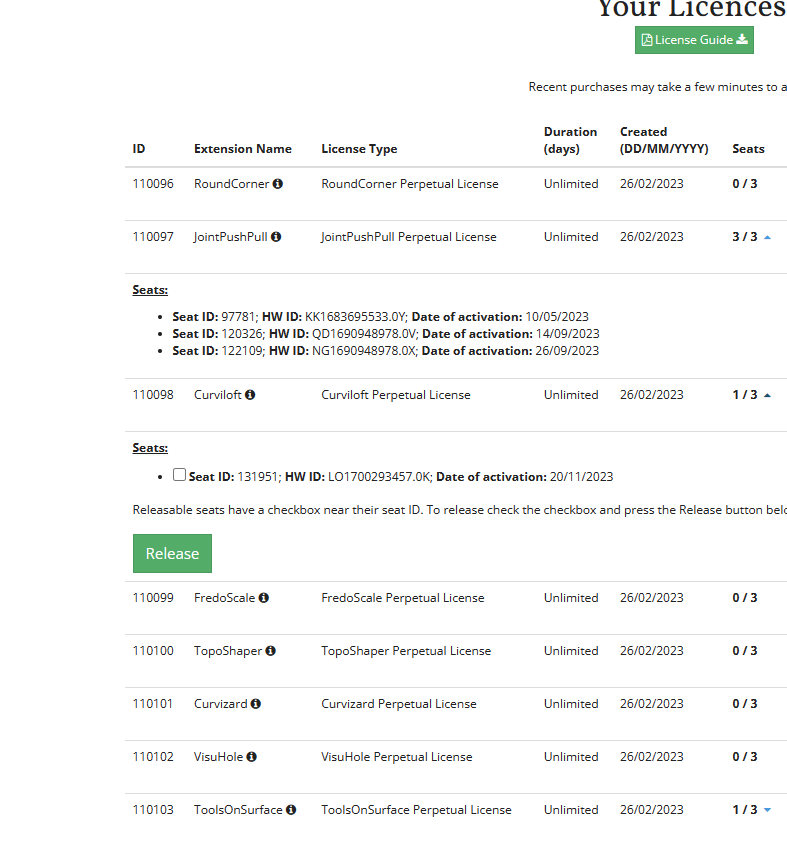
          Please someone help me with retrieve my license for this!!!
          I did active fully on 3 seats although I only have 1 desktop and 1 laptop.
          The reason was that I did reinstall my desktop and laptop several times due to softwares clashing.
          At that time, I did not release or deactivate my seats.
          Therefore, all the 3 seats now stayed in my previous installed windows.
          I go to license page (attached image) and see that other plugins have "release" button whilst "Joint Push Pull" doesn't have.

          Is there anything to reset my license for "Joint Push Pull"?
          I am being desperated now. I contacted to SketchUcation support many times but it seeems they don't take it seriously.
          Now my license seems to be useless.

          PLEASE HELP!!!


          Screenshot 2023-11-20 204539.png

          1 條回覆 最後回覆 回覆 引用 0
          • fredo6F 離線
            fredo6
            最後由 編輯

            @thinhphamkts said:

            Is there anything to reset my license for "Joint Push Pull"?
            I am being desperated now. I contacted to SketchUcation support many times but it seeems they don't take it seriously.
            Now my license seems to be useless.

            I did reset all seats of your JPP licenses.
            You need to revalidate now.

            1 條回覆 最後回覆 回覆 引用 0
            • thinhphamktsT 離線
              thinhphamkts
              最後由 編輯

              @fredo6 said:

              @thinhphamkts said:

              Is there anything to reset my license for "Joint Push Pull"?
              I am being desperated now. I contacted to SketchUcation support many times but it seeems they don't take it seriously.
              Now my license seems to be useless.

              I did reset all seats of your JPP licenses.
              You need to revalidate now.

              WOW,
              Thanks a lot! I am really appreciate.

              1 條回覆 最後回覆 回覆 引用 0
              • A 離線
                AtlJimK
                最後由 編輯

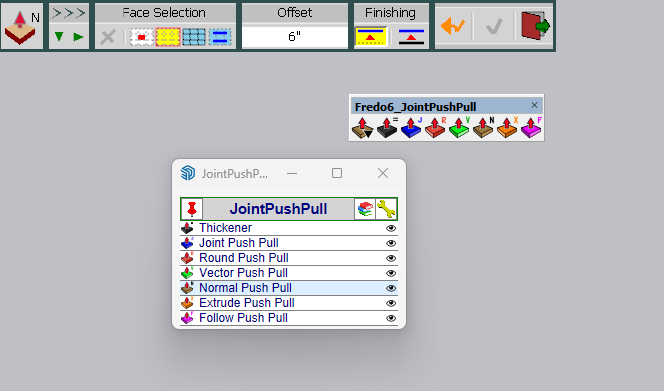
                Just purchased your bundle. I have had your free tools installed in the past under SU2023. After installing the purchased versions only the older versions of your plugin/toolbars show up. I had gone in ext mgr and uninstalled all Fredo tools and then reinstalled them but they still show as the old tools. Appreciate your help. Thanks.
                FT-JPP-old.png

                1 條回覆 最後回覆 回覆 引用 0
                • fredo6F 離線
                  fredo6
                  最後由 編輯

                  @atljimk said:

                  Just purchased your bundle. I have had your free tools installed in the past under SU2023. After installing the purchased versions only the older versions of your plugin/toolbars show up. I had gone in ext mgr and uninstalled all Fredo tools and then reinstalled them but they still show as the old tools. Appreciate your help. Thanks.

                  What you show in the screenshot is the new JPP.

                  So, what is the issue?

                  1 條回覆 最後回覆 回覆 引用 0
                  • F 離線
                    frederiqueD
                    最後由 編輯

                    Hi I have followed the different instructions(first Sketchucation 4.3.1 and LibFredo6 4.7a) to installed jointpushpull, I also restarted Sketchup, the tools appear but they do not work. How can I fixe the problem? in my ruby console I got the following message:

                    Error:
                    #<LoadError: 5: Access is denied. - C:/Users/Fred/AppData/Local/Temp/SCFLicense - SU2023/SUEX_SCFLibrary.so>
                    C:/Program Files/SketchUp/SketchUp 2023/Tools/RubyStdLib/rubygems/core_ext/kernel_require.rb:83:in require' C:/Program Files/SketchUp/SketchUp 2023/Tools/RubyStdLib/rubygems/core_ext/kernel_require.rb:83:in require'
                    c:/users/fred/appdata/roaming/sketchup/sketchup 2023/sketchup/plugins/sketchucation/scflicense/scflicenseruby.rbe:156:in load_binary' c:/users/fred/appdata/roaming/sketchup/sketchup 2023/sketchup/plugins/sketchucation/scflicense/scflicenseruby.rbe:80:in dynamic_token'
                    c:/users/fred/appdata/roaming/sketchup/sketchup 2023/sketchup/plugins/fredo6_!libfredo6/lib6plugin.rbe:1748:in tem_context' c:/users/fred/appdata/roaming/sketchup/sketchup 2023/sketchup/plugins/fredo6_!libfredo6/lib6plugin.rbe:1717:in tem_launcher'
                    c:/users/fred/appdata/roaming/sketchup/sketchup 2023/sketchup/plugins/fredo6_!libfredo6/lib6plugin.rbe:120:in launch_action' c:/users/fred/appdata/roaming/sketchup/sketchup 2023/sketchup/plugins/fredo6_!libfredo6/lib6plugin.rbe:240:in launch_action'
                    c:/users/fred/appdata/roaming/sketchup/sketchup 2023/sketchup/plugins/fredo6_jointpushpull/bootstrap_jointpushpull.rbe:87:in launch_action' c:/users/fred/appdata/roaming/sketchup/sketchup 2023/sketchup/plugins/fredo6_jointpushpull/bootstrap_jointpushpull.rbe:135:in block in declare_command'
                    c:/users/fred/appdata/roaming/sketchup/sketchup 2023/sketchup/plugins/fredo6_!libfredo6/lib6plugin.rbe:1469:in command_invoke' c:/users/fred/appdata/roaming/sketchup/sketchup 2023/sketchup/plugins/fredo6_!libfredo6/lib6plugin.rbe:1449:in block (2 levels) in build_config_commands'
                    c:/users/fred/appdata/roaming/sketchup/sketchup 2023/sketchup/plugins/fredo6_!libfredo6/lib6traductor.rbe:1387:in `block in add_command'

                    1 條回覆 最後回覆 回覆 引用 0
                    • TIGT 線上
                      TIG Moderator
                      最後由 編輯

                      @frederiqueD

                      That error looks like a permissions issue preventing you accessing Fredo's files in the Temp folder...
                      Try fixing you permissions by closing SketchUp and finding its installer's exe file [usually in Downloads]. Select its icon and right-click > context menu > Run as administrator... When prompted choose 'Repair'.
                      After it completes retry and see if it's fixed any permissions, and lets you run the tool without problems...

                      However, this permissions error might be more widely spread...
                      You could also look at the C:/Users/Fred/AppData/Local/Temp/ folder's properties and reset its security permissions to allow all others [including SketchUp to read/write in that folder and its subfolders...]

                      Repairing the installation will not adversely affect any installed extensions etc...

                      TIG

                      1 條回覆 最後回覆 回覆 引用 0
                      • F 離線
                        frederiqueD
                        最後由 編輯

                        Hi, thank you very much, it works finally after 2 days of trying....

                        1 條回覆 最後回覆 回覆 引用 0
                        • TIGT 線上
                          TIG Moderator
                          最後由 編輯

                          @frederiqueD

                          What was the final fix that worked ?

                          TIG

                          1 條回覆 最後回覆 回覆 引用 0
                          • S 離線
                            shamsabbas Newcomers
                            最後由 編輯

                            01642be0-d0b5-4107-9757-123c6d12884c-image.png
                            why is this happening ? can i get some help pls

                            Rich O BrienR TIGT 2 條回覆 最後回覆 回覆 引用 0
                            • Rich O BrienR 離線
                              Rich O Brien Moderator @shamsabbas
                              最後由 編輯

                              @shamsabbas Please follow the steps in the alert.

                              Delete signature file at C:\Users\SomeName\AppData\Local\SCF Licenses restart SketchUp and activate license.

                              Download the free D'oh Book for SketchUp 📖

                              1 條回覆 最後回覆 回覆 引用 0
                              • TIGT 線上
                                TIG Moderator @shamsabbas
                                最後由 TIG 編輯

                                @shamsabbas

                                Carefully read the error message.
                                There is a mismatch in your computer-name and the name in the license record.
                                [Perhaps you have renamed the computer or moved the license from another computer ?
                                If you have given your user or computer a name that doesn't follow Microsoft's rules that can also created unexpected issues...]

                                The error message advises you to erase the Signature file and the re-validate the license.

                                To do this click the Yes button and the folder containing the Signature file will open.
                                Delete that file [even though it's name says not to !].
                                This resets your licenses on that computer.

                                Now restart SketchUp, reopen the licensing dialog and this time the license validation should work.

                                TIG

                                W 2 條回覆 最後回覆 回覆 引用 0
                                • W 離線
                                  wharfedale1976 @TIG
                                  最後由 編輯

                                  @TIG
                                  @fredo6

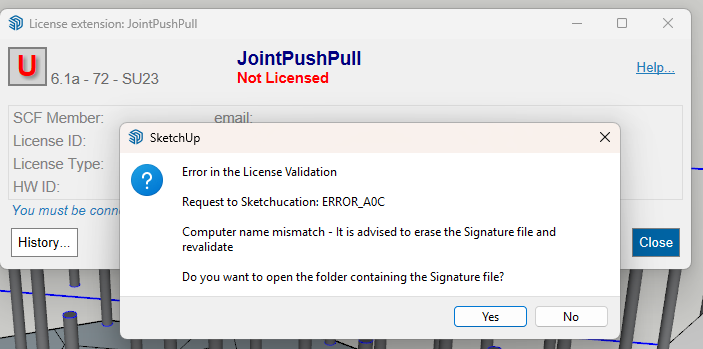
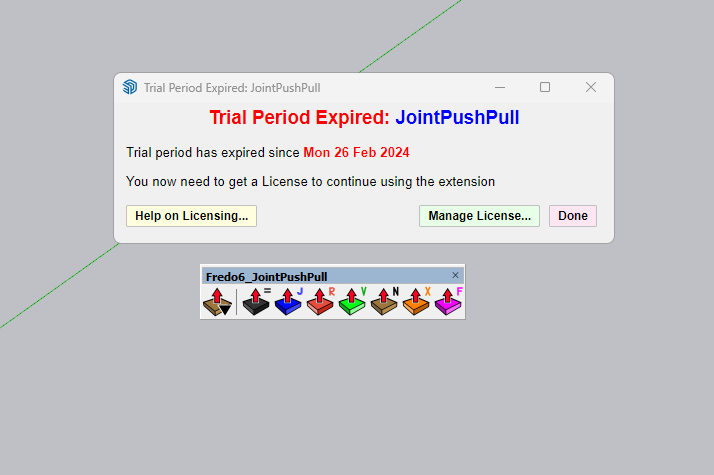
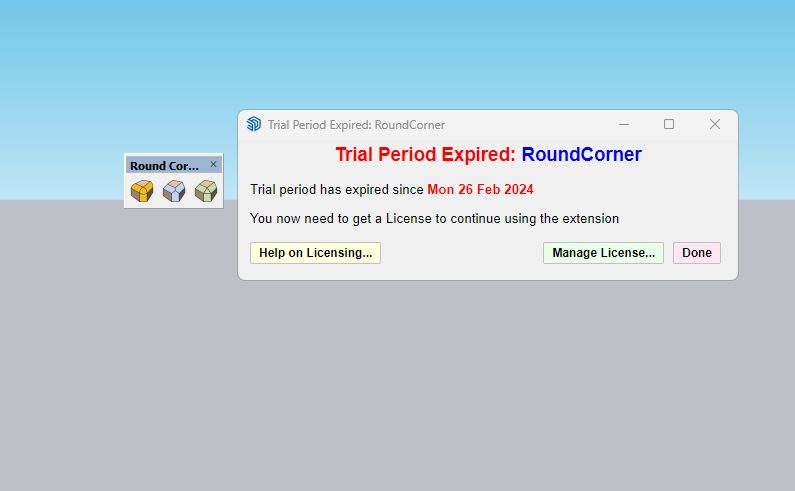
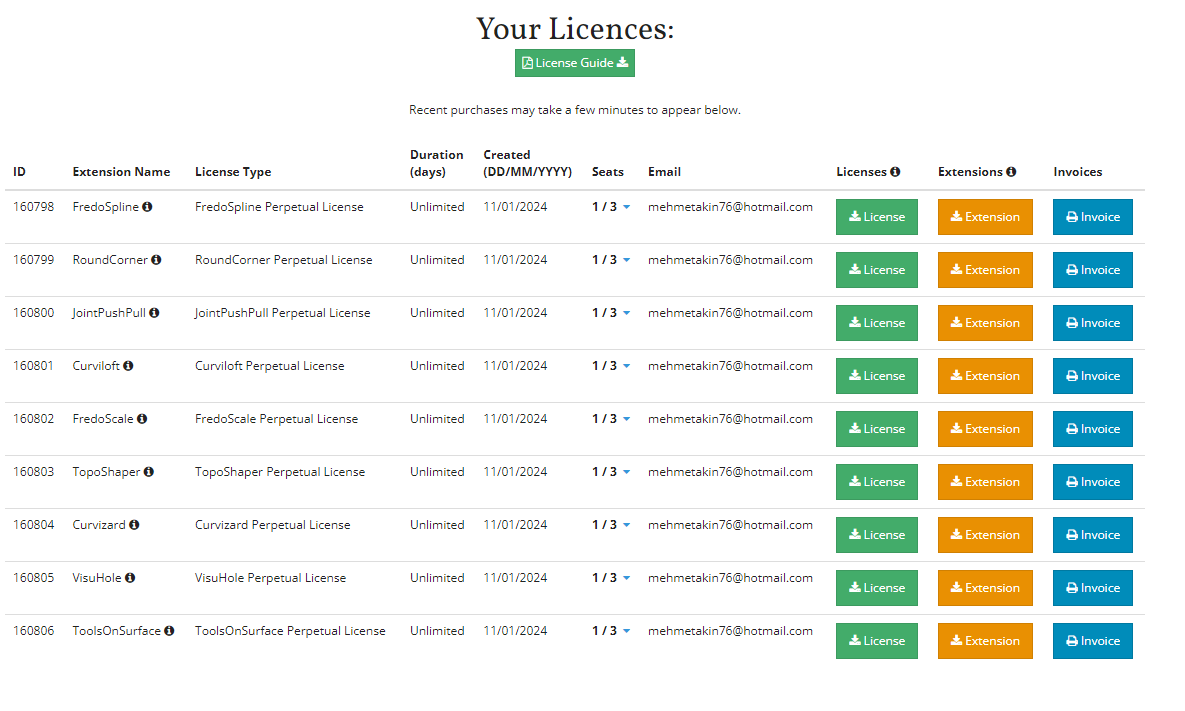
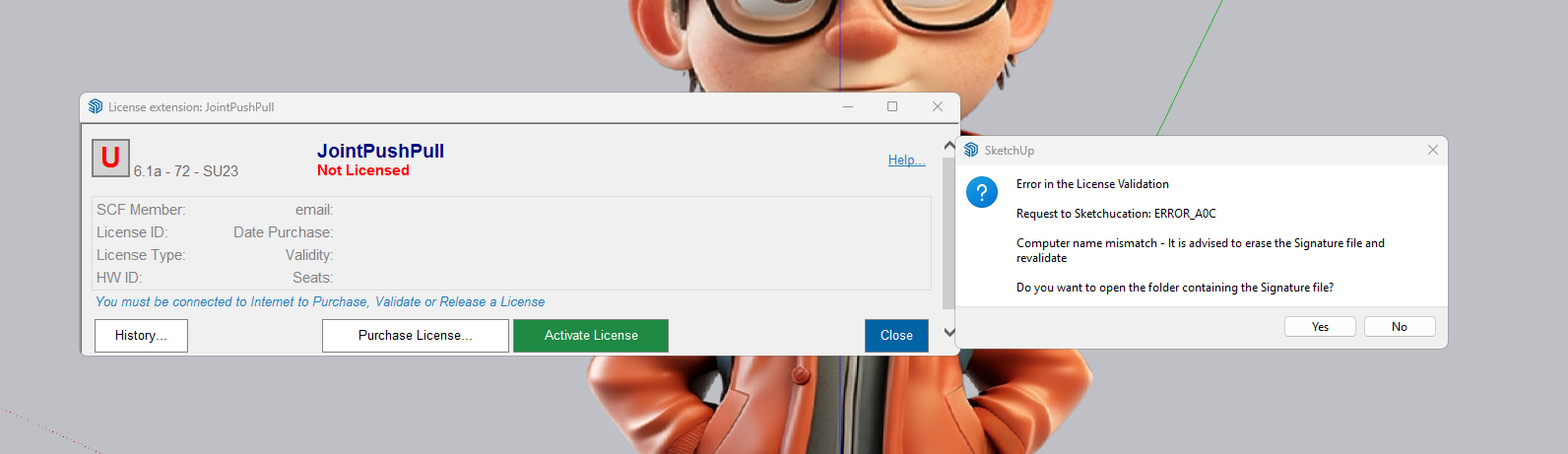
                                  The same problem just happened to me.
                                  While other licensed Fredo plugins ran, two plugins (joint push-pull and round-corner plugins) gave errors.
                                  I didn't change the computer name or move the license files.
                                  The interesting thing is that other Fredo plugins work.

                                  How should I go about fixing this problem?

                                  Thanks and Regards
                                  alt text
                                  alt text
                                  alt text
                                  alt text

                                  TIGT 1 條回覆 最後回覆 回覆 引用 0
                                  • W 離線
                                    wharfedale1976 @TIG
                                    最後由 編輯

                                    @TIG
                                    @fredo6

                                    The same problem just happened to me.
                                    While other licensed Fredo plugins ran, two plugins (joint push-pull and round-corner plugins) gave errors.
                                    I didn't change the computer name or move the license files.
                                    The interesting thing is that other Fredo plugins work.

                                    How should I go about fixing this problem?

                                    Thanks and Regards
                                    fredo plugins licence.png lisans hatası.png joint push pull.png round corner.png

                                    Rich O BrienR 1 條回覆 最後回覆 回覆 引用 0
                                    • Rich O BrienR 離線
                                      Rich O Brien Moderator @wharfedale1976
                                      最後由 編輯

                                      @wharfedale1976
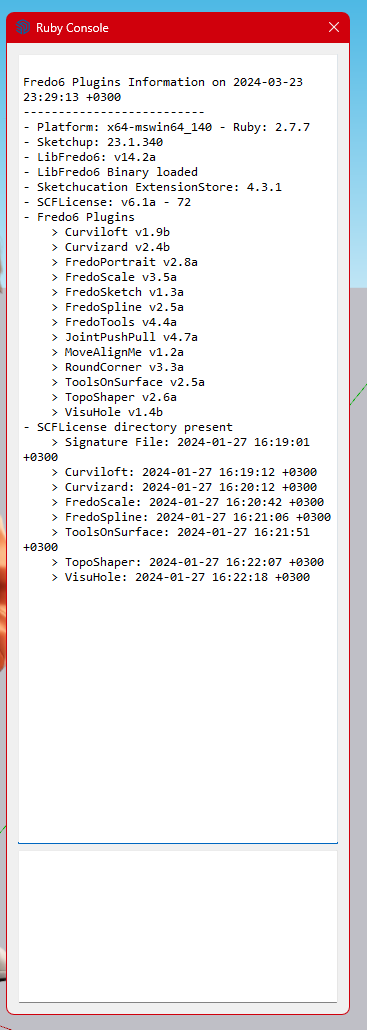
                                      Please run the Window > Libfredo Settings > Fredo6 Plugins Information for Sketchucation Support menu command in SketchUp and copy/paste the output into your reply.

                                      Download the free D'oh Book for SketchUp 📖

                                      W 2 條回覆 最後回覆 回覆 引用 0
                                      • W 離線
                                        wharfedale1976 @Rich O Brien
                                        最後由 編輯

                                        @Rich-O-Brien

                                        Fredo6 Plugins Information on 2024-03-23 23:29:13 +0300

                                        • Platform: x64-mswin64_140 - Ruby: 2.7.7
                                        • Sketchup: 23.1.340
                                        • LibFredo6: v14.2a
                                        • LibFredo6 Binary loaded
                                        • Sketchucation ExtensionStore: 4.3.1
                                        • SCFLicense: v6.1a - 72
                                        • Fredo6 Plugins

                                          Curviloft v1.9b
                                          Curvizard v2.4b
                                          FredoPortrait v2.8a
                                          FredoScale v3.5a
                                          FredoSketch v1.3a
                                          FredoSpline v2.5a
                                          FredoTools v4.4a
                                          JointPushPull v4.7a
                                          MoveAlignMe v1.2a
                                          RoundCorner v3.3a
                                          ToolsOnSurface v2.5a
                                          TopoShaper v2.6a
                                          VisuHole v1.4b

                                        • SCFLicense directory present

                                          Signature File: 2024-01-27 16:19:01 +0300
                                          Curviloft: 2024-01-27 16:19:12 +0300
                                          Curvizard: 2024-01-27 16:20:12 +0300
                                          FredoScale: 2024-01-27 16:20:42 +0300
                                          FredoSpline: 2024-01-27 16:21:06 +0300
                                          ToolsOnSurface: 2024-01-27 16:21:51 +0300
                                          TopoShaper: 2024-01-27 16:22:07 +0300
                                          VisuHole: 2024-01-27 16:22:18 +0300
                                          "Add help menu!"
                                          "create new"
                                          (eval):23: warning: calling URI.open via Kernel#open is deprecated, call URI.open directly or use URI#open

                                        "created"
                                        #Sketchup::Menu:0x000002b1bf9540e8PİCTURE.png
                                        1 條回覆 最後回覆 回覆 引用 0
                                        • W 離線
                                          wharfedale1976 @Rich O Brien
                                          最後由 編輯

                                          @Rich-O-Brien

                                          I deleted the SCFLicenseSignature - DO NOT MODIFY OR DELETE.txt file located in the \SCF Licenses folder. And when I reinstalled the licenses of the two plugins that gave the license error, the problem was solved.

                                          Thank you

                                          Rich O BrienR 1 條回覆 最後回覆 回覆 引用 0
                                          • TIGT 線上
                                            TIG Moderator @wharfedale1976
                                            最後由 編輯

                                            @wharfedale1976
                                            Do you have the latest versions downloaded and installed for those Extensions, LibFredo6 and the latest SketchUcation Tools [for the licensing] ?
                                            Please post the errors that you got.
                                            If it says to delete the Signature file have you done that ??
                                            Have you then tried re-validating the licenses etc ?

                                            TIG

                                            1 條回覆 最後回覆 回覆 引用 0
                                            • 1
                                            • 2
                                            • 3
                                            • 4
                                            • 5
                                            • 6
                                            • 7
                                            • 30
                                            • 31
                                            • 5 / 31
                                            • 第一個貼文
                                              最後的貼文
                                            Buy SketchPlus
                                            Buy SUbD
                                            Buy WrapR
                                            Buy eBook
                                            Buy Modelur
                                            Buy Vertex Tools
                                            Buy SketchCuisine
                                            Buy FormFonts

                                            Advertisement