sketchucation logo sketchucation
    • 登入
    Oops, your profile's looking a bit empty! To help us tailor your experience, please fill in key details like your SketchUp version, skill level, operating system, and more. Update and save your info on your profile page today!
    🔌 Smart Spline | Fluid way to handle splines for furniture design and complex structures. Download

    [Plugin] Layers Panel 1.2.1

    已排程 已置頂 已鎖定 已移動 Plugins
    672 貼文 109 Posters 204.1k 瀏覽 109 Watching
    正在載入更多貼文
    • 從舊到新
    • 從新到舊
    • 最多點贊
    回覆
    • 在新貼文中回覆
    登入後回覆
    此主題已被刪除。只有擁有主題管理權限的使用者可以查看。
    • B 離線
      bimbachi
      最後由 編輯

      question:
      is it possibul that LayerPanel window position would be kept as last open location on the screen? ❓

      1 條回覆 最後回覆 回覆 引用 0
      • jiminy-billy-bobJ 離線
        jiminy-billy-bob
        最後由 編輯

        @bimbachi said:

        I have a problem :

        • when adding keyshortcut to LayerPanel tool palet it adds shortcut to SketchucationPluginStore tool palet this same shortcut
        • and as result to use of shortcut, command opens SketchucationPluginStore tool palet!

        Weird, it works fine for me on windows. Can another mac user confirm this?
        What happens if you disable SCtools?

        @bimbachi said:

        question:
        is it possibul that LayerPanel window position would be kept as last open location on the screen? ❓

        I haven't figured how to do that on Mac, it works fine on windows...

        25% off Skatter for SketchUcation Premium Members

        1 條回覆 最後回覆 回覆 引用 0
        • jiminy-billy-bobJ 離線
          jiminy-billy-bob
          最後由 編輯


          New version 1.0.6 !

          Changelog :

          • Improved "add layer" menu (Hold-down the add layer button), based on Jim's great "Add layer" plugin
          • Fixed "Win32api" error when opening a file from a different drive than sketchup's. (Thanks to Dan Rathbun and TIG)
          • Fixed layer colors vanishing when switching scenes

          Download in the plugin store !


          Credit goes to Jim for the original "Add layer" UI idea : http://sketchucation.com/plugin/832-jf_add_layer
          Thanks to him for allowing me to embed it in Layers Panel

          25% off Skatter for SketchUcation Premium Members

          1 條回覆 最後回覆 回覆 引用 0
          • J 離線
            Jim
            最後由 編輯

            Seems like you un-published it because it does not show up in the Plugin Store.

            Hi

            1 條回覆 最後回覆 回覆 引用 0
            • TIGT 離線
              TIG Moderator
              最後由 編輯

              With the new authors' area once you start editing your entry it becomes 'unpublished'.
              After updating anything you must click the big button near the top to [re]publish it...
              Go back in and do that, and it should reappear in the listings again...

              TIG

              1 條回覆 最後回覆 回覆 引用 0
              • jiminy-billy-bobJ 離線
                jiminy-billy-bob
                最後由 編輯

                @tig said:

                With the new authors' area once you start editing your entry it becomes 'unpublished'.
                After updating anything you must click the big button near the top to [re]publish it...
                Go back in and do that, and it should reappear in the listings again...

                Uh, I did, but I guess I modified something else afterward.
                It should be fine now.

                25% off Skatter for SketchUcation Premium Members

                1 條回覆 最後回覆 回覆 引用 0
                • wind-borneW 離線
                  wind-borne
                  最後由 編輯

                  @jiminy-billy-bob said:

                  @bimbachi said:

                  I have a problem :

                  • when adding keyshortcut to LayerPanel tool palet it adds shortcut to SketchucationPluginStore tool palet this same shortcut
                  • and as result to use of shortcut, command opens SketchucationPluginStore tool palet!

                  Weird, it works fine for me on windows. Can another mac user confirm this?
                  What happens if you disable SCtools?

                  @bimbachi said:

                  question:
                  is it possibul that LayerPanel window position would be kept as last open location on the screen? ❓

                  I haven't figured how to do that on Mac, it works fine on windows...

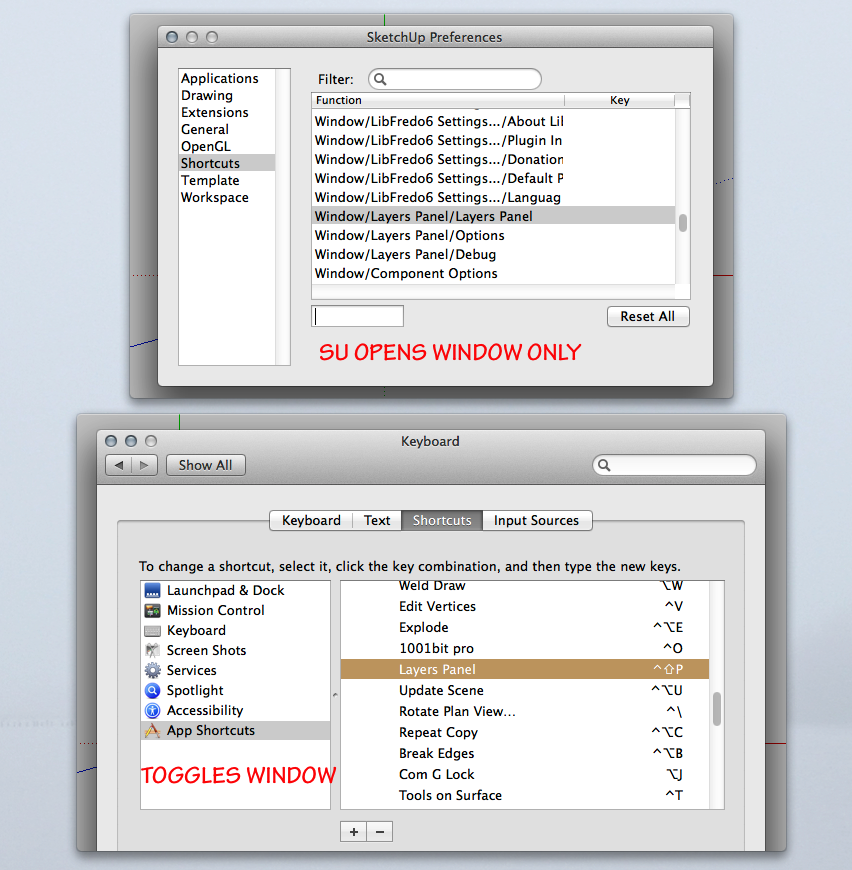
                  I am assuming what you really want is a shortcut to the layers panel itself and not the toolbar(Palette) icon.

                  Within SU shortcuts you can open layer panel window in Window menu but it won't toggle.

                  The most functional setup is in System Preferences as you can toggle window with shortcut. You do need to restart after setting or else merely toggles icon.

                  LPW.png

                  "To read between the lines was easier than to follow the text."OSX 10.11.6

                  %(#BF80BF)[SU 8 pro

                  1 條回覆 最後回覆 回覆 引用 0
                  • JQLJ 離線
                    JQL
                    最後由 編輯

                    @jiminy-billy-bob said:

                    @jql said:

                    I have a minor issue for you here. Win 7 SU 2014.

                    Whow, this is weird. Does this happen in the same file that was previously causing you issues? Do you know how to reproduce this?

                    It happened in the same file, I don't know how to reproduce it but it happened more than once. I will work on that same file this week so I'll let you know if anything strange happens.

                    Thanks again and best regards,

                    JQL

                    www.casca.pt
                    Visit us on facebook!

                    1 條回覆 最後回覆 回覆 引用 0
                    • F 離線
                      fountainhead
                      最後由 編輯

                      Not sure if this is an intended function or not, but I accidently discovered today that holding down 'control' and scrolling causes the whole menu system to resize...that was unexpected, and very helpful. I can double the number of layers visible on the screen. Has this functionality always been there?

                      1 條回覆 最後回覆 回覆 引用 0
                      • F 離線
                        fountainhead
                        最後由 編輯

                        Okay, nevermind. Did some looking, and apparently I've been living in the dark ages regarding control + mouse scroll functionality for about a zillion things. 😳

                        1 條回覆 最後回覆 回覆 引用 0
                        • G 離線
                          greatoe
                          最後由 編輯

                          2 issues on Mac

                          sorry I don't know if these issues been posted before ...

                          1. the panel won't remember its on-screen location
                            everytime i drag the panel to somewhere other to another position, most of the time the 2nd screen, after I close the panel and open it again, it will return to its original position.
                            this also happens when SketchUp restarts.

                          2. color picker does not work.
                            屏幕快照 2014-04-13 上午10.22.38.png

                          Mac OS X 10.9.2
                          SU2014

                          1 條回覆 最後回覆 回覆 引用 0
                          • sallyS 離線
                            sally
                            最後由 編輯

                            Hello,

                            this looks great but I'm not sure if it is compatible for a Mac, it looks like people have tried it, but it does state on the download page that it is for Windows. Will it cause me any problems if I try it? have any Mac users tried it, any ideas gratefully received.

                            Thanks.

                            1 條回覆 最後回覆 回覆 引用 0
                            • jiminy-billy-bobJ 離線
                              jiminy-billy-bob
                              最後由 編輯

                              It is OSX compatible, though some minor bugs remain. You should try it.

                              Where do you see it being windows only?

                              25% off Skatter for SketchUcation Premium Members

                              1 條回覆 最後回覆 回覆 引用 0
                              • sallyS 離線
                                sally
                                最後由 編輯

                                Hi Jiminy,

                                thanks for your speedy response, whilst looking for where it said it was for "windows", I realise I was being very dim!! I saw usage window layers panel and my brain made it mean usage for Windows!

                                I'll give it a try, it looks great. I'll let you know if I have any problems. All the best, Sally


                                Screen Shot 2014-04-22 at 17.08.00.png

                                1 條回覆 最後回覆 回覆 引用 0
                                • jiminy-billy-bobJ 離線
                                  jiminy-billy-bob
                                  最後由 編輯


                                  New version 1.1.0 !

                                  Introducing layer states :
                                  [screenr:2lwo1pas]PWgN[/screenr:2lwo1pas]

                                  It works like Photoshop's "layer comps". I didn't keep the "comp" name, as in Sketchup it usually means "components".


                                  Changelog :

                                  • Added layer "states" (with new dialog). States allows to save snapshots of the current layers visibility, and restore them later.
                                  • Fixed several bugs

                                  Download in the plugin store !


                                  25% off Skatter for SketchUcation Premium Members

                                  1 條回覆 最後回覆 回覆 引用 0
                                  • I 離線
                                    ivreich
                                    最後由 編輯

                                    Hi

                                    Have just downloaded the new version of Layers Panel (1.1.0) and I'm getting an error message when I try to create a new group or layer. Error message attached.

                                    Also, I'm having trouble saving layer states. When I save and close a model, all the layer states come up empty again when I reopen it.

                                    Once again, thanks for the great plugin...despite being a work in progress, it's already made it to the top of my list of most used plugins.

                                    Keep up the awesome work!

                                    Cheers
                                    Joel
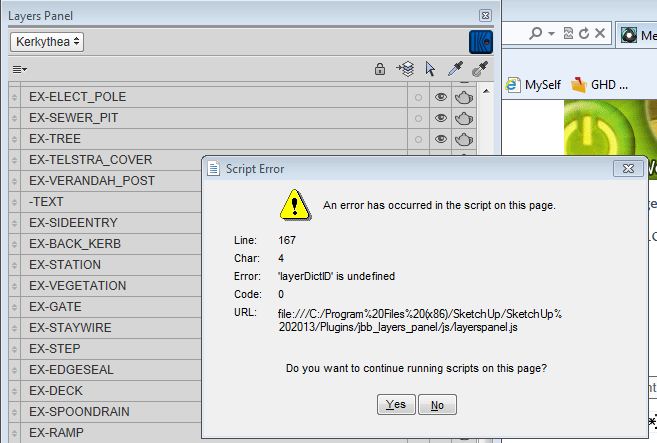

                                    Error mesage when trying to create new layer or layer group

                                    1 條回覆 最後回覆 回覆 引用 0
                                    • jiminy-billy-bobJ 離線
                                      jiminy-billy-bob
                                      最後由 編輯

                                      Does it happen in every file? Even a brand new one?

                                      25% off Skatter for SketchUcation Premium Members

                                      1 條回覆 最後回覆 回覆 引用 0
                                      • C 離線
                                        chris87
                                        最後由 編輯

                                        Crash when opening sketchup 8 pro !

                                        1 條回覆 最後回覆 回覆 引用 0
                                        • jiminy-billy-bobJ 離線
                                          jiminy-billy-bob
                                          最後由 編輯

                                          I'll need a little more details if you want me to help you...

                                          25% off Skatter for SketchUcation Premium Members

                                          1 條回覆 最後回覆 回覆 引用 0
                                          • C 離線
                                            chris87
                                            最後由 編輯

                                            @jiminy-billy-bob said:

                                            I'll need a little more details if you want me to help you...

                                            With your plugin, Sketchup 8 Pro (32 bits Windows 7) doesn't start correctly and a bug splat was produced.
                                            If i remove your plugin, all is OK... and sketchup starts correctly !
                                            Best regards

                                            1 條回覆 最後回覆 回覆 引用 0
                                            • 1
                                            • 2
                                            • 23
                                            • 24
                                            • 25
                                            • 26
                                            • 27
                                            • 33
                                            • 34
                                            • 25 / 34
                                            • 第一個貼文
                                              最後的貼文
                                            Buy SketchPlus
                                            Buy SUbD
                                            Buy WrapR
                                            Buy eBook
                                            Buy Modelur
                                            Buy Vertex Tools
                                            Buy SketchCuisine
                                            Buy FormFonts

                                            Advertisement