Barley Twist Spirals
-
Pilou, you trot that video out every time someone asks how to draw anything.


That's not a barley twist either.
-
@gilles said:
Sorry Dave, there are two starts and I could have done n starts in one shot.
Show the setup. And which version of Screw are you using.
-
screw1_5.rb.
select 3 profiles (in the following case), set start point, set end point, enter n steps n turn and go.

-
Thanks. that should help the OP.
Isn't it great there are usually multiple ways to arrive at the same point in SketchUp?
And you finally drew a barley twist.
 Here's a cutter profile for that.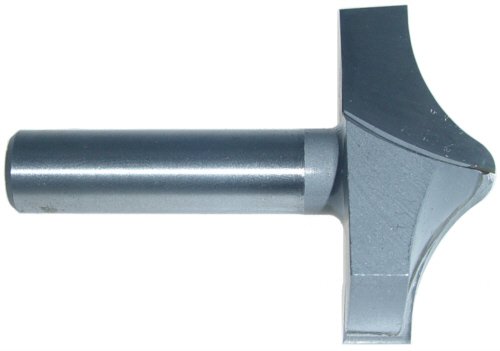
-
@dave r said:
Pilou, you trot that video out every time someone asks how to draw anything.
That's not a barley twist either.
True but otherwise a brilliant solution!
(I could imagine Kito Raupp is Pilou himself in a humble disguise)
-
Here is a step by step.


-
@gilles said:
Made in one shot with screw1_5.rb.
AND it works also with components.
This is what we call a rope twist not a barley twist. The barley twist has another (interior) radius. The rope twist looks like rope - though your method may work for a barley twist as well. David R's is definitely a barley
-
-
Dave R
Love your solution but I need to fit it to the other part of my newel. Gilles method looks like it will work. In CAD I'll usually do a sweep of the newel profile then draw my barley twist profile - sweep the barley profile with the correct pitch then subtract it from my newel sweep. I wish I could do it this way (specifically the subtract function) in SU since this yields the most realistic geometry - though again Gilles looks pretty right (just needs more interior radius to be classified as a true barley twist). Thanks -
Its up to you to create the good profile.

You can also do this with screw:

-
archturn, you could use the method I showed and create the transitions when you've finished. There isn't any reason you couldn't fit it to the rest of the turning. I did on the table legs. The transitions are similar to creating the pommels which I've showed in several other blog posts so I didn't bother with them in that one. The Screw plugin is nice, too. although you can do multiple starts the way Gilles shows, I would still make a single turn as a component and copy it as I did in the blog to keep file size down and make it easier to adjust the length.
-
@dave r said:
archturn, you could use the method I showed and create the transitions when you've finished. There isn't any reason you couldn't fit it to the rest of the turning. I did on the table legs. The transitions are similar to creating the pommels which I've showed in several other blog posts so I didn't bother with them in that one. The Screw plugin is nice, too. although you can do multiple starts the way Gilles shows, I would still make a single turn as a component and copy it as I did in the blog to keep file size down and make it easier to adjust the length.
Totally agree with this.

-
Hi,
here are two more options


-
I can see that I should have been visiting the forum more frequently instead of pulling my hair out. Awesome!!!
-
Yes. You should have.
And as I wrote before, there's more than one way to arrive at the final result in SketchUp. This is a great example. -
@charly2008 said:
Hi,
here are two more optionsCharly
I'm wondering how to use the "follow me keep" plugin". I installed it and though it shows up in my plugin menu nothing seems to happen when I click it. -
You have first to select both the path and the face and then run the plugin.
-
Just a question: why use two plugins instead of one which does very well the job?
-
@gilles said:
Just a question: why use two plugins instead of one which does very well the job?
I'm going to try them all. I remeber some time back trying the "draw helix" without the "follow me keep" tool. That was one of the times I gave up. The result from using the native "follow me" is pretty ugly so I thought I would see what this tool was all about.
Again, I wasted a lot of time by not coming here first. -
@gilles said:
screw1_5.rb.
select 3 profiles (in the following case), set start point, set end point, enter n steps n turn and go.
Could you elaborate on using screw1_5??





Hello! It looks like you're interested in this conversation, but you don't have an account yet.
Getting fed up of having to scroll through the same posts each visit? When you register for an account, you'll always come back to exactly where you were before, and choose to be notified of new replies (either via email, or push notification). You'll also be able to save bookmarks and upvote posts to show your appreciation to other community members.
With your input, this post could be even better 💗
Register Login


Advertisement