sketchucation logo sketchucation
    • 登入
    Oops, your profile's looking a bit empty! To help us tailor your experience, please fill in key details like your SketchUp version, skill level, operating system, and more. Update and save your info on your profile page today!
    🔌 Smart Spline | Fluid way to handle splines for furniture design and complex structures. Download

    [PLUGIN] Voronoi + Conic Curve

    已排程 已置頂 已鎖定 已移動 Plugins
    136 貼文 53 Posters 233.7k 瀏覽 52 Watching
    正在載入更多貼文
    • 從舊到新
    • 從新到舊
    • 最多點贊
    回覆
    • 在新貼文中回覆
    登入後回覆
    此主題已被刪除。只有擁有主題管理權限的使用者可以查看。
    • OxerO 離線
      Oxer
      最後由 編輯

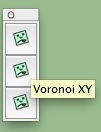
      Thanks TIG for the effort but your icons don't show on Mac. 😢 ❓

      Icons.jpg

      I don't know if the problem is in the ConicCurveInFace.rb file, if there is a missing code to load the icons. The mouse icon shows correctly.

      "The result is the end what is important is the process" by Oxer
      http://www.oxervision.blogspot.com/

      1 條回覆 最後回覆 回覆 引用 0
      • TIGT 離線
        TIG Moderator
        最後由 編輯

        I don't expect this to fix it... but you never know 😲

        Look in subfolder's .rb files for these lines...
        cmd.small_icon = "voronoi_conic/icon0s.png" cmd.large_icon = "voronoi_conic/icon0.png"

        Change it to read thus:
        cmd.small_icon = File.join(File.dirname(__FILE__), "icon0s.png") cmd.large_icon = File.join(File.dirname(__FILE__), "icon0.png")

        AND similarly make changes for the other 2 similar entries for cmd1 & cmd2...
        Save & restart SketchUp........

        TIG

        1 條回覆 最後回覆 回覆 引用 0
        • OxerO 離線
          Oxer
          最後由 編輯

          Thanks you very much TIG!! 👍
          Problem fixed, I changed the lines and the icons show now.
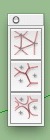
          icons.jpg

          "The result is the end what is important is the process" by Oxer
          http://www.oxervision.blogspot.com/

          1 條回覆 最後回覆 回覆 引用 0
          • CTXC 離線
            CTX
            最後由 編輯

            for TIG:
            Thank you first of all for the suggestion ........ but I get this message .Where I do wrong? Thanks in advance! 🎉 🎉
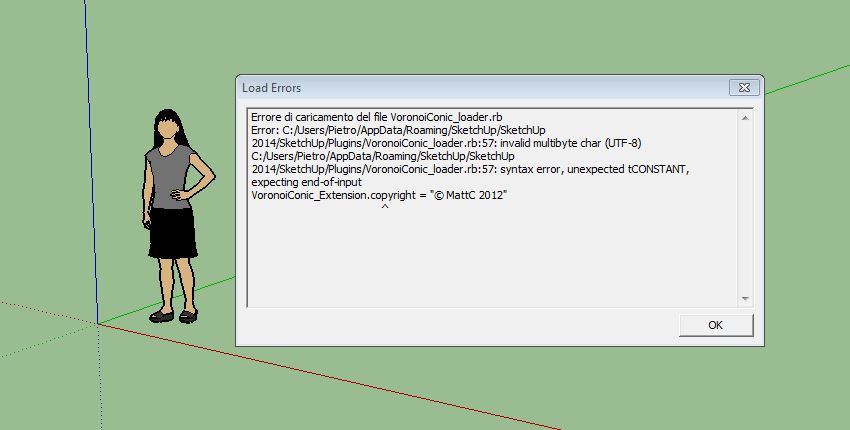

            Error message

            1 條回覆 最後回覆 回覆 引用 0
            • O 離線
              Oxygen220
              最後由 編輯

              anyone know what to do when this happens?

              Error Loading File VoronoiXY.rb
              Error: #<LoadError: cannot load such file -- delauney3.rb>
              C:/Program Files (x86)/SketchUp/SketchUp 2014/Tools/RubyStdLib/rubygems/core_ext/kernel_require.rb:45:in require' C:/Program Files (x86)/SketchUp/SketchUp 2014/Tools/RubyStdLib/rubygems/core_ext/kernel_require.rb:45:in require'
              C:/Users/MR-T-REX/AppData/Roaming/SketchUp/SketchUp 2014/SketchUp/Plugins/VoronoiXY.rb:31:in `<top (required)>'

              1 條回覆 最後回覆 回覆 引用 0
              • TIGT 離線
                TIG Moderator
                最後由 編輯

                Yes.
                It's an incompatibility with SketchUp v2014 Ruby2...

                I'm working on a fix...

                TIG

                1 條回覆 最後回覆 回覆 引用 0
                • O 離線
                  Oxygen220
                  最後由 編輯

                  ok so i got the points and triangulation working, but when i select the point and click voronoi, nothing happens, what am i missing? 😧 no errors come up, just nothing happens.

                  1 條回覆 最後回覆 回覆 引用 0
                  • TIGT 離線
                    TIG Moderator
                    最後由 編輯

                    Here is the updated RBZ in the PluginStore http://sketchucation.com/pluginstore?pln=VoronoiXY
                    It has the corrected icons / paths and is now compatibly encoded files for >= SketchUp v2014 [and earlier!]...
                    It also auto-removes any of its outdated and unwanted files from the base Plugins folder...

                    TIG

                    1 條回覆 最後回覆 回覆 引用 0
                    • OxerO 離線
                      Oxer
                      最後由 編輯

                      Hi TIG, you forgot to fix the problem with the TAB key on Mac in the new version:

                      @tig said:

                      The dialog won't open on MAC because the ConicCurveInFace.rb code uses:
                      def onKeyDown(...
                      at line #10.
                      For some unfathomable reason a TAB-key down on MAC is not 'seen', so while pressing the TAB-key on a PC works, it fails silently on a MAC.
                      It's easily fixed by changing the code to read:
                      def onKeyUp(...
                      So then when you release the TAB-key the dialog appears - works on MAC AND PC.
                      Also change the next line from:
                      if key==9 or key==15 or key==48...
                      to read:
                      if key==9 or key==15 ###or key==48...

                      "The result is the end what is important is the process" by Oxer
                      http://www.oxervision.blogspot.com/

                      1 條回覆 最後回覆 回覆 引用 0
                      • TIGT 離線
                        TIG Moderator
                        最後由 編輯

                        Doh ! 😒
                        So many bug-fixes... v2.3 in progress...

                        TIG

                        1 條回覆 最後回覆 回覆 引用 0
                        • TIGT 離線
                          TIG Moderator
                          最後由 編輯

                          Here's v2.3 which fixes the TAB bug on MACs...
                          http://sketchucation.com/pluginstore?pln=VoronoiXY

                          TIG

                          1 條回覆 最後回覆 回覆 引用 0
                          • O 離線
                            Oxygen220
                            最後由 編輯

                            god damn, ok so i got the 2.3 version, and finally able to get the icons, but the problems still there, i can create points, i can triangulate but when i try the vonoroi tool, nothing happens D:, either its not working or im an idiot and forgot to do something, or both..

                            1 條回覆 最後回覆 回覆 引用 0
                            • CTXC 離線
                              CTX
                              最後由 編輯

                              For Tig:
                              Thank you very much, with the two updates (TIG: Triangulate Points v1.1 and
                              MattC: VoronoiXY v2.3) now everything works great.
                              Thanks again for the speed of response. 😍 😍 👍 👍

                              1 條回覆 最後回覆 回覆 引用 0
                              • CTXC 離線
                                CTX
                                最後由 編輯

                                I would like to ask if anyone knows a plugin for SU able to draw points (maybe choosing how many and in what geometry) on a surface. ❓ ❓
                                Many thanks

                                1 條回覆 最後回覆 回覆 引用 0
                                • TIGT 離線
                                  TIG Moderator
                                  最後由 編輯

                                  This is the staple 'PointTool'...
                                  http://sketchucation.com/pluginstore?pln=PointTool
                                  Toolbar or menu item...
                                  It draws individual cpoints [guides] - but you can of course use Rotate OR Move +Ctrl to Copy and then type NNx +<enter> to array them by the number NN repeating the distance, or /NN to divide the original distance up with your copies...

                                  TIG

                                  1 條回覆 最後回覆 回覆 引用 0
                                  • pilouP 離線
                                    pilou
                                    最後由 編輯

                                    You have Raytracer by Thomthom who dropts Cpoints on Surfaces! 😉

                                    http://sketchucation.com/forums/download/file.php?id=53901&t=1

                                    Frenchy Pilou
                                    Is beautiful that please without concept!
                                    My Little site :)

                                    1 條回覆 最後回覆 回覆 引用 0
                                    • D 離線
                                      darkshadow47
                                      最後由 編輯

                                      OK, I feel like a complete idiot for not being able to make this work. I have the current plugin from MattC and TIGs separate triangulation plugin. After creating a polygon and selecting it, if I select Triangulate Points it will ask for a layer name, and then fail with the "No Guide Points in selection". How do I generate guide points?

                                      The Conic curve in a face works fine...

                                      1 條回覆 最後回覆 回覆 引用 0
                                      • R 離線
                                        ronel_12
                                        最後由 編輯

                                        No Existe para Pc ? saludos y bendiciones

                                        1 條回覆 最後回覆 回覆 引用 0
                                        • TIGT 離線
                                          TIG Moderator
                                          最後由 編輯

                                          @ronel_12 said:

                                          No Existe para Pc ? saludos y bendiciones
                                          No entiendo lo que quieres decir.
                                          Esto funciona en la PC.
                                          ¿Por qué crees que no lo hace?

                                          I don't understand what you mean.
                                          This works on PC.
                                          Why do you think it does not?

                                          TIG

                                          1 條回覆 最後回覆 回覆 引用 0
                                          • A 離線
                                            AUTER
                                            最後由 編輯

                                            i tried to install in my SketchUp but didnt work... anyone could help me with this?

                                            1 條回覆 最後回覆 回覆 引用 0
                                            • 1
                                            • 2
                                            • 3
                                            • 4
                                            • 5
                                            • 6
                                            • 7
                                            • 5 / 7
                                            • 第一個貼文
                                              最後的貼文
                                            Buy SketchPlus
                                            Buy SUbD
                                            Buy WrapR
                                            Buy eBook
                                            Buy Modelur
                                            Buy Vertex Tools
                                            Buy SketchCuisine
                                            Buy FormFonts

                                            Advertisement