sketchucation logo sketchucation
    • 登入
    Oops, your profile's looking a bit empty! To help us tailor your experience, please fill in key details like your SketchUp version, skill level, operating system, and more. Update and save your info on your profile page today!
    🔌 Smart Spline | Fluid way to handle splines for furniture design and complex structures. Download

    [Plugin][$] Curvizard - v2.5a - 01 Apr 24


    已排程 已置頂 已鎖定 已移動 Plugins
    198 貼文 58 Posters 330.6k 瀏覽 57 Watching
    正在載入更多貼文
    • 從舊到新
    • 從新到舊
    • 最多點贊
    回覆
    • 在新貼文中回覆
    登入後回覆
    此主題已被刪除。只有擁有主題管理權限的使用者可以查看。
    • ArcA 離線
      Arc
      最後由 編輯

      Translation into Chinese...
      Chinese language

      1 條回覆 最後回覆 回覆 引用 0
      • S 離線
        smicha
        最後由 編輯

        Fredo, You are genius!!! Thank you so much for fantastic update.

        1 條回覆 最後回覆 回覆 引用 0
        • V 離線
          victor hugo
          最後由 編輯

          Pretty useful plugin!!!

          I've downloaded the update 1.1c and installed per instructions and when I go to "Fredo tools" to "Check the Plugin Update"; Curvizard still shows in pink/red. I re-downloaded the file and it keeps saying I need to do update!!!??

          Thanks.

          1 條回覆 最後回覆 回覆 引用 0
          • cottyC 離線
            cotty
            最後由 編輯

            1.1c or 1.1d?

            my SketchUp gallery

            1 條回覆 最後回覆 回覆 引用 0
            • V 離線
              victor hugo
              最後由 編輯

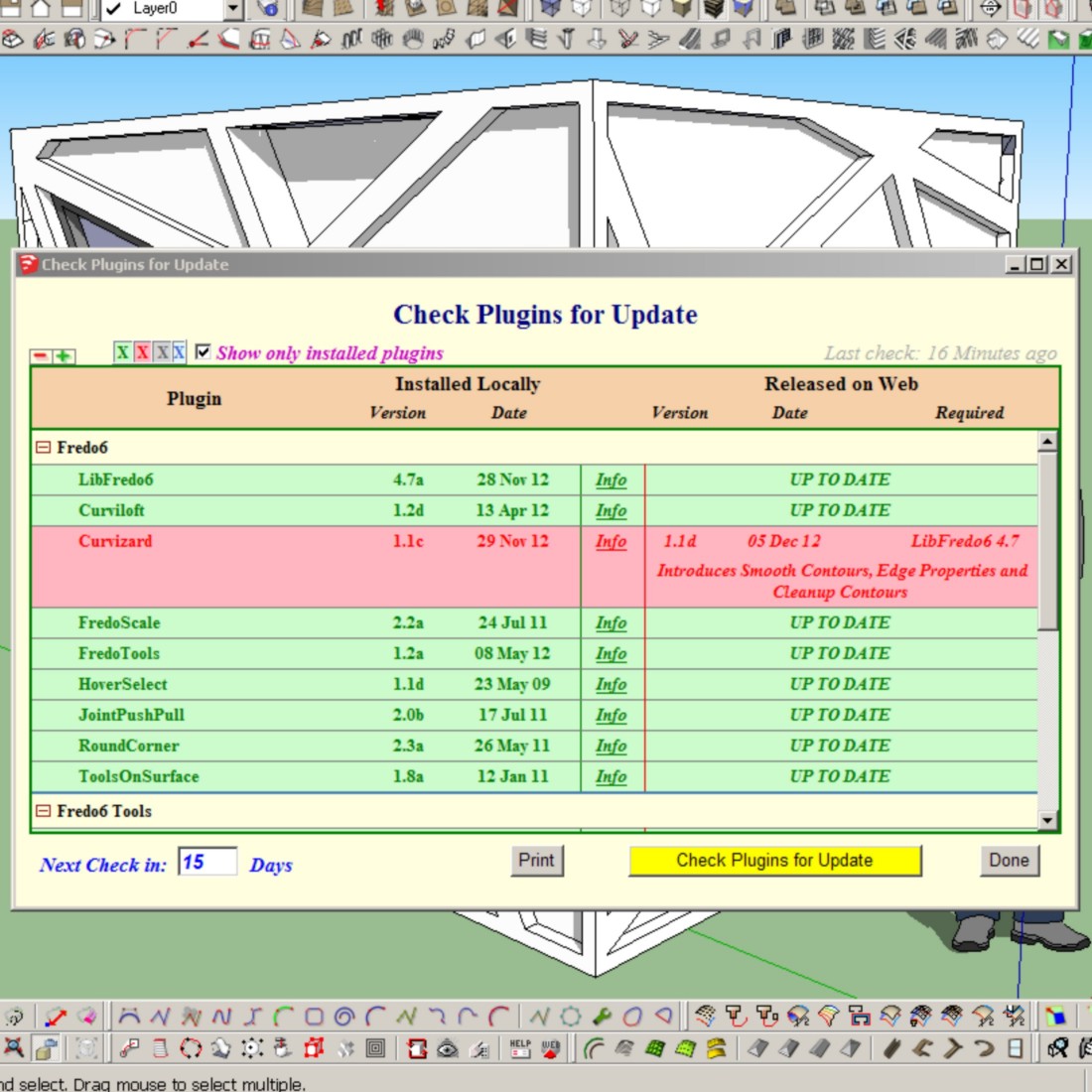
              I had 1.1c and just did 1.1d and the attched is what is showing

              Thanks.

              Fredo6-Curvizard.jpg

              1 條回覆 最後回覆 回覆 引用 0
              • cottyC 離線
                cotty
                最後由 編輯

                You are right, it seems that in the 1.1d file "Curvizard.plugin" the version is still 1.1c ...

                my SketchUp gallery

                1 條回覆 最後回覆 回覆 引用 0
                • guanjinG 離線
                  guanjin
                  最後由 編輯

                  @cotty said:

                  You are right, it seems that in the 1.1d file "Curvizard.plugin" the version is still 1.1c ...

                  I am also, but does not affect use.

                  I come from China, is to learn

                  1 條回覆 最後回覆 回覆 引用 0
                  • S 離線
                    small08
                    最後由 編輯

                    Amazing work Fredo, Thank-you!

                    1 條回覆 最後回覆 回覆 引用 0
                    • M 離線
                      matt.gordon320
                      最後由 編輯

                      Hi Fredo,

                      I was wondering if you might be able to take a look at my office's model to see what might be causing the error(s) I'm getting? I've attached both the model and the error report.

                      Thanks!

                      Matt


                      Master Topo Clean ERROR.skp


                      Ruby Error - Curvizard#simplify_curve - 10-Dec-12 13_43_35.txt

                      1 條回覆 最後回覆 回覆 引用 0
                      • TIGT 離線
                        TIG Moderator
                        最後由 編輯

                        Matt

                        What are you trying to do when you get the error message ?
                        Your post is too scant. 😕

                        TIG

                        1 條回覆 最後回覆 回覆 引用 0
                        • M 離線
                          matt.gordon320
                          最後由 編輯

                          My apologies, my message is absolutely lacking in any detail 😳

                          I've brought in a dwg containing topographic information from a civil consultants's office, and I'm trying to use Curvizard to simplify the contours. When I do, the interface of SketchUp pauses for a second, then comes up with an error message window containing the information in the attached text report. I can't quite figure out what the error is, or whether it's something that I introduced through cleaning up the DWG, or whether it's something that is just lost in translation from AutoCAD => SketchUp.

                          Hope that's better 😄

                          Thanks!

                          Matt

                          1 條回覆 最後回覆 回覆 引用 0
                          • TIGT 離線
                            TIG Moderator
                            最後由 編輯

                            There are lots of 'gaps' in your contours etc which are probably causing the issues.
                            You could always draw a few lines in to heal the critical ones before doing anything else...

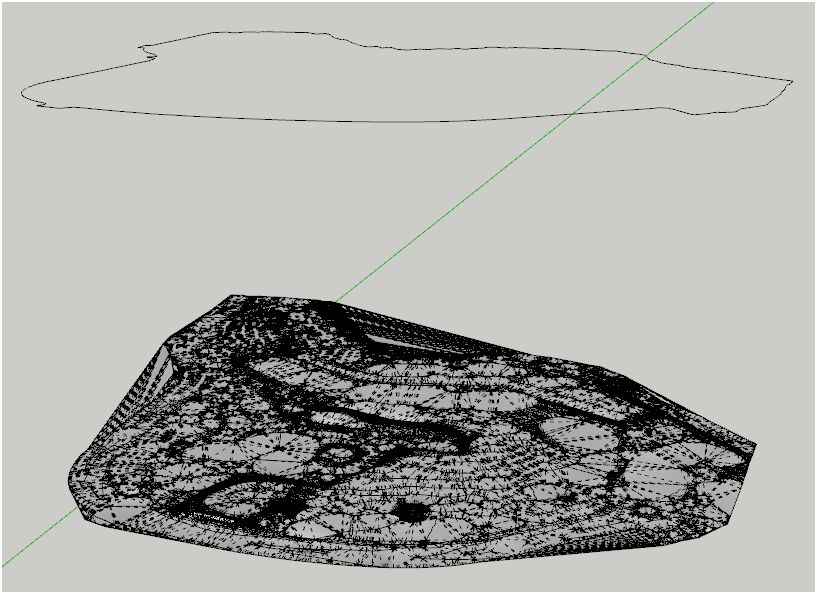
                            I ran your contour-lines [without any other processing] through the Sandbox Tools > From Contours.
                            After some processing it made a complex terrain mesh...Capture.PNGI assume this is something like you hoped for ? Perhaps you need to choose your tools... "When the only tool you have is a hammer, everything starts to look like a nail..." 😉
                            TIG

                            1 條回覆 最後回覆 回覆 引用 0
                            • fredo6F 離線
                              fredo6
                              最後由 編輯

                              The erreor 'reference to deleted vertex' may occur in some situations and not easy to fix.

                              I suggest you use the mode "Erase and Create" rather than deform.

                              Were you processing all (or many) contours at once?

                              Fredo

                              1 條回覆 最後回覆 回覆 引用 0
                              • M 離線
                                matt.gordon320
                                最後由 編輯

                                @tig said:

                                There are lots of 'gaps' in your contours etc which are probably causing the issues.
                                You could always draw a few lines in to heal the critical ones before doing anything else...

                                I ran your contour-lines [without any other processing] through the Sandbox Tools > From Contours.
                                After some processing it made a complex terrain mesh...[attachment=0:28k6bpaf]<!-- ia0 -->Capture.PNG<!-- ia0 -->[/attachment:28k6bpaf]I assume this is something like you hoped for ? Perhaps you need to choose your tools... "When the only tool you have is a hammer, everything starts to look like a nail..." 😉

                                Yes, I tried running the "From Contours", and it worked fine, I was just trying to test the difference in file size that Fredo's tool might save. I'm pretty much the only one in the office who bothers to try to keep file size down, so I figured I'd try it.

                                @unknownuser said:

                                The erreor 'reference to deleted vertex' may occur in some situations and not easy to fix.

                                I suggest you use the mode "Erase and Create" rather than deform.

                                Were you processing all (or many) contours at once?

                                Fredo

                                I'll try to see if "Erase and Create" will work for me. I was running all of them at once. It's my first time using the tool 😳 so I was more just testing than anything. Is running all of them at once a terrible idea, like I'm currently realizing it might be?

                                1 條回覆 最後回覆 回覆 引用 0
                                • M 離線
                                  marszbrowse
                                  最後由 編輯

                                  Hi There,

                                  First of all thanks for all your good work!

                                  I've installed your plugin(s) and all worked like a charm. Unfortunately I've been kind of a dumb ass by moving some of the files out of the Curvizard folder. Tought they were in the wrong folder at the time. Since then on every load, SU keeps reporting missing *.rb files from the loader. Even with all the Curvizard files removed and all so with them installed (and working) What can I do, there is no info about this in the manual.

                                  TIA

                                  Marsz

                                  1 條回覆 最後回覆 回覆 引用 0
                                  • TIGT 離線
                                    TIG Moderator
                                    最後由 編輯

                                    @marszbrowse said:

                                    Hi There,

                                    First of all thanks for all your good work!

                                    I've installed your plugin(s) and all worked like a charm. Unfortunately I've been kind of a dumb ass by moving some of the files out of the Curvizard folder. Thought they were in the wrong folder at the time. Since then on every load, SU keeps reporting missing *.rb files from the loader. Even with all the Curvizard files removed and all so with them installed (and working) What can I do, there is no info about this in the manual.

                                    TIA

                                    Marsz
                                    I'm afraid tools' authors can't make accommodations for every user's stupidity... 😒
                                    Even some full error messages from you would be helpful - rather than your précis...
                                    Re-get all of the needed files/subfolders again.
                                    Now look at what is in these.
                                    Find all matching files/subfolders inside the Plugins folder and remove them.
                                    Now reinstall the newly got files correctly...

                                    There are clear instructions about where the files/subfolders and helpers etc go, reread that and make sure you know what to do... 😕

                                    TIG

                                    1 條回覆 最後回覆 回覆 引用 0
                                    • fredo6F 離線
                                      fredo6
                                      最後由 編輯

                                      @marszbrowse said:

                                      I've installed your plugin(s) and all worked like a charm. Unfortunately I've been kind of a dumb ass by moving some of the files out of the Curvizard folder. Tought they were in the wrong folder at the time. Since then on every load, SU keeps reporting missing *.rb files from the loader. Even with all the Curvizard files removed and all so with them installed (and working) What can I do, there is no info about this in the manual.

                                      Here is the footprint of Curvizard files and folders, so that you could reorganize your Plugins directory
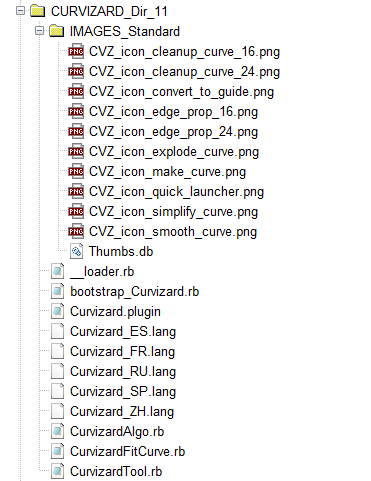
                                      Detailed footprint Curvizard.png

                                      Fredo

                                      1 條回覆 最後回覆 回覆 引用 0
                                      • Rich O BrienR 離線
                                        Rich O Brien Moderator
                                        最後由 編輯

                                        Hi Fredo,

                                        The tooltips for Smooth contours are showing as Simplify Contours for the toolbar icons, onscreen HUD and in the Status bar.

                                        The tool works as expected it is just the tooltips that are incorrect.

                                        Great update by the way 👍

                                        Download the free D'oh Book for SketchUp 📖

                                        1 條回覆 最後回覆 回覆 引用 0
                                        • M 離線
                                          marszbrowse
                                          最後由 編輯

                                          Thanks TIG and Fredo6,

                                          Of course I realize that stupidity isn't something you should support. As a matter of fact you should do nothing at all, and I appreciate your work deeply. So Respect from my side.

                                          I've searched my whole folder file by file, and first removed all the files that also came in the zip. Thereby completely installed the plugin.

                                          Now when I open a file, which I've recently edited, it keeps giving the error:

                                          Error Loading File bootstrap_Curvizard.rb
                                          uninitialized constant Curvizard::T6Error Loading File CurvizardAlgo.rb
                                          uninitialized constant Curvizard::T6Error Loading File CurvizardTool.rb
                                          uninitialized constant Curvizard::T6

                                          Thought a new install will fix this, but it won't. My folders are now exactly as listed above, and works super! Regardless of the load error I keep getting.

                                          I there a location I could look?

                                          Thanks for your help.

                                          Marsz

                                          1 條回覆 最後回覆 回覆 引用 0
                                          • fredo6F 離線
                                            fredo6
                                            最後由 編輯

                                            @Marsz

                                            This seems to be an error related to the installation of LibFredo6.
                                            You should check the foot print (just one file, LibFredo6.rb and one folder LIBFREDO6_Dir_47).

                                            Fredo

                                            1 條回覆 最後回覆 回覆 引用 0
                                            • 1
                                            • 2
                                            • 3
                                            • 4
                                            • 5
                                            • 6
                                            • 9
                                            • 10
                                            • 4 / 10
                                            • 第一個貼文
                                              最後的貼文
                                            Buy SketchPlus
                                            Buy SUbD
                                            Buy WrapR
                                            Buy eBook
                                            Buy Modelur
                                            Buy Vertex Tools
                                            Buy SketchCuisine
                                            Buy FormFonts

                                            Advertisement