[Plugin] FredoTools::ThruPaint - v1.3a - 20 Oct 16
-
Hi guys, i tried to download but it keeps loading forever and it never actually downloads it. I tried also downloading from the extension manager or directly from fredo tools in skp, but it doesnt work.. plzz heeelp
-
Is this plugin still available? It doesn't come up with any search.
-
TruPaint is now installed as part of FredoTools. See first post above, and read down towards the bottom, or go look for FredoTools.
For that matter I don't know if the search is working right on the store, but you can find FreodTools in a full listing of Fredo6 plugins in the search
-
hi everyone, is the downloadlink broken, or is it just me?
-
What 'downlink' ?
https://sketchucation.com/pluginstore?pln=FredoTools
works fine...
You do need to be logged in to the PluginStore ?? -
I have been modeling in SU for years and have gained so much from the plugins and discussions with Fredo, Thom Thom, Tig and many others.
But I have been going in circles figuring out a UV workflow for taking my SU model into UE4 using Datasmith. My architectural forms are not super complex or organic, but a fair amount of curved surfaces and some double curvature. I have been using SubD and Quadface Tools.
I have played with SketchUV, Wrap-r and Thrupaint. Thrupaint is the most intuitive to me, but it says that it is not actually UV Mapping, and I don't know enough about UV to know what that means. Will it get me into trouble in UE4 (which I haven't trained on yet)? Or will it be enough for Datasmith to convert properly?
I haven't been able to get SketchUV to work with SubD quads unless I de-triangulate, which in turn messes with my curved geometry.
I thought Wrap-r was the solution when I unwrapped and textured the control mesh, but then it is distorted when I SubD. Unwrapping the subdivided mesh seems to be a royal pain. I am not trying to add edge wear or anything at least in SU, just want stand-in metal, stone and wood textures, but as seamless as possible.
Again, Thrupaint is the most intuitive tool for me, but is it UV mapping or not? I appreciate any help anyone can give.
-
Are there any known issues with Twinmotion and its sync plugin ??? Each time I reload the models after saving, i have to retexture in Twinmotion.
-
Sorry no problem for me : with ThruPaint or Not!
The Sync works like a charm!
(Su 2017 Make --> TwinMotion 2019 free )
I believe that we must have the SU Pro for Sync with free TwinMotion 2020 ?When you say "reload" what is exactly ?
Direct from SU with the Twin Sync plugin or a simple reload inside Twin after saved a SU FIle ? -
Ok, a bit short explanation

Example.
I model a pipe, steel pipe. Create a material in SU and load a albedo image. Then i use Fredo
s Thru paint (latest version) and i texture it using Quadmesh UV mapping. The texture adds nicely in SU and I`m all happy to send it to TM using the sync tool (No merging, keeping all objects)
When the model shows up in TM, i load the rest of the textures, roughness, metallic and bump.
The model looks good in TM.
Now I save the model in SU and TM and shut down for the day.Next day: Open SU model, open Twinmotion model.. Maybe I add somthing in SU, maybe a second pipe, using the same workflow as described above, and syncing with TM The material i added on the first pipe the day before are gone and replaced with the one from SU.
I have to reload all the other maps. Rough, metallic and bump..This happens every time. I found another comment on this issue in the TM forums, saying it had to do with our favorite mapping tools, Thrupaint..
 (I don't belivee it )
Hope this makes sense
-
Hello dear Fredo,
I come across a problem regarding ThruPaint, makeing it exporting separate material for each face, which i don't want it to happen.
 Final model exports and it has for like 238 materials and so...
I encountered and found out when i was changing the material and deleting it, the error it never happens.

Using Sketchup 2020 and the last FredoTools on the sketchUcation.

Thank you.
Misticalages -
I am using sketchup pro 2020, installed ThruPhaint, does not show buttons, images cannot be used.

-
@suprachs said:
I am using sketchup pro 2020, installed ThruPaint, does not show buttons, images cannot be used.
Are you on Sketchup 2016?
If so, you need to take the legacy version of LibFredo6 and the legacy version of FredoTools.
-
Fredo may I ask some childish question?
Is there any fundamental difficulty to implement Natural UV mode that is aligned to longes edges of the tube-like surfaces? Just like QuadMesh UV mode but without distortions?Legend:
1- QuadMesh UV mode (almost OK except distortions)
2- Current Natural UV mode (messy)
3- The desired one- every segment of the tube gets aligned to direction distortion-free UV mapping. I can achieve it with a current Natural UV mode (clicking segment by segment) but is it possible to get it with single click?
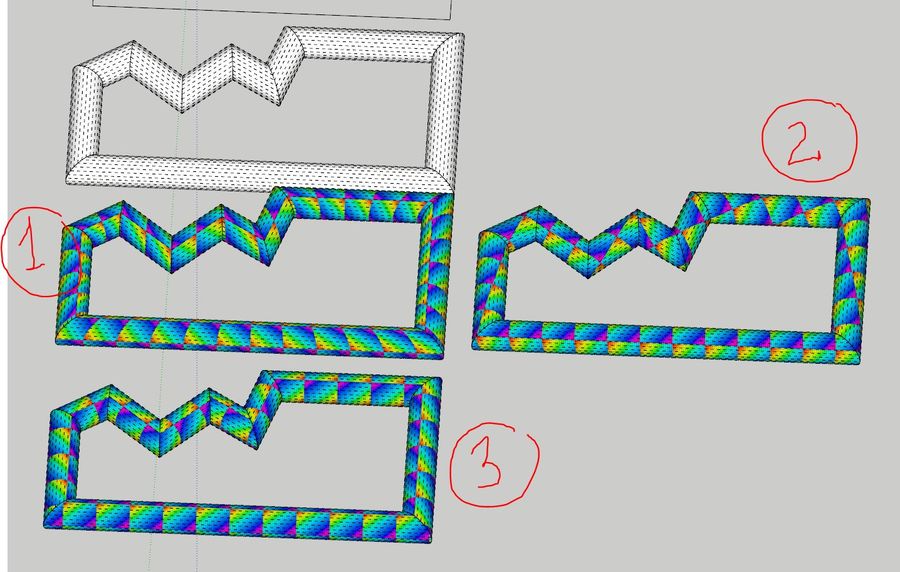
-
It doesn't crush ENScape or something so don't worry..
Enscape is a render plugin for sketchup and few other like Rhino, Vectorworks..I found that if I set up an ENS material and "Save As" it to some library, Fredo6 ThruPaint (which I use actually instead of native paint bucket) doesn't see ENS specific settings when introducing new material to the model.. It works with no problem when material is already one of the materials.
So if You have created a library of ENS setted up materials and want to use them in Your model, than when You pick the material from that library and paint it in Your model for the first time do it with native sKetchup Paint Tool. ThruPaint will make it a 'flat' sKetchup material loosing any links to bump, roughness etc. and mixing Tint Color and Color settings into texture image..
I don't really know who should fix what in order to make it work so I let know to both. I love ThruPaint and I have to use ENS.
-
@rv1974 said:
Fredo may I ask some childish question?
Is there any fundamental difficulty to implement Natural UV mode that is aligned to longes edges of the tube-like surfaces? Just like QuadMesh UV mode but without distortions?I guess that main problem is that plugin doesn't really know which direction is prefered one,. maybe we could assume the red 'U' direction..
Second problem ThruPaint tries very hard to make texturing continues.. As far as I have seen Your desired result it has breakes on every bend of tube.. So I guess You want some mix of 'quad' abd 'natural uv' modes.. Just select and paint each segment seperatly with 'natural uv'.. As You did I guess.. -
Thanks Fredo
-
@unknownuser said:
I guess that main problem is that plugin doesn't really know which direction is prefered one,. maybe we could assume the red 'U' direction..
Second problem ThruPaint tries very hard to make texturing continues.. As far as I have seen Your desired result it has breakes on every bend of tube.. So I guess You want some mix of 'quad' abd 'natural uv' modes.. Just select and paint each segment separately with 'natural uv'.. As You did I guess..But somehow it does know the preferred dimension when applying "Quad" UV". Plus, tools like Profile Builder manage to apply UVs correctly when generating new geometry. Indeed, essentially I'm asking is a hybrid of quad + natural modes. I think it's the most preferred mode for architects. It'd be nice to hear from Fredo if this hybrid mode is theoretically possible.
*>>
@unknownuser said:Just select and paint each segment separately with 'natural uv'.. As You did I guess
Right, manual clicking segment by segment is the current solution, but in many cases it's too laborious..
-
where can i get this?
-
@kevvv said:
where can i get this?
If you look at the first post in this thread you will see it's part of FredoTools and the link for it.
By the way, your profile says you are using SketchUp 2019 Free/Make but that's impossible. Please update your profile with the correct version.
-
I don't know what is going on, but Thrupaint is giving me so many issues right now. Its frustrating me to the point where I don't even want to use Sketchup anymore. I created a geometrically perfect onion dome, made of ENTIRELY quads, with no issues or errors in the construction.
When I try to use the Quad UV wrap to wrap a mosaic tile texture around the dome, it gives me errors every time. I get the yellow errors, and I get red errors, where it says the faces don't have 3 or 4 vertices, when they all do. I've been unable to texture this thrice d**ned dome because of it. Its ruining my project, and I really don't want to have to export the dome to 3ds Max to wrap the texture, because then it will need to be triangulated, which will completely mess it up when I import it back into Sketchup.
Does anyone have a solution for this stupid bug I keep experiencing?







Advertisement