sketchucation logo sketchucation
    • Login
    Oops, your profile's looking a bit empty! To help us tailor your experience, please fill in key details like your SketchUp version, skill level, operating system, and more. Update and save your info on your profile page today!
    Mac User? | Join the Rayscaper Beta for Mac Learn More

    [Plugin] SketchUV - now free

    Scheduled Pinned Locked Moved Plugins
    176 Posts 62 Posters 175.8k Views 62 Watching
    Loading More Posts
    • Oldest to Newest
    • Newest to Oldest
    • Most Votes
    Reply
    • Reply as topic
    Log in to reply
    This topic has been deleted. Only users with topic management privileges can see it.
    • D
      dacastror
      last edited by

      mistakes like this are appearing on the console

      Error: #<NameError: uninitialized constant DM_SketchUV::DM_UVTool::Set>

      I'm using Sketchup 2015. When you use version 1.0 works fine, but there are flaws in version 1.0.1

      1 Reply Last reply
      Reply Quote 0
      • W
        Whaat
        last edited by

        @dacastror said:

        mistakes like this are appearing on the console

        Error: #<NameError: uninitialized constant DM_SketchUV::DM_UVTool::Set>

        I'm using Sketchup 2015. When you use version 1.0 works fine, but there are flaws in version 1.0.1

        Thanks for the report - I'll look into it. Are you sure you have the latest version installed?

        SketchUp Plugins for Professionals

        1 Reply Last reply
        Reply Quote 0
        • BSquared18B
          BSquared18
          last edited by

          **Hello Dale,

          I started a thread titled "Need Help Using SketchUV for UV mapping" at:

          404 Not Found

          favicon

          (sketchucation.com)

          In short, I am trying to UV-map the texture from a .png file to a SketchUp 3D model of an aircraft instrument panel. The details are in the above-mentioned thread.

          I've gone through the steps listed in your tutorials, except that instead of applying a texture from SU's Paint Bucket palette, I have tried to import it using SU's Import Texture feature.

          But after applying it and trying to export it using Marginal's SU2XP plugin, I do not get the desired effect.

          Do you have any suggestions?

          Thank you,
          Bill**

          1 Reply Last reply
          Reply Quote 0
          • H
            hsrhdrehre5654654
            last edited by

            Great tool. Just one question.. im trying to export the uvs. Here is the problem, i set the extraction path in, for example d:/ , then i go to options - export uvs, and a msg appear saying that the uvs have been exported. Well, i cant find the obj file anywhere. And since in the msg box there is not info about the path itself, im totally lost. My guess is it is exporting the uvs to the default folder instead. So, what is the default folder where the uvs are exported?

            1 Reply Last reply
            Reply Quote 0
            • H
              hsrhdrehre5654654
              last edited by

              Oh well. NVM. It turns out i was "saving" the uvs, not exporting rofl!!! sorry my bad.

              1 Reply Last reply
              Reply Quote 0
              • dereiD
                derei
                last edited by

                Can't export UVs. The error is "Unable to export UVs" and after a quick inspection in the console, it seems the default export path doesn't exist anymore (indeed, the folder was renamed). The problem is that I have no idea how I can convince the plugin to export somewhere else...

                Please help!

                DESIGNER AND ARTIST DEREI.UK

                1 Reply Last reply
                Reply Quote 0
                • dereiD
                  derei
                  last edited by

                  @derei said:

                  Can't export UVs. The error is "Unable to export UVs" and after a quick inspection in the console, it seems the default export path doesn't exist anymore (indeed, the folder was renamed). The problem is that I have no idea how I can convince the plugin to export somewhere else...

                  Please help!

                  Solved - I deleted the REG entry. Nonetheless, should address the issue in a better manner (if path not found, to prompt for a new path).

                  Cheers!

                  DESIGNER AND ARTIST DEREI.UK

                  1 Reply Last reply
                  Reply Quote 0
                  • sicksickisckS
                    sicksickisck
                    last edited by

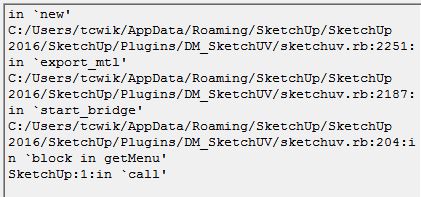
                    EXPORT UV.JPG
                    EXPORT UV, BUG SKP 2016VER.JPG

                    1 Reply Last reply
                    Reply Quote 0
                    • W
                      Whaat
                      last edited by

                      @sicksickisck said:

                      [attachment=1:2ohepcgx]<!-- ia1 -->EXPORT UV.JPG<!-- ia1 -->[/attachment:2ohepcgx]
                      EXPORT UV, BUG SKP 2016[attachment=0:2ohepcgx]<!-- ia0 -->VER.JPG<!-- ia0 -->[/attachment:2ohepcgx]

                      Do you have the entire ruby output available?

                      I'm guessing you might have a conflicting plugin.

                      SketchUp Plugins for Professionals

                      1 Reply Last reply
                      Reply Quote 0
                      • K
                        kubap
                        last edited by

                        Hi, sketchup says that this plugin is unidentified (doesn't have digital signature) and therefore may be risky to use. I don't have this issue with other plugins.

                        1 Reply Last reply
                        Reply Quote 0
                        • W
                          Whaat
                          last edited by

                          @kubap said:

                          Hi, sketchup says that this plugin is unidentified (doesn't have digital signature) and therefore may be risky to use. I don't have this issue with other plugins.

                          Thanks for the note - the current version on the EW might not have a signature. I'll have to fix that.

                          SketchUp Plugins for Professionals

                          1 Reply Last reply
                          Reply Quote 0
                          • K
                            kcezario_ep
                            last edited by

                            I do not know why this happens to me always.
                            Some faces never get right


                            error01.jpg


                            error02.jpg


                            error03.jpg


                            error04.jpg

                            1 Reply Last reply
                            Reply Quote 0
                            • W
                              Whaat
                              last edited by

                              @kcezario_ep said:

                              I do not know why this happens to me always.
                              Some faces never get right

                              Have you checked the Ruby Console for errors?

                              SketchUp Plugins for Professionals

                              1 Reply Last reply
                              Reply Quote 0
                              • L
                                lBeral
                                last edited by

                                @derei said:

                                @derei said:

                                Can't export UVs. The error is "Unable to export UVs" and after a quick inspection in the console, it seems the default export path doesn't exist anymore (indeed, the folder was renamed). The problem is that I have no idea how I can convince the plugin to export somewhere else...

                                Please help!

                                Solved - I deleted the REG entry. Nonetheless, should address the issue in a better manner (if path not found, to prompt for a new path).

                                Cheers!

                                If someone have the same problem the registry's path is
                                "HKEY_CURRENT_USER\Software\SketchUp\SketchUp 2017\UVTools"

                                1 Reply Last reply
                                Reply Quote 0
                                • M
                                  maurorog
                                  last edited by

                                  How to apply the tool to an object that shows both front and back sides, such as a folded sheet

                                  http://i68.tinypic.com/rtguja.jpg

                                  1 Reply Last reply
                                  Reply Quote 0
                                  • W
                                    Whaat
                                    last edited by

                                    @maurorog said:

                                    How to apply the tool to an object that shows both front and back sides, such as a folded sheet

                                    Hi maurorog,

                                    I don't think it is possible to apply the UV mapping to the back side of the face in SketchUV, unless someone knows a clever trick.

                                    SketchUp Plugins for Professionals

                                    1 Reply Last reply
                                    Reply Quote 0
                                    • E
                                      Einstein
                                      last edited by

                                      Hello!
                                      Could someone please post the lost manual PDF file? I'd gladly see list of hotkeys instead if video tutorial.

                                      Or just tell me how to move and rotate UV texture while mapping?
                                      I know that scaling goes by typing *X or /X but can't find the rest of transformation hotkeys.

                                      1 Reply Last reply
                                      Reply Quote 0
                                      • S
                                        safak
                                        last edited by

                                        Hi,

                                        I want to be able to have models with UV mapping but without textures applied to them. Is there any way to do it without seeing the multi-coloured default material of SketchUV?

                                        Thank you,

                                        1 Reply Last reply
                                        Reply Quote 0
                                        • N
                                          nlipovac
                                          last edited by

                                          Replace it with a white pic - 512x512 jpg, in the plugin folder.

                                          1 Reply Last reply
                                          Reply Quote 0

                                          Hello! It looks like you're interested in this conversation, but you don't have an account yet.

                                          Getting fed up of having to scroll through the same posts each visit? When you register for an account, you'll always come back to exactly where you were before, and choose to be notified of new replies (either via email, or push notification). You'll also be able to save bookmarks and upvote posts to show your appreciation to other community members.

                                          With your input, this post could be even better šŸ’—

                                          Register Login
                                          • 1
                                          • 2
                                          • 5
                                          • 6
                                          • 7
                                          • 8
                                          • 9
                                          • 9 / 9
                                          • First post
                                            Last post
                                          Buy SketchPlus
                                          Buy SUbD
                                          Buy WrapR
                                          Buy eBook
                                          Buy Modelur
                                          Buy Vertex Tools
                                          Buy SketchCuisine
                                          Buy FormFonts

                                          Advertisement