sketchucation logo sketchucation
    • 登入
    Oops, your profile's looking a bit empty! To help us tailor your experience, please fill in key details like your SketchUp version, skill level, operating system, and more. Update and save your info on your profile page today!
    🔌 Smart Spline | Fluid way to handle splines for furniture design and complex structures. Download

    Making tyres in SU

    已排程 已置頂 已鎖定 已移動 Newbie Forum
    sketchup
    65 貼文 11 Posters 4.8k 瀏覽 11 Watching
    正在載入更多貼文
    • 從舊到新
    • 從新到舊
    • 最多點贊
    回覆
    • 在新貼文中回覆
    登入後回覆
    此主題已被刪除。只有擁有主題管理權限的使用者可以查看。
    • KrisidiousK 離線
      Krisidious
      最後由 編輯

      Lecra is this for rFactor2?

      By: Kristoff Rand
      Home DesignerUnique House Plans

      1 條回覆 最後回覆 回覆 引用 0
      • L 離線
        lecra
        最後由 編輯

        Kris,

        @krisidious said:

        Lecra is this for rFactor2?

        You mean what kind of game? Farming Simulator 2011.

        KR; Lecra

        I'm new to SU but so thirstily to learn all the stuff. Help me fighting against my thirst

        1 條回覆 最後回覆 回覆 引用 0
        • KrisidiousK 離線
          Krisidious
          最後由 編輯

          I thought you might be modding this game, like I am...

          By: Kristoff Rand
          Home DesignerUnique House Plans

          1 條回覆 最後回覆 回覆 引用 0
          • GaieusG 離線
            Gaieus
            最後由 編輯

            @lecra said:

            I'm there now. The problem that I see now is the rounded shoulder of the tire. Is there a way to make this edge after have textured them a bit rounder?

            I can't really see where the problem exactly is. Can you attach the wheel (model) itself, too?

            Gai...

            1 條回覆 最後回覆 回覆 引用 0
            • L 離線
              lecra
              最後由 編輯

              Gaieus,

              @gaieus said:

              @lecra said:

              I'm there now. The problem that I see now is the rounded shoulder of the tire. Is there a way to make this edge after have textured them a bit rounder?

              I can't really see where the problem exactly is. Can you attach the wheel (model) itself, too?

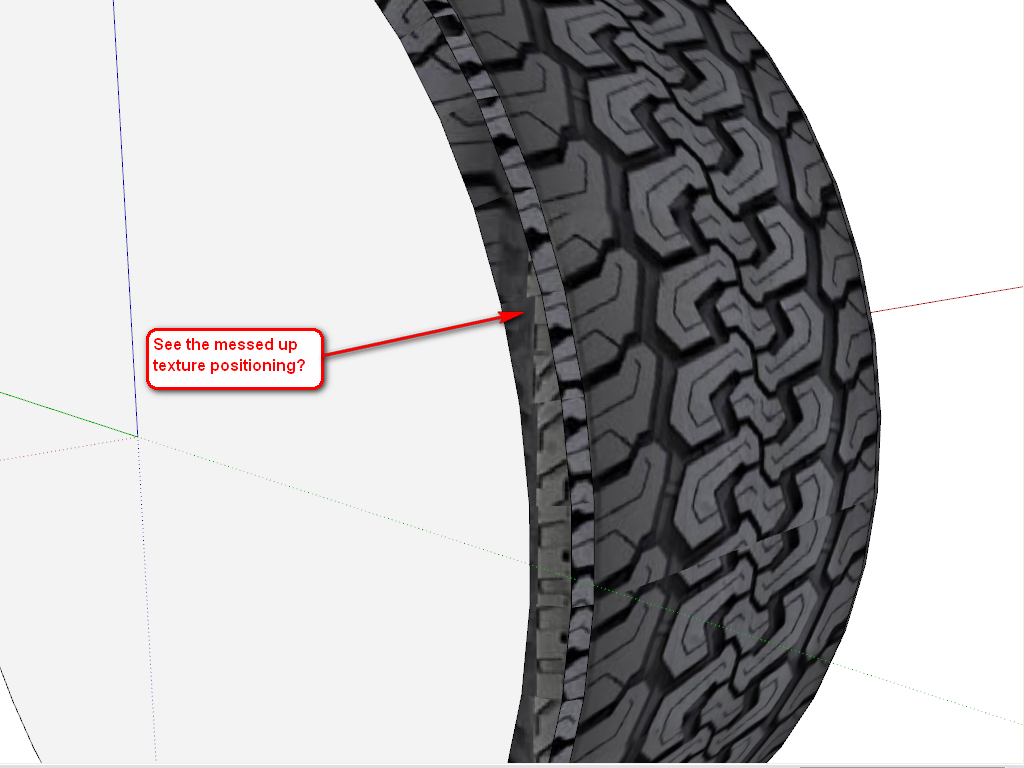
              Look at the edges of the tire. I don't know how to round the the edge so that the tire looks realistic and not in the shape of a square (at the end of the texture on the right and left side)!

              Below the attached file:
              LecraTyre_2.skp

              Many thanks for your help Gaieus. Much appreciated.

              KR; Lecra

              I'm new to SU but so thirstily to learn all the stuff. Help me fighting against my thirst

              1 條回覆 最後回覆 回覆 引用 0
              • GaieusG 離線
                Gaieus
                最後由 編輯

                Something like this?


                LecraTyre_2.skp

                Gai...

                1 條回覆 最後回覆 回覆 引用 0
                • gillesG 離線
                  gilles
                  最後由 編輯

                  Have a look at this if it can help.
                  step by step.


                  LecraTyre.skp

                  " c'est curieux chez les marins ce besoin de faire des phrases "

                  1 條回覆 最後回覆 回覆 引用 0
                  • L 離線
                    lecra
                    最後由 編輯

                    Gaieus,

                    @gaieus said:

                    Something like this?

                    Exactly that! Tell me!

                    KR; Lecra

                    I'm new to SU but so thirstily to learn all the stuff. Help me fighting against my thirst

                    1 條回覆 最後回覆 回覆 引用 0
                    • GaieusG 離線
                      Gaieus
                      最後由 編輯

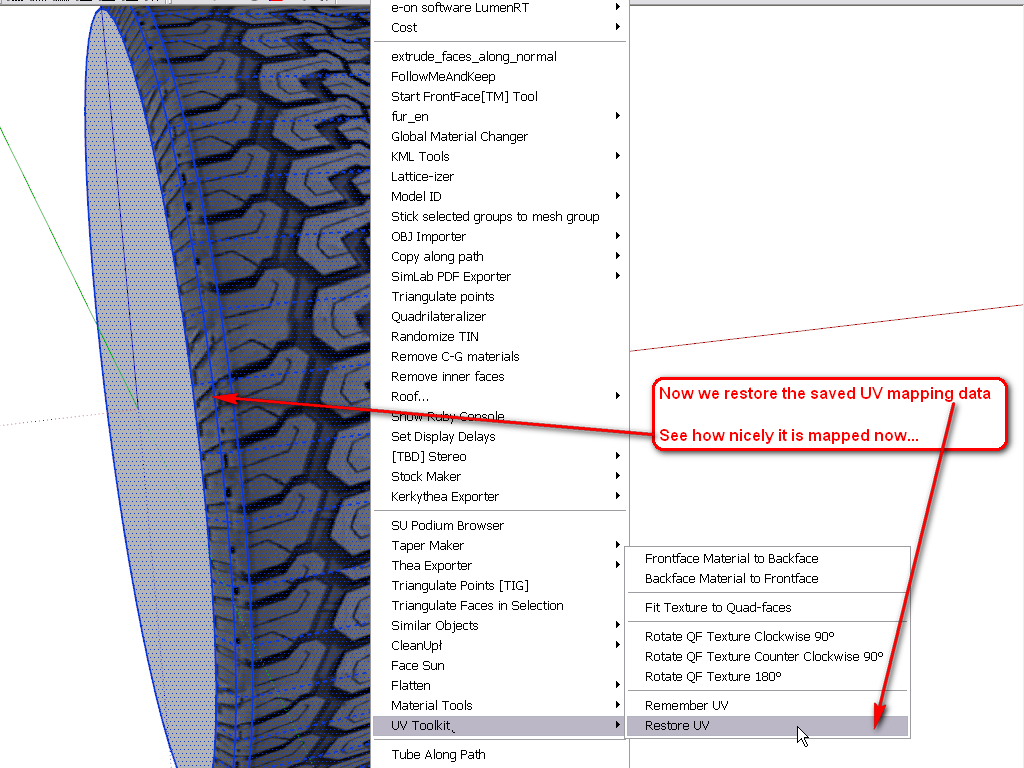
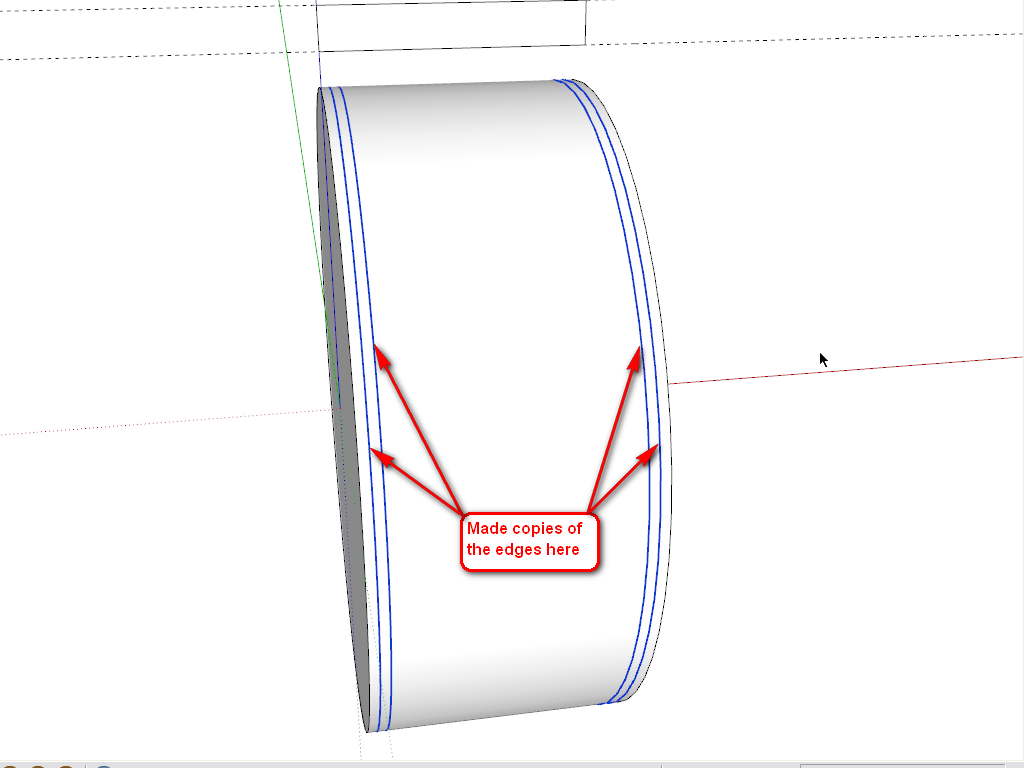
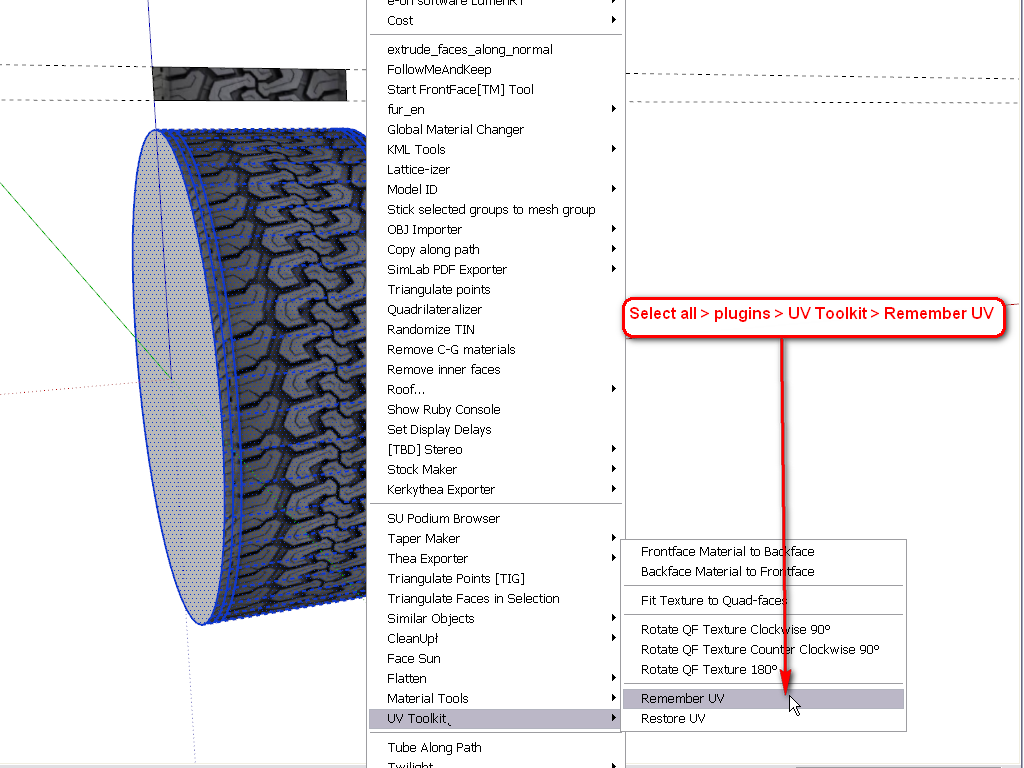
                      Well, here are some steps (it could have been done differently, too - but this was the easiest from an already existing shape you made). The plugin I used can be downloaded here (note that some additional plugin is also needed and read the instructions carefully).

                      This is the weakest part of SketchUp and if you want to nicely position some texture on a more complex, curved shape than a simple cylinder, you really need plugins.
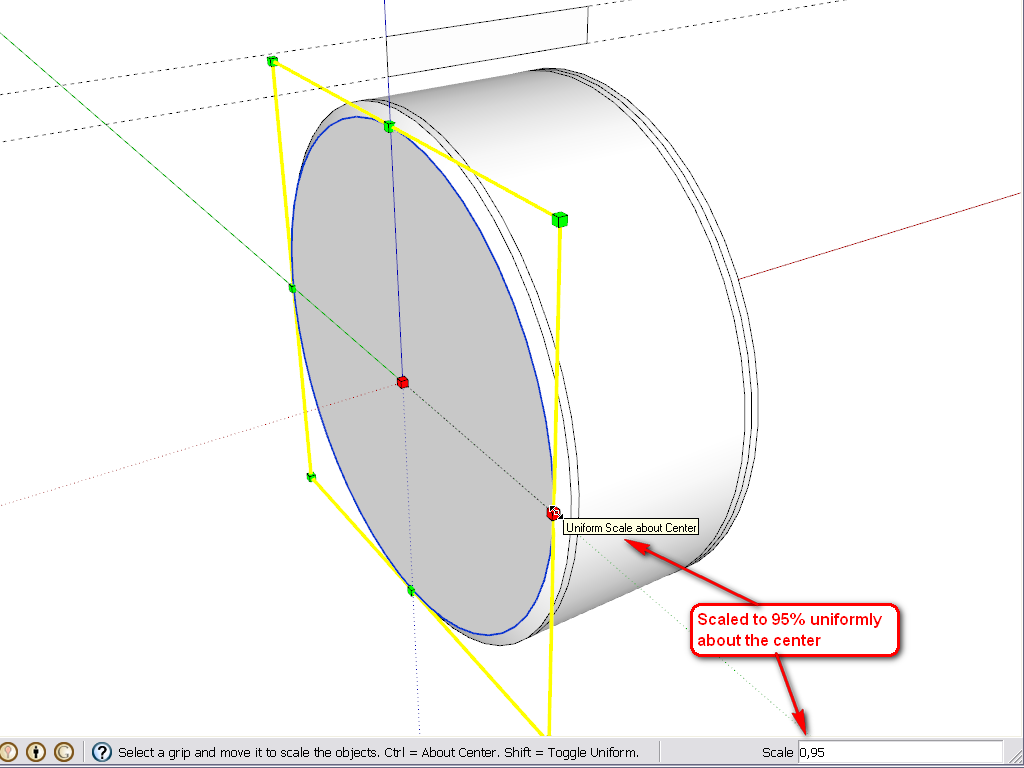
                      1.png


                      2.png


                      3.png


                      4.png


                      5.png


                      6.png

                      Gai...

                      1 條回覆 最後回覆 回覆 引用 0
                      • L 離線
                        lecra
                        最後由 編輯

                        Gaieus,

                        @gaieus said:

                        Well, here are some steps (it could have been done differently, too - but this was the easiest from an already existing shape you made). The plugin I used can be downloaded here (note that some additional plugin is also needed and read the instructions carefully).

                        This is the weakest part of SketchUp and if you want to nicely position some texture on a more complex, curved shape than a simple cylinder, you really need plugins.
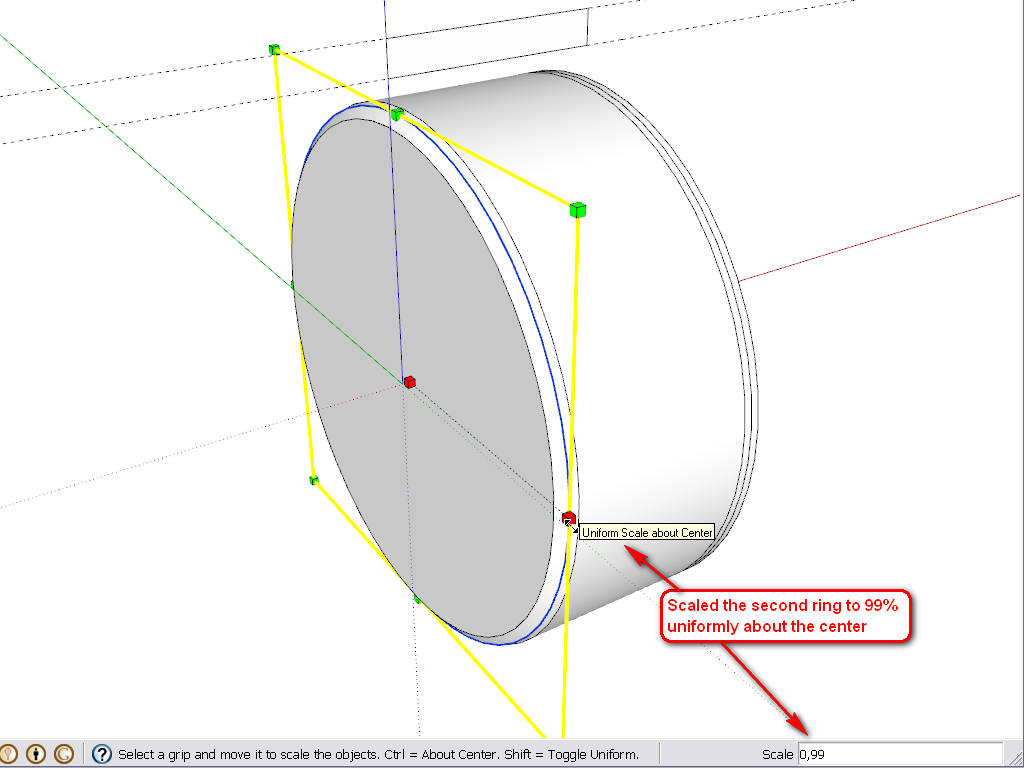
                        Damn! I expected there was a plugin in the game! 😮 But I had to sweat some liter, what?

                        In order to draw the 4 edges you have drawn, do I need another plugin?
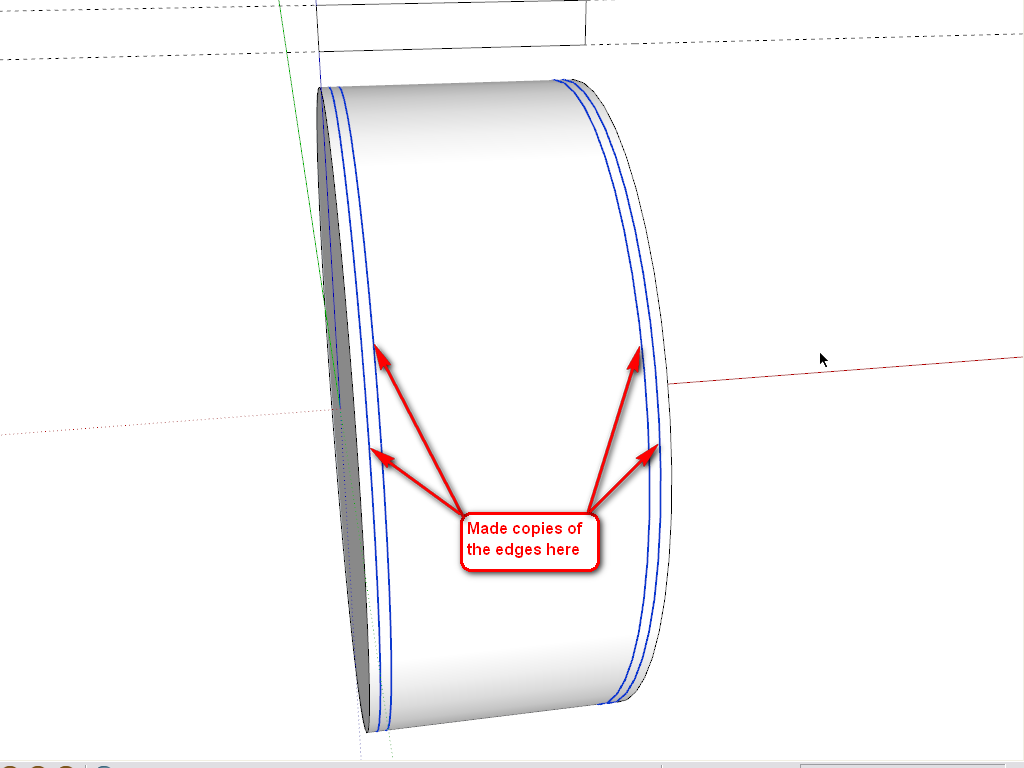
                        1.png

                        Many thanks for the hints until now Gaieus!

                        KR; Lecra

                        I'm new to SU but so thirstily to learn all the stuff. Help me fighting against my thirst

                        1 條回覆 最後回覆 回覆 引用 0
                        • L 離線
                          lecra
                          最後由 編輯

                          Gaieus,

                          @gaieus said:

                          In order to draw the 4 edges you have drawn, do I need another plugin?
                          [attachment=0:1e0zy92x]<!-- ia0 -->1.png<!-- ia0 -->[/attachment:1e0zy92x]

                          Many thanks for the hints until now Gaieus!

                          Ups. I think I got it. Select the edge and choose the move tool, hit ctrl copy and move the edge. Right?

                          KR; Lecra

                          I'm new to SU but so thirstily to learn all the stuff. Help me fighting against my thirst

                          1 條回覆 最後回覆 回覆 引用 0
                          • L 離線
                            lecra
                            最後由 編輯

                            Gilles,

                            @gilles said:

                            Have a look at this if it can help.
                            step by step.

                            Merci beaucoup! It's also a way but I have issue with the other side. The right side is not parallel to the left one. Maybe due to the texture.

                            KR; Lecra

                            I'm new to SU but so thirstily to learn all the stuff. Help me fighting against my thirst

                            1 條回覆 最後回覆 回覆 引用 0
                            • GaieusG 離線
                              Gaieus
                              最後由 編輯

                              @lecra said:

                              Ups. I think I got it. Select the edge and choose the move tool, hit ctrl copy and move the edge. Right?

                              Exactly.

                              @lecra said:

                              Damn! I expected there was a plugin in the game! But I had to sweat some liter, what?

                              Well, one really has to learn the basic tools first. In 90% of the cases, the simplest SU tools are enough - and even faster than tinkering with plugins.

                              You could have started with this plugin (to simply map your tyre cylindrically):
                              http://forums.sketchucation.com/viewtopic.php?t=10404
                              or unwrap and texture nicely with this one:
                              http://forums.sketchucation.com/viewtopic.php?t=39442
                              or here is a very complex one that can do so many other things, too:
                              http://forums.sketchucation.com/viewtopic.php?t=36051
                              (there is a free version...)

                              Gai...

                              1 條回覆 最後回覆 回覆 引用 0
                              • L 離線
                                lecra
                                最後由 編輯

                                @Gaieus,

                                Many thanks for your support and tutorial. It works like a charme....

                                Below you can see the results. I'm no looking for tire treads images for agricultural (farm) vehicles.
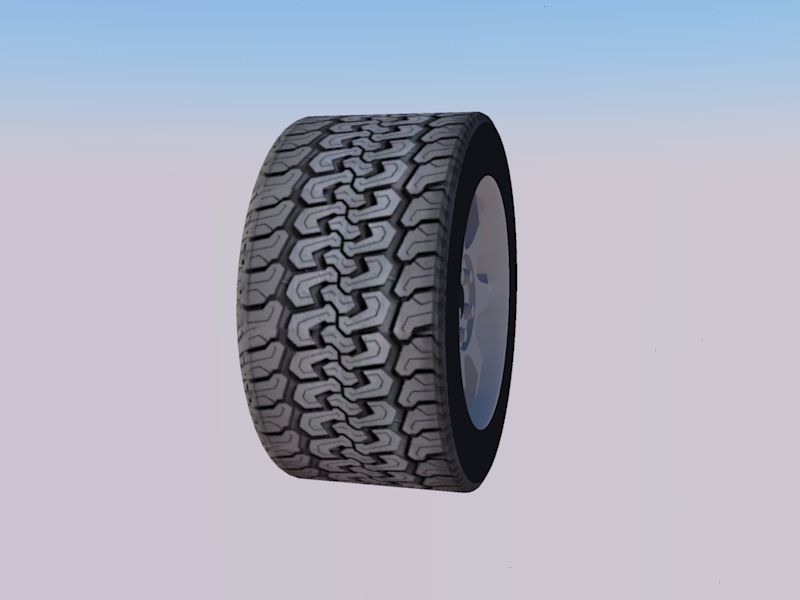
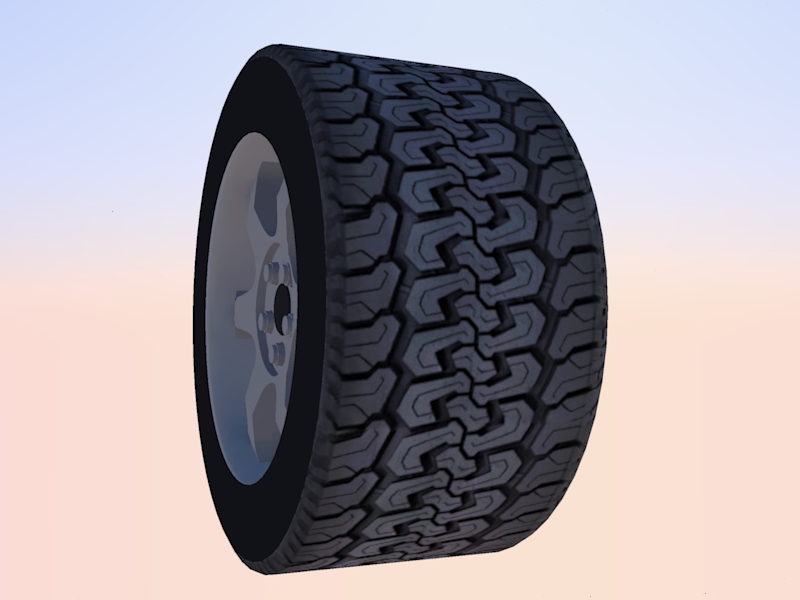
                                LecraTire _1.jpg

                                LecraTire _2.jpg

                                Thanks again. Great help.

                                KR; Lecra

                                I'm new to SU but so thirstily to learn all the stuff. Help me fighting against my thirst

                                1 條回覆 最後回覆 回覆 引用 0
                                • D 離線
                                  driven
                                  最後由 編輯

                                  Looks good, how big/small is your skp now?
                                  john

                                  learn from the mistakes of others, you may not live long enough to make them all yourself...

                                  1 條回覆 最後回覆 回覆 引用 0
                                  • L 離線
                                    lecra
                                    最後由 編輯

                                    Hi driven,

                                    @driven said:

                                    Looks good, how big/small is your skp now?
                                    john

                                    Exactly 504 Kb small/big 😄

                                    KR; Lecra

                                    I'm new to SU but so thirstily to learn all the stuff. Help me fighting against my thirst

                                    1 條回覆 最後回覆 回覆 引用 0
                                    • GaieusG 離線
                                      Gaieus
                                      最後由 編輯

                                      Good. What are you rendering it with? It looks like Kerkythea. IMO a little (bit more enhanced?) bumpiness would add to it. Of course, eventually there needs to be some environment or a render to look good (even for the reflections as there needs to be something reflected of course)

                                      Gai...

                                      1 條回覆 最後回覆 回覆 引用 0
                                      • GaieusG 離線
                                        Gaieus
                                        最後由 編輯

                                        Good. What are you rendering it with? It looks like Kerkythea. IMO a little (bit more enhanced?) bumpiness would add to it. Of course, eventually there needs to be some environment for a render to look good (even for the reflections as there needs to be something reflected...)
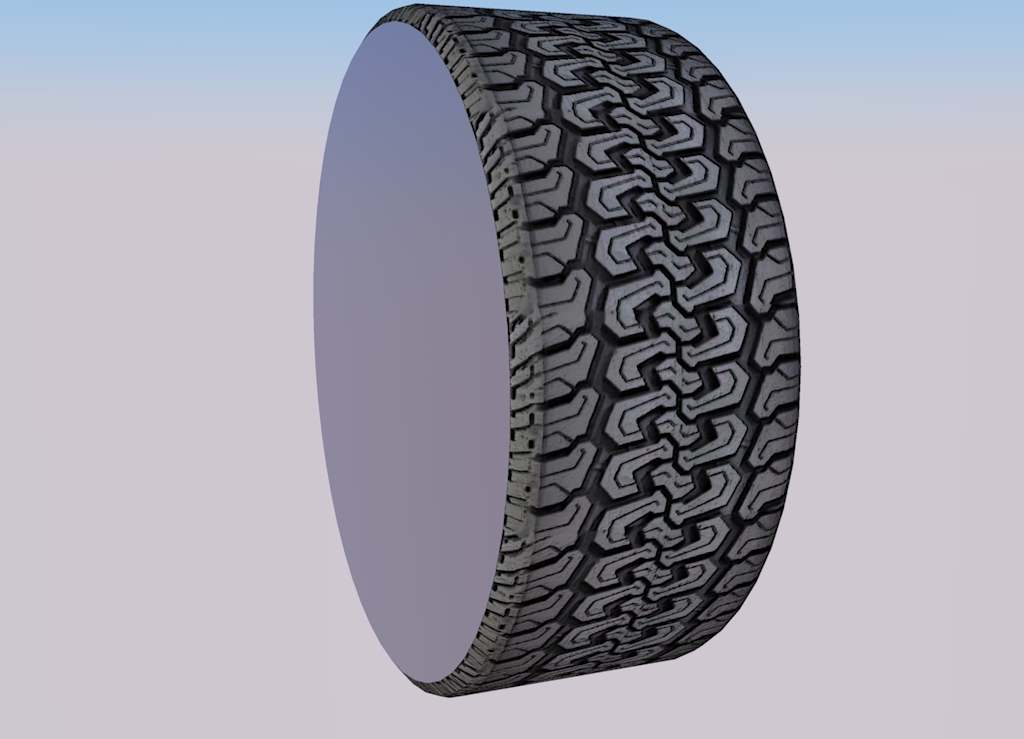

                                        tyre.jpg

                                        Gai...

                                        1 條回覆 最後回覆 回覆 引用 0
                                        • simon le bonS 離線
                                          simon le bon
                                          最後由 編輯

                                          Hi,
                                          Definitely a useful thread with great tips and tricks 👍 😉

                                          @gaieus said:

                                          Good. What are you rendering it with? It looks like Kerkythea. IMO a little (bit more enhanced?) bumpiness would add to it. Of course, eventually there needs to be some environment for a render to look good (even for the reflections as there needs to be something reflected...)

                                          my quote:
                                          This tutorial Making Bump Maps in SKP from CanonFodder000 on Deviant Art

                                          http://fc08.deviantart.net/fs71/f/2010/248/e/9/making_bump_maps_in_skp_by_canonfodder000-d2y3poi.png

                                          simon

                                          1 條回覆 最後回覆 回覆 引用 0
                                          • L 離線
                                            lecra
                                            最後由 編輯

                                            Gaieus,

                                            @gaieus said:

                                            Good. What are you rendering it with? It looks like Kerkythea.

                                            Nope, Twilight. I have to admit, I was just rendering this image with the default settings. I have absolute no experience with rendering. I try to follow your suggestion learning first dominating SU and then to enter in the big world of rendering. I have to admit, that waiting would make me nervous but in my old age I have to be patient as I cannot learn so fast anymore! 🤣

                                            KR; Lecra

                                            I'm new to SU but so thirstily to learn all the stuff. Help me fighting against my thirst

                                            1 條回覆 最後回覆 回覆 引用 0
                                            • 1
                                            • 2
                                            • 3
                                            • 4
                                            • 2 / 4
                                            • 第一個貼文
                                              最後的貼文
                                            Buy SketchPlus
                                            Buy SUbD
                                            Buy WrapR
                                            Buy eBook
                                            Buy Modelur
                                            Buy Vertex Tools
                                            Buy SketchCuisine
                                            Buy FormFonts

                                            Advertisement