Hide dimensions text
-
Good day,
I have been working on graphics for a guidebook and the editor has requested my images without text. Is there any way to 'hide' all the text including the dimension text without the dimension lines and leaders changing?
Thanks
KA
-
You could write some short code [one-liner pasted into the Ruby Console + <enter>] to replace all text using ' ' [space], that way all text in the model [use a copy please!] becomes ' ', you'll keep the leader, but the text is then 'invisible'.
Sketchup.entities.each{|e|e.text=" " if e.class==Sketchup::Text}
to process Text inside nested groups/components try
Sketchup.definitions.each{|d|next if d.image?;d.entities.each{|e|e.text=" " if e.class==Sketchup::Text}}
Unfortunately there's no equivalent code to do the same with a 'dimension'.
If you want to have the dimension line/arrows without any text, then you must edit each one manually in turn ,and replace [paste] the text with ' '...

-
Thanks for the quick response! Unfortunetely my code and ruby console experience falls into a catagory between zero and ziltch.
 However, the images that I am producing aren't that text and dimension extensive and manually editing each one shouldn't be a problem. What is the 'input' that I replace the text with in order to have it 'invisible'?
@keeneanderson said:,and replace [paste] the text with ' '...
' '... = apostrophy, space, apostrophy, period, period, period ?
Cheers
KA
-
If you are just editing the dimension text manually, just use a space. No apostrophes. That would be a catastrophe.

-
That works perfect! Saved me from a catastrophe.
 Thanks again!
 -
If I had put a space alone without the
''you wouldn't have seen it, and if I typed it as'space'you'd have typed it
BTW IF you want to revert to the actual dimension add<>
If you want to add text AND the actual dimension useTEXT <>and the<>part is auto-replaced with the dimension in current units.

-
Simpler yet, just put all your text/dimension objects on a separate Documentation layer. That way you can turn them on or off at will.
-
@jgb said:
Simpler yet, just put all your text/dimension objects on a separate Documentation layer. That way you can turn them on or off at will.
How do you separate the dimension text from the arrows?
-
-
You can't layer a dim's geometry and text separately.
However, layering dims/text IS a very useful tool...
To 'hide' a dim's text, but leave its line/arrows you have to replace the dim's text with a space ' '...
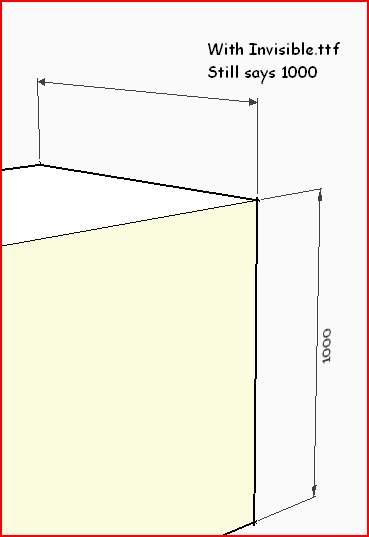
OR make/find/install a custom ttf font where all the characters are 'blank' and then use that font for your [selected] dims [temporarily], so they are not visible [but retain their text, with not further editing needed].
Later on you can swap back to a standard font - say 'Arial' - which makes the dim's text visible again... -
I started to play with this, however limited that is.
One partial solution (sort of!) is to make the text 1 point or .001 in high. That effectively makes the text almost invisible (looks like a small line)
 but, and a big but... the arrowheads also disappear.
-
Get a 'blank ttf' Font... This 'Invisble.ttf' is OK. The 'infinity' symbol is its visible character [tiny dot]...Invisible.zip
-
This would be ideal to hide copyright notices within the model.
See topic.....
-




Hello! It looks like you're interested in this conversation, but you don't have an account yet.
Getting fed up of having to scroll through the same posts each visit? When you register for an account, you'll always come back to exactly where you were before, and choose to be notified of new replies (either via email, or push notification). You'll also be able to save bookmarks and upvote posts to show your appreciation to other community members.
With your input, this post could be even better 💗
Register Login


Advertisement