Not breaking faces & not making faces
-
Recently SU 8 is falling to pieces.
 , M2?
, M2?
Tested 6 & 7 and they are working fine.
Removing all plugins made no difference.First vid 8 on left and 7 on right
not breaking face and clicking on one rectangle highlights otherSecond vid, after making a few rectangles where faces come and go native push pull reveals what?
 to try
 -
not just Lion, same on 10.5.8
I thought something was odd lately.
I tried it with no plugins, same [lack of] result.
john
-
dunno.. i can't get that to happen on my setup (lion with su M2).. everything is working good for me.
not even sure where to begin troubleshooting this?
i guess for starters, i'll post my blank template to see if it's still happening on your computers with my trouble-free template??
-
Thanks for taking a look, fellow Macnuts
same result, click on far rectangle, highlights close one, also doesn't break face
-
Can you open the Ruby Console and enter this command?
Sketchup.break_edges? -
Please ensure that any .rb files in the Tools folder are not duplicated in the Plugins folder.
Remove any from Plugins that are. The Tools ones are installed with Sketchup, some ill-advised 'collections' of scripts misplace old copies of some base-level files in Plugins.The
Sketchup.break_edges?typed into the Ruby Console tells us if your Sketchup is set to auto-break crossing edges - the default istrue.
You can toggle it on/off using
Sketchup.break_edges=true
and
Sketchup.break_edges=falseWhich exact version of v8 are you using v8M2 does [seemingly] fix some issues for Lion users...
-
Thanks thomthom and TIG
Read false, will it stay true now that i changed in console?
Troubling me since i installed 8 M2. -
Try changing it manually and see what it is next time you startup Sketchup...
It just might be fixed !
You might have a script that's resetting it to 'false' at start up.
Although I don't know of one.
If you do a search through the files in Plugins and subfolders for the textSketchup.break_edgesit might reveal a culprit [unless of course it's compiled]...
OR you Sketchup is foobar... -
i did try a restarting SU a couple times after changing and so far so gooooood

-
Hi just got back in and ran the suggestions,
I'm on 10.5.8 and V8 Pro M2
Sketchup.break_edges?with all plugins turned ON returnedfalseSketchup.break_edges?with all .rb plugins turned ON and all .rbs plugins OFF returnedfalseSketchup.break_edges?with ALL plugins turned OFF returnedfalseran
Sketchup.break_edges=truein Ruby Consoleafter restart...
with ALL plugins turned OFF
Sketchup.break_edges?returnstruewith ALL plugins turned ON
Sketchup.break_edges?returnstrueran a few plugins that break or restore edges SU still returns true.
I greped my plugins folder and edges.rb [by TT] uses
break_edge = Sketchup.break_edges? Sketchup.break_edges = falseand then
# Restore the break_edges setting Sketchup.break_edges = break_edge return temp_edges.sizeis that the same as saying
Sketchup.break_edges = true???I was using EdgeTools recently, but didn't notice a change afterwards, it was the OP that made me think about a few oddities, very recently...
Everything seems to be OK, I'll keep an eye out for it failing again.
cheers TIG and Thomas.
-
TT's tool does temporarily reset the edge-splitting to 'false'... BUT it is failsafe-trapped to 'ensure' it's set back as it was when the tool started off [even on a crash]... so it should never mess with your settings...
This is weird ? -
It is possible I had a hang , caused by another operation, the last time I used EdgeTools.
Could that effect the reset?
john
-
It might do...

You [we] need to ask TT... as I can see no reason to reset it at all, because API-made-edges never break whatever the main Sketchup setting ? So changing it back and forth seems to do nothing anyway -
hmm... thought the fail catching should be safe. But I might have to look into this. If TIG is right and the setting only affect the native tools and not Ruby API made edges then is is redundant...
-
cheer TT,
since I did the reset I've had a couple of crashes and it's still returning 'true' at the moment.
so it maybe something else...
john
-
@driven said:
I was using EdgeTools recently, but didn't notice a change afterwards, it was the OP that made me think about a few oddities, very recently...
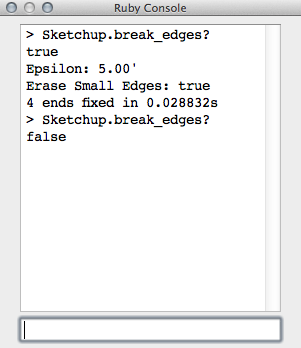
Close Gaps of Edge Tools breaks SU setting on my Mac if tolerance setting doesn't allow ends to meet.
Thanks for the help all, good learning experience now that I know the way out.
-
hi wind-borne,
I was doing something similar then running other scripts that caused hangs... I need try those scripts now... they might work after all
a question, does it stay false after a restart when induced?
john
-
@driven said:
hi wind-borne,
a question, does it stay false after a restart when induced?
john
yes, restarting SU or computer has no effect but =true works like a charm

-
hm... I cannot see why this should be happening at all. But I'm inclined to just remove the break_edges references all together.




Hello! It looks like you're interested in this conversation, but you don't have an account yet.
Getting fed up of having to scroll through the same posts each visit? When you register for an account, you'll always come back to exactly where you were before, and choose to be notified of new replies (either via email, or push notification). You'll also be able to save bookmarks and upvote posts to show your appreciation to other community members.
With your input, this post could be even better 💗
Register Login


Advertisement