sketchucation logo sketchucation
    • 登入
    Oops, your profile's looking a bit empty! To help us tailor your experience, please fill in key details like your SketchUp version, skill level, operating system, and more. Update and save your info on your profile page today!
    🔌 Smart Spline | Fluid way to handle splines for furniture design and complex structures. Download

    [Plugin] FredoTools - v4.5c - 24 Jun 24


    已排程 已置頂 已鎖定 已移動 Plugins
    463 貼文 123 Posters 710.4k 瀏覽 121 Watching
    正在載入更多貼文
    • 從舊到新
    • 從新到舊
    • 最多點贊
    回覆
    • 在新貼文中回覆
    登入後回覆
    此主題已被刪除。只有擁有主題管理權限的使用者可以查看。
    • TIGT 離線
      TIG Moderator
      最後由 編輯

      Have you restarted SketchUp following the installations ?
      That will ensure everything gets properly synced...
      Also, are you looking in the right places ?
      Many of Fredo's tools have their own Toolbar.
      And most of them also appear under SketchUp's "Tools" menu - in large submenus - "Fredo Tools" and "Fredo6 Collection"...

      TIG

      1 條回覆 最後回覆 回覆 引用 0
      • A 離線
        ardesigninterior
        最後由 編輯

        Thanks for the Plugin by Fredo6. it is awesome to help my works.

        1 條回覆 最後回覆 回覆 引用 0
        • designerbursaD 離線
          designerbursa
          最後由 編輯

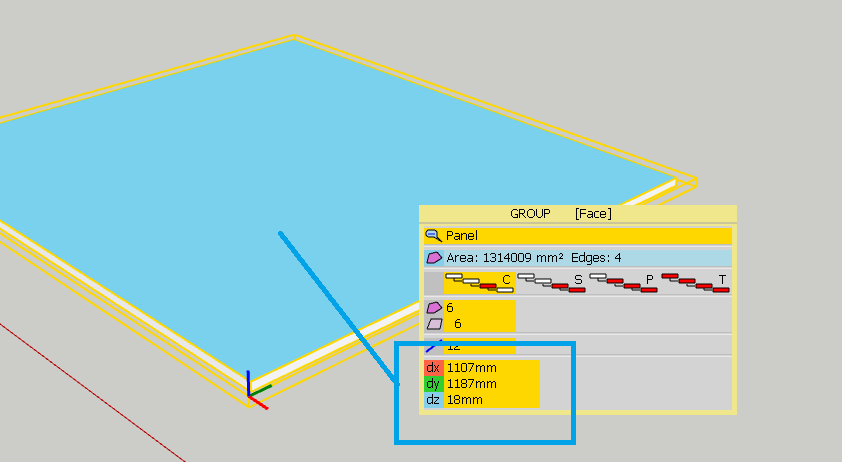
          Can you add a command that shows the external dimensions of the solid part?

          1 條回覆 最後回覆 回覆 引用 0
          • designerbursaD 離線
            designerbursa
            最後由 編輯

            solid volume command. It would be nice to have a report window that shows the dimensions of the part I selected on the screen.

            1 條回覆 最後回覆 回覆 引用 0
            • fredo6F 離線
              fredo6
              最後由 編輯

              @designerbursa said:

              solid volume command. It would be nice to have a report window that shows the dimensions of the part I selected on the screen.

              I think it should be a different plugin, because the request does apply to objects which are non-solid.

              By the way, there may exist already some plugins giving the dimension of the bounding box, which I assume is what you want.

              Fredo

              PS: indeed, there is no problem to adding this feature to Solid Volume, but that would be restrictive.

              1 條回覆 最後回覆 回覆 引用 0
              • designerbursaD 離線
                designerbursa
                最後由 編輯

                @fredo6 said:

                @designerbursa said:

                solid volume command. It would be nice to have a report window that shows the dimensions of the part I selected on the screen.

                I think it should be a different plugin, because the request does apply to objects which are non-solid.

                By the way, there may exist already some plugins giving the dimension of the bounding box, which I assume is what you want.

                Fredo

                PS: indeed, there is no problem to adding this feature to Solid Volume, but that would be restrictive.

                This is exactly what I'm looking for "element stat" 😄
                Sorry, now I noticed.
                Thanks FREDO! ..

                1 條回覆 最後回覆 回覆 引用 0
                • designerbursaD 離線
                  designerbursa
                  最後由 編輯

                  @fredo6 said:

                  @designerbursa said:

                  solid volume command. It would be nice to have a report window that shows the dimensions of the part I selected on the screen.

                  I think it should be a different plugin, because the request does apply to objects which are non-solid.

                  By the way, there may exist already some plugins giving the dimension of the bounding box, which I assume is what you want.

                  Fredo

                  PS: indeed, there is no problem to adding this feature to Solid Volume, but that would be restrictive.

                  This is exactly what I'm looking for "ElementStats" 😄
                  Sorry, now I noticed.
                  Thanks FREDO! ..

                  Ekran Görüntüsü (1).png

                  1 條回覆 最後回覆 回覆 引用 0
                  • L 離線
                    Loiseau
                    最後由 編輯

                    Hi,
                    Am intéres to have the extention "VisuHole" from Fredo6. You thing is possible ❓

                    1 條回覆 最後回覆 回覆 引用 0
                    • TIGT 離線
                      TIG Moderator
                      最後由 編輯

                      @loiseau said:

                      Hi,
                      Am intéres to have the extention "VisuHole" from Fredo6. You thing is possible ❓
                      You need to download the appropriate RBZ files for that extension by Fredo, and his support Lib, from the SketchUcation PluginStore.
                      https://sketchucation.com/pluginstore?pln=VisuHole
                      https://sketchucation.com/pluginstore?pln=LibFredo6
                      Then install the two RBZ files - using the SketchUp Extension Manager > Install [red] button...
                      Then restart SketchUp to sync everything.
                      Then use the tool as explained in the usage notes...


                      Vous devez télécharger les fichiers RBZ appropriés pour cette extension de Fredo, et son support Lib, à partir du SketchUcation PluginStore.
                      https://sketchucation.com/pluginstore?pln=VisuHole
                      https://sketchucation.com/pluginstore?pln=LibFredo6
                      Installez ensuite les deux fichiers RBZ - à l'aide du bouton SketchUp Extension Manager> Installer [rouge] ...
                      Ensuite, redémarrez SketchUp pour tout synchroniser.
                      Ensuite, utilisez l'outil comme expliqué dans les notes d'utilisation ...

                      TIG

                      1 條回覆 最後回覆 回覆 引用 0
                      • fredo6F 離線
                        fredo6
                        最後由 編輯

                        NEW RELEASE: FredoTools v3.5a - 12 Sep 19

                        Requirement: LibFredo6 v9.1b or above

                        FredoTools 3.5a introduces the ColorBySlope tool, which create a color mapping for a terrain mesh based on the slope of its faces.


                        See FredoTools plugin home page for Download.

                        See also main post of this thread for User Discussion.

                        Fredo

                        1 條回覆 最後回覆 回覆 引用 0
                        • OxerO 離線
                          Oxer
                          最後由 編輯

                          New Spanish Language file (added Color by Slope).

                          FredoTools_ES.zip

                          "The result is the end what is important is the process" by Oxer
                          http://www.oxervision.blogspot.com/

                          1 條回覆 最後回覆 回覆 引用 0
                          • fredo6F 離線
                            fredo6
                            最後由 編輯

                            @oxer said:

                            New Spanish Language file (added Color by Slope).

                            Thank you. it will go into the next release soon (along with a new tool).

                            Fredo

                            1 條回覆 最後回覆 回覆 引用 0
                            • D 離線
                              dedmin
                              最後由 編輯

                              Original post here - https://sketchucation.com/forums/viewtopic.php?f=80&t=71619

                              1 條回覆 最後回覆 回覆 引用 0
                              • fredo6F 離線
                                fredo6
                                最後由 編輯

                                NEW RELEASE: FredoTools v3.6a - 16 Oct 19

                                Requirement: LibFredo6 v9.2a or above

                                FredoTools 3.6a is a major release which introduces:

                                • ColorByAltitude tool, which create a color mapping for a terrain mesh based on the altitude of its faces.
                                • ColorPaint tool, which is a configurable Color Selector.
                                • A new view 'Outliner' in ReportLabelArea tool, with a hierarchical, expandable tree of groups and components with their individual areas.

                                See FredoTools plugin home page for Download.

                                See also main post of this thread for User Discussion.

                                Fredo

                                1 條回覆 最後回覆 回覆 引用 0
                                • V 離線
                                  volker72
                                  最後由 編輯

                                  Hi,
                                  i have a question for you.
                                  I calculate thermal bridges (building physics). I place the edges on different layers (edges = thermal bridges).
                                  A report that outputs the length of the edges according to layers, like the ReportLabelArea does with areas, would be great.
                                  Is this easy to do?
                                  I could imagine that other users could also use this ReportLabelLenght.
                                  You are doing a great job, thank you very much and many greetings
                                  Volker

                                  1 條回覆 最後回覆 回覆 引用 0
                                  • fredo6F 離線
                                    fredo6
                                    最後由 編輯

                                    NEW RELEASE: FredoTools v3.7a - 02 Nov 19

                                    Requirement: LibFredo6 v9.3a or above

                                    FredoTools 3.6a is a major release which introduces evolutions in:

                                    • ColorByAltitude, cosmetic adjustments and bug fixing.
                                    • ColorPaint, support of transparency and edition of colors.
                                    • ReportLabelArea, interactive flow and other cosmetic adjustments

                                    See FredoTools plugin home page for Download.

                                    See also main post of this thread for User Discussion.

                                    Fredo

                                    1 條回覆 最後回覆 回覆 引用 0
                                    • fredo6F 離線
                                      fredo6
                                      最後由 編輯

                                      NEW RELEASE: FredoTools v3.8a - 18 Nov 19

                                      Requirement: LibFredo6 v9.4a or above

                                      FredoTools 3.8a is a major release which introduces:

                                      • ColorFlatMode
                                      • bug fixing and various cosmetic adjustments

                                      See FredoTools plugin home page for Download.

                                      See also main post of this thread for User Discussion.

                                      Fredo

                                      1 條回覆 最後回覆 回覆 引用 0
                                      • P 離線
                                        pbs1962
                                        最後由 編輯

                                        Looking for help with curvishear..
                                        Just started working with this awesome plugin, but I must be doing something wrong.
                                        When I run this to build a ramp (two concentric semicircles) the model appears correct but it remains flat...I've tried various views, changing the height in case it was a scale problem...but no luck...I can post a video of my steps if that helps.
                                        Does anyone have a fix or suggestions for where to get more info?
                                        Thanks

                                        1 條回覆 最後回覆 回覆 引用 0
                                        • Dave RD 離線
                                          Dave R
                                          最後由 編輯

                                          How about posting your SKP file with the ramp ready to run Curvishear?

                                          Etaoin Shrdlu

                                          %

                                          (THERE'S NO PLACE LIKE)

                                          G28 X0.0 Y0.0 Z0.0

                                          M30

                                          %

                                          1 條回覆 最後回覆 回覆 引用 0
                                          • P 離線
                                            pbs1962
                                            最後由 編輯

                                            @pbs1962 said:

                                            Looking for help with curvishear..
                                            Just started working with this awesome plugin, but I must be doing something wrong.
                                            When I run this to build a ramp (two concentric semicircles) the model appears correct but it remains flat...I've tried various views, changing the height in case it was a scale problem...but no luck...I can post a video of my steps if that helps.
                                            Does anyone have a fix or suggestions for where to get more info?
                                            Thanks

                                            Here's the skp file.
                                            Thanks


                                            ramp.skp

                                            1 條回覆 最後回覆 回覆 引用 0
                                            • 1
                                            • 2
                                            • 20
                                            • 21
                                            • 22
                                            • 23
                                            • 24
                                            • 22 / 24
                                            • 第一個貼文
                                              最後的貼文
                                            Buy SketchPlus
                                            Buy SUbD
                                            Buy WrapR
                                            Buy eBook
                                            Buy Modelur
                                            Buy Vertex Tools
                                            Buy SketchCuisine
                                            Buy FormFonts

                                            Advertisement