sketchucation logo sketchucation
    • Login
    Oops, your profile's looking a bit empty! To help us tailor your experience, please fill in key details like your SketchUp version, skill level, operating system, and more. Update and save your info on your profile page today!
    ⚠️ Update | Sketchucation Tools 5.0.8 released with licensing improvements and bugfixes Download

    [Plugin] QuadFaceTools

    Scheduled Pinned Locked Moved Plugins
    680 Posts 116 Posters 745.0k Views 116 Watching
    Loading More Posts
    • Oldest to Newest
    • Newest to Oldest
    • Most Votes
    Reply
    • Reply as topic
    Log in to reply
    This topic has been deleted. Only users with topic management privileges can see it.
    • thomthomT
      thomthom
      last edited by

      Hmm.... I cannot reproduce on this one either. Can you do a video capture to show your steps?

      Thomas Thomassen — SketchUp Monkey & Coding addict
      List of my plugins and link to the CookieWare fund

      1 Reply Last reply
      Reply Quote 0
      • K
        kaas
        last edited by

        @thomthom said:

        Hmm.... I cannot reproduce on this one either. Can you do a video capture to show your steps?

        Here you go - shocking isn't it? I'm thinking I'm wasting your time. There must be something wrong at my end. Although it is strange; only TTlib2, QFT, Selection toys installed (all fresh from SketchUcation tools & TTlib2 from Extension warehouse). SU-pro 16.1.1449 64 bit.

        Edit + pic: it also crashes after adding a few loops and at some point it doesn't detect the loop anymore (blue line) and...ooops
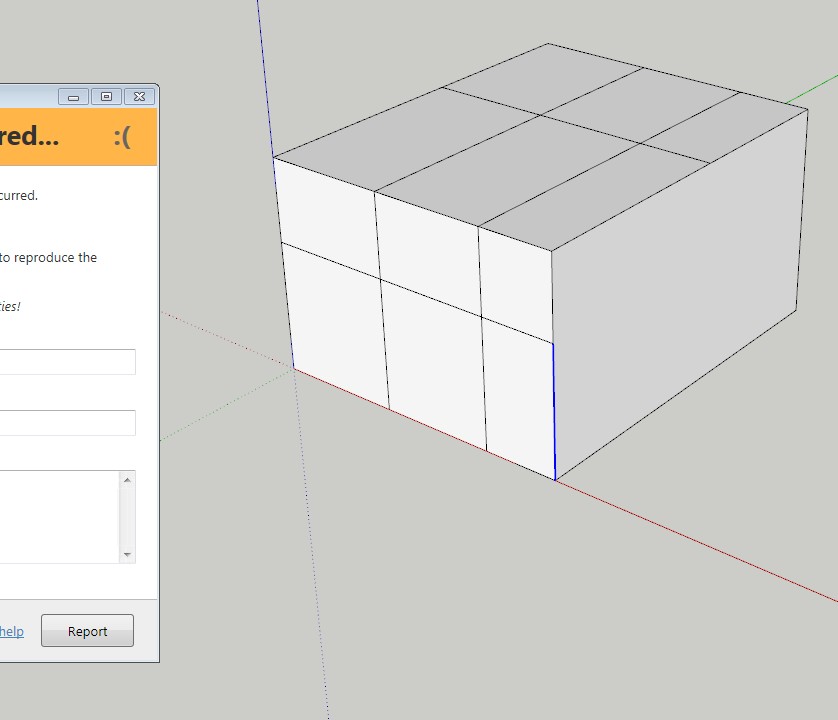

        qft_oops.avi


        qft_oops2.jpg

        1 Reply Last reply
        Reply Quote 0
        • thomthomT
          thomthom
          last edited by

          Hmm... have you submitted the reports? Did you include your name/email other info?

          Also, what version of Internet Explorer do you have installed? The error reporting dialog looks odd.

          Thomas Thomassen — SketchUp Monkey & Coding addict
          List of my plugins and link to the CookieWare fund

          1 Reply Last reply
          Reply Quote 0
          • K
            kaas
            last edited by

            @thomthom said:

            Hmm... have you submitted the reports? Did you include your name/email other info?

            Also, what version of Internet Explorer do you have installed? The error reporting dialog looks odd.

            I have submitted only a very few (user name Max). Sometimes it caused an oops-loop and I didn't report those either.

            I'm running win7 x64 on my desktop with IE11.0.9600.18449

            1 Reply Last reply
            Reply Quote 0
            • thomthomT
              thomthom
              last edited by

              I see the issue now. It's when you offset only one edge.
              https://bitbucket.org/thomthom/quadface-tools/issues/103/offsetloop-errors-when-selecting-only-one

              I also noticed another issue, if you pick an edge at the end of your selection the offset is missing an edge.
              https://bitbucket.org/thomthom/quadface-tools/issues/104/offsetloop-missing-edges

              Thomas Thomassen — SketchUp Monkey & Coding addict
              List of my plugins and link to the CookieWare fund

              1 Reply Last reply
              Reply Quote 0
              • K
                kaas
                last edited by

                @thomthom said:

                I see the issue now. It's when you offset only one edge.
                .. I also noticed another issue, if you pick an edge at the end of your selection the offset is missing an edge...

                Both true. Glad you could reproduce the issue. I'm a bit confused nobody has noticed this before. The offset tool itself could be quite useful.

                1 Reply Last reply
                Reply Quote 0
                • thomthomT
                  thomthom
                  last edited by

                  As it is now, consider the OffsetTool an alpha-version. I would not have exposed it yet had it not been for being persistently nagged to do so. 😉

                  Thomas Thomassen — SketchUp Monkey & Coding addict
                  List of my plugins and link to the CookieWare fund

                  1 Reply Last reply
                  Reply Quote 0
                  • HornOxxH
                    HornOxx
                    last edited by

                    Hi All
                    I just nee a little help how to install the current QuadFace tools correctly, to get
                    access to this cool live mesh analysis feature.

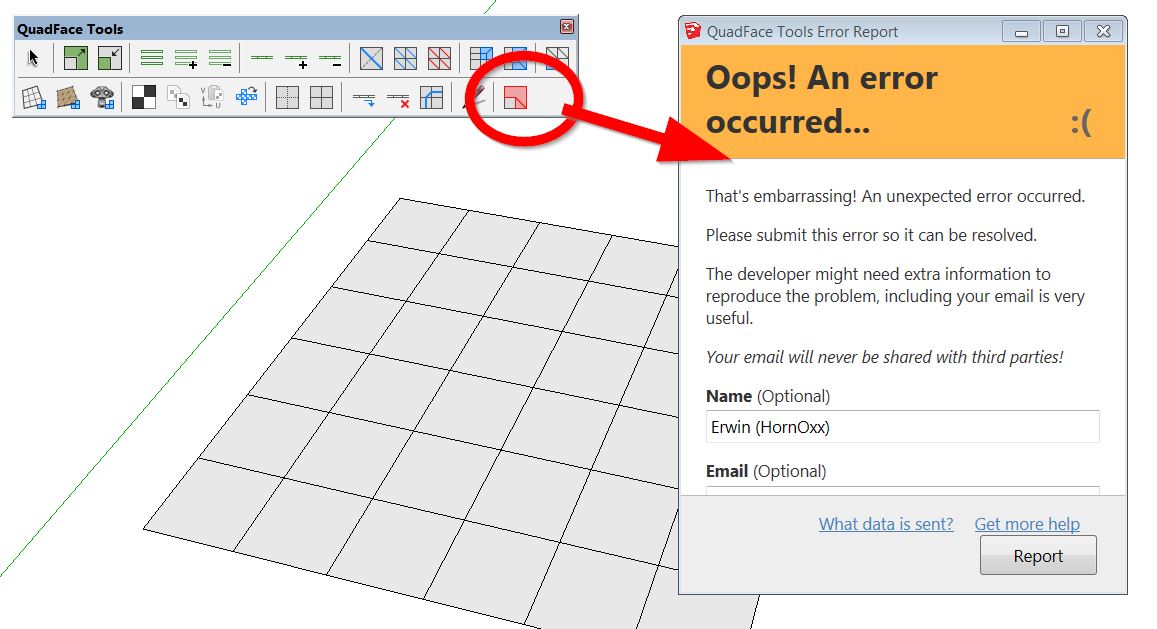
                    I always get the error message (shown below) when I activate live mesh analysis.
                    I also installed the current tt Lib².
                    I´m trying to run Quadface tools within my SU 2015 Make which is my prefered Quad-version
                    with tools like SubD, Vertex tools etc...

                    I appreciate any help - Thanks


                    quadface-bug.jpg

                    never trust a skinny cook

                    1 Reply Last reply
                    Reply Quote 0
                    • thomthomT
                      thomthom
                      last edited by

                      @hornoxx said:

                      I´m trying to run Quadface tools within my SU 2015 Make which is my prefered Quad-version
                      with tools like SubD, Vertex tools etc...

                      Ah, sorry - bad user feedback on my end. The error is due to the functionality being SU2016+ only.

                      Thomas Thomassen — SketchUp Monkey & Coding addict
                      List of my plugins and link to the CookieWare fund

                      1 Reply Last reply
                      Reply Quote 0
                      • O
                        optimaforever
                        last edited by

                        Hello Thomas,

                        Perhaps has it been asked before, but is there a way to tweak the bydefault colors for the analysis tool? Not that I don't understand your wise choice of colors, but I'd prefer more contrasted colors like white-red...
                        And I agree, it's a pity one can't replace a default sketchUp view mode (like monochrome or x-ray that I don't use often) with this analyse view mode, to keep the textures/UVW mapping.

                        Otherwise, good job! 👍

                        1 Reply Last reply
                        Reply Quote 0
                        • thomthomT
                          thomthom
                          last edited by

                          No color options as of yet. But it's something I wanted to add. The current version was a quick and dirty tool - turns out to be more useful than expected.

                          Thomas Thomassen — SketchUp Monkey & Coding addict
                          List of my plugins and link to the CookieWare fund

                          1 Reply Last reply
                          Reply Quote 0
                          • eneroth3E
                            eneroth3
                            last edited by

                            I've just discovered the UV Mapping Tool in this plugin and it's so incredible useful. Not finding it earlier is definitely a Doh Moment for me. I'm a quad fan now! 😛

                            My website: http://julia-christina-eneroth.se/

                            1 Reply Last reply
                            Reply Quote 0
                            • thomthomT
                              thomthom
                              last edited by

                              @eneroth3 said:

                              I'm a quad fan now! 😛

                              whohoo! 😄

                              Thomas Thomassen — SketchUp Monkey & Coding addict
                              List of my plugins and link to the CookieWare fund

                              1 Reply Last reply
                              Reply Quote 0
                              • C
                                cmoreink
                                last edited by

                                How do you import an .obj file?
                                It crashes every time I try ---> file, import, select .obj file "oops, an error occurred 😞" a message displays (box) askes me if I want to send a report.
                                The tool bar displays ok
                                Any idea why?

                                my portfolio

                                1 Reply Last reply
                                Reply Quote 0
                                • jo-keJ
                                  jo-ke
                                  last edited by

                                  I would like to use this plugin to texture a curtain.

                                  Link Preview Image
                                  3D Warehouse

                                  3D Warehouse is a website of searchable, pre-made 3D models that works seamlessly with SketchUp.

                                  favicon

                                  (3dwarehouse.sketchup.com)

                                  I tried to convert the mesh but it doesn't work.

                                  What did I wrong?

                                  same with that one:

                                  Link Preview Image
                                  3D Warehouse

                                  3D Warehouse is a website of searchable, pre-made 3D models that works seamlessly with SketchUp.

                                  favicon

                                  (3dwarehouse.sketchup.com)

                                  http://www.zz7.de

                                  1 Reply Last reply
                                  Reply Quote 0
                                  • jo-keJ
                                    jo-ke
                                    last edited by

                                    I really don't know how to convert the mesh, to let the texturing tool work.

                                    anybody has got an idea?

                                    http://www.zz7.de

                                    1 Reply Last reply
                                    Reply Quote 0
                                    • A
                                      alamin
                                      last edited by

                                      any pdf manual?

                                      1 Reply Last reply
                                      Reply Quote 0
                                      • BoxB
                                        Box
                                        last edited by

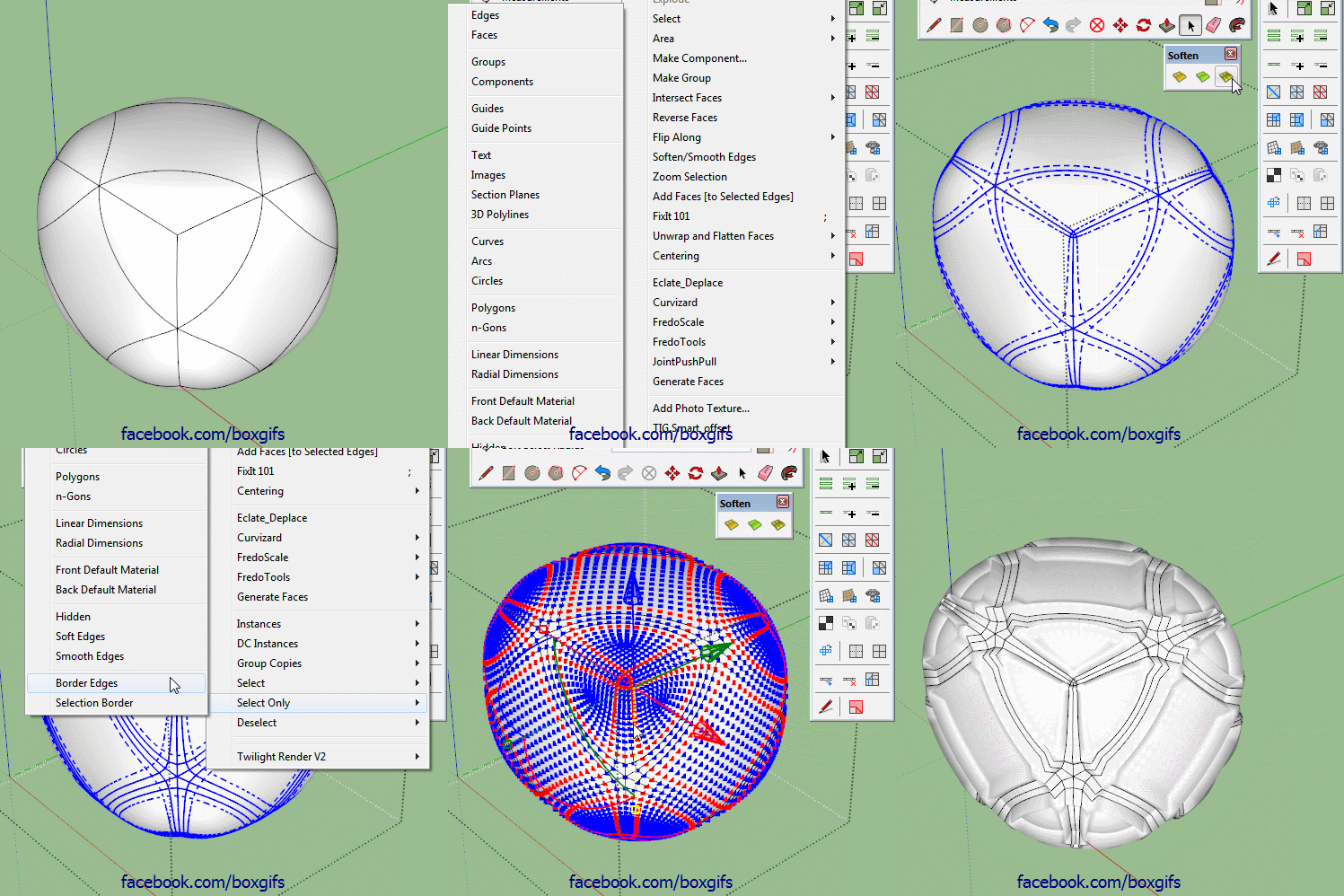
                                        Thomthom, any chance of adding a selection option where you can step the ring/loop selected?
                                        So, instead of adding or subtracting, each click moves the selection one loop over and deselects the one you are on.

                                        Edit: I'll just add this gif to help explain what I mean,I have a workaround but it would be helpful to have.

                                        Step Select.gif

                                        1 Reply Last reply
                                        Reply Quote 0
                                        • pilouP
                                          pilou
                                          last edited by

                                          No French UI version ❓

                                          Frenchy Pilou
                                          Is beautiful that please without concept!
                                          My Little site :)

                                          1 Reply Last reply
                                          Reply Quote 0
                                          • thomthomT
                                            thomthom
                                            last edited by

                                            @cmoreink said:

                                            How do you import an .obj file?
                                            It crashes every time I try ---> file, import, select .obj file "oops, an error occurred 😞" a message displays (box) askes me if I want to send a report.
                                            The tool bar displays ok
                                            Any idea why?

                                            Can you share this obj file please? (You can PM me if you don't want to share the file publicly)

                                            Thomas Thomassen — SketchUp Monkey & Coding addict
                                            List of my plugins and link to the CookieWare fund

                                            1 Reply Last reply
                                            Reply Quote 0

                                            Hello! It looks like you're interested in this conversation, but you don't have an account yet.

                                            Getting fed up of having to scroll through the same posts each visit? When you register for an account, you'll always come back to exactly where you were before, and choose to be notified of new replies (either via email, or push notification). You'll also be able to save bookmarks and upvote posts to show your appreciation to other community members.

                                            With your input, this post could be even better 💗

                                            Register Login
                                            • 1
                                            • 2
                                            • 5
                                            • 6
                                            • 7
                                            • 8
                                            • 9
                                            • 33
                                            • 34
                                            • 7 / 34
                                            • First post
                                              Last post
                                            Buy SketchPlus
                                            Buy SUbD
                                            Buy WrapR
                                            Buy eBook
                                            Buy Modelur
                                            Buy Vertex Tools
                                            Buy SketchCuisine
                                            Buy FormFonts

                                            Advertisement