sketchucation logo sketchucation
    • 登入
    Oops, your profile's looking a bit empty! To help us tailor your experience, please fill in key details like your SketchUp version, skill level, operating system, and more. Update and save your info on your profile page today!
    🔌 Smart Spline | Fluid way to handle splines for furniture design and complex structures. Download

    [Plugin] View Parts (1.2) — Sept 13 2011

    已排程 已置頂 已鎖定 已移動 Plugins
    35 貼文 24 Posters 39.7k 瀏覽 24 Watching
    正在載入更多貼文
    • 從舊到新
    • 從新到舊
    • 最多點贊
    回覆
    • 在新貼文中回覆
    登入後回覆
    此主題已被刪除。只有擁有主題管理權限的使用者可以查看。
    • B 離線
      Ben Ritter
      最後由 編輯

      Thank you.

      1 條回覆 最後回覆 回覆 引用 0
      • Bob JamesB 離線
        Bob James
        最後由 編輯

        Thank you

        i7-4930K 3.4Ghz, 2x GTX780 6GB, 32GB DDR3-1600 ECC, OCZ Vertex 4 500GB, WD Black 3TB, 32TB NAS, 4x 27" Monitors, SpaceMouse Pro, X-keys XK-60

        1 條回覆 最後回覆 回覆 引用 0
        • W 離線
          wyatt
          最後由 編輯

          This is great. Thank you!

          1 條回覆 最後回覆 回覆 引用 0
          • spenceS 離線
            spence
            最後由 編輯

            Oh this is fabulous, thanks Chris.

            Spence

            1 條回覆 最後回覆 回覆 引用 0
            • Jean-FrancoJ 離線
              Jean-Franco
              最後由 編輯

              Very useful, thank you !

              Jean-Franco

              1 條回覆 最後回覆 回覆 引用 0
              • S 離線
                studeag
                最後由 編輯

                Extremely usefull,

                Thank you!

                1 條回覆 最後回覆 回覆 引用 0
                • TIGT 線上
                  TIG Moderator
                  最後由 編輯

                  This is a very good idea. 😄

                  I have a few points...

                  Please remember to parenthesize you arguments, for future Ruby compatibility - e.g. it's best like
                  model.pages.add("Initial State")
                  and NOT
                  model.pages.add "Initial State"
                  I know the API is full of 'wrong' examples and they do work... BUT with changes to the way Ruby works across versions, then if they aren't inside () you will get issues...

                  You should protect you code inside a module - someone else might have also defined hideAll too in their 'unwrapped' code... which might mess up you [or them] !
                  So let's call it
                  ` module CMD

                  ALL code goes here

                  endThen recast your three methods with a leading self.like this def **self.**hideAll()
                  ...etc, Also ensure that any calls of those methods then appear as **self.**hideAll()etc The menu section also needs to use ...{**self.**viewParts()}if it's within the module, but if it's outside of the module then it becomes ...{**CMD.**viewParts()}`

                  Also you could replace the
                  if file_loaded?("viewparts.rb")
                  etc with
                  if file_loaded?(File.basename(__FILE__))
                  as __FILE__ returns the path to the script itself and doesn't rely on the file keeping a certain name.

                  Personally I'd also put this Tool under the 'View' menu rather than in 'Plugins'... but that's me...

                  Please don't take my comments as criticisms of a great idea, that's well executed - it's just that these minor tweaks would make it more 'robust'... 🤓

                  TIG

                  1 條回覆 最後回覆 回覆 引用 0
                  • MALAISEM 離線
                    MALAISE
                    最後由 編輯

                    Great tool for complex mechanisms

                    Thanks a lot

                    La Connaissance n'a de valeur que partagée

                    1 條回覆 最後回覆 回覆 引用 0
                    • fastech370F 離線
                      fastech370
                      最後由 編輯

                      Awesome Plugin. This saves a lot of time!!!!!

                      1 條回覆 最後回覆 回覆 引用 0
                      • D 離線
                        driven
                        最後由 編輯

                        hi,

                        does anyone have this working on a mac... [EDIT-the examples on a mac!!!]

                        I tried both standard and a version using TIG's mods, and although both create scenes, everything is hidden.

                        the only way to see any content is to use 'edit>>unhide>>all' but then 'ALL' are unhidden in 'ALL' scenes.

                        I tried using the hide 'other' feature to see the individual elements, but this gets zeroed when I switch pages[scenes].

                        does the model need to have separate layers for each group/component?

                        any ideas?
                        john
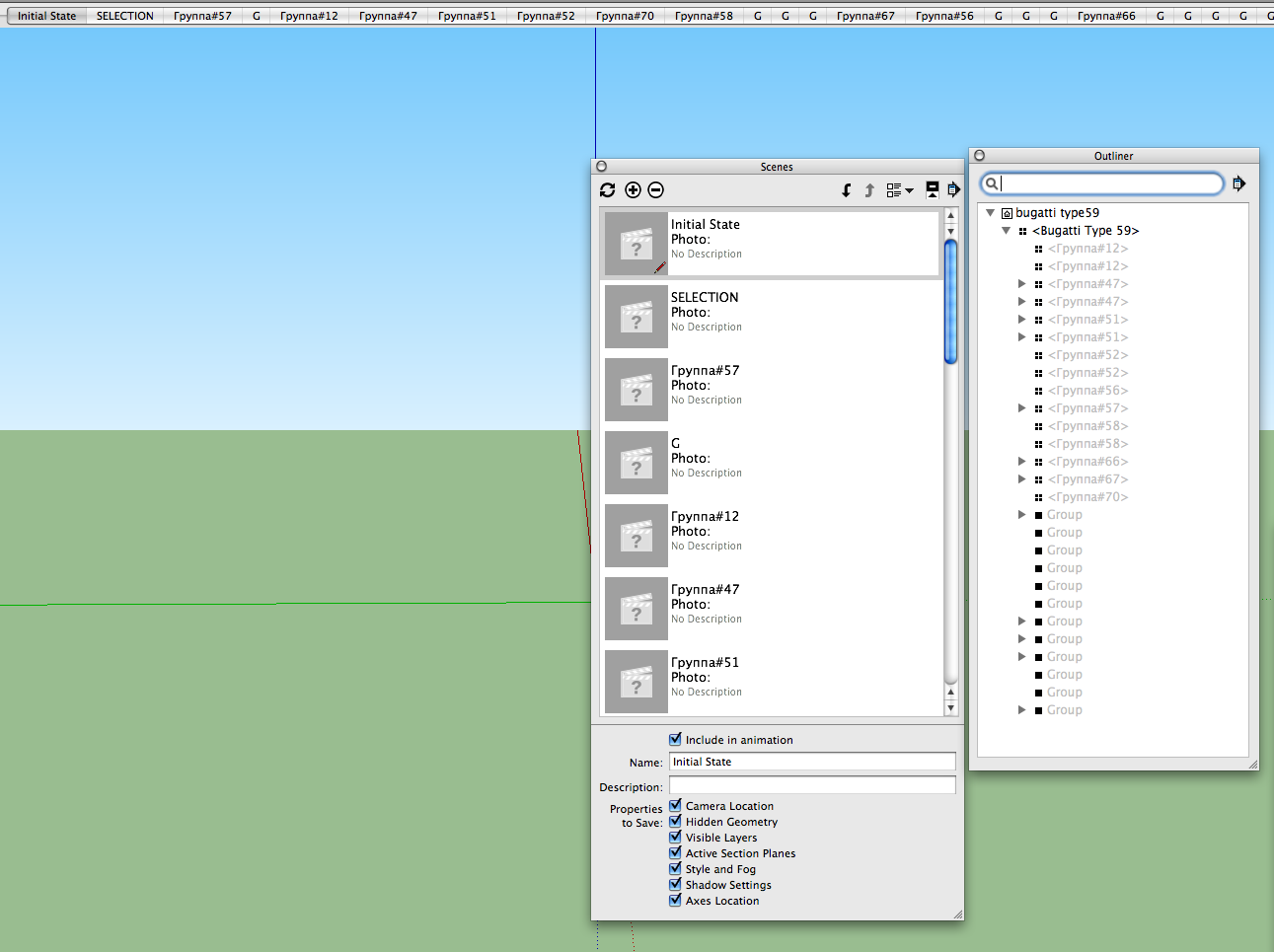
                        lovely model from 3d warehouse

                        learn from the mistakes of others, you may not live long enough to make them all yourself...

                        1 條回覆 最後回覆 回覆 引用 0
                        • Jean-FrancoJ 離線
                          Jean-Franco
                          最後由 編輯

                          Hi,

                          @driven said:

                          I tried both standard and a version using TIG's mods, and although both create scenes, everything is hidden.

                          I've the same situation under Windows XP 3.
                          If I select components within a group and launch Viewparts, it creates all the needed scenes but all is hidden. And no way to unhide anything.

                          Have a look at the attached file.

                          Driven, If you don't mind, I'd like to have your updated script with TIG's modifications to do a test.
                          I'm sorry but I'm really not a Ruby scripter.
                          Thanks.

                          cerificateur-scenes.skp

                          Jean-Franco

                          1 條回覆 最後回覆 回覆 引用 0
                          • yellow perilY 離線
                            yellow peril
                            最後由 編輯

                            Hi has anyone any idea why this script seams to lock up my files while using the arc tool, I have unstalled this excellent script and found that all is working fine, maybe its a mac issue, some help would be much appreciated........

                            Thank You

                            1 條回覆 最後回覆 回覆 引用 0
                            • R 離線
                              rjhorky
                              最後由 編輯

                              for the life of me I cannot figure out why I cannot get this to work. I click on the link, save to the plugins folder within SU8. It does not show up anywhere but I can see it in the folder. Any ideas?

                              1 條回覆 最後回覆 回覆 引用 0
                              • Dave RD 離線
                                Dave R
                                最後由 編輯

                                Did you restart sketchUp after installing the file in the Plugins folder? Did it install with the .rb extension?

                                Etaoin Shrdlu

                                %

                                (THERE'S NO PLACE LIKE)

                                G28 X0.0 Y0.0 Z0.0

                                M30

                                %

                                1 條回覆 最後回覆 回覆 引用 0
                                • K 離線
                                  ksjoern
                                  最後由 編輯

                                  The Plugin does not work with a Mac. I put it in the correct folder (Library/Application Support/Google SketchUp 8/SketchUp/plugins).
                                  The required 'sketchup.rb' is included in the TT_Lib2. But the plug-in window shows no entry "Exploded View"
                                  Any idea what I could change?
                                  Could it be a problem not working with an english system interface?
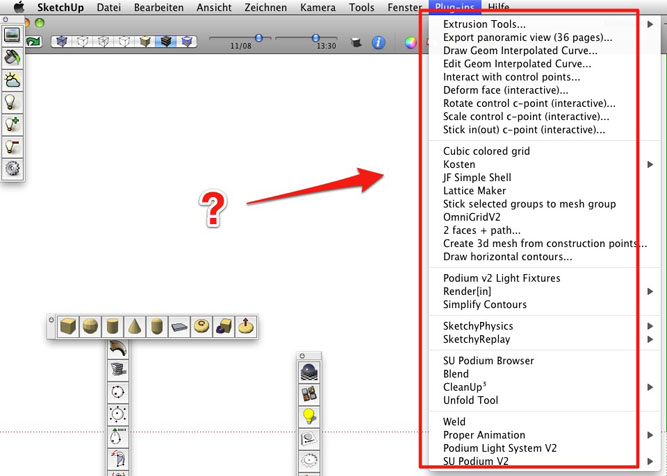

                                  wiewparts.jpg

                                  1 條回覆 最後回覆 回覆 引用 0
                                  • thomthomT 離線
                                    thomthom
                                    最後由 編輯

                                    @ksjoern said:

                                    The required 'sketchup.rb' is included in the TT_Lib2.

                                    No - this plugin has no dependance on TT_Lib2.

                                    The required sketchup.rb is located in SketchUp's Tools folder. (Where it should stay.)

                                    Thomas Thomassen — SketchUp Monkey & Coding addict
                                    List of my plugins and link to the CookieWare fund

                                    1 條回覆 最後回覆 回覆 引用 0
                                    • thomthomT 離線
                                      thomthom
                                      最後由 編輯

                                      @driven said:

                                      You need to have at least 1 group or component in your model,

                                      you will then get a 'Parts>> views ' entry in the Plugin Menu,

                                      Menus in the top level menus (File,Edit,View,Plugins,etc...) does not hide or show based on selection. They are fixed. Only context menus are dynamic like that.

                                      Thomas Thomassen — SketchUp Monkey & Coding addict
                                      List of my plugins and link to the CookieWare fund

                                      1 條回覆 最後回覆 回覆 引用 0
                                      • D 離線
                                        driven
                                        最後由 編輯

                                        hi,

                                        You need to have at least 1 group or component in your model,

                                        you should have a 'Parts>> views ' entry in the Plugin Menu, [Edited following TT's comment..]

                                        click on that entry, choose your options and it will make the scenes.

                                        click on scene tabs to view.

                                        group a square, then try it out.

                                        if you open a drawing with lots of groups, it will make lots of scenes.

                                        john

                                        learn from the mistakes of others, you may not live long enough to make them all yourself...

                                        1 條回覆 最後回覆 回覆 引用 0
                                        • D 離線
                                          driven
                                          最後由 編輯

                                          @thomthom said:

                                          Menus in the top level menus (File,Edit,View,Plugins,etc...) does not hide or show based on selection. They are fixed. Only context menus are dynamic like that.

                                          edited my post, your are correct, I loaded it from console to test, so it wasn't there before , but was after... dohh

                                          learn from the mistakes of others, you may not live long enough to make them all yourself...

                                          1 條回覆 最後回覆 回覆 引用 0
                                          • K 離線
                                            ksjoern
                                            最後由 編輯

                                            Great, now it works on my mac. - I've probably always have the downloaded previous (1.1) version.
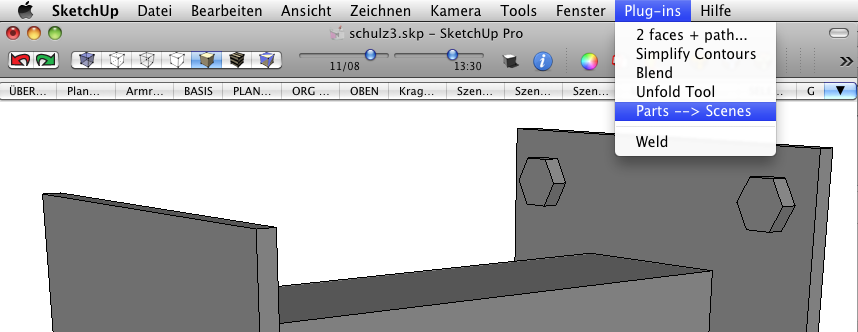

                                            Knips 2011-09-16 um 08.35.41.png

                                            1 條回覆 最後回覆 回覆 引用 0
                                            • 1
                                            • 2
                                            • 2 / 2
                                            • 第一個貼文
                                              最後的貼文
                                            Buy SketchPlus
                                            Buy SUbD
                                            Buy WrapR
                                            Buy eBook
                                            Buy Modelur
                                            Buy Vertex Tools
                                            Buy SketchCuisine
                                            Buy FormFonts

                                            Advertisement