sketchucation logo sketchucation
    • 登入
    Oops, your profile's looking a bit empty! To help us tailor your experience, please fill in key details like your SketchUp version, skill level, operating system, and more. Update and save your info on your profile page today!
    🔌 Smart Spline | Fluid way to handle splines for furniture design and complex structures. Download

    [Plugin] !AdditionalPluginFolders - v5.4a - 27 Sep 20

    已排程 已置頂 已鎖定 已移動 Plugins
    156 貼文 51 Posters 234.6k 瀏覽 51 Watching
    正在載入更多貼文
    • 從舊到新
    • 從新到舊
    • 最多點贊
    回覆
    • 在新貼文中回覆
    登入後回覆
    此主題已被刪除。只有擁有主題管理權限的使用者可以查看。
    • M 離線
      matt.gordon320
      最後由 編輯

      @thomthom said:

      Yea, Windows will place files in Virtual Store when you have UAC enabled, I think. I don't have this issue, but I'm running as administrator with UAC disabled because I muck about the system a lot when programming. It's not recommended for regular users to do so.
      Instead give yourself full access to the Plugins folder.

      When you look in a folder and some files have ended up in Virtual Store there should be a "Compatibility Files" button that does pretty much the same as that utility I linked to.

      Thanks Thomthom. Yes, I'm running in an office setup with IT Management, and though they've granted full access to my plugins and installation rights, I'd never heard of VirtualStore until now. Thanks for bringing it to my attention. I've never had the issue before, but I always like to know the reason I get errors as well as how to resolve them. Thanks agian mate!

      1 條回覆 最後回覆 回覆 引用 0
      • B 離線
        baiduaiya
        最後由 編輯

        Thank you very much!

        1 條回覆 最後回覆 回覆 引用 0
        • W 離線
          water520
          最後由 編輯

          thank you

          1 條回覆 最後回覆 回覆 引用 0
          • Z 離線
            Zonicn2t
            最後由 編輯

            Thank you

            1 條回覆 最後回覆 回覆 引用 0
            • D 離線
              dante115
              最後由 編輯

              what is this error ?
              https://lh6.googleusercontent.com/-dOZUFuLXLfU/UXGSl-DA0JI/AAAAAAAAAZI/hBaTZFLedC4/s1361/Untitled.jpg

              1 條回覆 最後回覆 回覆 引用 0
              • S 離線
                scott216
                最後由 編輯

                I have a plugin that doesn't run if I put it in the additional plugin folder. This is the plugin: http://code.google.com/p/sketchup-svg-outline-plugin/downloads/list

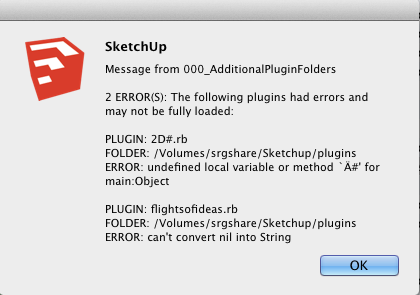
                Attached is a screenshot of the errors I get.

                I'd appreciate any suggestions that will get this to work.

                Screen Shot 2013-04-22 at 5.03.32 PM.png

                1 條回覆 最後回覆 回覆 引用 0
                • fredo6F 離線
                  fredo6
                  最後由 編輯

                  Scott,

                  Never heard of these plugins.

                  Anyway, they may not be able to run in another directory than the native Sketchup Plugins folder.

                  Or they may have bug. Keep in mind that 000_AdditionalPluginFolders just reports in clear what Ruby would find as an error at startup time, but without showing it to the user. And also, trapping the errors, avoid that the whole load process stops.

                  Fredo

                  1 條回覆 最後回覆 回覆 引用 0
                  • TIGT 離線
                    TIG Moderator
                    最後由 編輯

                    The 2D#.rb file is the initial-loader for my 2Dtools.
                    It will try to load a file in the 2DTools subfolder that is named 2D#loader.rb.
                    This 2D#.rb file and its 2DTools folder must be in the same directory - which is usually Plugins. but as long as it is on the $LOAD_PATH list it should be OK.
                    This 2D#loader file in turn loads various 2d tools rb files from the subfolder to make a single submenu and the 2Dtools toolbar.

                    Fredo's tool can generate some odd errors, e.g. if you have 'dislocated' a loader rb and its subfolder of scripts.
                    This error message bears no resemblance to anything that this particular file does, so either it is this dislocation issue [which I suspect], OR you have somehow corrupted the rb file - perhaps you have opened it in a wordprocessor rather than a plain-text editor, which would have then added formating to the text that will break SketchUp when it tries to load it...

                    TIG

                    1 條回覆 最後回覆 回覆 引用 0
                    • irwanwrI 離線
                      irwanwr
                      最後由 編輯

                      I've been using this plugin for long and haven't found any problem yet.
                      Until now. I installed SketchUp in this PC of a friend along with the plugin I've been using too in the PC at home.
                      But it gave me this message and I don't understand what it means;
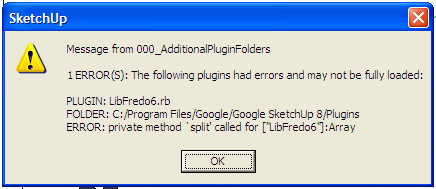
                      SketchUp Add Plugins Error.png

                      I've tried to reinstall the LibFredo.

                      1 條回覆 最後回覆 回覆 引用 0
                      • fredo6F 離線
                        fredo6
                        最後由 編輯

                        @irwanwr
                        Which version of LibFredo6 are you installing?

                        Fredo

                        1 條回覆 最後回覆 回覆 引用 0
                        • mitcorbM 離線
                          mitcorb
                          最後由 編輯

                          @dante: your error message appears to be about VRay, not Additional Plugins Folder by Fredo6. Or, do you mean that your Vray is contained there?

                          I take the slow, deliberate approach in my aimless wandering.

                          1 條回覆 最後回覆 回覆 引用 0
                          • irwanwrI 離線
                            irwanwr
                            最後由 編輯

                            It was 4.7a, then last night just downloaded 4.9b.

                            Edit:
                            Hi, Fredo6
                            Everything works fine now with the recent LibFredo 4.9 👍 😄

                            1 條回覆 最後回覆 回覆 引用 0
                            • fredo6F 離線
                              fredo6
                              最後由 編輯

                              NEW RELEASE 3.2a - 12 Jun 2013

                              Minor update giving more detail when errors are encountered during the Plugin load process (exect file and line in the Ruby code)

                              Also available on the SCF Plugin Store.
                              http://sketchucation.com/resources/pluginstore?pln=000_AdditionalPluginFolders

                              See first post of this thread for downloading the script.

                              1 條回覆 最後回覆 回覆 引用 0
                              • Rich O BrienR 線上
                                Rich O Brien Moderator
                                最後由 編輯

                                thanks Fredo

                                Download the free D'oh Book for SketchUp 📖

                                1 條回覆 最後回覆 回覆 引用 0
                                • fredo6F 離線
                                  fredo6
                                  最後由 編輯

                                  NEW RELEASE 4.0 - 30 Aug 2013

                                  Important update made necessary for the release LibFredo6 5.2 when it comes

                                  This is in relation with the lengthy changes of naming conventions to my plugins (LibFredo6 will now be based on the name Fredo6_!LibFredo6). If you do not upgrade, then you will continue loading the previous version of LibFredo6.

                                  Also available on the SCF Plugin Store.
                                  http://sketchucation.com/resources/pluginstore?pln=000_AdditionalPluginFolders

                                  See first post of this thread for downloading the script.

                                  1 條回覆 最後回覆 回覆 引用 0
                                  • fredo6F 離線
                                    fredo6
                                    最後由 編輯

                                    NEW RELEASE 4.1 - 01 Sep 2013

                                    Change of name of the Plugin file and Important update made necessary for the release LibFredo6 5.2 when it comes

                                    the ruby file is now named !AdditionalPluginFolders.rb instead of 000_AdditionalPluginFolders.rb.

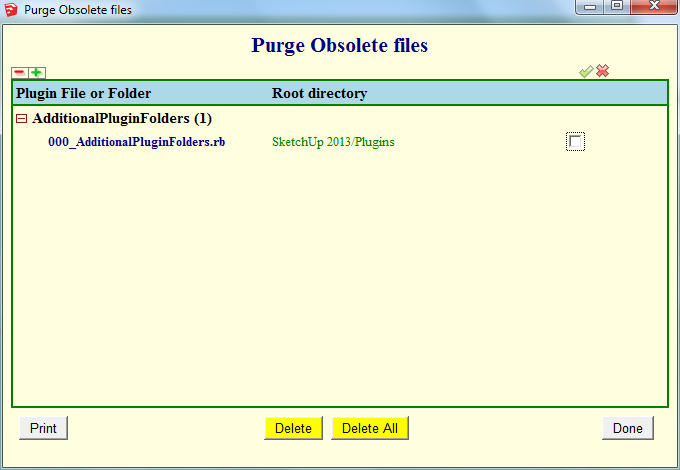
                                    This should be transparent to you, but it is a good idea to delete the old file 000_AdditionalPluginFolders.rb. If you have LibFredo6 installed, you can do it via the Purge Obsolete Files utility.
                                    AdditionalPluginFolders - purge.png

                                    This is in relation with the lengthy changes of naming conventions to my plugins (LibFredo6 will now be based on the name Fredo6_!LibFredo6). If you do not upgrade, then you will continue loading the previous version of LibFredo6.

                                    Sorry for inconvenience with all these name changes, but it is part of the general evolution to have a cleaner footprint of files and folders for scripts.

                                    Also available on the SCF Plugin Store.
                                    http://sketchucation.com/resources/pluginstore?pln=000_AdditionalPluginFolders

                                    See first post of this thread for downloading the script.

                                    1 條回覆 最後回覆 回覆 引用 0
                                    • LanaL 離線
                                      Lana
                                      最後由 編輯

                                      Very, very, very thanks. You are good.

                                      1 條回覆 最後回覆 回覆 引用 0
                                      • fredo6F 離線
                                        fredo6
                                        最後由 編輯

                                        NEW RELEASE 4.2a - 23 Oct 2013

                                        Important update for future Sketchup compatibility. Also necessary for the release LibFredo6 5.3 when it comes

                                        Also available on the SCF Plugin Store.
                                        http://sketchucation.com/resources/pluginstore?pln=000_AdditionalPluginFolders

                                        See first post of this thread for downloading the script.

                                        1 條回覆 最後回覆 回覆 引用 0
                                        • Rich O BrienR 線上
                                          Rich O Brien Moderator
                                          最後由 編輯

                                          If you click the More Info button in the PluginStore in SketchUp you'll see something new for displaying help on Plugins....😉

                                          Download the free D'oh Book for SketchUp 📖

                                          1 條回覆 最後回覆 回覆 引用 0
                                          • L 離線
                                            loukas87
                                            最後由 編輯

                                            hi guys, amazing posts, but I can t understand how to download and install this plugins, someone will be so pretty to help me? I m using sketch up 8 pro.
                                            Thanks in advance

                                            1 條回覆 最後回覆 回覆 引用 0
                                            • 1
                                            • 2
                                            • 3
                                            • 4
                                            • 5
                                            • 6
                                            • 7
                                            • 8
                                            • 4 / 8
                                            • 第一個貼文
                                              最後的貼文
                                            Buy SketchPlus
                                            Buy SUbD
                                            Buy WrapR
                                            Buy eBook
                                            Buy Modelur
                                            Buy Vertex Tools
                                            Buy SketchCuisine
                                            Buy FormFonts

                                            Advertisement



