[Plugin] !AdditionalPluginFolders - v5.4a - 27 Sep 20
-
This is not the hard part

Search the Plugins forum, or see the PluginStore - search that for its instructions and download too
Also read its instructions carefully... and find / get the support 'Lib' and install that too... -
Is it possible, that in Sketchup 2014 this doesn't work anymore? can anyone confirm? cheers.
-
Works just fine.
Get the latest version and the latest Fredo Lib from the PluginStore... -
Unfortunately, im usng office pc which doesnt allow me to put anything into original sketchup plugin folder. Is there a way i can install the plugins externally?
-
Please complete your User-Profile...
If you have v2014, on PCs the default Plugins folder is now within your User path, so you should have suitable permissions...
But in earlier PC versions the Plugins folder is within the Program Files folder, and is therefore always restricted [unless the permissions are changed].Assuming you have v8/v2013...
You need to convince the IT guys to install at least this one script [+ the LibFredo] in the main restricted Plugins folder.
It will load at startup and allow you to specify another Plugins folder for your own use.
You will then be able to install plugins into that folder [after a restart] manually.
Change RBZ to ZIP and extract the contents, keeping files in subfolders as they are shipped...Unfortunately the native RBZ installer always uses the default Plugins folder, so you can't use that when you are restricted.
BUT if you have the SketchUcation Plugin Store tools installed, thereafter you can AutoInstall any downloaded RBZ using the 'Archive Installer' available from its menu - you will be offered your additional plugins folder in a dialog...
If you use the PluginStore dialog itself [run within SketchUp] you will also be offered your additional plugins folder for that AutoInstallation, without recourse to having a physical RBZ file at all...
-
Help! I do not have the Sketch up Plug-in file to drop anything in to!
-
@jooles13 said:
Help! I do not have the Sketch up Plug-in file to drop anything in to!
A bit more info might help?
What plugin file are you missing?
-
If you mean the v2014 default 'Plugins' FOLDER... then if you Download the RBZ version of any Plugin from the PluginStore, then you can use the v2014 Preferences > Extensions > Install... button to automatically do the installation for you [remember that most of Fredo's tools also need his 'Lib', that is also available from the PluginStore...].
If you install the SketchUcation PluginStore toolset [see Resouces...] then you can then browse and AutoInstall Plugins from within SketchUp, without even having to download the RBZ...
That also includes a useful submenu item to open the Plugins folder for you, should you ever need to look into it... -
Where in the heck do I find !AdditionalPluginFolders - I've searched the SketchUp Extension Warehouse as well as setchucation and the internet.
I have SketchUp 2014 installed on my Win8.1 system.
Looking at my system I do see C:\Program Files (x86)\SketchUp\SketchUp 2014\Plugins!AdditionalPluginFolders.rb and it is dated 3/4/2014 Do I already have the latest installed? How can I verify? Is it installed in the correct location?
Sorry but I'm lost. -
@jgt1942 said:
Where in the heck do I find !AdditionalPluginFolders - I've searched the SketchUp Extension Warehouse as well as sketchucation and the internet.
I have SketchUp 2014 installed on my Win8.1 system.
Looking at my system I do see C:\Program Files (x86)\SketchUp\SketchUp 2014\Plugins!AdditionalPluginFolders.rb and it is dated 3/4/2014 Do I already have the latest installed? How can I verify? Is it installed in the correct location?
Sorry but I'm lost.
Where did theC:\Program Files (x86)\SketchUp\SketchUp 2014\Pluginsfolder come from ?
It is NOT made by SketchUp in SketchUp v2014.
It is NEVER used !
If you have made it manually, then please remove it - it will not auto-load any Plugins from within it anyway.
If you have copied it over from say SketchUp v2013, then there is a good chance that some of its Plugins will be incompatible if reloacted in the correct folder!
Get the latest versions of all Plugins and install those into the correct location...
Most Plugins have been made compatible with v2014, but you need the newest versions of them.The default Plugins folder [from which any Plugins auto-load as SketchUp starts up] can be found using this snippet in the 'Ruby Console':
Sketchup.find_support_file('Plugins')
It is typically returned as:
C:/Users/YourUserName/AppData/Roaming/SketchUp/SketchUp 2014/SketchUp/PluginsWith ALL SketchUp versions since v8M2 you can AutoInstall RBZ archived Plugins using the
Preferences > Extensions > Install...button...
This is SketchUp 101
You don't then need to worry about this as the correct default Plugins folder is always used...Aside - there is a potential 'shared' Plugins folder, which can be located in:
C:/ProgramData/SketchUp/SketchUp 2014/
BUT that is NOT made by SketchUp.
If you [or an Installer App] add it manually, then its contents are also auto-loaded as SketchUp's starts up.
This folder is not normally used - each User get their own Plugins folder.
The native AutoInstaller always puts RBZ contents into the User's Plugins folder.
The ProgramData Plugins folder is only useful when shared Plugins are used between several Users on that one PC.If you get the 'SketchUcation PluginStore Toolset' [install it from the RBZ downloadble from the Resources submenu item above]... then you can use that to AutoInstall Plugins directly - skipping the RBZ download altogether.
Unlike the native AutoInstaller it also spots if you have any additional Plugins folders setup, into which you might want to install the Plugin, and it offers those alternatives where appropriate...Fredo's Additional Plugins Folder tool needs to load from the 'default Plugins folder' [which always auto-loads].
This tool then allows you to specify custom Plugins folders - such as Dropbox or GoogleDrive - from which your synced Plugins can be auto-loaded as SketchUp starts on any PC...But before you jump into the world of Additional Plugins folders please ensure you have the proper defaults setup, and you understand how they work...
-
Hi Fredo
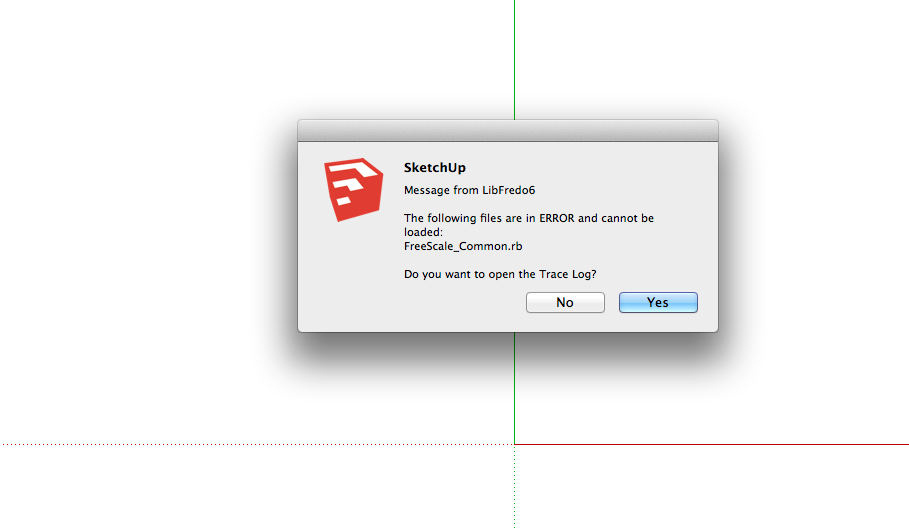
 having a slight issue with your plugins, I recently decided to update what is in my system and now whenever I start SU I get an error message from LibFredo6 saying some files are in error and cannot load, please see attached
I have not had this issue before, and I have attempted to redo the install 3 times now with same result…
both using the old way of just putting in the plugins folder and running the auto install from within plugin store, also updated to the latest version…osx 10.8, macbook pro, Sketchup8Pro
any help greatly appreciated
PS the plugins do seem to be working at least the ones that load…
Thanks
D
-
Did you try to open the trace log file and see what the error is?
Fredo
-
Hi sorry for late reply yes I opened the log but I am not sure how to read it I can post the results if will help
-
You seem to have FreeScale still present in your plugins. This is a very old version of FredoScale. I suggest you remove the subfolder and rb file.
Fredo
-
Thank you fine sir!
These plugins are incredible and you and the other developers are so generous of your time!
D -
love love love this plug in.
the only thing that would make it even easier for me.
when I drag the !AdditionalPluginFolders.rb to different computers I have to set up the file paths each time.
we have 4 folders of plug into load depending on needs.
Is there a pref/config file I need to copy across as well so that the paths are
For this and other great plugins a big donation coming your way for all your amazing work.
nothing in life is free especially peoples creativity.
-
Thanks for your kind words.
The alternate directories are stored in registry, not in a config file. So I am afraid you need to key in the directories again when moving from computer to computer.Fredo
-
@alimac said:
love love love this plug in.
the only thing that would make it even easier for me.
when I drag the !AdditionalPluginFolders.rb to different computers I have to set up the file paths each time.
we have 4 folders of plug into load depending on needs.
Is there a pref/config file I need to copy across as well so that the paths are
For this and other great plugins a big donation coming your way for all your amazing work.
nothing in life is free especially peoples creativity.
What we did in the office was find the registry file and created one for 2013/2014 and put it on the server. Each time we need to install SKP and !AdditionalPluginFolders on a new computer, all we have to do is double click the registry for the correct version which then installs the correct path for the !AdditionalPluginFolders to find the other plugins.
-
@fredo
a version 5 feature?
@smunky
i'll run it past our in house IT. I can imagine the answer........
-





Advertisement